Outline Unions, intersections, differences (6.2.5, 6.4.2) Lecture - - PDF document

outline
SMART_READER_LITE
LIVE PREVIEW

Outline Unions, intersections, differences (6.2.5, 6.4.2) Lecture - - PDF document

Outline Unions, intersections, differences (6.2.5, 6.4.2) Lecture 03: SQL Subqueries (6.3) Aggregations (6.4.3 6.4.6) Friday, October 4, 2002 Hint for reading the textbook: read the entire chapter 6 ! Reading assignment from


slide-1
SLIDE 1

1

1

Lecture 03: SQL

Friday, October 4, 2002

2

Outline

  • Unions, intersections, differences

(6.2.5, 6.4.2)

  • Subqueries (6.3)
  • Aggregations (6.4.3 – 6.4.6)

Hint for reading the textbook: read the entire chapter 6 ! Reading assignment from “SQL for Nerds”: chapter 4, “More complex queries” (you will find it very useful for subqueries)

3

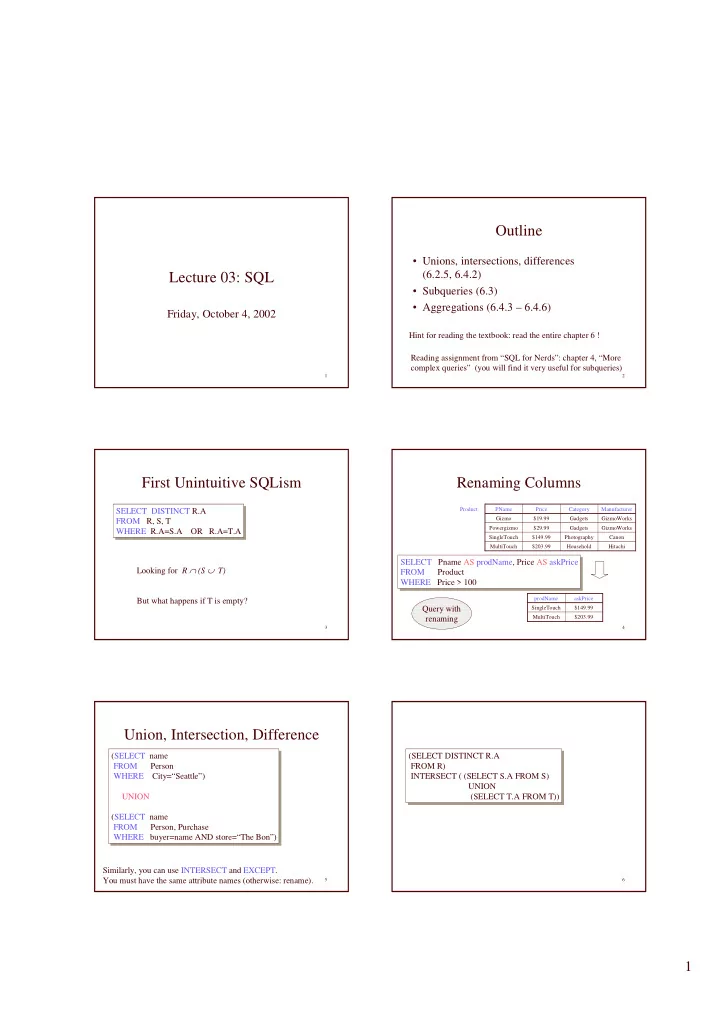
First Unintuitive SQLism

SELECT DISTINCT R.A FROM R, S, T WHERE R.A=S.A OR R.A=T.A SELECT DISTINCT R.A FROM R, S, T WHERE R.A=S.A OR R.A=T.A Looking for R ∩ (S ∪ T) But what happens if T is empty?

4

Renaming Columns

Hitachi Household $203.99 MultiTouch Canon Photography $149.99 SingleTouch GizmoWorks Gadgets $29.99 Powergizmo GizmoWorks Gadgets $19.99 Gizmo Manufacturer Category Price PName

SELECT Pname AS prodName, Price AS askPrice FROM Product WHERE Price > 100 SELECT Pname AS prodName, Price AS askPrice FROM Product WHERE Price > 100

Product $203.99 MultiTouch $149.99 SingleTouch askPrice prodName

Query with renaming

5

Union, Intersection, Difference

(SELECT name FROM Person WHERE City=“Seattle”) UNION (SELECT name FROM Person, Purchase WHERE buyer=name AND store=“The Bon”) (SELECT name FROM Person WHERE City=“Seattle”) UNION (SELECT name FROM Person, Purchase WHERE buyer=name AND store=“The Bon”) Similarly, you can use INTERSECT and EXCEPT. You must have the same attribute names (otherwise: rename).

6

(SELECT DISTINCT R.A FROM R) INTERSECT ( (SELECT S.A FROM S) UNION (SELECT T.A FROM T)) (SELECT DISTINCT R.A FROM R) INTERSECT ( (SELECT S.A FROM S) UNION (SELECT T.A FROM T))

slide-2
SLIDE 2

2

7

Conserving Duplicates

(SELECT name FROM Person WHERE City=“Seattle”) UNION ALL (SELECT name FROM Person, Purchase WHERE buyer=name AND store=“The Bon”) (SELECT name FROM Person WHERE City=“Seattle”) UNION ALL (SELECT name FROM Person, Purchase WHERE buyer=name AND store=“The Bon”)

8

Subqueries

A subquery producing a single value: In this case, the subquery returns one value. If it returns more, it’s a run-time error.

SELECT Purchase.product FROM Purchase WHERE buyer = (SELECT name FROM Person WHERE ssn = ‘123456789‘); SELECT Purchase.product FROM Purchase WHERE buyer = (SELECT name FROM Person WHERE ssn = ‘123456789‘);

9

Can say the same thing without a subquery: This is equivalent to the previous one when the ssn is a key and ‘123456789’ exists in the database;

  • therwise they are different.

SELECT Purchase.product FROM Purchase, Person WHERE buyer = name AND ssn = ‘123456789‘ SELECT Purchase.product FROM Purchase, Person WHERE buyer = name AND ssn = ‘123456789‘

10

Subqueries Returning Relations

SELECT Company.name FROM Company, Product WHERE Company.name=Product.maker AND Product.name IN (SELECT Purchase.product FROM Purchase WHERE Purchase .buyer = ‘Joe Blow‘); SELECT Company.name FROM Company, Product WHERE Company.name=Product.maker AND Product.name IN (SELECT Purchase.product FROM Purchase WHERE Purchase .buyer = ‘Joe Blow‘); Find companies who manufacture products bought by Joe Blow. Here the subquery returns a set of values: no more runtime errors.

11

Subqueries Returning Relations

SELECT Company.name FROM Company, Product, Purchase WHERE Company.name= Product.maker AND Product.name = Purchase.product AND Purchase.buyer = ‘Joe Blow’ SELECT Company.name FROM Company, Product, Purchase WHERE Company.name= Product.maker AND Product.name = Purchase.product AND Purchase.buyer = ‘Joe Blow’ Equivalent to: Is this query equivalent to the previous one ? Beware of duplicates !

12

Removing Duplicates

SELECT Company.name FROM Company, Product, Purchase WHERE Company.name= Product.maker AND Product.name = Purchase.product AND Purchase.buyer = ‘Joe Blow’ SELECT Company.name FROM Company, Product, Purchase WHERE Company.name= Product.maker AND Product.name = Purchase.product AND Purchase.buyer = ‘Joe Blow’ SELECT DISTINCT Company.name FROM Company, Product, Purchase WHERE Company.name= Product.maker AND Product.name = Purchase.product AND Purchase.buyer = ‘Joe Blow’ SELECT DISTINCT Company.name FROM Company, Product, Purchase WHERE Company.name= Product.maker AND Product.name = Purchase.product AND Purchase.buyer = ‘Joe Blow’ ←Multiple copies ← Single copies

slide-3
SLIDE 3

3

13

Removing Duplicates

SELECT DISTINCT Company.name FROM Company, Product, Purchase WHERE Company.name= Product.maker AND Product.name = Purchase.product AND Purchase.buyer = ‘Joe Blow’ SELECT DISTINCT Company.name FROM Company, Product, Purchase WHERE Company.name= Product.maker AND Product.name = Purchase.product AND Purchase.buyer = ‘Joe Blow’ SELECT DISTINCT Company.name FROM Company, Product WHERE Company.name= Product.maker AND Product.name IN (SELECT Purchase.product FROM Purchase WHERE Purchase.buyer = ‘Joe Blow’) SELECT DISTINCT Company.name FROM Company, Product WHERE Company.name= Product.maker AND Product.name IN (SELECT Purchase.product FROM Purchase WHERE Purchase.buyer = ‘Joe Blow’) Now they are equivalent

14

Subqueries Returning Relations

SELECT name FROM Product WHERE price > ALL (SELECT price FROM Purchase WHERE maker=‘Gizmo-Works’) SELECT name FROM Product WHERE price > ALL (SELECT price FROM Purchase WHERE maker=‘Gizmo-Works’) Product ( pname, price, category, maker) Find products that are more expensive than all those produced By “Gizmo-Works” You can also use: s > ALL R s > ANY R EXISTS R

15

Question for Database Fans and their Friends

  • Can we express this query as a single SELECT-

FROM-WHERE query, without subqueries ?

  • Hint: show that all SFW queries are monotone

(figure out what this means). A query with ALL is not monotone

16

Conditions on Tuples

SELECT DISTINCT Company.name FROM Company, Product WHERE Company.name= Product.maker AND (Product.name,price) IN (SELECT Purchase.product, Purchase.price) FROM Purchase WHERE Purchase.buyer = “Joe Blow”); SELECT DISTINCT Company.name FROM Company, Product WHERE Company.name= Product.maker AND (Product.name,price) IN (SELECT Purchase.product, Purchase.price) FROM Purchase WHERE Purchase.buyer = “Joe Blow”); May not work in SQL server...

17

Correlated Queries

SELECT DISTINCT title FROM Movie AS x WHERE year <> ANY (SELECT year FROM Movie WHERE title = x.title); SELECT DISTINCT title FROM Movie AS x WHERE year <> ANY (SELECT year FROM Movie WHERE title = x.title); Movie (title, year, director, length) Find movies whose title appears more than once. Note (1) scope of variables (2) this can still be expressed as single SFW correlation

18

Complex Correlated Query

Product ( pname, price, category, maker, year)

  • Find products (and their manufacturers) that are more expensive

than all products made by the same manufacturer before 1972 Powerful, but much harder to optimize !

SELECT DISTINCT pname, maker FROM Product AS x WHERE price > ALL (SELECT price FROM Product AS y WHERE x.maker = y.maker AND y.year < 1972); SELECT DISTINCT pname, maker FROM Product AS x WHERE price > ALL (SELECT price FROM Product AS y WHERE x.maker = y.maker AND y.year < 1972);

slide-4
SLIDE 4

4

19

Aggregation

SELECT Avg(price) FROM Product WHERE maker=“Toyota” SELECT Avg(price) FROM Product WHERE maker=“Toyota” SQL supports several aggregation operations: SUM, MIN, MAX, AVG, COUNT

20

Aggregation: Count

SELECT Count(*) FROM Product WHERE year > 1995 SELECT Count(*) FROM Product WHERE year > 1995 Except COUNT, all aggregations apply to a single attribute

21

Aggregation: Count

COUNT applies to duplicates, unless otherwise stated: SELECT Count(category) same as Count(*) FROM Product WHERE year > 1995 Better: SELECT Count(DISTINCT category) FROM Product WHERE year > 1995

22

Simple Aggregation

Purchase(product, date, price, quantity) Example 1: find total sales for the entire database SELECT Sum(price * quantity) FROM Purchase Example 1’: find total sales of bagels SELECT Sum(price * quantity) FROM Purchase WHERE product = ‘bagel’

23

Simple Aggregations

Product Date Price Quantity Bagel 10/21 0.85 15 Banana 10/22 0.52 7 Banana 10/19 0.52 17 Bagel 10/20 0.85 20 Purchase

24

Grouping and Aggregation

Usually, we want aggregations on certain parts of the relation. Purchase(product, date, price, quantity) Example 2: find total sales after 9/1 per product. SELECT product, Sum(price*quantity) AS TotalSales FROM Purchase WHERE date > “9/1” GROUPBY product SELECT product, Sum(price*quantity) AS TotalSales FROM Purchase WHERE date > “9/1” GROUPBY product Let’s see what this means…

slide-5
SLIDE 5

5

25

Grouping and Aggregation

  • 1. Compute the FROM and WHERE clauses.
  • 2. Group by the attributes in the GROUPBY
  • 3. Select one tuple for every group (and apply aggregation)

SELECT can have (1) grouped attributes or (2) aggregates.

26

First compute the FROM-WHERE clauses (date > “9/1”) then GROUP BY product: Product Date Price Quantity Banana 10/19 0.52 17 Banana 10/22 0.52 7 Bagel 10/20 0.85 20 Bagel 10/21 0.85 15

27

Then, aggregate

Product TotalSales Bagel $29.75 Banana $12.48

SELECT product, Sum(price*quantity) AS TotalSales FROM Purchase WHERE date > “9/1” GROUPBY product SELECT product, Sum(price*quantity) AS TotalSales FROM Purchase WHERE date > “9/1” GROUPBY product

28

GROUP BY v.s. Nested Quereis

SELECT product, Sum(price*quantity) AS TotalSales FROM Purchase WHERE date > “9/1” GROUP BY product SELECT product, Sum(price*quantity) AS TotalSales FROM Purchase WHERE date > “9/1” GROUP BY product SELECT DISTINCT x.product, (SELECT Sum(y.price*y.quantity) FROM Purchase y WHERE x.product = y.product AND y.date > ‘9/1’) AS TotalSales FROM Purchase x WHERE x.date > “9/1” SELECT DISTINCT x.product, (SELECT Sum(y.price*y.quantity) FROM Purchase y WHERE x.product = y.product AND y.date > ‘9/1’) AS TotalSales FROM Purchase x WHERE x.date > “9/1”

29

Another Example

SELECT product, Sum(price * quantity) AS SumSales Max(quantity) AS MaxQuantity FROM Purchase GROUP BY product SELECT product, Sum(price * quantity) AS SumSales Max(quantity) AS MaxQuantity FROM Purchase GROUP BY product For every product, what is the total sales and max quantity sold?

Product SumSales MaxQuantity Banana $12.48 17 Bagel $29.75 20

30

HAVING Clause

SELECT product, Sum(price * quantity) FROM Purchase WHERE date > “9/1” GROUP BY product HAVING Sum(quantity) > 30 SELECT product, Sum(price * quantity) FROM Purchase WHERE date > “9/1” GROUP BY product HAVING Sum(quantity) > 30 Same query, except that we consider only products that had at least 100 buyers. HAVING clause contains conditions on aggregates.

slide-6
SLIDE 6

6

31

General form of Grouping and Aggregation

SELECT S FROM R1,…,Rn WHERE C1 GROUP BY a1,…,ak HAVING C2

S = may contain attributes a1,…,ak and/or any aggregates but NO OTHER ATTRIBUTES C1 = is any condition on the attributes in R1,…,Rn C2 = is any condition on aggregate expressions

Why ?

32

General form of Grouping and Aggregation

SELECT S FROM R1,…,Rn WHERE C1 GROUP BY a1,…,ak HAVING C2 Evaluation steps: 1. Compute the FROM-WHERE part, obtain a table with all attributes in R1,…,Rn 2. Group by the attributes a1,…,ak 3. Compute the aggregates in C2 and keep only groups satisfying C2 4. Compute aggregates in S and return the result

33

Aggregation

Author(login,name) Document(url, title) Wrote(login,url) Mentions(url,word)

34

  • Find all authors who wrote at least 10

documents:

  • Attempt 1: with nested queries

SELECT DISTINCT Author.name FROM Author WHERE count(SELECT Wrote.url FROM Wrote WHERE Author.login=Wrote.login) > 10 SELECT DISTINCT Author.name FROM Author WHERE count(SELECT Wrote.url FROM Wrote WHERE Author.login=Wrote.login) > 10 This is SQL by a novice

35

  • Find all authors who wrote at least 10

documents:

  • Attempt 2: SQL style (with GROUP BY)

SELECT Author.name FROM Author, Wrote WHERE Author.login=Wrote.login GROUP BY Author.name HAVING count(wrote.url) > 10 SELECT Author.name FROM Author, Wrote WHERE Author.login=Wrote.login GROUP BY Author.name HAVING count(wrote.url) > 10 This is SQL by an expert No need for DISTINCT: automatically from GROUP BY

36

  • Find all authors who have a vocabulary over

10000 words:

SELECT Author.name FROM Author, Wrote, Mentions WHERE Author.login=Wrote.login AND Wrote.url=Mentions.url GROUP BY Author.name HAVING count(distinct Mentions.word) > 10000 SELECT Author.name FROM Author, Wrote, Mentions WHERE Author.login=Wrote.login AND Wrote.url=Mentions.url GROUP BY Author.name HAVING count(distinct Mentions.word) > 10000 Look carefully at the last two queries: you may be tempted to write them as a nested queries, but in SQL we write them best with GROUP BY