Non-Functional Properties Reid Holmes How the analyst designed it - - PowerPoint PPT Presentation

non functional properties
SMART_READER_LITE
LIVE PREVIEW

Non-Functional Properties Reid Holmes How the analyst designed it - - PowerPoint PPT Presentation

Home Gallery Create Shop About Title Drag-and drop cells to Description rearrange the cells. Click on the captions to Home Gallery Create Shop About edit them. Save Cancel To remove a cell, just Title leave the caption empty.


slide-1
SLIDE 1

Material and some slide content from:

  • Software Architecture: Foundations,

Theory, and Practice

  • Elisa Baniassad

Reid Holmes

Non-Functional Properties

Home Gallery Create Shop About

Title

Drag-‑and drop cells to rearrange the cells. Click on the captions to edit them. To remove a cell, just leave the caption empty.

Description

Save Cancel Privacy & Terms

Type the text

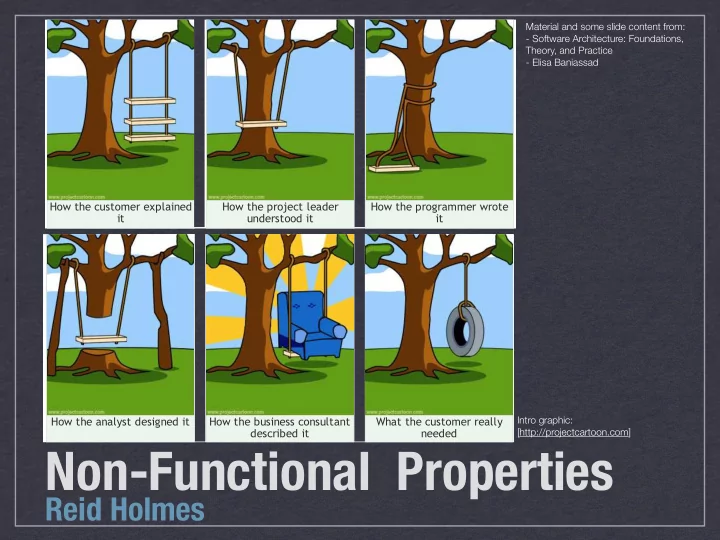
How the customer explained it How the project leader understood it How the programmer wrote it How the analyst designed it How the business consultant described it What the customer really needed

Home Gallery Create Shop About

Title

Drag-‑and drop cells to rearrange the cells. Click on the captions to edit them. To remove a cell, just leave the caption empty.

Description

Save Cancel Privacy & Terms

Type the text

How the customer explained it How the project leader understood it How the programmer wrote it How the analyst designed it How the business consultant described it What the customer really needed

Intro graphic: [http://projectcartoon.com]

slide-2
SLIDE 2

REID HOLMES - SE2: SOFTWARE DESIGN & ARCHITECTURE

System Stakeholders

  • Architectural documents are used by a variety of

system stakeholders:

  • Developers
  • Managers
  • Sales
  • Testers
  • Support
  • Maintenance
  • DevOps
  • Customers
slide-3
SLIDE 3

REID HOLMES - SE2: SOFTWARE DESIGN & ARCHITECTURE

Stakeholder Questions

  • Management: are we on schedule?
  • Developers: who is responsible for what?
  • Sales: can we claim it can do this task?
  • QA: what teams do we talk to about defects?
  • DevOps: where should this component be

deployed?

  • Support: which QA team signed off on this?
  • Maintenance: how can we add this feature?
slide-4
SLIDE 4

REID HOLMES - SE2: SOFTWARE DESIGN & ARCHITECTURE

Stakeholder Conflicts

  • System requirements fall into two broad categories:
  • Functional Properties: what the system is

supposed to do (‘the system shall do X’).

  • Non-Functional Properties: what the system is

supposed to be (‘the system shall be Y’).

  • Each stakeholder will have their own opinion about

what NFPs matter most:

  • e.g., the development team will care about

maintainability more than the customer

  • e.g., QA will be more interested in the testability
  • f the application than sales
slide-5
SLIDE 5

REID HOLMES - SE2: SOFTWARE DESIGN & ARCHITECTURE REID HOLMES - SE2: SOFTWARE DESIGN & ARCHITECTURE

NFPs

  • NFPs are constraints on the manner in which the

system implements and delivers its functionality.

  • E.g.,
  • Efficiency
  • Complexity
  • Scalability
  • Heterogeneity
  • Adaptability
  • Security
  • Dependability

[TAILOR ET AL.]

slide-6
SLIDE 6

REID HOLMES - SE2: SOFTWARE DESIGN & ARCHITECTURE REID HOLMES - SE2: SOFTWARE DESIGN & ARCHITECTURE

FP vs NFP

  • Products are sold based on their FPs.
  • e.g., Cell phone, Car, Tent.
  • However, NFPs play a critical role in perception.
  • “This program keeps crashing”
  • “It doesn’t work with my [...]”
  • “It’s too slow”

[TAILOR ET AL.]

slide-7
SLIDE 7

REID HOLMES - SE2: SOFTWARE DESIGN & ARCHITECTURE REID HOLMES - SE2: SOFTWARE DESIGN & ARCHITECTURE

Design guidelines for NFPs

  • Provide guidelines that support various NFPs.
  • Focus on architectural level:
  • Components
  • Connectors
  • Topologies

[TAILOR ET AL.]

slide-8
SLIDE 8

REID HOLMES - SE2: SOFTWARE DESIGN & ARCHITECTURE REID HOLMES - SE2: SOFTWARE DESIGN & ARCHITECTURE

NFP: Efficiency

  • Efficiency is a quality that reflects a system’s

ability to meet its performance requirements.

  • Components:
  • Keep them “small”.
  • Simple and compact interfaces.
  • Allow multiple interfaces to the same functionality.
  • Separate data from processing components.
  • Separate data from meta data.
  • Connectors:
  • Carefully select connectors.
  • Be careful of broadcast connectors.
  • Encourage asynchronous interaction.
  • Be wary of location/distribution transparency.
  • Topology:
  • Keep frequent collaborators “close”.
  • Consider the efficiency impact of selected styles.

[TAILOR ET AL.]

slide-9
SLIDE 9

REID HOLMES - SE2: SOFTWARE DESIGN & ARCHITECTURE REID HOLMES - SE2: SOFTWARE DESIGN & ARCHITECTURE

NFP: Complexity

  • Complexity is a property that is proportional to the

size of a system, its volume of constituent elements, their internal structure, and their interdependencies.

  • Components:
  • Separate concerns.
  • Isolate functionality from interaction.
  • Ensure cohesiveness.
  • Insulate processing from data format changes.
  • Connectors:
  • Isolate interaction from functionality.
  • Restrict interactions provided by each connector.
  • Topology:
  • Eliminate unnecessary dependencies.
  • Use hierarchical (de)composition.

[TAILOR ET AL.]

slide-10
SLIDE 10

REID HOLMES - SE2: SOFTWARE DESIGN & ARCHITECTURE REID HOLMES - SE2: SOFTWARE DESIGN & ARCHITECTURE

NFP: Scalability / Heterogeneity

  • Scalability: The capability of a system to be

adapted to meet new size / scope requirements.

  • Heterogeneity: A system’s ability to be composed
  • f, or execute within, disparate parts.
  • Portability: The ability of a system to execute on

multiple platforms while retaining their functional and non-functional properties.

[TAILOR ET AL.]

slide-11
SLIDE 11

REID HOLMES - SE2: SOFTWARE DESIGN & ARCHITECTURE REID HOLMES - SE2: SOFTWARE DESIGN & ARCHITECTURE

  • Components:
  • Keep components focused
  • Simplify interfaces
  • Avoid unnecessary heterogeneity
  • Distribute data sources
  • Replicate data
  • Connectors:
  • Use explicit connectors
  • Choose the simplest connectors
  • Direct vs. indirect connectors
  • Topology:
  • Avoid bottlenecks
  • Place data close to consumer
  • Location transparency

NFP: Scalability / Heterogeneity

[TAILOR ET AL.]

slide-12
SLIDE 12

REID HOLMES - SE2: SOFTWARE DESIGN & ARCHITECTURE REID HOLMES - SE2: SOFTWARE DESIGN & ARCHITECTURE

NFP: Evolvability

  • Evolvability: The ability to change to satisfy new

requirements and environments.

  • Components:
  • Same as for complexity.
  • Goal is to reduce risks by isolating modifications.
  • Connectors:
  • Clearly define responsibilities.
  • Make connectors flexible.
  • Topology:
  • Avoid implicit connectors.
  • Encourage location transparency.

[TAILOR ET AL.]

slide-13
SLIDE 13

REID HOLMES - SE2: SOFTWARE DESIGN & ARCHITECTURE REID HOLMES - SE2: SOFTWARE DESIGN & ARCHITECTURE

NFP: Dependability

  • Reliability: The probability a system will perform

within its design limits without failure over time.

  • Availability: The probability the system is available at

a particular instant in time.

  • Robustness: The ability of a system to respond

adequately to unanticipated runtime conditions.

  • Fault-tolerance: The ability of a system to respond

gracefully to failures at runtime.

  • Faults arise from: environment, components, connectors,

component-connector mismatches.

  • Survivability: The ability to resist, recover, and adapt

to threats.

  • Sources: attacks, failures, and accidents.
  • Steps: resist, recognize, recover, adapt.
  • Safety: The ability to avoid failures that will cause loss
  • f life, injury, or loss to property.

[TAILOR ET AL.]

slide-14
SLIDE 14

REID HOLMES - SE2: SOFTWARE DESIGN & ARCHITECTURE REID HOLMES - SE2: SOFTWARE DESIGN & ARCHITECTURE

NFP: Dependability

  • Components:
  • Control external component dependencies.
  • Support reflection.
  • Support exception handling.
  • Connectors:
  • Use explicit connectors.
  • Provide interaction guarantees.
  • Topology:
  • Avoid single points of failure.
  • Enable back-ups.
  • Support system health monitoring.
  • Support dynamic adaptation.

[TAILOR ET AL.]