News Department of Computer Science Undergraduate Events CPSC 314 - - PowerPoint PPT Presentation

news
SMART_READER_LITE
LIVE PREVIEW

News Department of Computer Science Undergraduate Events CPSC 314 - - PowerPoint PPT Presentation

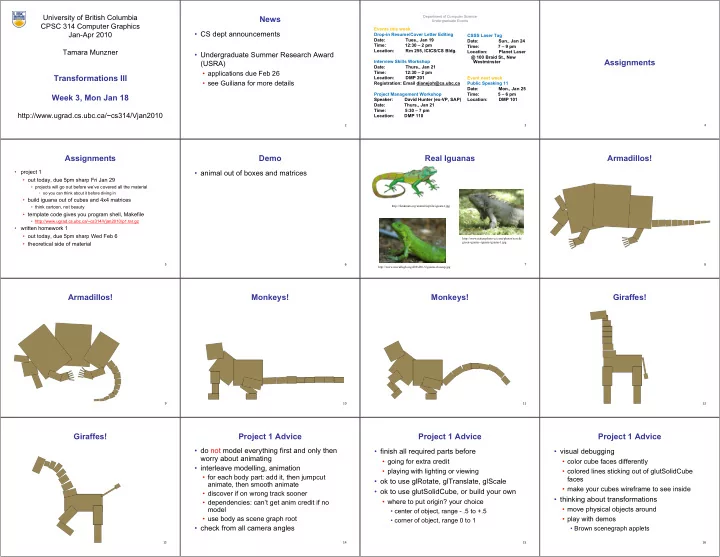
University of British Columbia News Department of Computer Science Undergraduate Events CPSC 314 Computer Graphics Events this week CS dept announcements Jan-Apr 2010 Drop-in Resume/Cover Letter Editing CSSS Laser Tag Date:


slide-1
SLIDE 1

University of British Columbia CPSC 314 Computer Graphics Jan-Apr 2010 Tamara Munzner http://www.ugrad.cs.ubc.ca/~cs314/Vjan2010

Transformations III Week 3, Mon Jan 18

2

News

  • CS dept announcements
  • Undergraduate Summer Research Award

(USRA)

  • applications due Feb 26
  • see Guiliana for more details
3 Department of Computer Science Undergraduate Events

Events this week Drop-in Resume/Cover Letter Editing Date: Tues., Jan 19 Time: 12:30 – 2 pm Location: Rm 255, ICICS/CS Bldg. Interview Skills Workshop Date: Thurs., Jan 21 Time: 12:30 – 2 pm Location: DMP 201 Registration: Email dianejoh@cs.ubc.ca Project Management Workshop Speaker: David Hunter (ex-VP, SAP) Date: Thurs., Jan 21 Time: 5:30 – 7 pm Location: DMP 110 CSSS Laser Tag Date: Sun., Jan 24 Time: 7 – 9 pm Location: Planet Laser @ 100 Braid St., New Westminster Event next week Public Speaking 11 Date: Mon., Jan 25 Time: 5 – 6 pm Location: DMP 101

4

Assignments

5

Assignments

  • project 1
  • out today, due 5pm sharp Fri Jan 29
  • projects will go out before we’ve covered all the material
  • so you can think about it before diving in
  • build iguana out of cubes and 4x4 matrices
  • think cartoon, not beauty
  • template code gives you program shell, Makefile
  • http://www.ugrad.cs.ubc.ca/~cs314/Vjan2010/p1.tar.gz
  • written homework 1
  • out today, due 5pm sharp Wed Feb 6
  • theoretical side of material
6

Demo

  • animal out of boxes and matrices
7

Real Iguanas

http://www.naturephoto-cz.com/photos/sevcik/ green-iguana--iguana-iguana-1.jpg http://www.mccullagh.org/db9/d30-3/iguana-closeup.jpg http://funkman.org/animal/reptile/iguana1.jpg 8

Armadillos!

9

Armadillos!

10

Monkeys!

11

Monkeys!

12

Giraffes!

13

Giraffes!

14

Project 1 Advice

  • do not model everything first and only then

worry about animating

  • interleave modelling, animation
  • for each body part: add it, then jumpcut

animate, then smooth animate

  • discover if on wrong track sooner
  • dependencies: can’t get anim credit if no

model

  • use body as scene graph root
  • check from all camera angles
15

Project 1 Advice

  • finish all required parts before
  • going for extra credit
  • playing with lighting or viewing
  • ok to use glRotate, glTranslate, glScale
  • ok to use glutSolidCube, or build your own
  • where to put origin? your choice
  • center of object, range - .5 to +.5
  • corner of object, range 0 to 1
16

Project 1 Advice

  • visual debugging
  • color cube faces differently
  • colored lines sticking out of glutSolidCube

faces

  • make your cubes wireframe to see inside
  • thinking about transformations
  • move physical objects around
  • play with demos
  • Brown scenegraph applets
slide-2
SLIDE 2 17

Project 1 Advice

  • smooth transition
  • change happens gradually over X frames
  • key click triggers animation
  • one way: redraw happens X times
  • linear interpolation:

each time, param += (new-old)/30

  • or redraw happens over X seconds
  • even better, but not required
18

Project 1 Advice

  • transitions
  • safe to linearly interpolate parameters for

glRotate/glTranslate/glScale

  • do not interpolate individual elements of 4x4

matrix!

19

Style

  • you can lose up to 15% for poor style
  • most critical: reasonable structure
  • yes: parametrized functions
  • no: cut-and-paste with slight changes
  • reasonable names (variables, functions)
  • adequate commenting
  • rule of thumb: what if you had to fix a bug two

years from now?

  • global variables are indeed acceptable
20

Version Control

  • bad idea: just keep changing same file
  • save off versions often
  • after got one thing to work, before you try starting something

else

  • just before you do something drastic
  • how?
  • not good: commenting out big blocks of code
  • a little better: save off file under new name
  • p1.almostworks.cpp, p1.fixedbug.cpp
  • much better: use version control software
  • strongly recommended
21

Version Control Software

  • easy to browse previous work
  • easy to revert if needed
  • for maximum benefit, use meaningful comments to describe

what you did

  • “started on tail”, “fixed head breakoff bug”, “leg code compiles but

doesn’t run”

  • useful when you’re working alone
  • critical when you’re working together
  • many choices: RCS, CVS, svn/subversion
  • all are installed on lab machines
  • svn tutorial is part of next week’s lab
22

Graphical File Comparison

  • installed on lab machines
  • xfdiff4 (side by side comparison)
  • xwdiff (in-place, with crossouts)
  • Windows: windiff
  • http://keithdevens.com/files/windiff
  • Macs: FileMerge
  • in /Developer/Applications/Utilities
23

Readings for Transformations I-IV

  • FCG Chap 6 Transformation Matrices
  • except 6.1.6, 6.3.1
  • FCG Sect 13.3 Scene Graphs
  • RB Chap Viewing
  • Viewing and Modeling Transforms until Viewing Transformations
  • Examples of Composing Several Transformations through

Building an Articulated Robot Arm

  • RB Appendix Homogeneous Coordinates and Transformation

Matrices

  • until Perspective Projection
  • RB Chap Display Lists
24

Review: Shear, Reflection

  • shear along x axis
  • push points to right in proportion to height
  • reflect across x axis
  • mirror

x y x y

  • +
  • =
  • 1

1 y x sh y x

x
  • +
  • =
  • 1

1 y x y x x x

25

Review: 2D Transformations

  • =
  • +

+ =

  • +
  • '

' y x b y a x b a y x

( ) ( ) ( ) ( )

  • =
  • y

x y x

  • cos

sin sin cos ' '

  • =
  • y

x b a y x ' ' scaling matrix rotation matrix

  • =
  • '

' y x y x d c b a translation multiplication matrix?? vector addition matrix multiplication matrix multiplication

) , ( b a

(x,y) (x′,y′)

26

Review: Linear Transformations

  • linear transformations are combinations of
  • shear
  • scale
  • rotate
  • reflect
  • properties of linear transformations
  • satisifes T(sx+ty) = s T(x) + t T(y)
  • origin maps to origin
  • lines map to lines
  • parallel lines remain parallel
  • ratios are preserved
  • closed under composition
  • =
  • y

x d c b a y x ' ' dy cx y by ax x + = + = ' '

27

x x y y w w w= w=1 1

Review: Homogeneous Coordinates

  • point in 2D cartesian + weight w =

point P in 3D homog. coords

  • multiples of (x,y,w) form 3D line L
  • all homogeneous points on L

represent same 2D cartesian point

  • homogenize to convert homog. 3D

point to cartesian 2D point:

  • divide by w to get (x/w, y/w, 1)
  • projects line to point onto w=1 plane
  • like normalizing, one dimension up

) , , ( w y x

homogeneous homogeneous

) , ( w y w x

cartesian cartesian / w / w

x y 1

  • x w

y w w

  • 28

Review: Homogeneous Coordinates

  • 2D transformation matrices are now 3x3:
  • =

1 ) cos( ) sin( ) sin( ) cos(

  • tation

R

  • =

1 b a cale S

  • =

1 1 1

y x

T T ranslation T

  • +

+ =

  • +
  • +
  • =
  • 1

1 1 1 1 1 1 1 1 1 b y a x b y a x y x b a use rightmost column!

29

Review: Affine Transformations

  • affine transforms are combinations of
  • linear transformations
  • translations
  • properties of affine transformations
  • origin does not necessarily map to origin
  • lines map to lines
  • parallel lines remain parallel
  • ratios are preserved
  • closed under composition
  • =
  • w

y x f e d c b a w y x 1 ' '

30

Review: 3D Transformations

  • =
  • 1

1 1 1 1 1 ' ' ' z y x c b a z y x translate(a,b,c) translate(a,b,c)

  • =
  • 1

1 cos sin sin cos 1 1 ' ' ' z y x z y x

  • )

, ( Rotate

  • x
  • =
  • 1

1 1 ' ' ' z y x c b a z y x scale(a,b,c) scale(a,b,c)

  • 1

cos sin 1 sin cos

  • )

, ( Rotate

  • y
  • 1

1 cos sin sin cos

  • )

, ( Rotate

  • z

1 hyx hzx hxy 1 hzy hxz hyz 1 1

  • shear(

shear(hxy hxy, ,hxz hxz, ,hyx hyx, ,hyz hyz, ,hzx hzx, ,hzy hzy) )

31

Review: Composing Transformations

Ta Tb = Tb Ta, but Ra Ta Tb = Tb Ta, but Ra Rb Rb != != Rb Rb Ra and Ta Ra and Ta Rb Rb != != Rb Rb Ta Ta

  • translations commute
  • rotations around same axis commute
  • rotations around different axes do not commute
  • rotations and translations do not commute
32

p'= TRp Review: Composing Transformations

  • which direction to read?
  • right to left
  • interpret operations wrt fixed coordinates
  • moving object
  • left to right
  • interpret operations wrt local coordinates
  • changing coordinate system
  • OpenGL updates current matrix with postmultiply
  • glTranslatef(2,3,0);
  • glRotatef(-90,0,0,1);
  • glVertexf(1,1,1);
  • specify vector last, in final coordinate system
  • first matrix to affect it is specified second-to-last

OpenGL pipeline ordering!

slide-3
SLIDE 3 33

p'= TRp More: Composing Transformations

  • which direction to read?
  • right to left
  • interpret operations wrt fixed coordinates
  • moving object
  • draw thing
  • rotate thing by -90 degrees wrt origin
  • translate it (-2, -3) over
34

p'= TRp More: Composing Transformations

  • which direction to read?
  • left to right
  • interpret operations wrt local coordinates
  • changing coordinate system
  • translate coordinate system (2, 3) over
  • rotate coordinate system 90 degrees wrt origin
  • draw object in current coordinate system
  • in OpenGL, cannot move object once it is drawn!!
35

General Transform Composition

  • transformation of geometry into coordinate

system where operation becomes simpler

  • typically translate to origin
  • perform operation
  • transform geometry back to original

coordinate system

36

Rotation About an Arbitrary Axis

  • axis defined by two points
  • translate point to the origin
  • rotate to align axis with z-axis (or x or y)
  • perform rotation
  • undo aligning rotations
  • undo translation

Arbitrary Rotation

  • arbitrary rotation: change of basis
  • given two orthonormal coordinate systems XYZ and ABC
  • A’s location in the XYZ coordinate system is (ax, ay, az, 1), ...

Y Z X B C A

Arbitrary Rotation

  • arbitrary rotation: change of basis
  • given two orthonormal coordinate systems XYZ and ABC
  • A’s location in the XYZ coordinate system is (ax, ay, az, 1), ...

Y Z X B C A Y Z X B C A (cx, cy, cz, 1) (ax, ay, az, 1) (bx, by, bz, 1)

Arbitrary Rotation

  • arbitrary rotation: change of basis
  • given two orthonormal coordinate systems XYZ and ABC
  • A’s location in the XYZ coordinate system is (ax, ay, az, 1), ...
  • transformation from one to the other is matrix R whose

columns are A,B,C:

Y Z X B C A Y Z X B C A (cx, cy, cz, 1) (ax, ay, az, 1) (bx, by, bz, 1)

R(X) = ax bx cx ay by cy az bz cz 1

  • 1

1

  • = (ax,ay,az,1) = A
40

Transformation Hierarchies

41

Transformation Hierarchies

  • scene may have a hierarchy of coordinate

systems

  • stores matrix at each level with incremental

transform from parent’s coordinate system

  • scene graph

road road stripe1 stripe1 stripe2 stripe2 ... ... car1 car1 car2 car2 ... ... w1 w1 w3 w3 w2 w2 w4 w4

42

Transformation Hierarchy Example 1

torso torso head head RUarm RUarm RLarm RLarm Rhand Rhand RUleg RUleg RLleg RLleg Rfoot Rfoot LUarm LUarm LLarm LLarm Lhand Lhand LUleg LUleg LLleg LLleg Lfoot Lfoot world world trans(0.30,0,0) rot(z, ) trans(0.30,0,0) rot(z, )

  • 43

Transformation Hierarchy Example 2

  • draw same 3D data with different

transformations: instancing

44

Transformation Hierarchies Demo

  • transforms apply to graph nodes beneath
http://www. http://www.cs cs.brown. .brown.edu/exploratories/freeSoftware/catalogs/ edu/exploratories/freeSoftware/catalogs/ scenegraphs scenegraphs.html .html 45

Transformation Hierarchies Demo

  • transforms apply to graph nodes beneath
http://www. http://www.cs cs.brown. .brown.edu/exploratories/freeSoftware/catalogs/ edu/exploratories/freeSoftware/catalogs/ scenegraphs scenegraphs.html .html 46

Matrix Stacks

  • challenge of avoiding unnecessary

computation

  • using inverse to return to origin
  • computing incremental T1 -> T2
Object coordinates Object coordinates World coordinates World coordinates

T T1

1(x)

(x) T T2

2(x)

(x) T T3

3(x)

(x)

47

Matrix Stacks

glPushMatrix glPushMatrix() () glPopMatrix glPopMatrix() () A A B B C C A A B B C C A A B B C C C C glScale3f(2,2,2) glScale3f(2,2,2) D = C scale(2,2,2) trans(1,0,0) D = C scale(2,2,2) trans(1,0,0) A A B B C C D D DrawSquare DrawSquare() () glTranslate3f(1,0,0) glTranslate3f(1,0,0) DrawSquare DrawSquare() () glPushMatrix glPushMatrix() () glPopMatrix glPopMatrix() ()

48

Modularization

  • drawing a scaled square
  • push/pop ensures no coord system change

void void drawBlock drawBlock(float k) { (float k) { glPushMatrix glPushMatrix(); (); glScalef glScalef(k,k,k); (k,k,k); glBegin glBegin(GL_LINE_LOOP); (GL_LINE_LOOP); glVertex3f(0,0,0); glVertex3f(0,0,0); glVertex3f(1,0,0); glVertex3f(1,0,0); glVertex3f(1,1,0); glVertex3f(1,1,0); glVertex3f(0,1,0); glVertex3f(0,1,0); glEnd glEnd(); (); glPopMatrix glPopMatrix(); (); } }

slide-4
SLIDE 4 49

Matrix Stacks

  • advantages
  • no need to compute inverse matrices all the time
  • modularize changes to pipeline state
  • avoids incremental changes to coordinate systems
  • accumulation of numerical errors
  • practical issues
  • in graphics hardware, depth of matrix stacks is limited
  • (typically 16 for model/view and about 4 for projective matrix)
50

Transformation Hierarchy Example 3

F FW

W

F Fh

h

F Fh

h

glLoadIdentity glLoadIdentity(); (); glTranslatef glTranslatef(4,1,0); (4,1,0); glPushMatrix glPushMatrix(); (); glRotatef glRotatef(45,0,0,1); (45,0,0,1); glTranslatef glTranslatef(0,2,0); (0,2,0); glScalef glScalef(2,1,1); (2,1,1); glTranslate glTranslate(1,0,0); (1,0,0); glPopMatrix glPopMatrix(); (); F F1

1

F Fh

h

F Fh

h

F Fh

h

F Fh

h

F Fh

h 51

Transformation Hierarchy Example 4

4

  • 1
  • 5
  • 3
  • 2
  • x

x y y glTranslate3f(x,y,0); glTranslate3f(x,y,0); glRotatef glRotatef( ,0,0,1); ( ,0,0,1); DrawBody DrawBody(); (); glPushMatrix glPushMatrix(); (); glTranslate3f(0,7,0); glTranslate3f(0,7,0); DrawHead DrawHead(); (); glPopMatrix glPopMatrix(); (); glPushMatrix glPushMatrix(); (); glTranslate glTranslate(2.5,5.5,0); (2.5,5.5,0); glRotatef glRotatef( ,0,0,1); ( ,0,0,1); DrawUArm DrawUArm(); (); glTranslate glTranslate(0,-3.5,0); (0,-3.5,0); glRotatef glRotatef( ,0,0,1); ( ,0,0,1); DrawLArm DrawLArm(); (); glPopMatrix glPopMatrix(); (); ... (draw other arm) ... (draw other arm)

1
  • 2
  • 3
  • 52

Hierarchical Modelling

  • advantages
  • define object once, instantiate multiple copies
  • transformation parameters often good control knobs
  • maintain structural constraints if well-designed
  • limitations
  • expressivity: not always the best controls
  • can’t do closed kinematic chains
  • keep hand on hip
  • can’t do other constraints
  • collision detection
  • self-intersection
  • walk through walls