SLIDE 1
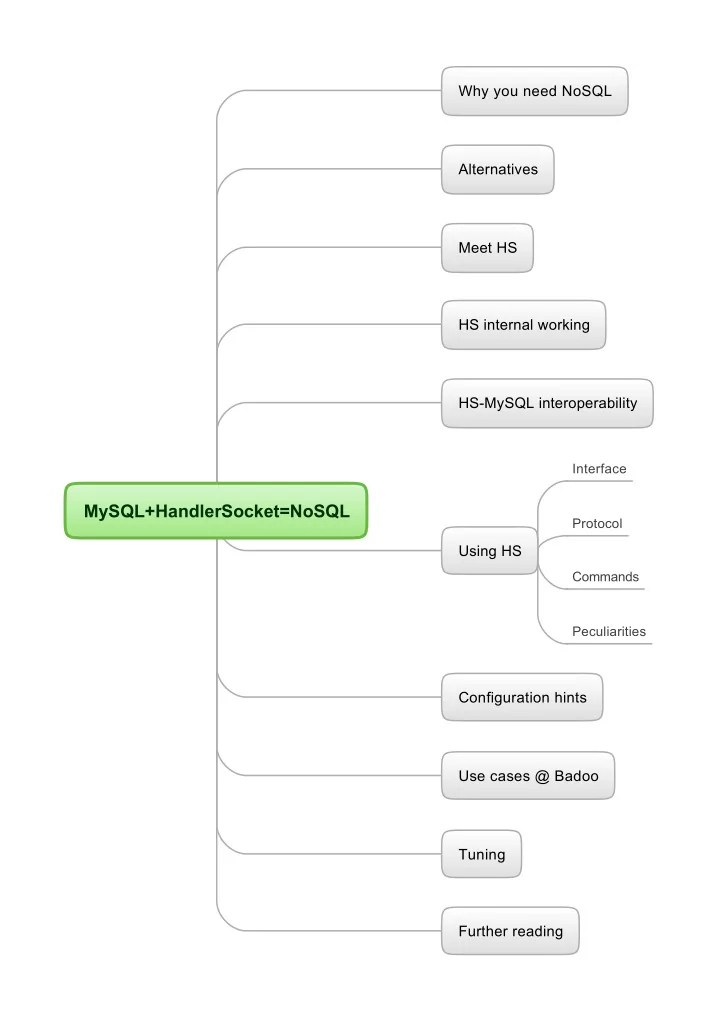
MySQL+HandlerSocket=NoSQL
Why you need NoSQL Alternatives Meet HS HS-MySQL interoperability HS internal working Using HS Configuration hints Use cases @ Badoo Tuning Further reading
Interface Protocol Commands Peculiarities
SLIDE 2
Why you need NoSQL
SQL benefits
Aggregate functions subqueries JOINs Complicated WHERE conditions Transactions ...
But for a website most of your queries are simple
Like this one: SELECT `user` FROM `users` WHERE `id` = 1 So, you use memcached to save MySQl from 1000 RPS
What about another way
If I tell you there's a way to use MySQL and run 1000s of RPS for simple queries
SLIDE 3
MySQL HANDLER statement
Alternatives
Okay, but I've heard MySQL already provides NoSQL access
Yes, this is NoSQL-via-SQL query handler `try1` open as h; handler h read `PRIMARY` >= (1) where `value` LIKE 'v %' AND `key` RLIKE 'k' LIMIT 3; handler h read `PRIMARY` first where `value` LIKE 'v %'; handler h CLOSE; Cons Read-only! You get all fields Pros where_condition can be full-featured MySQL expression, except subqueries or JOINS No special client library needed where_condition can be applied to any fields You can fetch multiple rows per query Not consistent Not really fast
Mysql innodb memcahed plugin
http://dev.mysql.com/doc/refman/5.6/en/innodb- memcached.html
NDBAPI
http://dev.mysql.com/doc/refman/5.0/en/handler.html Cons Pros early beta a little bit complicated to deploy works only on single row - not sure preview is currently N/A for download can retrieve/store multiple columns of your choice Returns one row Very limited filtering abilities. No result sub-filtering, no >, <, <=, >=, != selectors You can use memcached itself Cons Separate MySQL product with lots of peculiarities, complicated NDBstorage engine only Complicated API with a limited subset of languages supported officially http://dev.mysql.com/doc/ndbapi/en/overview-ndb- api.html
Faster in MariaDB # SELECT * FROM family WHERE id = 1; # MySQL HANDLER family OPEN; HANDLER family READ `PRIMARY` = (id) WHERE id = 1; HANDLER family CLOSE; # With MariaDB 5.3 HANDLER family OPEN; PREPARE stmt FROM 'HANDLER family READ `PRIMARY` = (id) WHERE id = ?'; set @id=1; EXECUTE stmt USING @id; DEALLOCATE PREPARE stmt; HANDLER family CLOSE; Even better with persistent connections!
SLIDE 4 What HS is not
Meet HS
Withstands 10000+ simultaneous connections Allows you to work with the same table via SQL simultaneously No second cache -> no data inconsistency
What HS is
MySQL plug-in with direct access to InnoDB/XtraDB It works as a daemon inside the mysqld process, accepting TCP connections, and executing requests from clients. HandlerSocket does not support SQL queries. Instead, it has its own simple protocol for CRUD operations on tables.
Pros
To lower CPU usage it does not parse SQL. It batch-processes requests where possible, which further reduces CPU usage and lowers disk usage. The client/server protocol is very compact compared to mysql/libmysql, which reduces network usage. No duplicate cache (throw out memcached)
Cons
Originally InnoDB only, but works with some other storage engines
Handlersocket history
Was originally intended for fast PK lookups Community contribution by DeNa corp, Japan. Written by Akira Higuchi http://www.dena.jp/en/index.html Later was loved by the community, gained extra functionality Also simple protocol means easy debugging, you can try it yourself with telnet Can be used with MySQL replication Bundled with Percona Server No transactions/stored procedures Some data types are not fully supported Charsets/collations/timezones functionality is very limited Buggy in lesser used functionality You'll work with hard disk then, HS will make no sense Not intended for working with datasets which don't fit in RAM Poor support limited authentication, MySQL users are not supported Not supported by Oracle. Not for hosting/shared usage unpredictable time of bugfixes (22 open bug reports for example). My favorite ‘off by one error in IN() requests’ is still not fixed. Unmature Not a tool for creating/modifying tables loose documentation — learn by trial and error (this talk will cover 99% you will need) Update/insert commands behavior was once changed dramatically, drawing broken inserts/updates you can't even get handlersocket plugin's version through handler socket interface Protocol was not designed for persistent connections, need some tricks Sometimes holds tables open in some cases, preventing table structure modifications You will possibly want to write your own client library with persistent connections after this talk Not an interface for HANDLER MySQL statement Lots of client libraries on the net Not a key-value/document store This is rather an interface for reading/writing relational data Not a ‘binary SQL’ No subqueries, no JOINs, no aggregate functions Not a tool for complex queries
- perations you can make are limited
SLIDE 5 HandlerSocket requests are deadlock-free Modifications are durable Only one writer thread can be executed at the same time
Image 3 (write cycle)
Reader threads don’t block with InnoDB
Image 2 read cycle
closes tables when traffics become small etc so that it won't block administrative commands (DDL) forever. To access MySQL tables, of course HandlerSocket needs to open/close tables (very costly). But HandlerSocket does not
- pen/close tables every time. It
keeps tables opened for reuse. NoSQL network server inside MySQL. which listens on specific ports, accepting NoSQL protocols/APIs, then accessing to InnoDB directly by using MySQL internal storage engine APIs. This approach is similar to NDBAPI, but it can talk with InnoDB.
Image 1 (web server)
HS internal working
SLIDE 6
HS-MySQL interoperability
HS can be used with MySQL replication (using bin log with row-based format) auto_increment is supported You read consistent data via HS and via SQL
LOCK TABLES … READ will not LOCK TABLES … WRITE will also fail Never ever try to do DDL statements on a table you worked with via HS, even if you've closed all the sockets
Table opening/closing logic is complicated It's a plugin, so this should work install plugin handlersocket soname 'handlersocket.so'; uninstall plugin handlersocket; but don't do it! Usually hangs DB. MySQL users, permissions are not supported Current builds invalidate query_cache
SLIDE 7
Interface
You get 2 ports open — 9998, 9999 9998 — will not allow you to modify data Workflow:
Client initiates connection. (здесь сделать пример) Client sends request. Client receives response. Client sends next request. ...
For one request you get one response. You can send N requests in bulk, you will receive N responses in the order of requests.
SLIDE 8 Peculiarities
Will ‘ON UPDATE CURRENT_TIMESTAMP’ work? Always provide data for all selected columns bug Supported fields
You can read all data types You can't write TIMESTAMP fields While writing overflowing data is cut the same way as via SQL
Charsets
[TYPE] Written via SQL Read through SQL Read through NoSQL [TYPE] Written via HS => Read via SQL if you work with UTF8 only — don't worry at all. Just comply to HS protocol encoding standard. BLOBS are binary — you read what you write w/o any charset applied Table charset cp1251 written by HS in cp1251, read via SQL (connection charset utf8) Example 1 (We write in same charset) Example 2 (fields with different charsets) CREATE TABLE `hscdemo3` ( `pk` bigint(20) unsigned NOT NULL AUTO_INCREMENT, `char` char(10) CHARACTER SET cp1251 NOT NULL DEFAULT '', <-- cp1251 `varchar` varchar(10) NOT NULL, <-- utf8 PRIMARY KEY (`pk`), ) ENGINE=InnoDB DEFAULT CHARSET=utf8;
P 89 test hscdemo3 PRIMARY pk,char,varchar 0 1 89 + 3 1 {'абвгд' in cp1251} {абвгд in utf8} 0 1
So these collations affect >,>=,<,<= operations (but not filters) and define the order you get results in SQL reads fields in the charset of connection When you use <, <= operations, you'll get records in reverse order SQL select (connection charset utf8) HS writes fields in the charset of the field Index is ordered according to the collations of the fields it consists of The only place collations are meaningful for HS is the
- rder it reads records from the index you opened
‘ON UPDATE CURRENT_TIMESTAMP’ is not working Example 3 (insert wrong chars) Example: CREATE TABLE `hscdemo3` ( `pk` bigint(20) unsigned NOT NULL AUTO_INCREMENT, `char` char(10) CHARACTER SET ascii NOT NULL DEFAULT '', <-- ascii `varchar` varchar(10) NOT NULL, <-- utf8 PRIMARY KEY (`pk`), ) ENGINE=InnoDB AUTO_INCREMENT=2 DEFAULT CHARSET=utf8;
P 89 test hscdemo3 PRIMARY pk,char,varchar0 1 89 = 1 1 0 3 1 {'абвгд' in cp1251} {абвгд in utf8}
[TYPE] Written via HS, read via SQL [CHAR(10), ascii] 0xe0e1e2e3e4 => 0x3f3f3f3f3f <- 5x ‘?’ ascii chars [VARCHAR(10), utf8] 0xd0b0d0b1d0b2d0b3d0b4 => 0xd0b0d0b1d0b2d0b3d0b4 <-- “абвгд” in utf8 {screenshot} if you try to insert out-of-charset bytes via HS, you get ‘?’ ascii chars Example: Always provide data for all columns you specified with {columns list} param in open_index request
- therwise you'll insert garbled data
Exception: non-empty constant default value was set for the column
Default values
Read via HS Use only for columns not specified in open_index! Insert via HS in charsets of the fileds Example 1: No default values provided, NOT NULL
P 89 test hscdemo3 PRIMARY pk,char,varchar 0 1 89 = 1 1 0 3 1 {'абвгд' in cp1251} {абвгд in utf8}
CREATE TABLE `hswdemo4` ( `pk` bigint(20) unsigned NOT NULL AUTO_INCREMENT, `int` int(11) NOT NULL, `smallint` smallint(6) NOT NULL, `tinyint` tinyint(4) NOT NULL, `mediumint` mediumint(9) NOT NULL, `bigint` bigint(20) NOT NULL, `bit` bit(2) NOT NULL, `decimal` decimal(4,4) NOT NULL, `float` float NOT NULL, `double` double NOT NULL, `date` date NOT NULL, `datetime` datetime NOT NULL, `timestamp` timestamp NOT NULL, `time` time NOT NULL, `year` year(4) NOT NULL, `char` char(10) NOT NULL, `varchar` varchar(10) NOT NULL, `binary` binary(10) NOT NULL, `varbinary` varbinary(10) NOT NULL, `tinyblob` tinyblob NOT NULL, `mediumblob` mediumblob NOT NULL, `blob` blob NOT NULL, `longblob` longblob NOT NULL, `tinytext` tinytext NOT NULL, `mediumtext` mediumtext NOT NULL, `text` text NOT NULL, `longtext` longtext NOT NULL, `enum` enum('small','medium','large','xlarge') NOT NULL, `set` set('one','two','three') NOT NULL, PRIMARY KEY (`pk`) ) ENGINE=InnoDB; HS reads fields in the charset of the field
{screenshot}
`timestamp` automatically gets 'DEFAULT CURRENT_TIMESTAMP ON UPDATE CURRENT_TIMESTAMP'. Insert via HS: wrong chars, right chars Insert via SQL, read via SQL:
1 0 0 0 0 0 00 0.0000 0 0 0000-00-00 0000-00-00 00:00:00 2012-11-26 11:57:51 00:00:00 0000
Insert via HS, read via SQL:
2 0 0 0 0 0 00 0.0000 0 0 0000-00-00 0000-00-00 00:00:00 0000-00-00 00:00:00 00:00:00 0000 small
Via HS enum doesn't work as expected, gets first possible value. Field with ‘timestamp’ data type get ‘0000-00-00 00:00:00’ instead of CURRENT_TIMESTAMP. Example 2: Constant default values provided CREATE TABLE `hsidemo2` ( `pk` bigint(20) unsigned NOT NULL AUTO_INCREMENT, `int` int(11) NOT NULL DEFAULT '1', `smallint` smallint(6) NOT NULL DEFAULT '2', `tinyint` tinyint(4) NOT NULL DEFAULT '3', `mediumint` mediumint(9) NOT NULL DEFAULT '4', `bigint` bigint(20) NOT NULL DEFAULT '5', `bit` bit(2) NOT NULL DEFAULT b'1', `decimal` decimal(4,4) NOT NULL DEFAULT '0.1235', `float` float NOT NULL DEFAULT '12.345', `double` double NOT NULL DEFAULT '123.45', `date` date NOT NULL DEFAULT '2012-10-01', `datetime` datetime NOT NULL DEFAULT '2012-10-01 01:02:03', `timestamp` timestamp NOT NULL DEFAULT '2012-10-01 01:02:03', `time` time NOT NULL DEFAULT '01:02:03', `year` year(4) NOT NULL DEFAULT '2012', `char` char(10) COLLATE utf8_unicode_ci NOT NULL DEFAULT 'abc', `varchar` varchar(10) COLLATE utf8_unicode_ci NOT NULL DEFAULT 'abc', `binary` binary(10) NOT NULL DEFAULT 'abc', `varbinary` varbinary(10) NOT NULL DEFAULT 'abc', `enum` enum('small','medium','large','xlarge') COLLATE utf8_unicode_ci NOT NULL DEFAULT 'large', `set` set('one','two','three') COLLATE utf8_unicode_ci NOT NULL DEFAULT 'two', PRIMARY KEY (`pk`) ) ENGINE=InnoDB DEFAULT CHARSET=utf8 COLLATE=utf8_unicode_ci; Note: BLOB and TEXT types can't have default values!
Sorting (collations)
Use http://www.collation-charts.org/mysql60/ Insert via SQL, read via SQL: CREATE TABLE `hsmdemo3` ( `id` int(11) unsigned NOT NULL AUTO_INCREMENT, `letter` char(1) NOT NULL DEFAULT '', `alp` char(2) NOT NULL DEFAULT '', PRIMARY KEY (`id`) ) ENGINE=InnoDB DEFAULT CHARSET=utf8; Collation = utf8_general_ci.
1 1 2 3 4 5 01 0.1235 12.345 123.45 2012-10-01 2012-10-01 01:02:03 2012-10-01 01:02:03 01:02:03 2012 abc abc abc\0\0\0\ abc large two
insert into hsmdemo3(`letter`, `alp`) VALUES ('y','en'), ('W','en'), ('z','en'), ('b','en'), ('C','en'), ('a','en'), ('V','en'), ('X','en'), ('П','ru'), ('а','ru'), ('ю','ru'), ('Г','ru'), ('я','ru'), ('б','ru'), ('Д','ru'), ('Ф','ru'); Insert via HS, read via SQL: Example 3: Default value = NULL
2 1 2 3 4 5 01 0.1235 12.345 123.45 2012-10-01 2012-10-01 01:02:03 2012-10-01 01:02:03 01:02:03 2012 abc abc abc abc large two
select * from hsmdemo3 order by letter; With constant default values provided everything works, except `binary` datatype, it will trim ending \0s from the default value. Don't use binary datatype.
Screenshot
What about NULL default values? Example 1: Going down the index CREATE TABLE `hsidemo5` ( `pk` bigint(20) unsigned NOT NULL AUTO_INCREMENT, `int` int(11) DEFAULT NULL, `smallint` smallint(6) DEFAULT NULL, `tinyint` tinyint(4) DEFAULT NULL, `mediumint` mediumint(9) DEFAULT NULL, `bigint` bigint(20) DEFAULT NULL, `bit` bit(2) DEFAULT NULL, `decimal` decimal(4,4) DEFAULT NULL, `float` float DEFAULT NULL, `double` double DEFAULT NULL, `date` date DEFAULT NULL, `datetime` datetime DEFAULT NULL, `timestamp` timestamp NULL DEFAULT NULL, `time` time DEFAULT NULL, `year` year(4) DEFAULT NULL, `char` char(10) COLLATE utf8_unicode_ci DEFAULT NULL, `varchar` varchar(10) COLLATE utf8_unicode_ci DEFAULT NULL, `binary` binary(10) DEFAULT NULL, `varbinary` varbinary(10) DEFAULT NULL, `enum` enum('small','medium','large','xlarge') COLLATE utf8_unicode_ci DEFAULT NULL, `set` set('one','two','three') COLLATE utf8_unicode_ci DEFAULT NULL, PRIMARY KEY (`pk`) ) ENGINE=InnoDB DEFAULT CHARSET=utf8 COLLATE=utf8_unicode_ci; Insert via SQL, read via SQL:
1 (NULL) (NULL) (NULL) (NULL) (NULL) (NULL) (NULL) (NULL) (NULL) (NULL) (NULL) (NULL) (NULL) (NULL) (NULL) (NULL) (NULL) (NULL) (NULL) (NULL)
Trying 10.10.145.16... Connected to dbh15.mlan. Escape character is '^]'. P 89 test hsmdemo3 letter id,letter,alp 0 1 89 >= 1 a 100 0 0 3 38 a en 36 b en 37 C en 39 V en 34 W en 40 X en 33 y en 35 z en 42 а ru 46 ru 44 Г ru 47 Д ru 41 П ru 48 Ф ru 43 ю ru 45 я ru Insert via HS, read via SQL:
38 a en 36 b en 37 C en 39 V en 34 W en 40 X en 33 y en 35 z en 42 а ru 46 б ru 44 Г ru 47 Д ru 41 П ru 48 Ф ru 43 ю ru 45 я ru 2 0 0 0 0 0 00 0.0000 0 0 0000-00-00 0000-00-00 00:00:00 0000-00-00 00:00:00 00:00:00 0000
Example 2: Going up the index NULL as a default value won't work. You'll get zeroed
89 <= 1 я 100 0 0 3 45 я ru 43 ю ru 48 Ф ru 41 П ru 47 Д ru 44 Г ru 46 б ru 42 а ru 35 z en 33 en 40 X en 34 W en 39 V en 37 C en 36 b en 38 a en
45 я ru 43 ю ru 48 Ф ru 41 П ru 47 Д ru 44 Г ru 46 б ru 42 а ru 35 z en 33 у en 40 X en 34 W en 39 V en 37 C en 36 b en 38 a en
Example 3: Going down the index (utf8_bin) Okay, now we convert the same table to collate with utf8_bin
select * from hsmdemo3 order by letter; {screenshot}
89 >= 1 0 100 0 0 3 37 C en 39 V en 34 W en 40 X en 38 a en 36 b en 33 y en 35 z en 44 Г ru 47 ru 41 П ru 48 Ф ru 42 а ru 46 б ru 43 ю ru 45 я ru
37 C en 39 V en 34 W en 40 X en 38 a en 36 b en 33 y en 35 z en 44 Г ru 47 Д ru 41 П ru 48 Ф ru 42 а ru 46 б ru 43 ю ru 45 я ru
Example 4: Let's try combined index P 89 test hsmdemo7 letters id,a,b 0 1 89 > 2 0 0 30 0 0 3 195 C a 112 C b 6 C C 205 C V 235 C W 27 C X 221 C y 228 C z 213 C а 119 250 C Г 109 C Д 72 C П 44 C Ф 16 C ю 202 C я 182 V a 32 V b 145 V C 114 V V 153 V W 144 V X 19 V y 190 V z 84 V а 146 V б 214 V Г 97 V Д 115 V П 40 V Ф CREATE TABLE `hsmdemo6` ( `id` int(11) unsigned NOT NULL AUTO_INCREMENT, `a` char(1) CHARACTER SET utf8 COLLATE utf8_bin NOT NULL DEFAULT '', `b` char(1) NOT NULL DEFAULT '', <-- this one gets utf8_general_ci collation PRIMARY KEY (`id`) ) ENGINE=InnoDB AUTO_INCREMENT=512 DEFAULT CHARSET=utf8; Fill it in with all possible combinations of the above letters randomly ordered: Select 30 rows from the beginning of index
195 C a 112 C b 6 C C 205 C V 235 C W 27 C X 221 C y 228 C z 213 C а 119 C б 250 C Г 109 C Д 72 C П 44 C Ф 16 C ю 202 C я 182 V a 32 V b 145 V C 114 V V 153 V W 144 V X 19 V y 190 V z 84 V а 146 V б 214 V Г 97 V Д 115 V П 40 V Ф
select * from hsmdemo7 order by a,b;
{screenshot}
CREATE TABLE `hsidemo6` ( `pk` bigint(20) unsigned NOT NULL AUTO_INCREMENT, `timestamp` timestamp NULL DEFAULT CURRENT_TIMESTAMP ON UPDATE CURRENT_TIMESTAMP, PRIMARY KEY (`pk`) ) ENGINE=InnoDB DEFAULT CHARSET=utf8 COLLATE=utf8_unicode_ci; {screenshot} P 89 test hsidemo6 PRIMARY pk0 1 89 = 1 1 1 0 U 2 0 1 1 {screenshot} Complete fail! [INT] -2147483648 => -2147483648 vs. -2147483648 [SMALLINT] -32768 => -32768 vs. -32768 [TINYINT] -128 => -128 vs. -128 [MEDIUMINT] -8388608 => -8388608 vs. -8388608 [BIGINT(20)] -9223372036854775807 =>
- 9223372036854775807 vs. -9223372036854775807
[BIT(2)] 2 => 0x02 vs. 0x02 [DECIMAL(4,4)] 0.1527 => 0.1527 vs. 0.1527 [FLOAT] 10203.10203 => 10203.1 vs. 10203.1 [DOUBLE] 102030.102030 => 102030.10203 vs. 102030.10203 [DATE] 1000-01-01 => 1000-01-01 vs. 1000-01-01 [DATETIME] 1000-01-01 00:00:00 => 1000-01-01 00:00:00 vs. 1000-01-01 00:00:00 [TIMESTAMP] 1970-01-01 00:00:01 => 1970-01-01 00:00:01 vs. 1970-01-01 00:00:01 [TIME] -838:59:59 => -838:59:59 vs. -838:59:59 [YEAR(4)] 2004 => 2004 vs. 2004 [CHAR(10)] abcdef => abcdef vs. abcdef [VARCHAR(10)] abcdef => abcdef vs. abcdef [BINARY(10)] abcdef => abcdef vs. abcdef [VARBINARY(10)] abcdef => abcdef vs. abcdef [TINYBLOB] abcdef => abcdef vs. abcdef [MEDIUMBLOB] abcdef => abcdef vs. abcdef [BLOB] abcdef => abcdef vs. abcdef [LONGBLOB] abcdef => abcdef vs. abcdef [TINYTEXT] abcdef => abcdef vs. abcdef [MEDIUMTEXT] abcdef => abcdef vs. abcdef [TEXT] abcdef => abcdef vs. abcdef [LONGTEXT] abcdef => abcdef vs. abcdef [ENUM('small', 'medium', 'large', 'xlarge')] large => large
[SET('one', 'two', 'three')] one,two => one,two vs.
[INT] -2147483648 => -2147483648 [SMALLINT] -32768 => -32768 [TINYINT] -128 => -128 [MEDIUMINT] -8388608 => -8388608 [BIGINT(20)] -9223372036854775807 =>
[BIT(2)] => 0x02 [DECIMAL(4,4)] 0.1527 => 0.1527 [FLOAT] 10203.10203 => 10203.1 !!! — cut, this is
[DOUBLE] 102030.102030 => 102030.10203 [DATE] 1000-01-01 => 1000-01-01 [DATETIME] 1000-01-01 00:00:00 => 1000-01-01 00:00:00 [TIMESTAMP] 1970-01-01 00:00:01 => 0000-00-00 00:00:00 !!! — not supported [TIME] -838:59:59 => -838:59:59 [YEAR(4)] 2004 => 2004 [CHAR(10)] abcdef => abcdef [VARCHAR(10)] abcdef => abcdef [BINARY(10)] abcdef => abcdef [VARBINARY(10)] abcdef => abcdef [TINYBLOB] abcdef => abcdef [MEDIUMBLOB] abcdef => abcdef [BLOB] abcdef => abcdef [LONGBLOB] abcdef => abcdef [TINYTEXT] abcdef => abcdef [MEDIUMTEXT] abcdef => abcdef [TEXT] abcdef => abcdef [LONGTEXT] abcdef => abcdef [ENUM('small', 'medium', 'large', 'xlarge')] large => large [SET('one', 'two', 'three')] one,two => one,two
????? is cp1251 in utf8. Not an error. [CHAR(10)] ????? => абвгд !!! [VARCHAR(10)] ????? => абвгд !!! [BINARY(10)] ????? => ????? [VARBINARY(10)] ????? => ????? [TINYBLOB] ????? => ????? [MEDIUMBLOB] ????? => ????? [BLOB] ????? => ????? [LONGBLOB] ????? => ????? [TINYTEXT] ????? => абвгд !!! [MEDIUMTEXT] ????? => абвгд !!! [TEXT] ????? => абвгд !!! [LONGTEXT] ????? => абвгд !!!
CREATE TABLE `hsidemo3` ( `pk` bigint(20) unsigned NOT NULL AUTO_INCREMENT, `char` char(10) COLLATE utf8_unicode_ci NOT NULL, `binary` binary(10) NOT NULL, `varbinary` varbinary(10) NOT NULL, `varchar` varchar(10) COLLATE utf8_unicode_ci NOT NULL, PRIMARY KEY (`pk`) ) ENGINE=InnoDB AUTO_INCREMENT=5 DEFAULT CHARSET=utf8 COLLATE=utf8_unicode_ci; P 89 test hsidemo3 PRIMARY pk,char,binary,varbinary,varchar 0 1 89 + 1 4 You get garbled data Constant non-empty default values work okay:
{screenshot} {screenshot}
SLIDE 9 Protocol
Each line ends with \n (0x0A) Each line consists of a set of tokens separated by \t (0x09) Requests and responses consist of single line Token is either NULL or an encoded string NULL is encoded as \0 (0x00) Strings are encoded this way:
Empty string is zero-length token Every byte in the range 0x00-0x0F is prefixed by 0x01 and shifted by 0x40. (E. g. 0x03 -> 0x01 0x43) Other bytes are left unmodified
Example: P<tab>\0<tab>(zero-length string)\n Protocol is text-like, but binary, connection has no charset Error response
When you do something awkward you get error
- response. They are similar for all the commands
{number > 1}\t1\t{text}\n {number > 1}\t0\n distinguish NULL from an empty string A continuation of 0x09 0x09 means that there is an empty string between them. A continuation of 0x09 0x0a means that there is an empty string at the end
SLIDE 10 Commands
Authentication
Syntax Params Ok response Fail response
Retrieve
Syntax Params LIMIT clause: IN clause: FILTER clause: Empty result Non-empty result is Simple example Command description — what can be done with it. You don't need this if you have no password Command description — what can be done with it. Examples
Retrieve 1 row by exact id Retrieve 3 rows starting from id 2
1-column index 2-column index
Retrieve all rows with warehouse = Virginia (1st column in index used) Retrieve row with warehouse = California & box = A1 (1st & 2nd column in index used) Retrieve all rows after warehouse = Seattle & box = A1 if sorted by warehouse, box: Get all rows with id IN (2, 4) Retrieve all rows with warehouse = Virginia & box IN (A1, B2):
IN Filters
Get all rows with id > 2 & box != A1 & count < 6 Get all rows with id >=0 going down the index until count > 1 Filter order has no effect. Update/Delete
Syntax Params Command description — what can be done with it. Small bug: Won't work until you specify limit. Error response MOD clause Ok response Error response Examples Update Delete
set count = 5 where warehouse = Seattle Get count where id=8 and set count=count+10 where id=8 Delete rows with id > 1 & count > 3 Create
Ok response for auto_increment: Syntax Command description — what can be done with it. Ok response Error response Params You should provide values for the columns you opened with open_index. Example Bug: Always provide data for all columns you specified with {columns list} param. (Will be discussed later)
Open index
Syntax Params To work with a table you need to get a special descriptor Command description — what can be done with it Notes You can re-open an index with the same {index id} and possibly other {db name}/{table name}/{index name}. You can open the same combination of {db name}, {table name}, {index name} multiple times, possibly with different {columns list}. You can't manually close indexes. Index is open until the client connection is closed. Open indices consume memory and make things work
- slower. Try to use less than 1000 indices.
For efficiency, keep {index id} small as far as possible. Ok response Simple examples
two Errors: locked table P 89 test hscwdemo2 PRIMARY pk2 1 open_table
SLIDE 11 Configuration hints
For full list of HS config params see https:// github.com/ahiguti/HandlerSocket-Plugin-for- MySQL/blob/master/docs-en/configuration-
HandlerSocket configuration options
handlersocket_threads = 16 Number of reader threads Recommended value is the number of logical CPU handlersocket_thread_wr = 1 Number of writer threads Recommended value is ... 1 handlersocket_port = 9998 Listening port for reader requests handlersocket_port_wr = 9999 Listening port for writer requests
MySQL configuration options
innodb_buffer_pool_size As large as possible innodb_log_file_size, innodb_log_files_in_group As large as possible innodb_thread_concurrency = 0
Number of file descriptors mysqld can open HandlerSocket can handle up to 65000 concurrent connections innodb_adaptive_hash_index = 1 Adaptive has index is fast, but consume memory
Options related to durability (use MySQL manual)
sync_binlog = 1 innodb_flush_log_at_trx_commit = 1 innodb_support_xa = 1
SLIDE 12
Use cases @ Badoo
Banned email lookup
One table (screenshot) We replaced select * where name= '…' and domain='…' with HS analogue Dual-core Intel(R) Xeon(R) CPU E5503 @ 2.00GHz ~52 millon rows 5 Gb All data fits in memory Persistent connects for HS are used Writes go via SQL, <10 RPS ~1000 RPS for read via HS ~2 ms per read
Persistent session store
1 table, 16 m rows, ~23Gb Get row by key, update row by key, insert row Periodical purging via SQL (DELETE FROM sess WHERE `ts` < ...) 12-core Intel(R) Xeon(R) CPU X5650 @ 2.67GHz All data fits in memory Persistent connects for HS are used Create: <10 RPS, ~1.2ms/request Update: ~180 RPS, ~1.3ms/request Get: ~3500 RPS, ~0.5 ms/request
Sharded persistent session store
10 000 tables Sessions are spread by `hash` which is randomly generated during session creation 10 million rows ~20 Gb 12-core Intel(R) Xeon(R) CPU X5650 @ 2.67GHz All data fits in memory Same operations: get row by key, update row by key, insert row Create: <10 RPS, ~1.3ms/request Update: ~150 RPS, ~1.3ms/request Get: ~1200 RPS, ~1.6 ms/request What was the benefit of sharding? Sharded setups withstand write load better Single-table setup worked well, but had low max write RPS Sharding gave us 2x limit Originally was slower. Moving from MySQL/InnoDB to Percona Server/XtraDB gave us ~ 4x more performance Second problem: when table grows, performance drops
1 million actively changed rows/2 million table and 2 million actively changed rows/20 million table showed 10x performance difference Clean obsolete rows daily Try sharding and compare with single-table setup for you application
60% CPU used, LA = 0.5 8% CPU used, LA = 5 3% CPU used, LA=10
Persistent cache
We cache users' interests list on 1 server per DC Interests are stored in > 1000000 tables across 200 servers Memcached has one problem — if it hangs/dies you can't restart it with the same data set quickly So we made our persistent cache for this 32 million rows shared across 10000 tables 14 Gb 12-core Intel(R) Xeon(R) CPU X5650 @ 2.67GHz 11% CPU load, LA=5 Same operations: get row by key, update row by key, insert row Create: <10 RPS, ~0.4ms/request Update: <10 RPS, ~0.4ms/request Get: ~14500 RPS max, ~0.5 ms/request
SLIDE 13 Requests and responses have no unique id, so you can't securely match requests and responses
Tuning
Try to shard by key with datasets > 10m rows, usually it helps User Percona Server/XtraDB Use persistent connections
There is one problem When working with web requests you can unintentionally leave some unread data in the socket and your process will start serving next request and this next request will inherit this open socket with some data it will send request and get this data and treat is as a response so it will get an answer from previous query and this will be 100% syntactically correct There is no guaranteed way to avoid this when using persistent connections but we're using a simple approach that allows us to sleep with no worry instead of doing retrieve value where key is 'abc' we do retrieve key, value where key is 'abc' this can be easily done with HS then we check we got that same key we were asking for This prevents us from reading other rows instead of the row we need Remember: open index consumes memory. You won't be able to hold 1000 connections with 1000 open indexes at the same time I open the corresponding index then if I get 2 1 stmtnum error from HS I execute a query I do it this way: Lazy open_index technique Recommendations To lower the probability of problems
- n socket read/write timeout
Alwayse reopen connection on syntax error Always try to read all the data from socket To work with any table you need to open index with normal connections you need to do it every time you open a new connection in the world of websites this is usually connect,
- pen_index, do 2—3 other requests, close connection
with persistent connections you can open index very rarely So, when creating a socket in your program (e. g. pfsockopen() in PHP) If you don't need to open different indexes under the same index number check if index is already open and open it if it's not
What else you can play with
InnoDB ROW_FORMAT InnoDB KEY_BLOCK_SIZE Merging indexes If you need to work with several indexes in HS table, try to merge them in one big multi-column index HASH indexes
SLIDE 14
http://www.percona.com/doc/percona-server/5.5/ performance/handlersocket.html
Percona's HS page
http://yoshinorimatsunobu.blogspot.ru/2010/10/using- mysql-as-nosql-story-for.html
HS introduction from authors
https://github.com/DeNADev/HandlerSocket-Plugin-for- MySQL/tree/master/docs-en
HS docs
https://github.com/DeNADev/HandlerSocket-Plugin-for- MySQL/
HS sources
https://github.com/DeNADev/HandlerSocket-Plugin-for- MySQL/blob/master/README
HS client libraries
Further reading