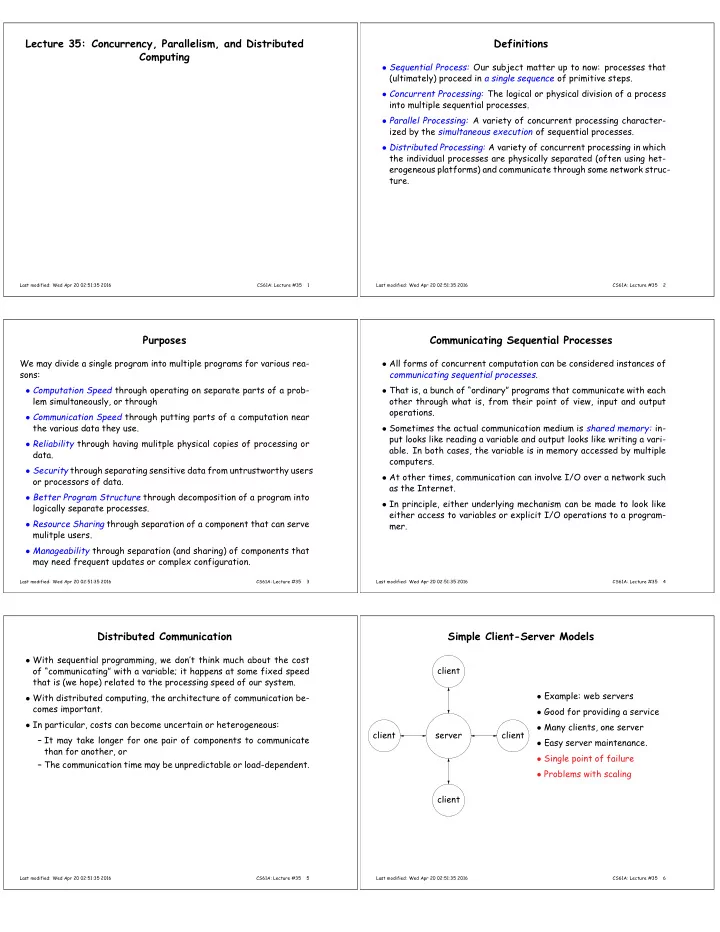
Lecture 35: Concurrency, Parallelism, and Distributed Definitions - - PDF document

lecture 35 concurrency parallelism and distributed
SMART_READER_LITE
LIVE PREVIEW

Lecture 35: Concurrency, Parallelism, and Distributed Definitions - - PDF document

Lecture 35: Concurrency, Parallelism, and Distributed Definitions Computing Sequential Process: Our subject matter up to now: processes that (ultimately) proceed in a single sequence of primitive steps. Concurrent Processing: The logical


slide-1
SLIDE 1

Lecture 35: Concurrency, Parallelism, and Distributed Computing

Last modified: Wed Apr 20 02:51:35 2016 CS61A: Lecture #35 1

Definitions

  • Sequential Process: Our subject matter up to now: processes that

(ultimately) proceed in a single sequence of primitive steps.

  • Concurrent Processing: The logical or physical division of a process

into multiple sequential processes.

  • Parallel Processing: A variety of concurrent processing character-

ized by the simultaneous execution of sequential processes.

  • Distributed Processing: A variety of concurrent processing in which

the individual processes are physically separated (often using het- erogeneous platforms) and communicate through some network struc- ture.

Last modified: Wed Apr 20 02:51:35 2016 CS61A: Lecture #35 2

Purposes

We may divide a single program into multiple programs for various rea- sons:

  • Computation Speed through operating on separate parts of a prob-

lem simultaneously, or through

  • Communication Speed through putting parts of a computation near

the various data they use.

  • Reliability through having mulitple physical copies of processing or

data.

  • Security through separating sensitive data from untrustworthy users
  • r processors of data.
  • Better Program Structure through decomposition of a program into

logically separate processes.

  • Resource Sharing through separation of a component that can serve

mulitple users.

  • Manageability through separation (and sharing) of components that

may need frequent updates or complex configuration.

Last modified: Wed Apr 20 02:51:35 2016 CS61A: Lecture #35 3

Communicating Sequential Processes

  • All forms of concurrent computation can be considered instances of

communicating sequential processes.

  • That is, a bunch of “ordinary” programs that communicate with each
  • ther through what is, from their point of view, input and output
  • perations.
  • Sometimes the actual communication medium is shared memory: in-

put looks like reading a variable and output looks like writing a vari-

  • able. In both cases, the variable is in memory accessed by multiple

computers.

  • At other times, communication can involve I/O over a network such

as the Internet.

  • In principle, either underlying mechanism can be made to look like

either access to variables or explicit I/O operations to a program- mer.

Last modified: Wed Apr 20 02:51:35 2016 CS61A: Lecture #35 4

Distributed Communication

  • With sequential programming, we don’t think much about the cost
  • f “communicating” with a variable; it happens at some fixed speed

that is (we hope) related to the processing speed of our system.

  • With distributed computing, the architecture of communication be-

comes important.

  • In particular, costs can become uncertain or heterogeneous:

– It may take longer for one pair of components to communicate than for another, or – The communication time may be unpredictable or load-dependent.

Last modified: Wed Apr 20 02:51:35 2016 CS61A: Lecture #35 5

Simple Client-Server Models

server client client client client

  • Example: web servers
  • Good for providing a service
  • Many clients, one server
  • Easy server maintenance.
  • Single point of failure
  • Problems with scaling
Last modified: Wed Apr 20 02:51:35 2016 CS61A: Lecture #35 6
slide-2
SLIDE 2

Variations: on to the cloud

  • Google and other providers modify this model with redundancy in

many ways.

  • For example, DNS load balancing (DNS = Domain Name System) al-

lows us to specify multiple servers.

  • Requests from clients go to different servers that all have copies
  • f relevant information.
  • Put enough servers in one place, you have a server farm. Put servers

in lots of places, and we have a cloud.

Last modified: Wed Apr 20 02:51:35 2016 CS61A: Lecture #35 7

Communication Protocols

  • One characteristic of modern distributed systems is that they are

conglomerations of products from many sources.

  • Web browers are a kind of universal client, but there are numer-
  • us kinds of browsers and many potential servers (and clouds of

servers).

  • So there must be some agreement on how they talk to each other.
  • The IP Protocol is an agreement for specifying destinations, pack-

aging messages, and delivering those messages.

  • On top of this, the transmission control protocol (TCP) handles is-

sues like persistent telephone-like connections and congestion con- trol.

  • The DNS handles conversions between names (inst.eecs.berkeley.edu)

and IP addresses (128.32.42.199).

  • The HyperText Transfer Protocol handles transfer of requests and

responses from web servers.

Last modified: Wed Apr 20 02:51:35 2016 CS61A: Lecture #35 8

Example: HTTP

  • When you click on a link, such as

http://inst.eecs.berkeley.edu/~cs61a/lectures, your browser: – Consults the DNS to find out where to look for inst.eecs.berkeley.edu. – Sends a message to port 80 at that address: GET ~cs61a/lectures HTTP 1.1 – The program listening there (the web server) then responds with HTTP/1.1 200 OK Content-Type: text/html Content-Length: 1354 <html> ... text of web page

  • Protocol has other messages: for example, POST is often used to

send data in forms from your browser. The data follows the POST message and other headers.

Last modified: Wed Apr 20 02:51:35 2016 CS61A: Lecture #35 9

Peer-to-Peer Communication

1 2 3 4 5 6 7

  • No central point of failure; clients talk

to each other.

  • Can route around network failures.
  • Computation and memory shared.
  • Can grow or shrink as needed.
  • Used for file-sharing applications, bot-

nets (!).

  • But, deciding routes, avoiding conges-

tion, can be tricky.

  • (E.g., Simple scheme, broadcasting all

communications to everyone, requires N 2 communication resource. Not prac- tical.

  • Maintaining consistency of copies re-

quires work.

  • Security issues.
Last modified: Wed Apr 20 02:51:35 2016 CS61A: Lecture #35 10

Clustering

  • A peer-to-peer network of “su-

pernodes,” each serving as a server for a bunch of clients.

  • Allows scaling; could be nested

to more levels.

  • Examples: Skype, network time

service.

Last modified: Wed Apr 20 02:51:35 2016 CS61A: Lecture #35 11

Parallelism

  • Moore’s law (“Transistors per chip doubles every N years”), where

N is roughly 2 (about 5, 000, 000× increase since 1971).

  • Similar rule applied to processor speeds until around 2004.
  • Speeds have flattend: further increases to be obtained through

parallel processing (witness: multicore/manycode processors).

  • With distributed processing, issues involve interfaces, reliability,

communication issues.

  • With other parallel computing, where the aim is performance, issues

involve synchronization, balancing loads among processors, and, yes, “data choreography” and communication costs.

Last modified: Wed Apr 20 02:51:35 2016 CS61A: Lecture #35 12
slide-3
SLIDE 3

Example of Parallelism: Sorting

  • Sorting a list presents obvious opportunities for parallelization.
  • Can illustrate various methods diagrammatically using comparators

as an elementary unit: 1 2 4 3 1 2 3 4

  • Each vertical bar represents a comparator—a comparison operation
  • r hardware to carry it out—and each horizontal line carries a data

item from the list.

  • A comparator compares two data items coming from the left, swap-

ping them if the lower one is larger than the upper one.

  • Comparators can be grouped into operations that may happen simul-

taneously; they are always grouped if stacked vertically as in the diagram.

Last modified: Wed Apr 20 02:51:35 2016 CS61A: Lecture #35 13

Sequential sorting

  • Here’s what a sequential sort (selection sort) might look like:

4 3 2 1 3 4 2 1 3 2 4 1 3 2 1 4 2 3 1 4 2 1 3 4 1 2 3 4

  • Each comparator is a separate operation in time.
  • In general, there will be Θ(N 2) steps.
  • But since some comparators operate on distinct data, we ought to

be able to overlap operations.

Last modified: Wed Apr 20 02:51:35 2016 CS61A: Lecture #35 14

Odd-Even Transposition Sorter

Data Comparator Separates parallel groups

Last modified: Wed Apr 20 02:51:35 2016 CS61A: Lecture #35 15

Odd-Even Sort Example

8 7 6 5 4 3 2 1 7 8 5 6 3 4 1 2 7 5 8 3 6 1 4 2 5 7 3 8 1 6 2 4 5 3 7 1 8 2 6 4 3 5 1 7 2 8 4 6 3 1 5 2 7 4 8 6 1 3 2 5 4 7 6 8 1 2 3 4 5 6 7 8

Last modified: Wed Apr 20 02:51:35 2016 CS61A: Lecture #35 16

Example: Bitonic Sorter

Data Comparator Separates parallel groups

Last modified: Wed Apr 20 02:51:35 2016 CS61A: Lecture #35 17

Bitonic Sort Example (I)

48 56 35 13 15 99 7 24 92 6 52 1 47 8 16 77 48 56 13 35 15 99 7 24 6 92 1 52 8 47 16 77 35 13 56 48 15 7 99 24 6 1 92 52 8 16 47 77 13 35 48 56 7 15 24 99 1 6 52 92 8 16 47 77 13 24 15 7 56 48 35 99 1 6 16 8 92 52 47 77 13 7 15 24 35 48 56 99 1 6 16 8 47 52 92 77 7 13 15 24 35 48 56 99 1 6 8 16 47 52 77 92

Last modified: Wed Apr 20 02:51:35 2016 CS61A: Lecture #35 18
slide-4
SLIDE 4

Bitonic Sort Example (II)

7 13 15 24 35 48 56 99 1 6 8 16 47 52 77 92 7 13 15 24 16 8 6 1 99 56 48 35 47 52 77 92 7 8 6 1 16 13 15 24 47 52 48 35 99 56 77 92 6 1 7 8 15 13 16 24 47 35 48 52 77 56 99 92 1 6 7 8 13 15 16 24 35 47 48 52 56 77 92 99

Last modified: Wed Apr 20 02:51:35 2016 CS61A: Lecture #35 19

Implementing Parallel Programs

  • The sorting diagrams were abstractions.
  • Comparators could be processors, or they could be operations di-

vided up among one or more processors.

  • Coordinating all of this is the issue.
  • One approach is to use shared memory, where multiple processors

(logical or physical) share one memory.

  • This introduces conflicts in the form of race conditions: processors

racing to access data.

Last modified: Wed Apr 20 02:51:35 2016 CS61A: Lecture #35 20

Memory Conflicts: Abstracting the Essentials

  • When considering problems relating to shared-memory conflicts,

it is useful to look at the primitive read-to-memory and write-to- memory operations.

  • E.g., the program statements on the left cause the actions on the

right. x = 5 WRITE 5 -> x x = square(x) READ x -> 5 (calculate 5*5 -> 25) WRITE 25 -> x y = 6 WRITE 6 -> y y += 1 READ y -> 6 (calculate 6+1 -> 7) WRITE 7 -> y

Last modified: Wed Apr 20 02:51:35 2016 CS61A: Lecture #35 21

Conflict-Free Computation

  • Suppose we divide this program into two separate processes, P1 and

P2: x = 5 x = square(x) y = 6 y += 1 P1 P2 WRITE 5 -> x READ x -> 5 (calculate 5*5 -> 25) WRITE 25 -> x WRITE 6 -> y READ y -> 6 (calculate 6+1 -> 7) WRITE 7 -> y x = 25 y = 7

  • The result will be the same regardless of which process’s READs and

WRITEs happen first, because they reference different variables.

Last modified: Wed Apr 20 02:51:35 2016 CS61A: Lecture #35 22

Read-Write Conflicts

  • Suppose that both processes read from x after it is initialized.

x = 5 x = square(x) y = x + 1 P1 P2 READ x -> 5 (calculate 5*5 -> 25) WRITE 25 -> x | | READ x -> 5 (calculate 5+1 -> 6) WRITE 6 -> y x = 25 y = 6

  • The statements in P2 must appear in the given order, but they need

not line up like this with statements in P1, because the execution of P1 and P2 is independent.

Last modified: Wed Apr 20 02:51:35 2016 CS61A: Lecture #35 23

Read-Write Conflicts (II)

  • Here’s another possible sequence of events

x = 5 x = square(x) y = x + 1 P1 P2 READ x -> 5 (calculate 5*5 -> 25) WRITE 25 -> x | | | | | | READ x -> 25 (calculate 25+1 -> 26) WRITE 26 -> y x = 25 y = 26

Last modified: Wed Apr 20 02:51:35 2016 CS61A: Lecture #35 24
slide-5
SLIDE 5

Read-Write Conflicts (III)

  • The problem here is that nothing forces P1 to wait for P1 to read x

before setting it.

  • Observation: The “calculate” lines have no effect on the outcome.

They represent actions that are entirely local to one processor.

  • The effect of “computation” is simply to delay one processor.
  • But processors are assumed to be delayable by many factors, such

as time-slicing (handing a processor over to another user’s task), or processor speed.

  • So the effect of computation adds nothing new to our simple model
  • f shared-memory contention that isn’t already covered by allowing

any statement in one process to get delayed by any amount.

  • So we’ll just look at READ and WRITE in the future.
Last modified: Wed Apr 20 02:51:35 2016 CS61A: Lecture #35 25

Write-Write Conflicts

  • Suppose both processes write to x:

x = 5 x = square(x) x = x + 1 P1 P2 | READ x -> 5 | | WRITE 25 -> x READ x -> 5 | WRITE 6 -> x | x = 25

  • This is a write-write conflict: two processes race to be the one that

“gets the last word” on the value of x.

Last modified: Wed Apr 20 02:51:35 2016 CS61A: Lecture #35 26

Write-Write Conflicts (II)

x = 5 x = square(x) x = x + 1 P1 P2 | READ x -> 5 WRITE 25 -> x | READ x -> 5 | | WRITE 6 -> x x = 26

  • This ordering is also possible; P2 gets the last word.
  • There are also read-write conflicts here. What is the total number
  • f possible final values for x? Four: 25, 5, 26, 36
Last modified: Wed Apr 20 02:51:35 2016 CS61A: Lecture #35 27