Lecture #14: Mutable Data, Lists, and Dictionaries Local, Global, - - PDF document

lecture 14 mutable data lists and dictionaries local
SMART_READER_LITE
LIVE PREVIEW

Lecture #14: Mutable Data, Lists, and Dictionaries Local, Global, - - PDF document

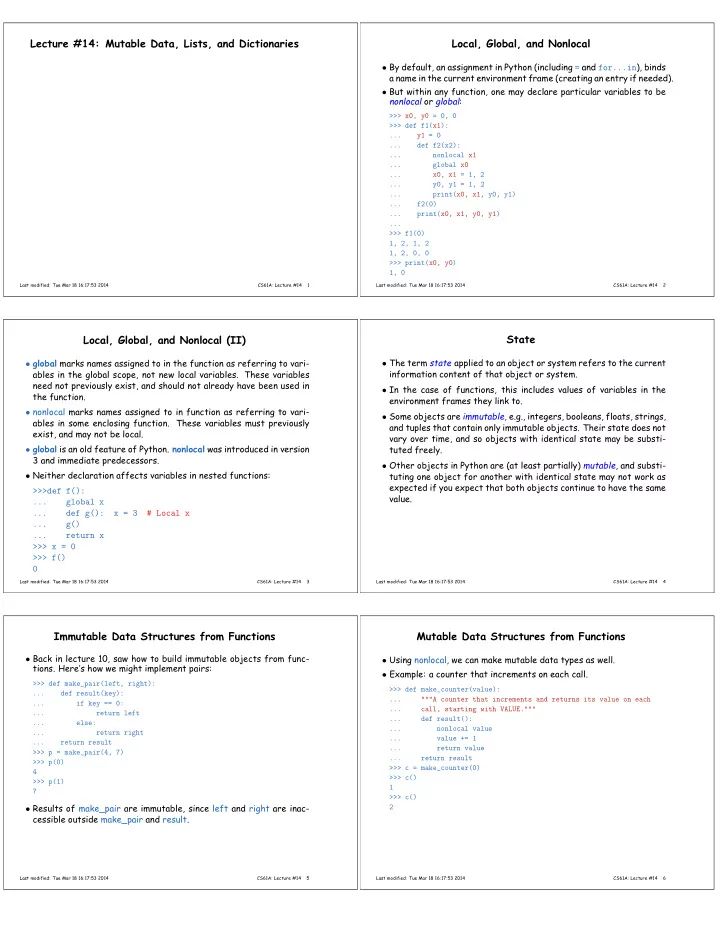
Lecture #14: Mutable Data, Lists, and Dictionaries Local, Global, and Nonlocal By default, an assignment in Python (including = and for...in ), binds a name in the current environment frame (creating an entry if needed). But within any


slide-1
SLIDE 1

Lecture #14: Mutable Data, Lists, and Dictionaries

Last modified: Tue Mar 18 16:17:53 2014 CS61A: Lecture #14 1

Local, Global, and Nonlocal

  • By default, an assignment in Python (including = and for...in), binds

a name in the current environment frame (creating an entry if needed).

  • But within any function, one may declare particular variables to be

nonlocal or global:

>>> x0, y0 = 0, 0 >>> def f1(x1): ... y1 = 0 ... def f2(x2): ... nonlocal x1 ... global x0 ... x0, x1 = 1, 2 ... y0, y1 = 1, 2 ... print(x0, x1, y0, y1) ... f2(0) ... print(x0, x1, y0, y1) ... >>> f1(0) 1, 2, 1, 2 1, 2, 0, 0 >>> print(x0, y0) 1, 0

Last modified: Tue Mar 18 16:17:53 2014 CS61A: Lecture #14 2

Local, Global, and Nonlocal (II)

  • global marks names assigned to in the function as referring to vari-

ables in the global scope, not new local variables. These variables need not previously exist, and should not already have been used in the function.

  • nonlocal marks names assigned to in function as referring to vari-

ables in some enclosing function. These variables must previously exist, and may not be local.

  • global is an old feature of Python. nonlocal was introduced in version

3 and immediate predecessors.

  • Neither declaration affects variables in nested functions:

>>>def f(): ... global x ... def g(): x = 3 # Local x ... g() ... return x >>> x = 0 >>> f()

Last modified: Tue Mar 18 16:17:53 2014 CS61A: Lecture #14 3

State

  • The term state applied to an object or system refers to the current

information content of that object or system.

  • In the case of functions, this includes values of variables in the

environment frames they link to.

  • Some objects are immutable, e.g., integers, booleans, floats, strings,

and tuples that contain only immutable objects. Their state does not vary over time, and so objects with identical state may be substi- tuted freely.

  • Other objects in Python are (at least partially) mutable, and substi-

tuting one object for another with identical state may not work as expected if you expect that both objects continue to have the same value.

Last modified: Tue Mar 18 16:17:53 2014 CS61A: Lecture #14 4

Immutable Data Structures from Functions

  • Back in lecture 10, saw how to build immutable objects from func-
  • tions. Here’s how we might implement pairs:

>>> def make_pair(left, right): ... def result(key): ... if key == 0: ... return left ... else: ... return right ... return result >>> p = make_pair(4, 7) >>> p(0) 4 >>> p(1) 7

  • Results of make_pair are immutable, since left and right are inac-

cessible outside make_pair and result.

Last modified: Tue Mar 18 16:17:53 2014 CS61A: Lecture #14 5

Mutable Data Structures from Functions

  • Using nonlocal, we can make mutable data types as well.
  • Example: a counter that increments on each call.

>>> def make_counter(value): ... """A counter that increments and returns its value on each ... call, starting with VALUE.""" ... def result(): ... nonlocal value ... value += 1 ... return value ... return result >>> c = make_counter(0) >>> c() 1 >>> c() 2

Last modified: Tue Mar 18 16:17:53 2014 CS61A: Lecture #14 6
slide-2
SLIDE 2

Another Example

  • Likewise, we could use the dispatching idea to implement mutable

rlists:

>>> def mut_rlist(head, rest): ... def result(key, newval=None): ... nonlocal head, rest ... if key == 0: return head ... if key == 1: return rest ... if key == 2: head = newval; ... if key == 3: rest = newval; ... return result >>> def first(r): return r(0) >>> def rest(r): return r(1) >>> def set_first(r, v): return r(2, v) >>> def set_rest(r, v): return r(3, v) >>> r = mut_rlist(1, None) >>> rest(r) # None >>> set_rest(r, mut_rlist(2, None)) >>> first(r) 1 >>> first(rest(r)) 2

Last modified: Tue Mar 18 16:17:53 2014 CS61A: Lecture #14 7

Referential Transparency and Immutable Structures

  • Immutable values are generally interchangeable: one can “substitute

equals for equals.”

  • The term referential transparency refers to this ability to refer to

values by any equivalent expression anywhere.

  • For our original (immutable) rlists, we can freely represent the two

sequences [1, 2, 3] and [0, 2, 3] like this:

S2 = rlist(2, rlist(3, None)) S1 = rlist(1, S2) S0 = rlist(0, S2) # or like this, substituting for S2: S2 = rlist(2, rlist(3, None)) S1 = rlist(1, rlist(2, rlist(3, None)) S0 = rlist(0, rlist(2, rlist(3, None))

S1: 1 2 3 S0: S1: 1 2 3 S0: 2 3

Last modified: Tue Mar 18 16:17:53 2014 CS61A: Lecture #14 8

Mutable Structures are not Referentially Transparent

  • Now consider mutable rlists:

>>> S2 = mut_rlist(2, rlist(3, None)) >>> S1 = mut_rlist(1, S2) >>> S0 = mut_rlist(0, S2) >>> set_first(rest(S0), 42) >>> first(rest(S0)) 42 >>> first(rest(S1)) 42 S2 = mut_rlist(2, rlist(3, None)) S1 = mut_rlist(1, mut_rlist(2, rlist(3, None)) S0 = mut_rlist(0, mut_rlist(2, rlist(3, None)) >>> set_first(rest(S0), 42) >>> first(rest(S0)) 42 >>> first(rest(S1)) 2

S1: 1 42 3 S0: S1: 1 2 3 S0: 42 3 So we cannot freely use either way of creating the lists and expect the same results.

Last modified: Tue Mar 18 16:17:53 2014 CS61A: Lecture #14 9

Truth: We Don’t Usually Build Structures This Way!

  • Usually, if we want an object with mutable state, we use one of

Python’s mutable object types.

  • We’ll see soon how to create such types.
  • But for now, let’s look at some standard ones.
Last modified: Tue Mar 18 16:17:53 2014 CS61A: Lecture #14 10

Lists

  • Lists are mutable tuples, syntactically distinguished by [...].
  • Generally like tuples, but unlike tuples, we can assign to elements:

>>> x = [1, 2, 3] >>> x[1] = 0 >>> x [1, 0, 3]

  • And can also assign to slices:

>>> x = [1, 2, 3] >>> x[1:2] = [6, 7, 8] # Replace 2nd item >>> x [1, 6, 7, 8, 3] >>> x[0:2] = [] # Remove first 2 >>> x [7, 8, 3]

Last modified: Tue Mar 18 16:17:53 2014 CS61A: Lecture #14 11

In Pictures

  • Like rlists, Python lists and tuples are referenced entities.

L = [1, [2, 3], 4] T = (0, L, 5) L: 1 4 2 3 T: 5

  • The values of L and T, as well as those of L[1] and T[1] are refer-

ences (aka pointers), which we typically depict as arrows.

  • Assignments, parameter passing, function returns, and list or tuple

constructors all deal with references.

  • In our interpreter, just about all Python values are references, even

integers, but for immutable values, we can usually ignore the fact.

Last modified: Tue Mar 18 16:17:53 2014 CS61A: Lecture #14 12
slide-3
SLIDE 3

Object Identity Versus Equality

  • The == operator is intended to test for equality of content or equiv-

alence of state. Two separate entities (tuples, strings, lists) can therefore be ==.

  • Sometimes (BUT NOT OFTEN) we need to see if two expressions in

fact denote the same object.

  • For this purpose, Python uses the operators is and is not.
  • The is operator tests equality of arrows, whereas == tests equality
  • f what’s at the ends of the arrows.

>>> x = 1000000 >>> (1,) == (1,) >>> "a"*100 == "a"*100 >>> x == x + 1 - 1 True True True >>> (1,) is (1,) >>> "a"*100 is "a"*100 >>> x is x + 1 - 1 False False False >>> () == () >>> "a"*10 is "a"*10 >>> x = 100 True True >>> x == x + 1 - 1 >>> () is () True True WHAT’S GOING ON?? >>> x is x + 1 - 1 True

Last modified: Tue Mar 18 16:17:53 2014 CS61A: Lecture #14 13

Object Identity Usually Irrelevant for Immutable Data

  • The examples where is and == differ can differ from Python imple-

mentation to Python implementation.

  • Runtime implementor is free to choose whether two expressions of

literals that produce equal (==) values do so by producing identical (is) objects.

  • This freedom results from the fact that, once equal, immutable val-

ues continue to be indistinguishable under equality, and other oper- ations.

  • Again, this is Referential transparency.
  • So when we write

>>> x = (2, 3) >>> L = (1, x) it doesn’t matter whether we create a new copy of x to put into L,

  • r use the same one.
  • . . . Unless we use is (which is why we generally don’t!).
Last modified: Tue Mar 18 16:17:53 2014 CS61A: Lecture #14 14

Object Identity Is Important in Lists

>>> x = [1, 2] >>> y = [0, x] >>> x[0] = 5 >>> y [0, [5, 2]] >>> x = [] >>> y [0, [5, 2]] # Why doesn’t y change?

Last modified: Tue Mar 18 16:17:53 2014 CS61A: Lecture #14 15

Shared Structure

  • Can make 2D lists, just as with tuples.
  • What’s the difference between the following ways to create an all-0

3x3 array?

Z1 = [ [0, 0, 0], [0, 0, 0], [0, 0, 0] ] Z2 = [ [0, 0, 0] ] * 3 # (For list expression E, E * 3 is computed by L + L + L, # where L is the value of E.) Z3 = [ [0, 0, 0] for r in range(3) ] Z4 = [ [0 for c in range(3)] for r in range(3) ]

Z1: Z3: Z4: Z2:

Last modified: Tue Mar 18 16:17:53 2014 CS61A: Lecture #14 16

Dictionaries

  • Dictionaries (type dict) are mutable mappings from one set of values

(called keys) to another.

  • Constructors:

>>> {} # A new, empty dictionary >>> { ’brian’ : 29, ’erik’: 27, ’zack’: 18, ’dana’: 25 } {’brian’: 29, ’erik’: 27, ’dana’: 25, ’zack’: 18} >>> L = (’aardvark’, ’axolotl’, ’gnu’, ’hartebeest’, ’wombat’) >>> successors = { L[i-1] : L[i] for i in range(1, len(L)) } >>> successors {’aardvark’: ’axolotl’, ’hartebeest’: ’wombat’, ’axolotl’: ’gnu’, ’gnu’: ’hartebeest’}

  • Queries:

>>> len(successors) 4 >>> ’gnu’ in successors True >>> ’wombat’ in successors False

Last modified: Tue Mar 18 16:17:53 2014 CS61A: Lecture #14 17

Dictionary Selection and Mutation

  • Selection and Mutation

>>> ages = { ’brian’ : 29, ’erik’: 27, ’zack’: 18, ’dana’: 25 } >>> ages[’erik’] 27 >>> ’erik’ in ages True >>> ’paul’ in ages False >>> ages[’paul’] ... KeyError: ’paul’ >>> ages.get(’paul’, "?") ’?’

  • Mutation:

>>> ages[’erik’] += 1; ages[’john’] = 56 ages {’brian’: 29, ’john’: 56, ’erik’: 28, ’dana’: 25, ’zack’: 18}

Last modified: Tue Mar 18 16:17:53 2014 CS61A: Lecture #14 18
slide-4
SLIDE 4

Dictionary Keys

  • Unlike sequences, ordering is not defined.
  • Keys must typically have immutable types that contain only immutable

data [can you guess why?] that have a __hash__ method. Take CS61B to find out what’s going on here.

  • When converted into a sequence, get the sequence of keys:

>>> ages = { ’brian’ : 29, ’erik’: 27, ’zack’: 18, ’dana’: 25 } >>> list(ages) [’brian’, ’erik’, ’dana’, ’zack’] # One possible order >>> for name in ages: print(ages[name], end=",") 29, 27, 25, 18,

Last modified: Tue Mar 18 16:17:53 2014 CS61A: Lecture #14 19

A Dictionary Problem

def frequencies(L): """A dictionary giving, for each w in L, the number of times w appears in L. >>> frequencies([’the’, ’name’, ’of’, ’the’, ’name’, ’of’, ’the’, ... ’song’]) {’of’: 2, ’the’: 3, ’name’: 2, ’song’: 1} """ result = {} for word in L: result[word] = result.get(word, 0) + 1 return result

Last modified: Tue Mar 18 16:17:53 2014 CS61A: Lecture #14 20

Using Only Keys

  • Suppose that all we need are the keys (values are irrelevant):

def is_duplicate(L): """True iff L contains a duplicated item.""" items = {} for x in L: if x in items: return True items[x] = True # Or any value return False def common_keys(D0, D1): """Return dictionary containing the keys in both D0 and D1.""" result = {} for x in D0: if x in D1: result[x] = True return result

  • These dictionaries serve as sets of values.
Last modified: Tue Mar 18 16:17:53 2014 CS61A: Lecture #14 21

Sets

  • Python supplies a specialized set data type for slightly better syntax

(and perhaps speed) than dictionaries for set-like operations.

  • Operations

Set operation Python Syntax Modification {} set() {1, 2, 3} { 1, 2, 3 }, set([1,2,3]) {x ∈ L|P(x)} { x for x in L if P(x) } A ∪ B A | B A |= B A ∩ B A & B A &= B A \ B A - B A -= B A ∪ {x} A | {x} A.add(x) A \ {x} A - {x} A.discard(x) x ∈ A x in A A ⊆ B A <= B

Last modified: Tue Mar 18 16:17:53 2014 CS61A: Lecture #14 22

Reworked Examples with Sets

def is_duplicate(L): """True iff L contains a duplicated item.""" items = set() for x in L: if x in items: return True items.add(x) return False def common_keys(D0, D1): """Return set containing the keys in both D0 and D1.""" return set(D0) & set(D1)

  • As shown in the last example, anything that can iterated over can

be used to create a set.

Last modified: Tue Mar 18 16:17:53 2014 CS61A: Lecture #14 23