Learning objectives Understand the purpose of integration testing - - PowerPoint PPT Presentation

learning objectives
SMART_READER_LITE
LIVE PREVIEW

Learning objectives Understand the purpose of integration testing - - PowerPoint PPT Presentation

Learning objectives Understand the purpose of integration testing Distinguish typical integration faults from faults that Integration and Component-based should be eliminated in unit testing Understand the nature of


slide-1
SLIDE 1

(c) 2007 Mauro Pezzè & Michal Young Ch 21, slide 1

Integration and Component-based Software Testing

(c) 2007 Mauro Pezzè & Michal Young Ch 21, slide 2

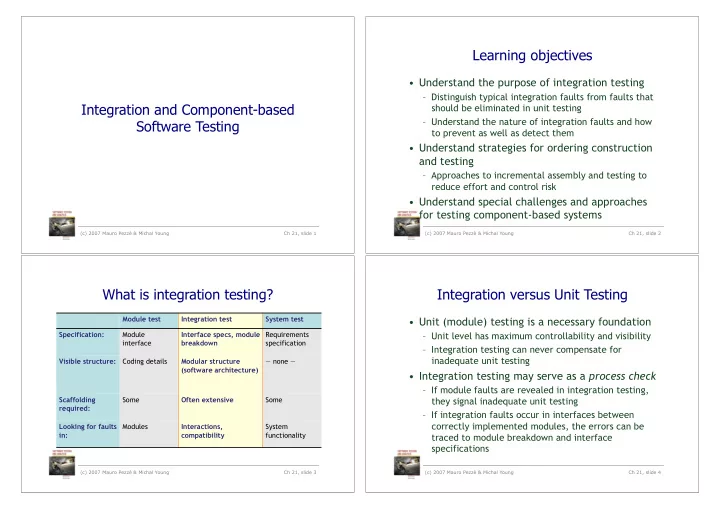
Learning objectives

  • Understand the purpose of integration testing

– Distinguish typical integration faults from faults that should be eliminated in unit testing – Understand the nature of integration faults and how to prevent as well as detect them

  • Understand strategies for ordering construction

and testing

– Approaches to incremental assembly and testing to reduce effort and control risk

  • Understand special challenges and approaches

for testing component-based systems

What is integration testing?

Module test Integration test System test Specification: Module interface Interface specs, module breakdown Requirements specification Visible structure: Coding details Modular structure (software architecture) — none — Scaffolding required: Some Often extensive Some Looking for faults in: Modules Interactions, compatibility System functionality

(c) 2007 Mauro Pezzè & Michal Young Ch 21, slide 3

Integration versus Unit Testing

  • Unit (module) testing is a necessary foundation

– Unit level has maximum controllability and visibility – Integration testing can never compensate for inadequate unit testing

  • Integration testing may serve as a process check

– If module faults are revealed in integration testing, they signal inadequate unit testing – If integration faults occur in interfaces between correctly implemented modules, the errors can be traced to module breakdown and interface specifications

(c) 2007 Mauro Pezzè & Michal Young Ch 21, slide 4

slide-2
SLIDE 2

(c) 2007 Mauro Pezzè & Michal Young Ch 21, slide 5

Integration Faults

  • Inconsistent interpretation of parameters or values

– Example: Mixed units (meters/yards) in Martian Lander

  • Violations of value domains, capacity, or size limits

– Example: Buffer overflow

  • Side effects on parameters or resources

– Example: Conflict on (unspecified) temporary file

  • Omitted or misunderstood functionality

– Example: Inconsistent interpretation of web hits

  • Nonfunctional properties

– Example: Unanticipated performance issues

  • Dynamic mismatches

– Example: Incompatible polymorphic method calls

(c) 2007 Mauro Pezzè & Michal Young Ch 21, slide 6

Example: A Memory Leak

Apache web server, version 2.0.48 Response to normal page request on secure (https) port

static void ssl io filter disable(ap filter t *f) { bio filter in ctx t *inctx = f->ctx; inctx->ssl = NULL; inctx->filter ctx->pssl = NULL; }

No obvious error, but Apache leaked memory slowly (in normal use) or quickly (if exploited for a DOS attack)

(c) 2007 Mauro Pezzè & Michal Young Ch 21, slide 7

Example: A Memory Leak

Apache web server, version 2.0.48 Response to normal page request on secure (https) port

static void ssl io filter disable(ap filter t *f) { bio filter in ctx t *inctx = f->ctx; SSL_free(inctx -> ssl); inctx->ssl = NULL; inctx->filter ctx->pssl = NULL; }

The missing code is for a structure defined and created elsewhere, accessed through an

  • paque pointer.

(c) 2007 Mauro Pezzè & Michal Young Ch 21, slide 8

Example: A Memory Leak

Apache web server, version 2.0.48 Response to normal page request on secure (https) port

static void ssl io filter disable(ap filter t *f) { bio filter in ctx t *inctx = f->ctx; SSL_free(inctx -> ssl); inctx->ssl = NULL; inctx->filter ctx->pssl = NULL; }

Almost impossible to find with unit testing. (Inspection and some dynamic techniques could have found it.)

slide-3
SLIDE 3

Maybe you’ve heard ...

  • Yes, I implemented

module A, but I didn’t test it thoroughly yet. It will be tested along with module A when that’s ready.

(c) 2007 Mauro Pezzè & Michal Young Ch 21, slide 10

Translation...

  • Yes, I implemented

module A, but I didn’t test it thoroughly yet. It will be tested along with module A when that’s ready.

  • I didn’t think at all

about the strategy for testing. I didn’t design module A for testability and I didn’t think about the best order to build and test modules A and B.

(c) 2007 Mauro Pezzè & Michal Young Ch 21, slide 11

System Architecture

Integration Plan + Test Plan

  • Integration test

plan drives and is driven by the project “build plan”

– A key feature of the system architecture and project plan

(c) 2007 Mauro Pezzè & Michal Young Ch 21, slide 12

Build Plan ... ... Test Plan ...

(c) 2007 Mauro Pezzè & Michal Young Ch 21, slide 13

Big Bang Integration Test

An extreme and desperate approach:

Test only after integrating all modules +Does not require scaffolding

  • The only excuse, and a bad one
  • Minimum observability, diagnosability, efficacy,

feedback

  • High cost of repair
  • Recall: Cost of repairing a fault rises as a function of

time between error and repair

slide-4
SLIDE 4

Structural and Functional Strategies

  • Structural orientation:

Modules constructed, integrated and tested based on a hierarchical project structure

– Top-down, Bottom-up, Sandwich, Backbone

  • Functional orientation:

Modules integrated according to application characteristics or features

– Threads, Critical module

(c) 2007 Mauro Pezzè & Michal Young Ch 21, slide 14

Top down .

(c) 2007 Mauro Pezzè & Michal Young Ch 21, slide 15 Top stub A stub B stub C

Working from the top level (in terms of “use”

  • r “include” relation) toward the bottom.

No drivers required if program tested from top-level interface (e.g. GUI, CLI, web app, etc.)

Top A stub B stub C stub Y stub X

Top down ..

(c) 2007 Mauro Pezzè & Michal Young Ch 21, slide 16

Write stubs of called or used modules at each step in construction

Top A B C stub Y stub X

Top down ...

(c) 2007 Mauro Pezzè & Michal Young Ch 21, slide 17

As modules replace stubs, more functionality is testable

slide-5
SLIDE 5

Top A B C Y X

Top down ... complete

(c) 2007 Mauro Pezzè & Michal Young Ch 21, slide 18

... until the program is complete, and all functionality can be tested

Bottom Up .

(c) 2007 Mauro Pezzè & Michal Young Ch 21, slide 19 Driver X

Starting at the leaves of the “uses” hierarchy, we never need stubs

Bottom Up ..

(c) 2007 Mauro Pezzè & Michal Young Ch 21, slide 20 Y X Driver Driver

... but we must construct drivers for each module (as in unit testing) ...

Bottom Up ...

(c) 2007 Mauro Pezzè & Michal Young Ch 21, slide 21 A Y X Driver

... an intermediate module replaces a driver, and needs its

  • wn driver ...
slide-6
SLIDE 6

Bottom Up ....

(c) 2007 Mauro Pezzè & Michal Young Ch 21, slide 22 A B Y X Driver Driver A B C Y X Driver Driver Driver

Bottom Up .....

(c) 2007 Mauro Pezzè & Michal Young Ch 21, slide 23

... so we may have several working subsystems ...

Bottom Up (complete)

(c) 2007 Mauro Pezzè & Michal Young Ch 21, slide 24 Top A B C Y X

... that are eventually integrated into a single system.

Top (parts) Stub C Y

Sandwich .

(c) 2007 Mauro Pezzè & Michal Young Ch 21, slide 25

Working from the extremes (top and bottom) toward center, we may use fewer drivers and stubs

slide-7
SLIDE 7

Sandwich ..

(c) 2007 Mauro Pezzè & Michal Young Ch 21, slide 26 Top (more) A C Y X

Sandwich integration is flexible and adaptable, but complex to plan

Top A C X

Thread ...

(c) 2007 Mauro Pezzè & Michal Young Ch 21, slide 27

A “thread” is a portion of several modules that together provide a user-visible program feature.

Top A B C Y X

Thread ...

(c) 2007 Mauro Pezzè & Michal Young Ch 21, slide 28

Integrating one thread, then another, etc., we maximize visibility for the user

Thread ...

(c) 2007 Mauro Pezzè & Michal Young Ch 21, slide 29 Top A B C Y X

As in sandwich integration testing, we can minimize stubs and drivers, but the integration plan may be complex

slide-8
SLIDE 8

Critical Modules

  • Strategy: Start with riskiest modules

– Risk assessment is necessary first step – May include technical risks (is X feasible?), process risks (is schedule for X realistic?), other risks

  • May resemble thread or sandwich process in

tactics for flexible build order

– E.g., constructing parts of one module to test functionality in another

  • Key point is risk-oriented process

– Integration testing as a risk-reduction activity, designed to deliver any bad news as early as possible

(c) 2007 Mauro Pezzè & Michal Young Ch 21, slide 30 (c) 2007 Mauro Pezzè & Michal Young Ch 21, slide 31

Choosing a Strategy

  • Functional strategies require more planning

– Structural strategies (bottom up, top down, sandwich) are simpler – But thread and critical modules testing provide better process visibility, especially in complex systems

  • Possible to combine

– Top-down, bottom-up, or sandwich are reasonable for relatively small components and subsystems – Combinations of thread and critical modules integration testing are often preferred for larger subsystems

Working Definition of Component

  • Reusable unit of deployment and composition

– Deployed and integrated multiple times – Integrated by different teams (usually)

  • Component producer is distinct from component user
  • Characterized by an interface or contract
  • Describes access points, parameters, and all functional and

non-functional behavior and conditions for using the component

  • No other access (e.g., source code) is usually available
  • Often larger grain than objects or packages

– Example: A complete database system may be a component

(c) 2007 Mauro Pezzè & Michal Young Ch 21, slide 33

Components — Related Concepts

  • Framework
  • Skeleton or micro-architecture of an application
  • May be packaged and reused as a component, with “hooks”
  • r “slots” in the interface contract
  • Design patterns
  • Logical design fragments
  • Frameworks often implement patterns, but patterns are not
  • frameworks. Frameworks are concrete, patterns are

abstract

  • Component-based system
  • A system composed primarily by assembling components,
  • ften “Commercial off-the-shelf” (COTS) components
  • Usually includes application-specific “glue code”

(c) 2007 Mauro Pezzè & Michal Young Ch 21, slide 34

slide-9
SLIDE 9

Component Interface Contracts

  • Application programming interface (API) is

distinct from implementation

– Example: DOM interface for XML is distinct from many possible implementations, from different sources

  • Interface includes everything that must be

known to use the component

– More than just method signatures, exceptions, etc – May include non-functional characteristics like performance, capacity, security – May include dependence on other components

(c) 2007 Mauro Pezzè & Michal Young Ch 21, slide 35

Challenges in Testing Components

  • The component builder’s challenge:

– Impossible to know all the ways a component may be used – Difficult to recognize and specify all potentially important properties and dependencies

  • The component user’s challenge:

– No visibility “inside” the component – Often difficult to judge suitability for a particular use and context

(c) 2007 Mauro Pezzè & Michal Young Ch 21, slide 36

Testing a Component: Producer View

  • First: Thorough unit and subsystem testing

– Includes thorough functional testing based on application program interface (API) – Rule of thumb: Reusable component requires at least twice the effort in design, implementation, and testing as a subsystem constructed for a single use (often more)

  • Second: Thorough acceptance testing

– Based on scenarios of expected use – Includes stress and capacity testing

  • Find and document the limits of applicability

(c) 2007 Mauro Pezzè & Michal Young Ch 21, slide 37

Testing a Component: User View

  • Not primarily to find faults in the component
  • Major question: Is the component suitable for

this application?

– Primary risk is not fitting the application context:

  • Unanticipated dependence or interactions with environment
  • Performance or capacity limits
  • Missing functionality, misunderstood API

– Risk high when using component for first time

  • Reducing risk: Trial integration early

– Often worthwhile to build driver to test model scenarios, long before actual integration

(c) 2007 Mauro Pezzè & Michal Young Ch 21, slide 38

slide-10
SLIDE 10

Adapting and Testing a Component

  • Applications often access components through

an adaptor, which can also be used by a test driver

(c) 2007 Mauro Pezzè & Michal Young Ch 21, slide 39

Component Adaptor Application

(c) 2007 Mauro Pezzè & Michal Young Ch 21, slide 40

Summary

  • Integration testing focuses on interactions

– Must be built on foundation of thorough unit testing – Integration faults often traceable to incomplete or misunderstood interface specifications

  • Prefer prevention to detection, and make detection easier

by imposing design constraints

  • Strategies tied to project build order

– Order construction, integration, and testing to reduce cost or risk

  • Reusable components require special care

– For component builder, and for component user