
SLIDE 1
Introduction to the Lego NXT Vasilis Spiliopoulos < - - PowerPoint PPT Presentation
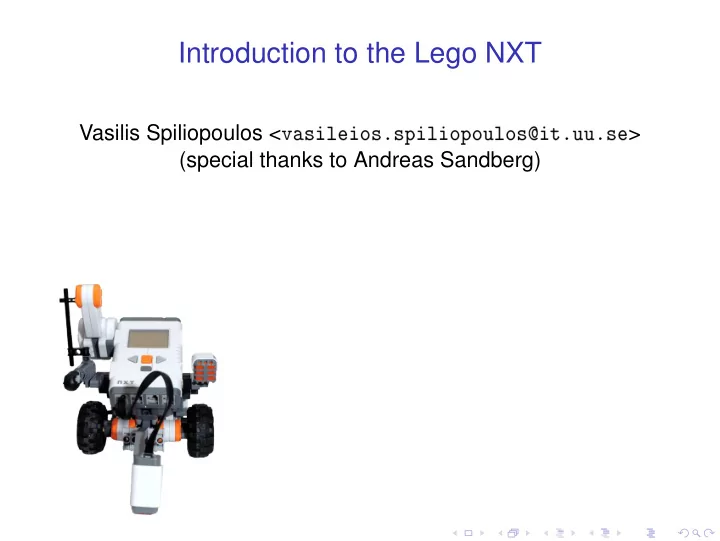
Introduction to the Lego NXT Vasilis Spiliopoulos < ssssts > (special thanks to Andreas Sandberg) What is Lego Mindstorm? A kit containing: A Lego NXT computer
◮ A Lego NXT computer ◮ 3 motors ◮ Touch sensor ◮ Light sensor ◮ Sound sensor ◮ Ultrasonic range sensor ◮ Lots of Lego bricks ◮ . . . and plenty of fun!
Hardware overview
CPUs
◮ The main CPU (AT91SAM7S256) is an ARM7TDMI based
◮ 32-bit RISC ◮ Running at 48 MHz ◮ 256 KiB Flash ◮ 64 KiB RAM
◮ IO coprocessor (Atmel ATmega 48)
◮ Running at 8 MHz ◮ 8-bit RISC (AVR) ◮ 4 KiB Flash ◮ 512 B RAM ◮ Samples analog sensors with @ 333 Hz ◮ Controls motors
CPUs
◮ The main CPU (AT91SAM7S256) is an ARM7TDMI based
◮ 32-bit RISC ◮ Running at 48 MHz ◮ 256 KiB Flash ◮ 64 KiB RAM
◮ IO coprocessor (Atmel ATmega 48)
◮ Running at 8 MHz ◮ 8-bit RISC (AVR) ◮ 4 KiB Flash ◮ 512 B RAM ◮ Samples analog sensors with @ 333 Hz ◮ Controls motors
External communication
◮ Bluetooth
◮ Only supports the serial profile (≈ 200 kb/s). ◮ Requires that devices have been paired. ◮ Useful for wireless debugging or robot cooperation. ◮ May sometimes be used to upload software to the NXT.
◮ USB
◮ Normally used for software upload ◮ Can be used for debugging ◮ Firmware uploading
◮ I2C
◮ Used for low-speed (9600 b/s) serial communication with
◮ RS485
◮ High-speed (≈ 1 Mb/s) serial communication. ◮ Can be used for wired communication between robots. ◮ Not used in default firmware.
External communication
◮ Bluetooth
◮ Only supports the serial profile (≈ 200 kb/s). ◮ Requires that devices have been paired. ◮ Useful for wireless debugging or robot cooperation. ◮ May sometimes be used to upload software to the NXT.
◮ USB
◮ Normally used for software upload ◮ Can be used for debugging ◮ Firmware uploading
◮ I2C
◮ Used for low-speed (9600 b/s) serial communication with
◮ RS485
◮ High-speed (≈ 1 Mb/s) serial communication. ◮ Can be used for wired communication between robots. ◮ Not used in default firmware.
External communication
◮ Bluetooth
◮ Only supports the serial profile (≈ 200 kb/s). ◮ Requires that devices have been paired. ◮ Useful for wireless debugging or robot cooperation. ◮ May sometimes be used to upload software to the NXT.
◮ USB
◮ Normally used for software upload ◮ Can be used for debugging ◮ Firmware uploading
◮ I2C
◮ Used for low-speed (9600 b/s) serial communication with
◮ RS485
◮ High-speed (≈ 1 Mb/s) serial communication. ◮ Can be used for wired communication between robots. ◮ Not used in default firmware.
External communication
◮ Bluetooth
◮ Only supports the serial profile (≈ 200 kb/s). ◮ Requires that devices have been paired. ◮ Useful for wireless debugging or robot cooperation. ◮ May sometimes be used to upload software to the NXT.
◮ USB
◮ Normally used for software upload ◮ Can be used for debugging ◮ Firmware uploading
◮ I2C
◮ Used for low-speed (9600 b/s) serial communication with
◮ RS485
◮ High-speed (≈ 1 Mb/s) serial communication. ◮ Can be used for wired communication between robots. ◮ Not used in default firmware.
◮ Included motors linear and not step motors.
◮ Speed is controlled using Pulse Width Modulation. ◮ The AVR µcontroller handles PWM generation.
◮ Feedback is provided by a quadrature encoder attached to
◮ Allows detection of rotation direction and amount.
Light sensor
◮ Simple photo-sensor that detects the strength of the
◮ Has a LED mounted to provide illumination. ◮ Analog sensor
Touch sensor
◮ Just a button with some Lego extras for mounting. Nothing
◮ Analog sensor
Sound sensor
◮ Measures sound intensity. ◮ Can be run in either DB or DBA mode. ◮ Analog sensor
Ultrasonic range sensor
◮ “Smart” sensor – uses I2C for communication. ◮ Detects distance to objects using sound pulses.
Overview
◮ NXT-G
◮ Bundled with the NXT. ◮ Graphical drag and drop flowchart programming. ◮ Doesn’t work for large applications, unstable. ◮ Requires Windows.
◮ RobotC
◮ Commercial, but the department has licenses. ◮ C-based language, but not “vanilla” C. ◮ Has an integrated development environment with
◮ Requires Windows.
◮ Not eXactly C
◮ Has an IDE (Bricx Command Center) ◮ Debugger support ◮ Supports at least Windows and OSX ◮ No releases in a long time – development has stagnated?
Overview
◮ NXT-G
◮ Bundled with the NXT. ◮ Graphical drag and drop flowchart programming. ◮ Doesn’t work for large applications, unstable. ◮ Requires Windows.
◮ RobotC
◮ Commercial, but the department has licenses. ◮ C-based language, but not “vanilla” C. ◮ Has an integrated development environment with
◮ Requires Windows.
◮ Not eXactly C
◮ Has an IDE (Bricx Command Center) ◮ Debugger support ◮ Supports at least Windows and OSX ◮ No releases in a long time – development has stagnated?
Overview
◮ NXT-G
◮ Bundled with the NXT. ◮ Graphical drag and drop flowchart programming. ◮ Doesn’t work for large applications, unstable. ◮ Requires Windows.
◮ RobotC
◮ Commercial, but the department has licenses. ◮ C-based language, but not “vanilla” C. ◮ Has an integrated development environment with
◮ Requires Windows.
◮ Not eXactly C
◮ Has an IDE (Bricx Command Center) ◮ Debugger support ◮ Supports at least Windows and OSX ◮ No releases in a long time – development has stagnated?
Overview (contd.)
◮ nxtOSEK
◮ GCC development environment (real C!) ◮ Uses some Japanese embedded OS used in the
◮ C/C++ library for accessing IO devices.
◮ LEJOS
◮ Mini-Java implementation. ◮ Uses the standard Java compiler, but a limited class library. ◮ Has a plugin for Eclipse. ◮ Works on most operating systems (even Solaris1) ◮ Somewhat limited debugging capabilities. 1Requires patching and a sacrifice to Cthulhu.
Overview (contd.)
◮ nxtOSEK
◮ GCC development environment (real C!) ◮ Uses some Japanese embedded OS used in the
◮ C/C++ library for accessing IO devices.
◮ LEJOS
◮ Mini-Java implementation. ◮ Uses the standard Java compiler, but a limited class library. ◮ Has a plugin for Eclipse. ◮ Works on most operating systems (even Solaris1) ◮ Somewhat limited debugging capabilities. 1Requires patching and a sacrifice to Cthulhu.
Overview
◮ The NXT can be controlled from a computer (or another
◮ Libraries exist for most common programming languages.
◮ Matlab ◮ Python ◮ Ruby ◮ Java ◮ . . .
Overview
◮ Requires custom firmware with a small Java Virtual
◮ Supports standard Java threads ◮ Almost the same code can used both on the NXT and on a
◮ Supports Bluetooth and for all communication with the NXT
Bluetooth – practical matters
◮ Bluetooth communication requires pairing to prevent
◮ Process is OS dependent ◮ Requires a PIN code, the default one is ’1234’
◮ When communicating with the NXT you should normally
◮ Unless your NXT has a ’good’ name, rename it to
Bluetooth – practical matters
◮ Bluetooth communication requires pairing to prevent
◮ Process is OS dependent ◮ Requires a PIN code, the default one is ’1234’
◮ When communicating with the NXT you should normally
◮ Unless your NXT has a ’good’ name, rename it to
Debug console
Motors
Light sensors
◮ Checkout the course homepage - examples will be
◮ software, tutorials etc.
◮ Checkout a kit ◮ Get started!