Hypervisors Credits : P. Chaganti Xen Virtualization A practical - - PDF document

hypervisors
SMART_READER_LITE
LIVE PREVIEW

Hypervisors Credits : P. Chaganti Xen Virtualization A practical - - PDF document

Introduction Hypervisors Credits : P. Chaganti Xen Virtualization A practical handbook D. Chisnall The definitive guide to Xen Hypervisor G. Kesden Lect. 25 CS 15-440 G. Heiser UNSW/NICTA/OKL Introduction


slide-1
SLIDE 1

1

Hypervisors

Introduction

Credits:

  • P. Chaganti – Xen Virtualization – A practical handbook
  • D. Chisnall – The definitive guide to Xen Hypervisor
  • G. Kesden – Lect. 25 CS 15-440
  • G. Heiser – UNSW/NICTA/OKL

Introduction

  • Virtualization is a technique of partitioning the

resources of a single computing platform into multiple segregated, virtualized, execution environments.

  • Each environment runs independently of the
  • ther, thus allowing multiple operating systems to

run on the same hardware.

Introduction

  • The concept of virtualization already present in

every-day computing…

  • Most

modern

  • perating

systems contain a simplified system of virtualization;

  • Each running process is able to act as if it is the
  • nly thing running. The CPUs and memory are

virtualized.

Introduction

  • Virtualization of the CPU: If a process tries to

consume all of the CPU, a modern operating system will preempt it and allow other processes to execute;

  • Virtualization of the memory: a running process

typically has its own virtual address space that the operating system maps to physical memory to give the process the illusion that it is the only user

  • f RAM.

Introduction

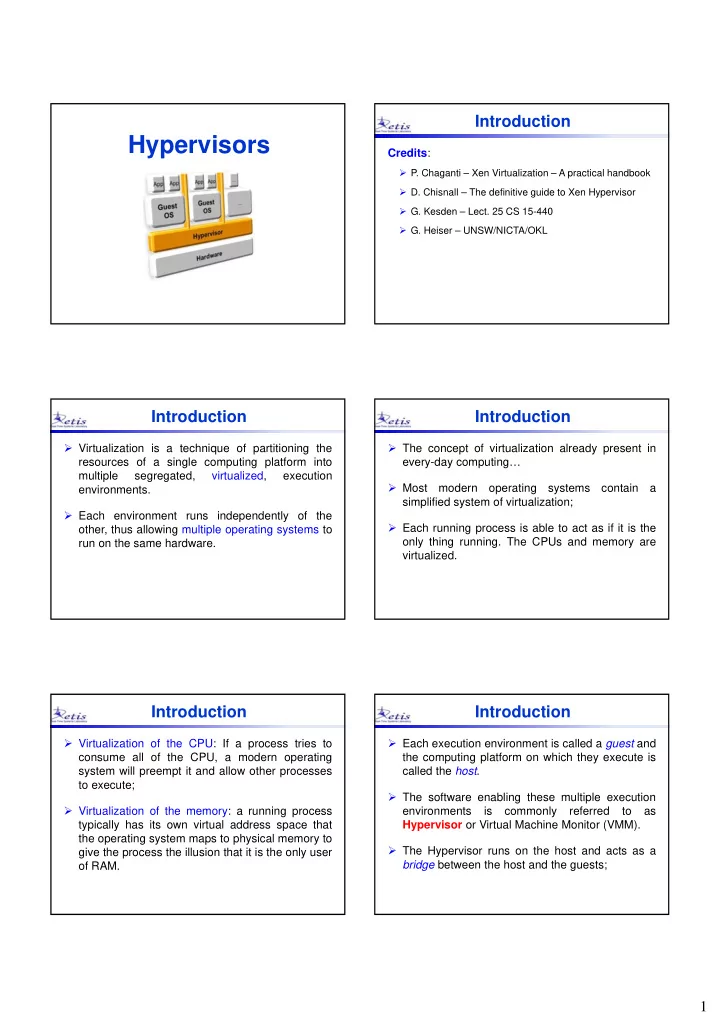
  • Each execution environment is called a guest and

the computing platform on which they execute is called the host.

  • The software enabling these multiple execution

environments is commonly referred to as Hypervisor or Virtual Machine Monitor (VMM).

  • The Hypervisor runs on the host and acts as a

bridge between the host and the guests;

slide-2
SLIDE 2

2

Mixed OS Environment

Figure: G. Kesden

Hardware Hypervisor

Linux Red Hat Solaris 10 XP Vista Mac OS

VM3 VM4 VM5 VM1 VM2

  • Multiple VMs can be implemented on a single

hardware platform to provide individuals or user groups with their own OS environments

Hardware Hypervisor

Mixed OS Environment

Figure: G. Kesden Linux Red Hat Solaris 10 XP Vista Mac OS

VM3 VM4 VM5 VM1 VM2

  • Virtualization

implies a two-level hierarchical scheduling framework

Local Scheduler Local Scheduler Local Scheduler Local Scheduler Local Scheduler Global Scheduler

Benefits of Virtualization

  • A virtualized system

can be (dynamically

  • r statically) re-

configured for changing needs

  • A single hardware

platform can support multiple operating systems concurrently

  • Virtualization helps

isolate the effects of a failure to the VM where the failure

  • ccurred
  • A system VM provides

a sandbox that isolates one system environment from

  • ther environments

Multiple Secure Environment

Failure Isolation

Better System Utilization

Mixed‐OS Environment

Figure: G. Kesden

Virtualization Properties

  • Fault Isolation
  • Software Isolation
  • Performance Isolation

(accomplished through scheduling and resource allocation)

Isolation

  • All VM state can be captured

into a file (i.e., you can

  • perate on VM by operating
  • n file– cp, rm)
  • Complexity is proportional to

virtual HW model and independent of guest software configuration

Encapsulation

  • All guest actions go through

the virtualizing software which can inspect, modify, and deny operations

  • Security

Interposition

1 2 3

Figure: G. Kesden

Methodologies

Three main methodologies used for providing virtualization:

  • System Emulation – All the hardware resources

are emulated.

  • The guest operating system can be run without any

modification;

  • It can use the hardware resources through the

hardware emulation layer;

  • The VMM executes the CPU instructions that need

more privileges than are available in the user space.

Methodologies

  • Paravirtualization – No hardware emulation.
  • The operating system that runs on a guest needs to be

a modified version that is aware of the fact that it is running inside a hypervisor;

  • Lower number of privileged CPU instructions that need

to be executed;

  • Higher performance w.r.t emulation, closer to native

speed.

slide-3
SLIDE 3

3

Methodologies

  • OS Level Virtualization – Each guest is isolated

and runs in a secure environment.

  • Only multiple instances of guests that run the same
  • perating systems as the host;
  • Close to sandboxes;
  • Low run-time overhead.
  • E.g., FreeBSD Jails, Solaris Zones

Types of Hypervisor

  • Gerald J. Popek and Robert P. Goldberg – “Formal

Requirements for Virtualizable Third Generation Architectures”, 1974

  • Type 1: native (bare-metal) hypervisors
  • The Hypervisor runs directly on the host's hardware to control

the hardware and to manage guest operating systems.

  • E.g., Xen, VMWare ESXi, Microsoft Hyper-V
  • Type 2: hosted hypervisors
  • These hypervisors run on a conventional operating system just

as other computer programs do.

  • E.g., VMWare Workstation, VirtualBox

Types of Hypervisor

Hardware Hypervisor OS OS OS Hardware Hypervisor OS OS OS OS Type-1 (bare-metal) Type-2 (hosted)

Implementation

“Trap and Emulate”

  • Raise of an exception (trap) when the guest

executes a privileged instruction (e.g., accessing a physical resources);

  • The exception handler is used to invoke the

hypervisor code.

Figure: G. Heiser

Implementation

“Trap and Emulate” Popek and Goldberg, 1974 “For any conventional third-generation computer, an effective VMM may be constructed if the set of sensitive instructions for that computer is a subset of the set of privileged instructions.”

Figure: G. Heiser

Implementation

“Trap and Emulate” Popek and Goldberg, 1974 – In other words… It is sufficient that all the instructions that could affect the correct functioning

  • f

the VMM (sensitive instructions) always trap and pass control to the VMM.

Figure: G. Heiser

slide-4
SLIDE 4

4

Implementation

“Trap and Emulate” Most common architectures are not virtualizable according to definition of Popek and Goldberg

  • x86 – lots of unvirtualizable features
  • E.g., PUSH of PSW (Processor State Word) is not privileged
  • MIPS – mostly virtualizable, but…
  • Kernel registers k0,k1 (needed to save/restore state) are user-

accessible

  • ARM – mostly virtualizable but…
  • Some instructions are undefined in user-mode

Implementation

Impure Virtualization Change the Guest OS code replacing sensitive instructions

  • Paravirtualization – by trapping code (hypercalls)
  • Binary translation - In-line code emulation

Hypercall

Embedded Systems

  • Virtualization historically used for easier sharing
  • f expensive mainframes.
  • Gone out of fashion in 80’s and resurrected in

recent years for improved isolation in modern computing systems.

  • Why virtualization for Embedded Systems?

Embedded Systems

License Separation

  • System composed of Linux + proprietary SW

(not open-source)

  • VMs can be used to isolate

Linux

Embedded Systems

Software-Architecture Abstraction

  • Support

for product series: same software running on different hardware;

  • Decoupling from the real hardware.
  • Benefits
  • Time-to-market;
  • Engineering cost.

Embedded Systems

Certification Issues

  • Encapsulation of a safety-critical subsystem that

can be certified independently

  • f

the

  • ther

subsystems running on the same platform

slide-5
SLIDE 5

5

Embedded Systems

Security

  • Protection against exploits;
  • E.g., software attacked by UI exploits
  • It is possible to compromise

the core SW from an attack of the UI SW

  • Virtualization protects this kind
  • f

attacks ensuring a separation into different VMs

Embedded Systems

Automotive Case-Study

  • Proliferation of ECUs: more than doubled in 10

years

Embedded Systems

Automotive Case-Study

  • Trend: Integration in fewer, more powerful, ECUs

Embedded Systems

Automotive Case-Study

  • Thanks to virtualization it is possible to re-use a

complete legacy ECU software

An Overview on The Xen Hypervisor The Xen Hypervisor

  • What is Xen?

“Xen is an open-source paravirtualization technology that provides a platform for running multiple operating systems in parallel on one physical hardware resource”

  • Originally developed in 2003 at the University of

Cambridge Computer Laboratory

slide-6
SLIDE 6

6

The Xen Hypervisor The Xen Hypervisor

  • Xen refers to each virtual machine that runs on a

system as a domain.

  • When Xen boots up, it first starts the hypervisor,

which is responsible for starting a domain named Domain0 (dom0) in which a specific host

  • perating system runs.

The Xen Hypervisor

  • Domain0 is a privileged domain that can access

the hardware resources and can manage all the

  • ther domain (e.g., create, destroy, save, restore,

etc.)

The Xen Hypervisor

  • An Unprivileged Domain (domU) guest is more

restricted.

  • Typically not allowed to perform hypercalls that

directly access to the hardware.

  • Not

able to manage

  • ther

domains

  • r

the hypervisor configuration

The Xen Hypervisor

  • Xen is based on para-virtualization
  • Requires modification of the guest OS
  • Insertion
  • f

hypercalls to replace privileged instructions;

  • Time virtualization

The Xen Hypervisor

Hardware-assisted virtualization

  • Newer processors have a set of instructions that

makes virtualization easier

  • x86: Intel VT-x and AMD Pacifica (AMD-V)
  • The

CPU provides traps for certain privileged instructions;

  • Enable

Guest OSes to be run without paravirtualization modifications (e.g., old OSes like Windows XP)

slide-7
SLIDE 7

7

The Xen Hypervisor

  • Domain  Xen
  • Hypercall (synchronous)
  • Xen  Domain
  • Asynchronous Event Mechanism (AEM) that replaces

device interrupts Xen dom0 domU domU

Hypercall AEM

The Xen Hypervisor

  • The Xen hypervisor is the basic abstraction layer
  • f software that sits directly on the hardware

below any operating systems.

  • It is responsible for CPU scheduling (VCPU to

CPU assignment) and memory partitioning of the various virtual machines running on the hardware device.

The Xen Hypervisor

  • Xen currently supports 4 VCPU schedulers
  • Credit
  • Credit2
  • RTDS
  • ARINC 653

Proportional Fair Share (e.g.,Weighted Round‐Robin) Global EDF with Reservation Servers Fixed Time Slices

The Xen Hypervisor

  • Xen does not provide any device driver.
  • It has no direct knowledge of networking, external

storage devices, video, or any other common I/O functions found on a computing system.

How does the I/O work in Xen?

The Xen Hypervisor

I/O in Xen

  • dom0 is a privileged domain that can access all

the hardware in the system

  • The OS running on dom0 has the device drivers

and performs I/O

  • perations
  • n

behalf

  • f

unprivileged guest domains (domU);

  • Shared memory is used for the communication

between a domU and dom0

The Xen Hypervisor

slide-8
SLIDE 8

8

T hank yo u!

Ale ssandro Bio ndi ale ssandro .bio ndi@sssup.it