Guidance on assessment by presentation and assessment by - - PDF document

guidance on assessment by presentation and assessment by
SMART_READER_LITE
LIVE PREVIEW

Guidance on assessment by presentation and assessment by - - PDF document

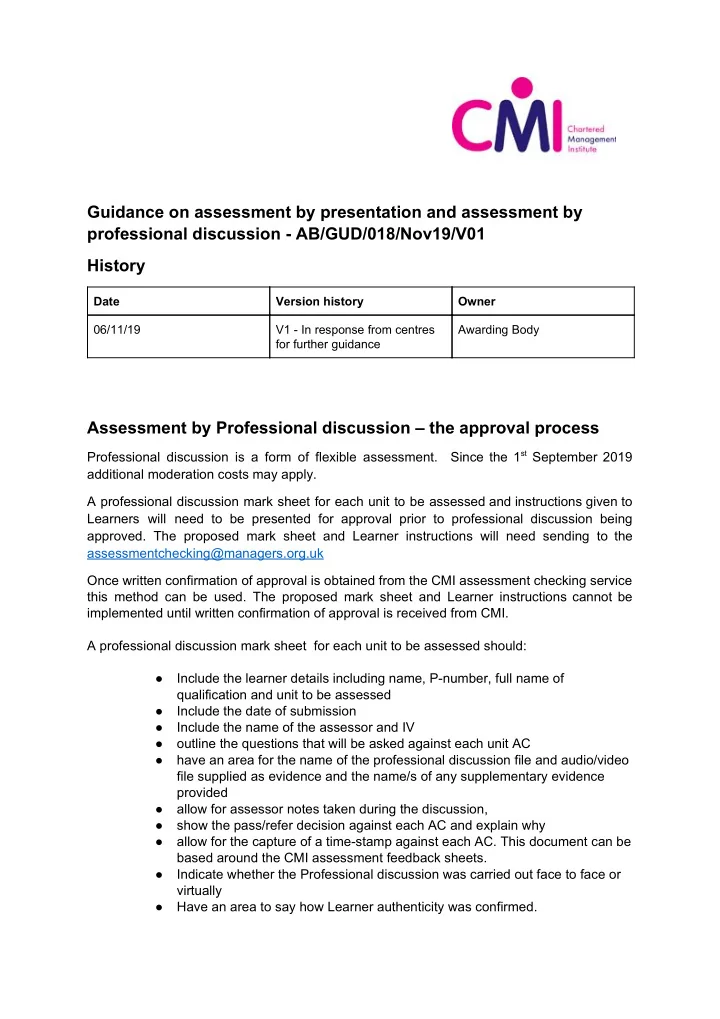
Guidance on assessment by presentation and assessment by professional discussion - AB/GUD/018/Nov19/V01 History Date Version history Owner 06/11/19 V1 - In response from centres Awarding Body for further guidance Assessment by Professional


slide-1
SLIDE 1

Guidance on assessment by presentation and assessment by professional discussion - AB/GUD/018/Nov19/V01 History

Date Version history Owner 06/11/19 V1 - In response from centres for further guidance Awarding Body

Assessment by Professional discussion – the approval process

Professional discussion is a form of flexible assessment. Since the 1​

st September 2019

additional moderation costs may apply. A professional discussion mark sheet for each unit to be assessed and instructions given to Learners will need to be presented for approval prior to professional discussion being

  • approved. The proposed mark sheet and Learner instructions will need sending to the

assessmentchecking@managers.org.uk Once written confirmation of approval is obtained from the CMI assessment checking service this method can be used. The proposed mark sheet and Learner instructions cannot be implemented until written confirmation of approval is received from CMI. A professional discussion mark sheet for each unit to be assessed should:

  • Include the learner details including name, P-number, full name of

qualification and unit to be assessed

  • Include the date of submission
  • Include the name of the assessor and IV
  • utline the questions that will be asked against each unit AC
  • have an area for the name of the professional discussion file and audio/video

file supplied as evidence and the name/s of any supplementary evidence provided

  • allow for assessor notes taken during the discussion,
  • show the pass/refer decision against each AC and explain why
  • allow for the capture of a time-stamp against each AC. This document can be

based around the CMI assessment feedback sheets.

  • Indicate whether the Professional discussion was carried out face to face or

virtually

  • Have an area to say how Learner authenticity was confirmed.
slide-2
SLIDE 2

All file names for files supplied to CMI should clearly indicate what the file contains and the Learner’s P-number. When the assignment brief is given to Learners it should clearly outline the instructions in terms of professional discussion format, the process and duration, clearly stating how these instructions relate to the unit ACs. Assessment by Professional discussion – the process All professional discussions must be audio or video recorded. Learners will need to provide consent for this to be done and reminded that this data will be shared with CMI for moderation purposes The Assessor must explain that a Professional Discussion is focused around the CMI assessment criteria and as such will be conducted more like a professional interview with specific time allowed to address each assessment criteria. During the Professional Discussion it is imperative that the assessor focuses the candidate

  • n the ACs and where necessary allows a specific time for each AC to be answered and

curtails discussion that goes beyond this time. To enable efficient moderation by CMI, professional discussions that are AC-focussed should aim to take no more than 30 minutes (if there are 3 assessment criteria) or 40 minutes (if there are 4 assessment criteria) per unit etc. 10 minutes per assessment criteria is perfectly adequate. Excessively long videos or audio recording will be returned to the centre for editing. The Assessor explains which units and ACs therein, are to be assessed. The Assessor explains that discussion will be recorded, but that no assessment decisions will be made during the discussion. The Assessor explains that he/she will take notes during the session and make a decision after the professional discussion is over. They should then explain how long the Professional Discussion will take. During the Professional Discussion the Assessor will need to note the time during the recording when ACs were evidenced. This is essential for moderation purposes. The assessor must inform the Learner when recording starts and stops. The Assessor conducts the Professional Discussion by using the pre-prepared questions from the Professional discussion mark sheet as prompts, supplementing these as necessary in order to encourage the learner to proffer the required evidence, adding notes to the mark sheet and logging down the times in the recording when specific ACs are discussed. The pre-prepared questionnaire should be based on the assessment criteria and as such should not be shared with the Learner prior to the Professional discussion. As the unit syllabus is in the public domain, the Learner will be expected to have prepared for the professional discussion prior to it happening. Activities after the discussion:

slide-3
SLIDE 3

On completion of the professional discussion, no assessment mark should be indicated to the Learner because all assessment evidence is subject to CMI moderation. In this respect, professional discussion is no different to written assessments. The Assessor should remind the Learner at this point that if the work is referred ie. a moderation batch is rejected, the Learner will need to provide responses to the feedback or fill gaps in the evidence in written form. Only in exceptional circumstances will a second professional discussion be arranged due to CMI rejecting a moderation batch. It is imperative therefore that centres assure rigorous internal verification before batches containing professional discussion recordings are uploaded to the hub. After the professional discussion, the assessor will need to make a pass/refer decision, compile the evidence together and submit for CMI moderation. Please note that the CMI hub restricts the file size of files that are uploaded. This should be taken into account when considering the format of files for video and audio recording. ​ The maximum file size allowed on the hub is 10MB. The CMI Assessor sends the audio or video recording, professional discussion mark sheet, any relevant supplementary evidence as indicated in the mark sheet and IV report to the CMI Moderator via the CMI hub. If evidence is located on the centre’s own VLE or e-portfolio an ‘ empty batch’ claim will still need to be made via the hub and location and access details provided via the hub for the CMI moderator. The CMI Moderator completes the moderation process, viewing/listening to extracts from the Professional Discussion, reviewing and supplementary material used for the assessment and producing a moderation report.

Assessment by presentation – the approval process

Please note that some units AC lend themselves to assessment by presentation while others do not. Presentation is a form of flexible assessment. Since the 1​

st September 2019

additional moderation costs may apply. A presentation mark sheet for each unit to be assessed and instructions given to Learners will need to be presented for approval prior to the presentation method being approved. The proposed mark sheet and Learner Instructions will need sending to the assessmentchecking@managers.org.uk Once written confirmation of approval is obtained from the CMI assessment checking service this method can be used. The proposed mark sheet and Learner instructions cannot be implemented until written confirmation of approval is received from CMI. The centre will need to provide a presentation mark sheet together with instructions given to learners.

slide-4
SLIDE 4

When the assignment brief is given to Learners it should clearly outline the instructions in terms of presentation size, delivery method and duration, clearly stating how these instructions relate to the unit ACs. A presentation mark sheet for each unit to be assessed can be based around existing unit mark sheets but should :

  • Include the learner details including name, P-number, full name of

qualification and unit to be assessed

  • Include the date of submission and date of presentation
  • Include the name of the assessor and IV
  • utline the questions that will be asked against each unit AC
  • have an area for the name of the presentation file and audio/video file

supplied as evidence and the name/s of any supplementary evidence provided

  • allow for assessor notes taken during or after the presentation,
  • show the pass/refer decision against each AC and explain why
  • allow for the capture of a time-stamp against each AC. Indicate whether the

presentation was carried out face to face or virtually

  • have an area to indicate how Learner authenticity was confirmed.

All file names for files supplied to CMI should clearly indicate what the file contains and the Learner’s P-number. Assessment by presentation - the process All presentations must be audio or video recorded. Learners will need to consent to this being done and must be reminded that this data will be shared with CMI for moderation purposes The Assessor must explain that a presentation should be focused around the CMI assessment criteria and as such needs to be concise with specific time ( and number of slides) to address each assessment criteria. A good benchmark is 2 minutes per slide and therefore no more than 5 slides to convey each assessment criteria. To enable efficient moderation by CMI, professional discussions that are AC-focussed should aim to take no more than 30 minutes (3 assessment criteria, 15 slides) or 40 minutes (4 assessment criteria, 20 slides) per unit etc. 10 minutes (5 slides) per assessment criteria is perfectly adequate. Excessively long videos or audio recording will be returned to the centre for editing. The Assessor explains which units and ACs therein, are to be assessed. The Assessor explains that discussion will be recorded, but that no assessment decisions will be made during the presentation. The Assessor explains that he/she will take notes and ask questions either during or at the end of the presentation and make a decision after the presentation is over. They should then explain how long the presentation will take and this should be no surprise to the Learner as clear instructions should have been given to the Learner when the assignment brief was given out. During the Presentation the Assessor will need to note the time and slide number during the recording when ACs were evidenced. This is essential for moderation purposes.

slide-5
SLIDE 5

The assessor must inform the Learner when recording starts and stops. The Assessor conducts the assessment of the presentation by either questioning the Learner during the presentation or at the end. This is done by using the mark sheet as a prompt and adding notes to the mark sheet logging down the times and slide number in the recording when specific ACs are discussed. After the presentation, the assessor will need to make a pass/refer decision, compile the evidence together and submit for CMI moderation. Please note that the CMI hub restricts the file size of files that are uploaded. This should be taken into account when considering the format of files for video and audio recording. ​ The maximum file size allowed on the hub is 10MB. The CMI Assessor sends the audio or video recording, professional discussion mark sheet, any relevant supplementary evidence as indicated in the mark sheet and IV report to the CMI Moderator via the CMI hub. If evidence is located on the centre’s own VLE or e-portfolio an ‘ empty batch’ claim will still need to be made via the hub and location and access details provided via the hub for the CMI moderator. The CMI Moderator completes the moderation process, viewing/listening to extracts from the Presentation, reviewing the slides and supplementary material and producing a moderation report.