Goal:&next&2D3&weeks& ! - - PDF document

goal next 2d3 weeks
SMART_READER_LITE
LIVE PREVIEW

Goal:&next&2D3&weeks& ! - - PDF document

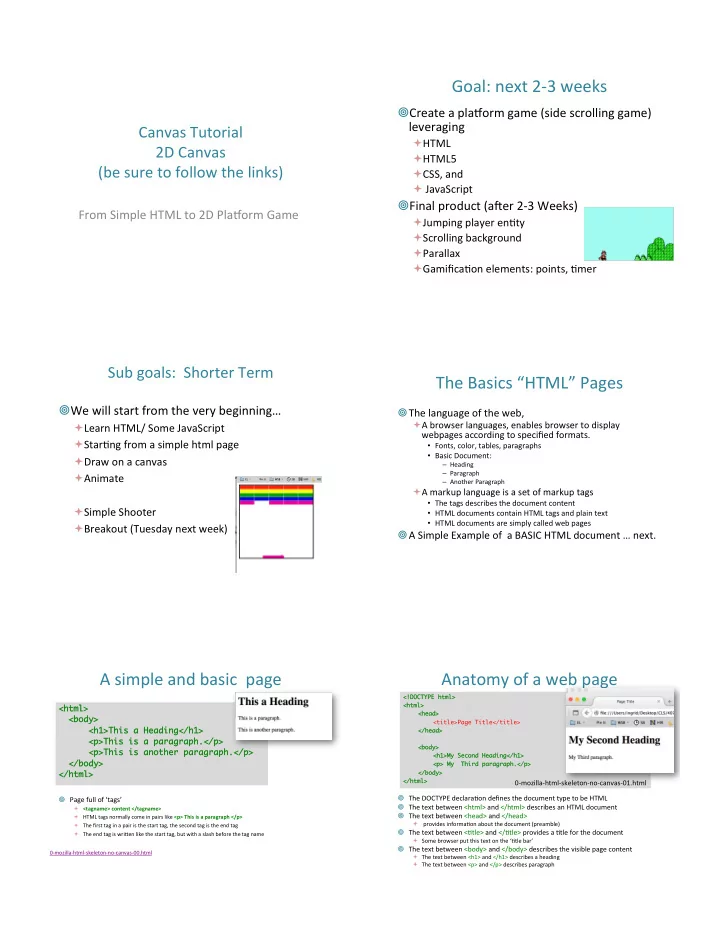
Goal:&next&2D3&weeks& ! Create&a&pla@orm&game&(side&scrolling&game)& leveraging& Canvas&Tutorial& " HTML& 2D&Canvas& " HTML5&


slide-1
SLIDE 1

Canvas&Tutorial& 2D&Canvas& (be&sure&to&follow&the&links)&

From&Simple&HTML&to&2D&Pla@orm&Game& &

Goal:&next&2D3&weeks&

! Create&a&pla@orm&game&(side&scrolling&game)& leveraging&

" HTML& " HTML5& " CSS,&and& " &JavaScript&

! Final&product&(aLer&2D3&Weeks)&

" Jumping&player&enOty& " Scrolling&background& " Parallax& " GamificaOon&elements:&points,&Omer&

Sub&goals:&&Shorter&Term& &

! We&will&start&from&the&very&beginning…&

" Learn&HTML/&Some&JavaScript& " StarOng&from&a&simple&html&page& " Draw&on&a&canvas& " Animate& " Simple&Shooter& " Breakout&(Tuesday&next&week)&

The&Basics&“HTML”&Pages&

! The&language&of&the&web,&&

" A&browser&languages,&enables&browser&to&display& webpages&according&to&specified&formats.&

  • Fonts,&color,&tables,&paragraphs&
  • Basic&Document:&

– Heading& – Paragraph& – Another&Paragraph&

" A&markup&language&is&a&set&of&markup&tags&

  • The&tags&describes&the&document&content&
  • HTML&documents&contain&HTML&tags&and&plain&text&
  • HTML&documents&are&simply&called&web&pages&

! A&Simple&Example&of&&a&BASIC&HTML&document&…&next.&

A&simple&and&basic&&page&

<html> <html> <body> <body> <h1>This a Heading</h1> <h1>This a Heading</h1> <p>This is a paragraph.</p> <p>This is a paragraph.</p> <p>This is another paragraph.</p> <p>This is another paragraph.</p> </body> </body> </html> </html>

0DmozillaDhtmlDskeletonDnoDcanvasD00.html&

! Page&full&of&‘tags’&

" <tagname>)content)</tagname>) " HTML&tags&normally&come&in&pairs&like&<p>)This)is)a)paragraph)</p>) " The&first&tag&in&a&pair&is&the&start&tag,&the&second&tag&is&the&end&tag& " The&end&tag&is&wri^en&like&the&start&tag,&but&with&a&slash&before&the&tag&name&

Anatomy&of&a&web&page&

! The&DOCTYPE&declaraOon&defines&the&document&type&to&be&HTML& ! The&text&between&<html>&and&</html>&describes&an&HTML&document& ! The&text&between&<head>&and&</head>&

" &provides&informaOon&about&the&document&(preamble)&

! The&text&between&<Otle>&and&</Otle>&provides&a&Otle&for&the&document&

" Some&browser&put&this&text&on&the&‘Otle&bar’&

! The&text&between&<body>&and&</body>&describes&the&visible&page&content&

" The&text&between&<h1>&and&</h1>&describes&a&heading& " The&text&between&<p>&and&</p>&describes&paragraph& <!DOCTYPE html> <!DOCTYPE html> <html> <html> <head> <head> <title>Page Title</title> </head> </head> <body> <body> <h1>My Second Heading</h1> <h1>My Second Heading</h1> <p> My Third paragraph.</p> <p> My Third paragraph.</p> </body> </body> </html> </html>

0DmozillaDhtmlDskeletonDnoDcanvasD01.html&

slide-2
SLIDE 2

The&<!DOCTYPE>&DeclaraOon&

! &Denote&which&language&you&use&

" DOCTYPE&html&is&for&the&

  • Old&school&html,&and&the&newer&HTML5&&

" <!DOCTYPE&html>&

Comments&

! &Comments&in&code,&use&a&&

" &<!DD&&&&

  • 2&dashes&
  • tag&to&denote&the&beginning&of&a&comment,&a&comment&

" DD>&

  • &concluded&or&'closed'&by&a&&DD>&tag,&see&above:&

" &A&comment:&

  • <!DD&A&COMMENT&&&DD>&

" Another&comment:&

&<!DD&& &Another&COMMENT,& & & &that&spans&mulOple&lines& & &DD>&

Example&Comment&

<!DOCTYPE html> <!DOCTYPE html> <html <html lang lang="en"> ="en"> <head> <head> <meta charset="utf-8" /> <meta charset="utf-8" /> <title>A tiny document</title> <title>A tiny document</title> </head> </head> <body> <body> <h1>Main heading in my document</h1> <h1>Main heading in my document</h1> <!-- COMMENT --> <!-- COMMENT --> <!-- Note that it is "h" + "1", not "h" + the letter "one" --> <!-- Note that it is "h" + "1", not "h" + the letter "one" --> <p>Hey!!!! I am coding in (Hyper Text Markup Language)HTML.</p> <p>Hey!!!! I am coding in (Hyper Text Markup Language)HTML.</p> </body> </body> </html> </html>

0DmozillaDhtmlDskeletonDnoDcanvasDcomment.html&

HTML&more&inDdepth&

! &Some&great&tutorials&are&available,&one&of&my& favorites,&that&have&nice&WYSIWYG&interfaces:&

" h^p://www.w3schools.com/html/default.asp&

! &Need&a&good&editor:&

" Simple:&&

  • vi,&notepad,&text&edit,&&emacs&

" Professional:&

  • Dreamweaver&(expensive)&

" We&will&use&simple&ones&–&and&&I&will&use&vi.& " Webstorm’s&jetbrain?&(will&try&to&see&if&I&can&get&a& educaOonal&license&for&this&one)&

HTML5&

! &As&of&October&2014&this&is&the&new&HTML& standard:&

" Adds&syntacOc&features&to&HTML:& " new&<video>,&<audio>&and&the&<canvas>'elements&

  • Handle&Graphical&and&mulOmedia&content&without&resorOng&

to&plugDins,&and&new&APIs&

" )<canvas>)is&for&graphics,&and&we&use&graphics&for& animaOon,&and&gaming.&

– It&can&draw&graphics&using&scripOng&(usually&javascript)&

! &It&was&a&HTML5&before&October&2014?&

" Yes,&but&now&it&is&official,&and&it&is&standard.&

h^p://en.wikipedia.org/wiki/HTML5&

What&is&a&<canvas>?&

! &A&container&for&hosOng&graphics.&

" Can&render&Bitmap&images&(JavaScript)&

! &A&rectangular&area&on&an&HTML&page.& ! &Canvas&has&several&methods&for&drawing:&

" Lines,&paths,&boxes,&circles,&text,&and&graphic&images.& " Defined&by&JavaScript&methods&(APIs)&for&drawing&the& graphics&(lines,&paths,&boxes,&circles,&shapes).& " JavaScript&API&

! &Also&for&text,&animaOon,&and&interacOon& ! …&and&games!&

slide-3
SLIDE 3

<canvas id= "drawing" width= "400" height= "200” style= "border:1px solid black"> </canvas>&

! &h^p://www.w3schools.com/tags/ ref_canvas.asp& ! &h^p://www.pageresource.com/html5/ canvasD2dDinterfaceDreference/&&

Simple&Canvas&&

! No&JavaScript&(yet)& ! h^p://www.w3schools.com/html/ html5_canvas.asp&

<!DOCTYPE&html>& <html>& <body>& & <canvas&id="myCanvas"&width="200"&height="200”&style="border:10px&solid&#FF0000;">& &Your&browser&does&not&support&the&HTML5&canvas&tag.& </canvas>& & </body>& </html>& 1DmozillaDcanvasDskeletonD00Dnojavascript.html&

Canvas&Images&

Background:& ! &ALer&drawing&a&‘shape’&on&canvas&it&is&‘gone’& canvas&does&not&know&of&the&&element& anymore&(bitmap,&raster&images)& ! &Fixed&Sets&of&Dots& ! &This&is&in&contrast&to&Scalable&Vector&Graphics& (SVG),&where&you&can&manipulate&the&spapes&

h^p://en.wikipedia.org/wiki/Scalable_Vector_Graphics&

Strategy&of&Drawing&Images&on&Canvas&

Done&by&JavaScript&in&3&steps:&

  • 1. Obtain&a&reference&to&the&canvas&element.&
  • 2. Obtain&a&2D&context&from&the&canvas&

element.&

  • 3. Draw&graphics&using&the&draw&funcOons&of&2D&

context.&

  • 4. &(not&a&4ths&step)&

Drawing&on&the&Canvas& with&JavaScript&

<!DOCTYPE&html>& <html>& <body>& & <canvas&id="myCanvas"&width="200"&height=”200"& &style="border:10px&solid&#2200c3;">& &Your&browser&does&not&support&the&canvas&element.& </canvas>& & <script>& &var&canvas&=&document.getElementById("myCanvas");&&//&find&the&canvas&element&& &var&ctx&=&canvas.getContext("2d");& & & & &//&&get&2D&object&ctx && &ctx.fillStyle&=&"#FF00CC";& & & & & & &//&now&can&draw&& &ctx.fillRect(0,0,150,75);&& & & &&&&&&&&&&&&&&&&&&&&&&&&&&&&//&using&the&methods&of&ctx& </script>& & </body>&

What)does)this)look)like?)

Drawing&on&the&Canvas& with&JavaScript&

<!DOCTYPE&html>& <html>& <body>& & <canvas&id="myCanvas"&width="200"&height=”200"& &style="border:10px&solid&#2200c3;">& &Your&browser&does&not&support&the&canvas&element.& </canvas>& & <script>& &var&canvas&=&document.getElementById("myCanvas");&&//&find&the&canvas&element&& &var&ctx&=&canvas.getContext("2d");& & & & &//&&get&2D&object&ctx && &ctx.fillStyle&=&"#FF00CC";& & & & & & &//&now&can&draw&& &ctx.fillRect(0,0,150,75);&& & & &&&&&&&&&&&&&&&&&&&&&&&&&&&&//&using&the&methods&of&ctx& </script>& & </body>& 1DmozillaDcanvasDskeletonD1DjsD.html&

slide-4
SLIDE 4

! &How&about&modularizaOon?&

" Pull&out&the&javascript&and&put&it&elsewhere?&

Drawing&on&the&Canvas& with&‘external’&JavaScript&

<!DOCTYPE&html>& <html>& <body>& & <canvas&id="myCanvas"&width="200"&height=”200"& &style="border:10px&solid&#2200c3;">& &Your&browser&does&not&support&the&canvas&element.& </canvas>& && <script&src="js/drawRectangle.js"></script>& & </body>&

! &Standard&to&have&a&subdirectory&“js”&for& javascript.&

1DmozillaDcanvasDskeletonD1DjsDex.html&

CSS&&&&canvas&onDload&

<html> <head> <title>Canvas tutorial</title> <script type="text/javascript"> function draw(){ var canvas = document.getElementById('tutorial'); if (canvas.getContext){ var ctx = canvas.getContext('2d'); } } </script> <style type="text/css"> canvas { border: 10px solid blue; } </style> </head> <body onload="draw();"> <canvas id="tutorial" width="150" height="150"></canvas> </body> </html>

1DmozillaDcanvasDskeletonD2Dcss.html&

Simple&Graphics&

! &Examples&

" Drawing& " Color& " Opacity& " Mouse& " Keyboard&

! &h^p://www.w3schools.com/canvas/ canvas_clock.asp&

! h^p://www.html5Dtutorials.org& ! h^p://www.w3schools.com/html/default.asp& ! h^p://en.wikipedia.org/wiki/HTML5& ! h^p://www.w3schools.com/canvas/ canvas_clock.asp& & ! h^p://tutorials.jenkov.com/html5Dcanvas/

  • verview.html&

! HTML,&XML,&XHTML,&HTML5,&HTML5&and&Canvas,& CCS,&JavaScript&