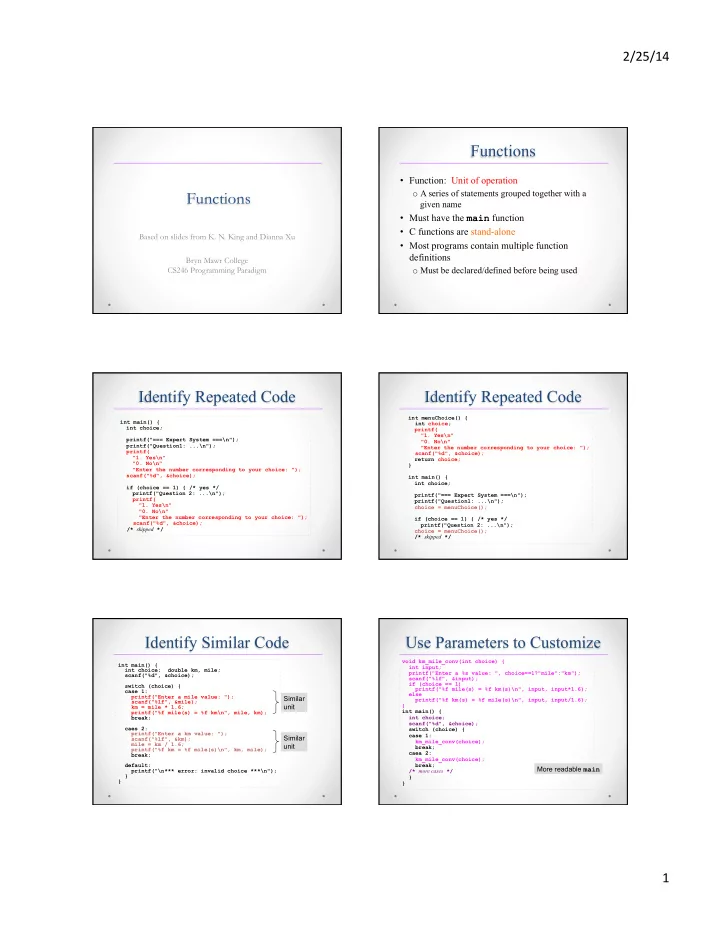
Functions Function: Unit of operation Functions o A series of - - PDF document

functions
SMART_READER_LITE
LIVE PREVIEW

Functions Function: Unit of operation Functions o A series of - - PDF document

2/25/14 Functions Function: Unit of operation Functions o A series of statements grouped together with a given name Must have the main function C functions are stand-alone Based on slides from K. N. King and Dianna Xu Most


slide-1
SLIDE 1

2/25/14 ¡ 1 ¡

Functions

Based on slides from K. N. King and Dianna Xu Bryn Mawr College CS246 Programming Paradigm

Functions

  • Function: Unit of operation
  • A series of statements grouped together with a

given name

  • Must have the main function
  • C functions are stand-alone
  • Most programs contain multiple function

definitions

  • Must be declared/defined before being used

Identify Repeated Code

int main() { int choice; printf("=== Expert System ===\n"); printf("Question1: ...\n"); printf( "1. Yes\n" "0. No\n" "Enter the number corresponding to your choice: "); scanf("%d", &choice); if (choice == 1) { /* yes */ printf("Question 2: ...\n"); printf( "1. Yes\n" "0. No\n" "Enter the number corresponding to your choice: "); scanf("%d", &choice); /* skipped */

Identify Repeated Code

int menuChoice() { int choice; printf( "1. Yes\n" "0. No\n" "Enter the number corresponding to your choice: "); scanf("%d", &choice); return choice; } int main() { int choice; printf("=== Expert System ===\n"); printf("Question1: ...\n"); choice = menuChoice(); if (choice == 1) { /* yes */ printf("Question 2: ...\n"); choice = menuChoice(); /* skipped */

Identify Similar Code

int main() { int choice; double km, mile; scanf("%d", &choice); switch (choice) { case 1: printf("Enter a mile value: "); scanf("%lf", &mile); km = mile * 1.6; printf("%f mile(s) = %f km\n", mile, km); break; caes 2: printf("Enter a km value: "); scanf("%lf", &km); mile = km / 1.6; printf("%f km = %f mile(s)\n", km, mile); break; default: printf("\n*** error: invalid choice ***\n"); } }

Similar unit Similar unit

Use Parameters to Customize

void km_mile_conv(int choice) { int input; printf("Enter a %s value: ", choice==1?"mile":"km"); scanf("%lf", &input); if (choice == 1) printf("%f mile(s) = %f km(s)\n", input, input*1.6); else printf("%f km(s) = %f mile(s)\n", input, input/1.6); } int main() { int choice; scanf("%d", &choice); switch (choice) { case 1: km_mile_conv(choice); break; caea 2: km_mile_conv(choice); break; /* more cases */ } }

More readable main

slide-2
SLIDE 2

2/25/14 ¡ 2 ¡

Function-oriented

  • C came before OO concept
  • C program resemble java programs with a single

giant class

  • C is procedural
  • Program organization and modularization is

achieved through function design

  • Carefully plan your function return type and

parameter list

  • Write small functions!

Function Call

void km_to_mile() { printf("Enter a mile value: "); scanf("%lf", &mile); km = mile * 1.6; printf("%f mile(s) = %f km\n", mile, km); } int main() { km_to_mile(); km_to_mile(); return 0; }

Function Return and Parameters

  • The syntax for C functions is the same as Java

methods

  • void keyword can be omitted

void km_to_mile(void) { } mile_to_km() { } int main() { int choice; }

Use of return in void Functions

void getinput() { int choice; while (1) { scanf("%d", &choice); switch (choice) { case 1: /* some action */ break; case 0: return; /* exit from getinput */ } } }

  • Exit from the function

The exit Function

  • Executing a return statement in main is one way to

terminate a program.

  • Another is calling the exit function, which belongs to

<stdlib.h>.

  • The statement

return expression;

in main is equivalent to

exit(expression);

  • To indicate normal termination, we’d pass 0:
  • exit(0); /* normal termination */The

difference between return and exit is that exit causes program termination regardless of which function calls it.

  • The return statement causes program termination only when it

appears in the main function.

Function Prototype

  • A prototype is a

function declaration which includes the return type and a list of parameters

  • A way to move function

definitions after main

  • Need not name formal

parameters

/* function prototypes */ double km2mile(double); double mile2km(double); int main() { } /* actual function definitions */ double km2mile(double k) { } double mile2km(double m) { }

slide-3
SLIDE 3

2/25/14 ¡ 3 ¡

Array Arguments

  • When a function parameter is a one-dimensional

array, the length of the array can be left unspecified:

int f(int a[]){ /* no length specified */ … }

  • We can supply the length—if the function needs it—

as an additional argument.

  • Example:

int sum_array(int a[], int n) { int i, sum = 0; for (i = 0; i < n; i++) sum += a[i]; return sum; }

  • Since sum_array needs to know the length of a,

we must supply it as a second argument.

Array Arguments

  • The prototype for sum_array has the following

appearance:

int sum_array(int a[], int n);

  • We can omit the parameter names if we wish:

int sum_array(int [], int);

Array Arguments

  • When sum_array is called, the first argument will be the

name of an array, and the second will be its length:

#define LEN 100 int main(void) { int b[LEN], total; … total = sum_array(b, LEN); … }

  • Notice that we don’t put brackets after an array name when

passing it to a function:

total = sum_array(b[], LEN); /*** WRONG ***/

Array Arguments

  • Suppose that we’ve only stored 50 numbers in the

b array, even though it can hold 100.

  • We can sum just the first 50 elements by writing

total = sum_array(b, 50);

  • Be careful not to tell a function that an array

argument is larger than it really is:

total = sum_array(b, 150); /*** WRONG ***/

sum_array will go past the end of the array, causing undefined behavior.

Array Arguments

  • A function is allowed to change the elements of an

array parameter, and the change is reflected in the corresponding argument.

  • A function that modifies an array by storing zero

into each of its elements:

void store_zeros(int a[], int n) { int i; for (i = 0; i < n; i++) a[i] = 0; }

Array Arguments

slide-4
SLIDE 4

2/25/14 ¡ 4 ¡

Array Arguments

  • If a parameter is a multidimensional array, only the length
  • f the first dimension may be omitted.
  • If we revise sum_array so that a is a two-dimensional

array, we must specify the number of columns in a:

#define LEN 10 int sum_two_dimensional_array(int a[][LEN], int n) { int i, j, sum = 0; for (i = 0; i < n; i++) for (j = 0; j < LEN; j++) sum += a[i][j]; return sum; }

The return Statement

  • A non-void function must use the return

statement to specify what value it will return.

  • The return statement has the form

return expression ;

  • The expression is often just a constant or variable:

return 0; return status;

  • More complex expressions are possible:

return n >= 0 ? n : 0;

The exit Function

  • Executing a return statement in main is one

way to terminate a program.

  • Another is calling the exit function, which

belongs to <stdlib.h>.

  • The argument passed to exit has the same

meaning as main’s return value: both indicate the program’s status at termination.

  • To indicate normal termination, we’d pass 0:

exit(0); /* normal termination */

The exit Function

  • The statement

return expression;

in main is equivalent to

exit(expression);

  • The difference between return and exit is that

exit causes program termination regardless of which function calls it.

  • The return statement causes program

termination only when it appears in the main function.

Local/Global Variables

  • Variables declared inside a function are local
  • Function arguments are local to the function passed

to

  • A global variable is a variable declared outside of

any function.

  • In a name conflict, the local

variable takes precedence

  • When local variable shadows

function parameter?

int x = 0; int f(int x) { int x = 1; return x; } int main() { int x; x = f(2); }

Local Variables

  • Since C99 doesn’t require variable declarations to

come at the beginning of a function, it’s possible for a local variable to have a very small scope:

slide-5
SLIDE 5

2/25/14 ¡ 5 ¡

Scope of Global Variables

  • The scope of a global variable starts at the point of

its definition.

  • Globals should be used with caution
  • Avoid changing a global inside

a function

  • Change a global by setting it

the return value of a function

  • If using globals at all, declare

them at the top.

int x; int f() { } int y; int g(){ } int main() { }

Call by Value

void f(int x) { x = x * x; printf("%d", x); } int main() { int x = 3; f(x); printf("%d", x); return 0; }

The variable x in f gets a copy of the value of the variable x in main. Does not change the value of x in main.

  • Same as Java, modification to function arguments

during function execution has no effect outside of function

Storage Classes

  • auto
  • The default – life time is the defining function
  • De-allocated once function exits
  • static (w.r.t. local variables)
  • Life time is the entire program – defined and

initialized the first time function is called only

  • Scope remains the same

void f() { static int counter = 0; counter++; }

Scope

  • In a C program, the same identifier may have several

different meanings.

  • The most important scope rule: When a declaration

inside a block names an identifier that’s already visible, the new declaration temporarily “hides” the old

  • ne, and the identifier takes on a new meaning.
  • At the end of the block, the identifier regains its old

meaning.

Scope

  • In the example on the previous slide, the identifier

i has four different meanings:

  • In Declaration 1, i is a variable with static storage

duration and file scope.

  • In Declaration 2, i is a parameter with block scope.
  • In Declaration 3, i is an automatic variable with

block scope.

  • In Declaration 4, i is also automatic and has block

scope.

  • C’s scope rules allow us to determine the meaning
  • f i each time it’s used (indicated by arrows).
slide-6
SLIDE 6

2/25/14 ¡ 6 ¡

static: globals and functions

  • Using the keyword static in front of a global or

a function changes the linkage, that is, the scope across multiple files.

  • static changes the linkage of an identifier to

internal, which means shared within a single (the current) file

  • We will discuss more of linkage and related

keywords, as well as header files when we discuss multiple source files

Documenting Functions

  • A comment for each function
  • Use descriptive function name, parameter names

#include <stdio.h> #include <math.h> /* truncate a value to specific precision */ double truncate(double val, int precision) { double adj = pow(10, precision); int tmp; tmp = (int) (val * adj); return tmp / adj; } int main() { }

Keep main Uncluttered

  • Your main function should consist mainly of

function calls

  • One main input loop or conditional is okay
  • Write your main and choose your function name

in such a way so that

  • the main algorithm and program structure is clearly

represented

  • the reader can get an idea how your program works

simply by glancing at your main

Recursion

  • A function is recursive if it calls itself.
  • The following function computes n! recursively,

using the formula n! = n × (n – 1)!:

int fact(int n) { if (n <= 1) return 1; else return n * fact(n - 1); }

  • To see how recursion works, let’s trace the

execution of the statement

i = fact(3);

fact(3) finds that 3 is not less than or equal to 1, so it calls fact(2), which finds that 2 is not less than or equal to 1, so it calls fact(1), which finds that 1 is less than or equal to 1, so it returns 1, causing fact(2) to return 2 × 1 = 2, causing fact(3) to return 3 × 2 = 6.

Recursion Recursion

  • The following recursive function computes xn,

using the formula xn = x × xn–1.

int power(int x, int n) { if (n == 0) return 1; else return x * power(x, n - 1); }

slide-7
SLIDE 7

2/25/14 ¡ 7 ¡

Recursion

  • We can condense the power function by putting a

conditional expression in the return statement:

int power(int x, int n) { return n == 0 ? 1 : x * power(x, n - 1); }

  • Both fact and power are careful to test a

“termination condition” as soon as they’re called.

  • All recursive functions need some kind of

termination condition in order to prevent infinite recursion.

  • Assume that the array to be sorted is indexed from

1 to n.

Quicksort algorithm

  • 1. Choose an array element e (the “partitioning element”),

then rearrange the array so that elements 1, …, i – 1 are less than or equal to e, element i contains e, and elements i + 1, …, n are greater than or equal to e.

  • 2. Sort elements 1, …, i – 1 by using Quicksort recursively.
  • 3. Sort elements i + 1, …, n by using Quicksort recursively.

The Quicksort Algorithm The Quicksort Algorithm

  • Example of partitioning an array:

Patitioning element

Program: Quicksort

  • The qsort.c program reads 10 numbers into an array,

calls quicksort to sort the array, then prints the elements in the array:

Enter 10 numbers to be sorted: 9 16 47 82 4 66 12 3 25 51 In sorted order: 3 4 9 12 16 25 47 51 66 82

  • The code for partitioning the array is in a separate function

named split.

qsort.c

/* Sorts an array of integers using Quicksort algorithm */ #include <stdio.h> #define N 10 void quicksort(int a[], int low, int high); int split(int a[], int low, int high); int main(void) { int a[N], i; printf("Enter %d numbers to be sorted: ", N); for (i = 0; i < N; i++) scanf("%d", &a[i]); quicksort(a, 0, N - 1); printf("In sorted order: "); for (i = 0; i < N; i++) printf("%d ", a[i]); printf("\n"); return 0; } void quicksort(int a[], int low, int high) { int middle; if (low >= high) return; middle = split(a, low, high); quicksort(a, low, middle - 1); quicksort(a, middle + 1, high); }

slide-8
SLIDE 8

2/25/14 ¡ 8 ¡

int split(int a[], int low, int high) { int part_element = a[low]; for (;;) { while (low < high && part_element <= a[high]) high--; if (low >= high) break; a[low++] = a[high]; while (low < high && a[low] <= part_element) low++; if (low >= high) break; a[high--] = a[low]; } a[high] = part_element; return high; }

Lab – Understanding Recursion

  • Given an array of 2n integers in the following format

a1 a2 a3 … an b1 b2 b3 … bn. Shuffle the array to a1 b1 a2 b2 a3 b3 … an bn without any extra memory.

  • Assumption: n=2i where i = 0, 1, 2, 3, etc.
  • Algorithm (hint: use recursion)?
  • Implement your algorithm.
  • Print out running traces for each recursive call.