Densmap Area(Si) Area(Ni) where, Wi = the - - PDF document

densmap area si area ni where wi the weight given to a
SMART_READER_LITE
LIVE PREVIEW

Densmap Area(Si) Area(Ni) where, Wi = the - - PDF document

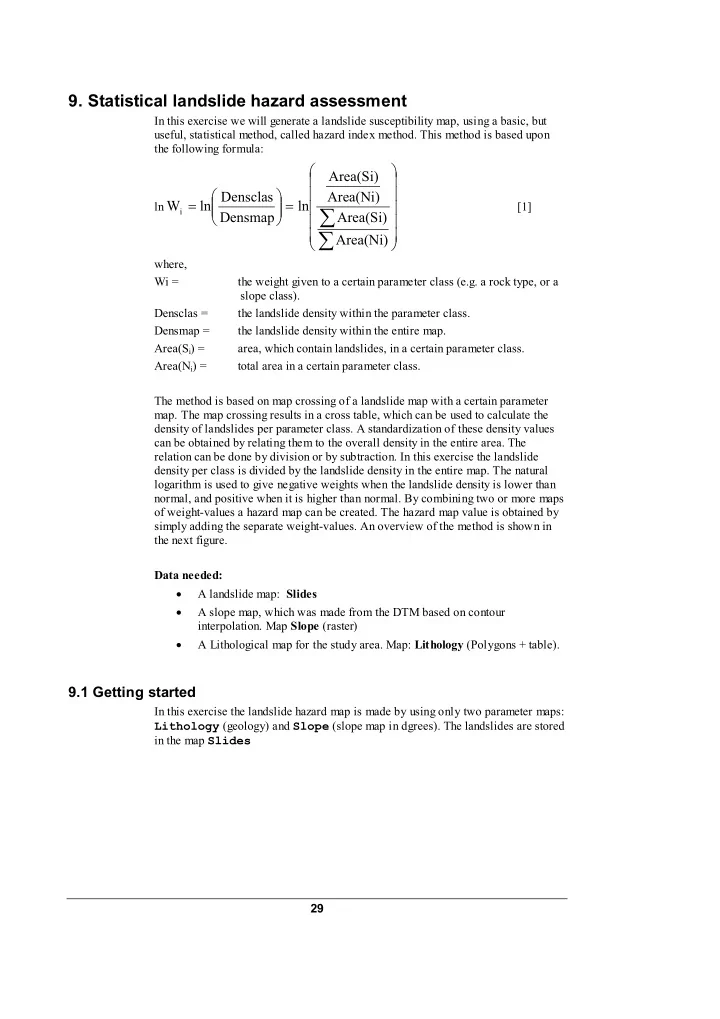
9. Statistical landslide hazard assessment In this exercise we will generate a landslide susceptibility map, using a basic, but useful, statistical method, called hazard index method. This method is based upon the following formula:


slide-1
SLIDE 1

29

  • 9. Statistical landslide hazard assessment

In this exercise we will generate a landslide susceptibility map, using a basic, but useful, statistical method, called hazard index method. This method is based upon the following formula: ln

              =         =

∑ ∑

Area(Ni) Area(Si) Area(Ni) Area(Si) ln Densmap Densclas ln Wi

[1] where, Wi = the weight given to a certain parameter class (e.g. a rock type, or a slope class). Densclas = the landslide density within the parameter class. Densmap = the landslide density within the entire map. Area(Si) = area, which contain landslides, in a certain parameter class. Area(Ni) = total area in a certain parameter class. The method is based on map crossing of a landslide map with a certain parameter

  • map. The map crossing results in a cross table, which can be used to calculate the

density of landslides per parameter class. A standardization of these density values can be obtained by relating them to the overall density in the entire area. The relation can be done by division or by subtraction. In this exercise the landslide density per class is divided by the landslide density in the entire map. The natural logarithm is used to give negative weights when the landslide density is lower than normal, and positive when it is higher than normal. By combining two or more maps

  • f weight-values a hazard map can be created. The hazard map value is obtained by

simply adding the separate weight-values. An overview of the method is shown in the next figure. Data needed:

  • A landslide map: Slides
  • A slope map, which was made from the DTM based on contour
  • interpolation. Map Slope (raster)
  • A Lithological map for the study area. Map: Lithology (Polygons + table).

9.1 Getting started

In this exercise the landslide hazard map is made by using only two parameter maps: Lithology (geology) and Slope (slope map in dgrees). The landslides are stored in the map Slides

slide-2
SLIDE 2

Case study: GIS for multi hazard risk assessment

30

Figure 1: Simplified flowchart for bivariate statistical analysis. In this exercise only 2 input maps are used

slide-3
SLIDE 3

Case study: GIS for multi hazard risk assessment

31

  • Open the map High_res_image and add the layer Slides. Click OK in

the Display Options dialog box. The map is displayed. Along side the landslide map you also have two parameter maps: Lithology (geological units) and Slope (slope angles).

  • Open the map Lithology and consult the information from the map

and the accompanying table.

  • Add the maps Lithology and Slope to the pixel information window.

When you move through the map you can simultaneously read the information from all three maps and their tables.

  • Also open the map Slope and look at the content. The map Slope

still needs to be classified into classes. Make a class (group) domain Slopecl , and add the slope classes you want to differentiate. You can make classes of 10 degree each.

  • Select from the main window: Operations / Image Processing

/Slicing. Select the raster map Slope, and the domain Slopecl. Name the output map Slopecl.

  • Close the map windows and the Pixel information window
  • Before you can use the maps in the analysis, you need to rasterize the

maps Slides and Lithology. Select from the main window Operations / Rasterize / Polygon to Raster. Select the polygon map: Slides, the georeference Somewhere and the output raster map: Slides. Do the same for the polygon map Lithology. Check the results So far you have only been looking at the content of the maps. You will now start with the actual analysis. A statistical analysis should be done using landslides with same characteristics. That is why we will separate the fossil landslides from the recent ones. We do that using a map calculation formula.

  • We are going to use only the classes Br (body of recent landslides)

and Sr (scarp of recent landslides). See the domain Slides for all codes and names. We make now a map in which these will have a value 1 and the rest (including the no-landslide areas) a value of 0. Type the following formula on the command line: Active:=iff(isundef(slides),0,iff((slides="br")or(Slides="sr"),1,0))

  • Meaning: if the map Slides has undefined values (? In the non-

landslide areas) then the result is 0. If the map Slides has the codes Br or Sr, than we assign a value of 1. For the other landslides we assign a value of 0.

  • The output map Active has a value domain, with minimum 0,

maximum 1 and precision 1.

slide-4
SLIDE 4

Case study: GIS for multi hazard risk assessment

32

  • Additional exercise:
  • By the way, if you want to know how the slope map as made. Here is

the procedure:

  • 1. Apply filter operation on the map Topo_dem. First DFDX filter

(name map also DFDX) and then DFDY filter (resulting in DFDY map).

  • 2. Type on the command line:

SLOPEPCT = 100 * HYP(DFDX,DFDY) and SLOPE = RADDEG(ATAN(SLOPEPCT/100))

  • Also make a slope map of the Lidar_dem. Check the differences.

9.2 Crossing the parameter maps with the landslide map

The landslide occurrence map, showing only the recent landslides (Active) can be crossed with the parameter maps. In this case the two maps Slopecl and Lithology are selected as examples. Of course in real applications many more parameter maps should be evaluated. First the map crossings between the occurrence map and the two parameter maps have to be carried out.

  • Select from the main ILWIS menu the options: Operations, Raster
  • perations, Cross.
  • Select the map Slopecl as the first map, the map Active as the

second map, and call the output table Actslope. (Ignoring the undefined values has no effects, as both maps don’t have undefined values). Click Show and OK. Now the crossing of the two maps takes place.

  • Have a look at the resulting cross table. As you can see this table

contains the combinations of the classes from the map Slopecl and the two types from the map Active.

  • Repeat the procedure for the crossing of the maps Lithology and
  • Active. Name the output cross-table ActLithology.

Now the amount of pixels with different landslide activities in each slope class and each geological unit, has been calculated, the landslide densities can be calculated.

9.3 Calculating landslide densities

After crossing the maps, the next step is to calculate density values. The cross-table includes the columns that will be calculated during this exercise. Each of the calculation steps is indicated below.

  • Make sure that the cross-table Actslope is active.

Step 1: Create a column in which only the active landslide are indicated by typing the following formula on the command line of

slide-5
SLIDE 5

Case study: GIS for multi hazard risk assessment

33 the table window: AreaAct=iff(Active=1,area,0)↵ You do this in order to calculate for each slope class the area with

  • nly active landslides.
  • Step 2: Calculate the total area in each slope class.

Select from the table menu: Columns, Aggregation. Select the column: Area. Select the function Sum. Select group by column Slopecl. Deselect the box Output Table, and enter the

  • utput column Areasloptot. Press OK. Select a precision of 1.0.
  • Step 3: Calculate the area with active landslides in each slope class.

Again select from the table menu: Column, Aggregation. Select the column: AreaAct, Select the function Sum, select Group by column Slopecl. Deselect the box Output Table, and enter the output column: Areaslopeact. Press OK. Select a precision of 1.0.

  • Step 4: calculate the total area in the map.

Again select from the table menu: Columns, Aggregation. Select the column: Area. Select the function Sum. Deselect the box group by. Deselect the box Output table, and enter the output column: Areamaptot. Press OK. Select a precision of 1.0.

  • Step 5: The next step is to calculate the total area with landslides in

the map. Again select from the table menu: Columns, Aggregation. Select the column: AreaAct. Select the function Sum. Deselect the box group by. Deselect the box Output Table, and enter the output column: Areamapact. Press OK. Select a step size of 1.0.

  • Step 6: Calculate the landslide density per slope class

Type: Densclas=Areaslopeact/Areasloptot↵ Select a precision of 0.0001.

  • Step 7: Calculate the landslide density for the entire map.

Type: Densmap=Areamapact/Areamaptot↵ Select a precision of 0.0001. The result will look like below: Table 2.1: Cross table and calculated columns

slide-6
SLIDE 6

Case study: GIS for multi hazard risk assessment

34 Now you have calculated all the required densities for the map slope.

  • Repeat the procedure for the cross-table ActLithology. You

don't have to calculate the density in the map anymore, since it is the same for both maps.

9.4 Calculating weight values

The final weight-values are calculated by taking the natural logarithm of the density in the class, divided by the density in the map. With this calculation we find that the density in the entire map = 225189 / 14000000 = 0.0161 Previously the calculation was done on the cross-table for the maps Slopecl and

  • Active. As you could see from the table 2.1, this results in many redundant

values, since you only want to calculate the densities and the weights for each slope

  • class. The result should look like table 2.2 instead, where each slope class occupies
  • nly one record. That is why you will work now with the attribute table connected to

the map Slopecl and use table joining combined with aggregation to obtain the data from the cross table. Table 5.3: Data stored in the attribute table.

  • Create a table for the domain Slopecl. This table contains no

additional columns, except the column with the domain. Repeat the procedure from above, but now with table joining.

  • Step 1: Calculate the total area in each slope class.

Select Columns, Join. Select table Actslope. Select column:

  • Area. Select function Sum. Select group by column Slopecl.

Select output column Areasloptot. Press OK.

  • Step 2: Calculate the area with active landslides in each slope class.

Select Columns, Join. Select table: Actslope. Select column

  • Areaact. Select function Sum. Select group by column
  • Slopecl. Select output column Areaslopact. Press OK.
  • Step 3: With both columns, you can calculate the landslide density

in each slope class with the formula: Densclas:=Areaslopact/Areasloptot↵ Select a precision of 0.0001.

  • If you look at the result, some classes have a density of 0. This

should be adjusted, since the calculation of the weights is not

  • possible. To adjust type the following formula:

Dclas:=iff(Densclas=0,0.0001,Densclas)↵

  • The final weight can now be calculated with the formula:

Weight:=ln(Dclas/0.0161)↵

  • Close the table.
slide-7
SLIDE 7

Case study: GIS for multi hazard risk assessment

35 Now you have calculated the weights for the map Slopecl.

  • Repeat the procedure for the table of the map Lithology.

9.5 Creating the weight maps

The weights from the table can now be used to renumber the maps.

  • Select from the main ILWIS menu: Operations, Raster
  • perations, Attribute map. Select raster map Slopecl. Select

attribute Weight. Select output raster map Wslopecl. Press OK.

  • Display the resulting map Wslopecl. Stretch between -2.5 and

+2.5

  • Use the same procedure the other parameter map Lithology. The

resulting map should be called: WLithology.

  • The weights for the two maps can be added with the formula:

Weight=Wslopecl+WLithology↵

  • Display the map Weight and use the pixel information window in
  • rder to read the information from the maps Slopecl, Wslopecl,

Lithology, WLithology and Weight.

9.6 Classifying the Weight map into the final hazard map

The map Weight has many values, and cannot be presented as it is as a qualitative hazard (susceptibility) map. In order to do so we first need to classify this map in a small number of units.

  • Calculate the histogram of the map Weight and select the boundary

values for three classes: Low hazard, Moderate hazard, and High hazard.

  • Create a new domain: Hazard. By selecting: File, Create, Create
  • domain. The domain should be a Class and tick on Group. Now

enter the names and the boundary values of the different classes in the domain. When you are ready, close the domain.

  • The last step is using the program slicing. Select: Operations,

Image processing, slicing. Select raster map: Weight. Select

  • utput raster map: hazard. Select domain: hazard. Press show and

OK.

  • Evaluate the output map with Pixel information. If necessary adjust

the boundary values of the domain hazard and run slicing again, until you are satisfied with the result

slide-8
SLIDE 8

Case study: GIS for multi hazard risk assessment

36

  • It is also important to include the areas occupied by old landslides in

the hazard map. We can do this with the formula: Final:=iff(isundef(slides),hazard,iff(active=1,"high hazard",iff((slides="bre")or(slides="sre"), "high hazard","Moderate hazard")))

9.7 Additional remarks

  • You can automate the calculation procedure by using a script, which

contains the formulas for the ILWIS operations. Parameters can be used in the form of %1 - %9. You can make a script by copying the statement which is shown on the command line when executing an

  • peration, and pasting it into a script file. Table calculation formulas

need the word TABCALC in front. For more information on scripts, consult the ILWIS Help, or the ILWIS User’s Guide.

  • The method was only done using two parameter maps, just to show

the procedure. In reality many more parameter are used. The method is also used to differentiate the parameters accordint ot their importance.

  • The analysis should actually be done for different landslide types

separately, as they will all have different combinations of causal factors.

  • It is very important in real application to validate the output map, This

can be done using the success rate method developed by Chung and

  • Fabbri. It should be done using two sets of landslides: one for making

the model, and one for checking the result. The best is to use two landslides sets that have been originated in two different periods.

  • The Hazard index method is a useful, but simple method. Many more

methods exist for landslide hazard assessment, which might be more appropriate, given the objectives of the study, the size of the area, and the available input data.

del active.* -force del active%1.* -force del %1w.* -force active:=iff(isundef(slides),0,iff((slides="br")or(slides="sr"),1,0)) Active%1.tbt := TableCross(%1,active,IgnoreUndefs) Tabcalc Active%1 AAct:=iff(active=1,Area,0) Tabcalc Active%1 AreaAct:=iff(AAct=0,1,AAct) crtbl %1w %1 Tabcalc %1w Areaclassact:= ColumnJoinSum(Active%1.tbt,AreaAct,%1,1) Tabcalc %1w Areaclasstot:= ColumnJoinSum(Active%1.tbt,Area,%1,1) Tabcalc %1w densclass:=areaclassact/areaclasstot Tabcalc %1w weight:=ln(densclass/0.0161) active%1:= MapAttribute(%1,%1w.tbt.weight)

slide-9
SLIDE 9

Case study: GIS for multi hazard risk assessment

37

  • 10. Landslide loss estimation.

Once we have generated a landslide susceptibility map we can now proceed with the loss calculation. This will be done only on a qualitative basis as we do not have information on the landslide probability. We will use the landslide hazard map, in which the actual landslides have been included as high hazard if they are active or as moderate hazard if they are old landslides. We will calculate the number of building located in high moderate and low hazard zones. The landslide susceptibility map is called HazFinal.

  • Rasterize

the map mappimg_units using the georeference Somewhere..

  • Select Operations / Raster Operations / Cross . Cross the raster map

Mapping_units with the raster map HazFinal. Create a cross table Mapping_units_LSH.

  • In the cross table Mapping_units_LSH, first calculate the total area
  • f each mapping unit. Select Columns / Aggregate. Select the column

Area, Function: Sum, group by Mapping_units, output column: area_unit

  • We now calculate the fraction of the mapping units that is in high
  • hazard. This can be done through the following formula:

LSH_high:=iff(HazFinal="high hazard", area/area_units,0) Use a precision of 0.01

  • Now calculate the fraction of the mapping units that is in moderate
  • hazard. Make the formula yourself.
  • Close the cross table Mapping_units_LSH.

The results can now be joined into the table mapping_units.

  • Open the table mapping_units.
  • Join with the table Mapping_units_LSH and read in the column

LSH_high using the aggregation function Maximum.

  • Do the same for the column LSH_moderate.
  • Then you can calculate the number of buildings in each mapping unit

which is in high hazard: LS_Risk_high = LSH_high * nr_buildings

  • Find out the total number of houses in the high landslide hazard class
  • Display the results as attribute of the map Mapping_units.

The results can be a bit misleading because the losses are shown per mapping unit, especially if the mapping unit is large and located in both steep and flat terrain. Another way is to cross the hazard map HazFinal with the map Floor_nr.

  • Select Operations / Raster Operations / Cross . Cross the raster map

Floor_nr with the raster map HazFinal. Create a cross table Floor_nr_LSH. Select output map Floor_nr_LSH.

  • In the cross table Floor_nr_LSH indicate the combination of

buildings with high hazard. This can be done through the following formula:

slide-10
SLIDE 10

Case study: GIS for multi hazard risk assessment

38 LR_high:=iff((hazfinal="high hazard")and(floor_nr>0),1,0)

  • Display the result as attribute of the map Floor_nr_LSH (don’t forget

to link the table to the map in the properties form.

  • Compare this result with the previous one. What can you conclude?