CS330 September 14 and 16, 2005 Enterprise Architectures Johannes - - PDF document

cs330
SMART_READER_LITE
LIVE PREVIEW

CS330 September 14 and 16, 2005 Enterprise Architectures Johannes - - PDF document

CS330 September 14 and 16, 2005 Enterprise Architectures Johannes Gehrke johannes@cs.cornell.edu http://www.cs.cornell.edu/johannes (Some of the slides are courtesy of Gustavo Alonso, Fabio Casati, Harumi Kuno, Vijay Machiraju and Ethan


slide-1
SLIDE 1

NBA 518: Enterprise Data Design and Analysis 1

CS330

September 14 and 16, 2005 Enterprise Architectures Johannes Gehrke johannes@cs.cornell.edu http://www.cs.cornell.edu/johannes (Some of the slides are courtesy of Gustavo Alonso, Fabio Casati, Harumi Kuno, Vijay Machiraju and Ethan Cerami)

2

Announcements

  • Laptops
  • Groups
  • Over the weekend
  • First homework
  • Requirement document assignment

3

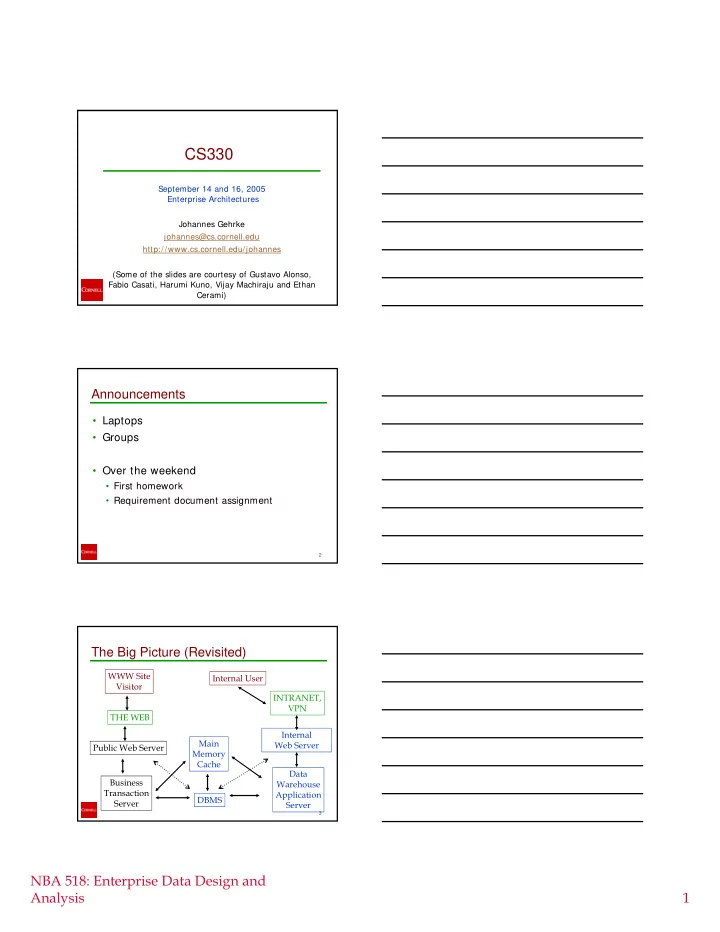
The Big Picture (Revisited)

WWW Site Visitor THE WEB Public Web Server Business Transaction Server Main Memory Cache DBMS Data Warehouse Application Server INTRANET, VPN Internal User Internal Web Server

slide-2
SLIDE 2

NBA 518: Enterprise Data Design and Analysis 2

Overview

  • Enterprise architectures
  • Internet concepts
  • URIs
  • The HTTP Protocol
  • The presentation layer
  • HTML, HTML Forms
  • Cookies
  • JavaScript
  • Style Sheets

5

Layers and Tiers

Client is any user or program that wants to perform an operation over the

  • system. Clients interact with the

system through a presentation layer The application logic determines what the system actually does. It takes care of enforcing the business rules and establish the business processes. The application logic can take many forms: programs, constraints, business processes, etc. The resource manager deals with the

  • rganization (storage, indexing, and

retrieval) of the data necessary to support the application logic. This is typically a database but it can also be a text retrieval system or any other data management system providing querying capabilities and persistence. Client Application Logic Resource Manager Presentation layer Business rules Business objects Client Server Database Client Business processes Persistent storage 6

A Game of Boxes and Arrows

  • Each box represents a part of the system.
  • Each arrow represents a connection

between two parts of the system.

  • The more boxes, the more modular the

system: more opportunities for distribution and parallelism. This allows encapsulation, component based design, reuse.

  • The more boxes, the more arrows: more

sessions (connections) need to be maintained, more coordination is necessary. The system becomes more complex to monitor and manage.

  • The more boxes, the greater the number of

context switches and intermediate steps to go through before one gets to the data. Performance suffers considerably.

  • System designers try to balance the

flexibility of modular design with the performance demands of real applications. Once a layer is established, it tends to migrate down and merge with lower layers.

There is no problem in system design that cannot be solved by adding a level of indirection. There is no performance problem that cannot be solved by removing a level of indirection.
slide-3
SLIDE 3

NBA 518: Enterprise Data Design and Analysis 3

7

Top-Down Design

top-down design PL-A PL-B PL-C AL-A AL-B AL-D AL-C RM-1 RM-2 top-down architecture RM-1 RM-2 AL-A AL-D AL-C AL-B PL-A PL-B PL-C

8

Top-Down design

presentation layer resource management layer application logic layer client i n f

  • r

m a t i

  • n

s y s t e m

  • 1. define access channels

and client platforms

  • 2. define presentation

formats and protocols for the selected clients and protocols

  • 3. define the functionality

necessary to deliver the contents and formats needed at the presentation layer

  • 4. define the data sources

and data organization needed to implement the application logic top-down design

9

Bottom-Up Design

  • In a bottom up design, many of the

basic components already exist. These are stand alone systems which need to be integrated into new systems.

  • The components do not necessarily

cease to work as stand alone

  • components. Often old applications

continue running at the same time as new applications.

  • This approach has a wide application

because the underlying systems already exist and cannot be easily replaced.

  • Much of the work and products in this

area are related to middleware, the intermediate layer used to provide a common interface, bridge heterogeneity, and cope with distribution.

Legacy systems New application Legacy applicati

  • n
slide-4
SLIDE 4

NBA 518: Enterprise Data Design and Analysis 4

10

Bottom-Up Design

bottom-up design PL-A PL-B PL-C AL-A AL-B AL-D AL-C b

  • t

t

  • m
  • u

p a r c h i t e c t u r e AL-A AL-D AL-C AL-B PL-A PL-B PL-C

wrapper wrapper wrapper wrapper wrapper wrapper

legacy application legacy application

legacy system legacy system legacy system

11

Bottom-Up Design

presentation layer resource management layer application logic layer client i n f

  • r

m a t i

  • n

s y s t e m

  • 1. define access channels

and client platforms

  • 2. examine existing resources

and the functionality they offer

  • 3. wrap existing resources

and integrate their functionality into a consistent interface

  • 4. adapt the output of the

application logic so that it can be used with the required access channels and client protocols bottom-up design

12

One Tier: Fully Centralized

  • The presentation layer,

application logic and resource manager are built as a monolithic entity.

  • Access through dumb terminals
  • This was the typical architecture
  • f mainframes, offering several

advantages:

  • no forced context switches in the

control flow (everything happens within the system),

  • all is centralized, managing and

controlling resources is easier,

  • the design can be highly
  • ptimized by blurring the

separation between layers.

Server

slide-5
SLIDE 5

NBA 518: Enterprise Data Design and Analysis 5

13

Two Tier: Client/Server

  • As computers became more

powerful, it was possible to move the presentation layer to the

  • client. This has several

advantages:

  • Clients are independent.
  • Computing power at clients.
  • It introduces the concept of API

(Application Program Interface). An interface to invoke the system from the outside. It also allows designers to think about federating the systems into a single system.

  • The resource manager only sees
  • ne client: the application logic.

This greatly helps with performance since there are no client connections/sessions to maintain.

Server

14

APIs in Client/Server

  • Introduced notion of a service
  • Introduced notion of an interface (how the client can invoke a given

service)

  • Many standardization efforts due to need for common APIs

resource management layer s e r v e r service interface service interface service interface service interface server’s API service service service service

15

Technical Aspects Of Two Tier

  • Advantages to Single Tier:
  • Take advantage of client capacity to off-load work to the clients
  • Work within the server takes place within one scope (almost as in 1

tier),

  • The server design is still tightly coupled and can be optimized by

ignoring presentation issues

  • Still relatively easy to manage and control from a software engineering

point of view

  • Disadvantages:
  • Connection management
  • Clients are “tied” to the system (no standard presentation layer).

Connect to two systems, a client needs two presentation layers.

  • No failure or load encapsulation. If the server fails, nobody can work.
  • The load created by one client will directly affect the work of others

since they are all competing for the same resources.

slide-6
SLIDE 6

NBA 518: Enterprise Data Design and Analysis 6

16

The Main Limitation of Client/Server

  • The responsibility of dealing

with heterogeneous systems is shifted to the client.

  • The client becomes

responsible for knowing where things are, how to get to them, and how to ensure consistency

  • Very inefficient (software

design, portability, code reuse, performance since the client capacity is limited, etc.).

  • These issues cannot be solved

with 2-tier Server A Server B

  • Accessing more than two servers:
  • The underlying systems don’t

know about each other

  • No common business logic
  • Client is the point of integration

(increasingly fat clients)

17

Three Tier: Middleware

  • Three layers are fully

separated.

  • The layers are also

typically distributed taking advantage of the complete modularity of the design

18

Middleware

  • Middleware is just a level of

indirection between clients and

  • ther layers of the system.
  • Introduces an additional layer of

business logic encompassing all underlying systems.

  • By doing this, a middleware

system:

  • simplifies the design of the clients

by reducing the number of interfaces,

  • provides transparent access to

the underlying systems,

  • acts as the platform for inter-

system functionality and high level application logic, and

  • takes care of locating resources,

accessing them, and gathering results.

Middleware or global application logic clients Local resource managers Local application logic

Server A Server B

middleware

slide-7
SLIDE 7

NBA 518: Enterprise Data Design and Analysis 7

19

Technical Aspects of Middleware

  • The introduction of a middleware layer helps in that:
  • the number of necessary interfaces is greatly reduced:
  • clients see only one system (the middleware),
  • local applications see only one system (the middleware),
  • it centralizes control (middleware systems themselves are

usually 2 tier),

  • it makes necessary functionality widely available to all clients,
  • it allows to implement functionality that otherwise would be

very difficult to provide, and

  • it is a first step towards dealing with application heterogeneity

(some forms of it).

  • The middleware layer does not help in that:
  • it is another indirection level,
  • it is complex software,
  • it is a development platform, not a complete system

20

A three tier middleware based system ...

External clients connecting logic control user logic internal clients 2 tier systems Resource managers wrappers

middleware

Resource manager 2 tier system middleware system External client

21

N-Tier Architectures

  • N-tier architectures result

from connecting several three tier systems to each

  • ther
  • The addition of the Web

layer led to the notion of “application servers”, which was used to refer to middleware platforms supporting access through the Web client resource management layer application logic layer i n f

  • r

m a t i

  • n

s y s t e m middleware presentation layer Web server Web browser HTML filter

slide-8
SLIDE 8

NBA 518: Enterprise Data Design and Analysis 8

22

INTERNET FIREWALL LAN Web server cluster LAN, gateways LAN internal clients LAN middleware application logic resource management layer database server

LAN middleware application logic

additional resource management layers

LAN Wrappers and gateways

file server application

N-tier In reality

23

Blocking or Synchronous Interaction

  • Traditionally, information

systems use blocking calls Synchronous interaction requires both parties to be “on-line”: the caller makes a request, the receiver gets the request, processes the request, sends a response, the caller receives the response.

  • The caller must wait until the

response comes back. but the interaction requires both client and server to be “alive” at the same time

Call Receive Response Answer idle time

Disadvantages due to synchronization:

  • Connection overhead
  • Higher probability of

failures

  • Difficult to identify and

react to failures

  • It is not really practical for

complex interactions

client server

24

Overhead of Synchronism

  • Need to maintain a session

between the caller and the receiver.

  • Maintaining sessions is
  • expensive. There is also a limit
  • n how many sessions can be

active at the same time

  • For this reason, client/server

systems often resort to connection pooling to optimize resource utilization

  • Have a pool of open

connections

  • Allocate connections as

needed

  • Synchronous interaction

requires a context for each call and a context management system for all incoming calls. request() do with answer receive process return session duration request() do with answer receive process return Context is lost Needs to be restarted!!

slide-9
SLIDE 9

NBA 518: Enterprise Data Design and Analysis 9

25

Failures In Synchronous Calls

  • If the client or the server fail,

the context is lost.

  • If the failure occurred before

1, nothing has happened

  • If the failure occurs after 1

but before 2 (receiver crashes), then the request is lost

  • If the failure happens after 2

but before 3, side effects may cause inconsistencies

  • If the failure occurs after 3

but before 4, the response is lost but the action has been performed (do it again?)

  • Who is responsible for finding
  • ut what happened?
  • Finding out when the failure

took place may not be easy. If there is a chain of invocations the failure can occur anywhere along the chain. request() do with answer receive process return 1 2 3 4 request() do with answer timeout try again do with answer receive process return 1 2 3 receive process return 2’ 3’

26

Two Solutions

ENHANCED SUPPORT

  • Client/Server systems

and middleware platforms provide a number of mechanisms to deal with the problems created by synchronous interaction:

  • Transactional interaction
  • Service replication and

load balancing ASYNCHRONOUS INTERACTION

  • Using asynchronous

interaction, the caller sends a message that gets stored somewhere until the receiver reads it and sends a response. The response is sent in a similar manner

  • Asynchronous interaction can

take place in two forms:

  • Non-blocking invocation
  • Persistent queues

27

Message Queuing

  • Reliable queuing is an

excellent complement to synchronous interactions:

  • Suitable to modular design:

the code for making a request can be in a different module (even a different machine!) than the code for dealing with the response

  • Easier to design sophisticated

distribution modes and it also helps to handle communication sessions in a more abstract way

  • More natural way to

implement complex interactions between heterogeneous systems do with answer do with answer request() request() receive process return queue queue

slide-10
SLIDE 10

NBA 518: Enterprise Data Design and Analysis 10

Overview

  • Enterprise architectures
  • Internet concepts
  • URIs
  • The HTTP Protocol
  • The presentation layer
  • HTML, HTML Forms
  • Cookies
  • JavaScript
  • Style Sheets

Internet Concepts

  • URIs
  • The HTTP Protocol
  • HTTP Overview
  • Example HTTP Session
  • HTTP 1.0 v. 1.1
  • Live Demo via HTTP Tracer Plus
  • Structure of Client Requests/Server

Responses

Uniform Resource Identifiers

  • Uniform naming schema to identify resources on

the Internet

  • A resource can be anything:
  • Index.html
  • mysong.mp3
  • picture.jpg
  • Example URIs:

http://www.cs.wisc.edu/~ dbbook/index.html mailto:webmaster@bookstore.com

slide-11
SLIDE 11

NBA 518: Enterprise Data Design and Analysis 11

Structure of URIs

http://www.cs.wisc.edu/~ dbbook/index.html

  • URI has three parts:
  • Naming schema (http)
  • Name of the host computer (www.cs.wisc.edu)
  • Name of the resource (~ dbbook/index.html)
  • URLs are a subset of URIs

HTTP Overview

  • HTTP: HyperText Transfer Protocol
  • Developed by Tim Berners Lee, 1990
  • Client/Server Architecture:
  • Client requests a document
  • Example clients: IE, Netscape, etc.
  • Server returns the document
  • Example servers: Apache, IIS

Watch HTTP

  • Telnet:
  • telnet www.yahoo.com 80
  • GET /
  • See your requests:
  • http://www.schroepl.net/cgi-bin/http_trace.pl
  • Trace your HTTP traffic:
  • http://www.sstinc.com/
slide-12
SLIDE 12

NBA 518: Enterprise Data Design and Analysis 12

Example HTTP Session

  • Client sends request, Server sends response
  • Client requests the following URL:

http://www.cs.cornell.edu:80/

  • Anatomy of the Request:
  • http:// HyperText Transfer Protocol; other options:

ftp, mailto.

  • www.cs.cornell.edu : host name
  • :80: Port Number. 80 is reserved for HTTP. Ports

can range from: 1-65,535

  • / Root document

The Client Request

Actual Browser Request GET / HTTP/1.1 Accept: image/gif, image/x-xbitmap, image/ jpeg, image/pjpeg, */* Accept-Language: en-us Accept-Encoding: gzip, deflate User-Agent: Mozilla/4.0 (compatible; MSIE 5.01; Windows NT) Host: www.cs.cornell.edu Connection: Keep-Alive

Anatomy of the Client Request

  • GET / HTTP/1.1
  • Requests the root / document.
  • Specifies HTTP version 1.1.
  • HTTP Versions: 1.0 and 1.1 (more on this later…)
  • Accept: image/gif, image/x-xbitmap, image/

jpeg, image/pjpeg, * /*

  • Indicates what type of media the browser will accept.
  • Accept-Language: en-us
  • Browser’s preferred language
  • Accept-Encoding: gzip, deflate
  • Accepts compressed data (speeds download times.)
slide-13
SLIDE 13

NBA 518: Enterprise Data Design and Analysis 13

Anatomy of the Client Request

  • User-Agent: Mozilla/4.0 (compatible; MSIE 5.01;

Windows NT)

  • Indicates the browser type.
  • Host: www.cs.cornell.edu
  • Required for HTTP 1.1
  • Optional for HTTP 1.0
  • A Server may host multiple hostnames. Hence, the

browser indicates the host name here.

  • Connection: Keep-Alive
  • Enables “persistent connections”. Faster

performance (more later…)

Server Response

HTTP/1.1 200 OK Date: Mon, 24 Sept 2001 20:54:26 GMT Server: Apache/1.3.6 (Unix) Last-Modified: Mon, 24 Sept 2001 14:06:11 GMT Content-length: 327 Connection: close Content-type: text/html <title>Sample Homepage</title> <img src="/images/oreilly_mast.gif"> <h1>Welcome</h2>This is the webpage of ...

Anatomy of Server Response

  • HTTP/1.1 200 OK
  • Server Status Code
  • Code 200: Document was found
  • We will examine other status codes shortly.
  • Date: Mon, 24 Sept 2001 20:54:26 GMT
  • Date on the server.
  • GMT (Greenwich Mean Time)
  • Last-Modified: Mon, 24 Sept 2001 14:06:11 GMT
  • Indicates the time when the document was last modified.
  • Very useful for browser caching.
  • If a browser already has the page in its cache, it may not need

to request the whole document again (more later…)

slide-14
SLIDE 14

NBA 518: Enterprise Data Design and Analysis 14

Anatomy of Server Response

  • Content-length: 327
  • Number of bytes in the document response.
  • Connection: close
  • Indicates that the server will close the connection.
  • If the client wants to send another request, it will need to open

another connection to the server.

  • Content-type: text/html
  • Indicates the MIME Type of the return document.
  • Multi-Purpose Internet Mail Extensions
  • Enables web servers to return binary or text files.
  • Other MIME Categories:
  • audio, video, images, xml
  • Anatomy of Server Response

The actual HTML document:

<title>Sample Homepage</title> <img src="/images/oreilly_mast.gif"> <h1>Welcome</h2>This is the web page of ...

HTTP 1.0 v. 1.1: Getting Objects

Once a browser receives an HTML page, it makes separate connections to retrieve different objects within the page.

Client Web Browser Web Server Give me /index.html Here you go... Now, give me logo.gif Here you go...

slide-15
SLIDE 15

NBA 518: Enterprise Data Design and Analysis 15

HTTP 1.0 v. 1.1

  • HTTP 1.0:
  • For each request, you must open a new

connection with the server.

  • HTTP 1.1
  • For each request, the default action is to

maintain an open connection with the server.

  • Faster, Persistent Connections
  • Supported by most browsers and servers.

Example: HTTP 1.0 v. 1.1

  • HTTP 1.0: Get HTML Page plus Images
  • Open Connection: GET /index.html
  • Open Connection: GET /logo.gif
  • Open Connection: GET /button.gif
  • HTTP 1.1: Get HTML Page plus Images
  • Open Persistent Connection: GET /index.html
  • GET /logo.gif
  • GET /button.gif

Client Requests

  • Every client request includes three parts:
  • Method: Used to indicate type of request,

HTTP Version and name of requested document.

  • Header Information: Used to specify browser

version, language, etc.

  • Entity Body: Used to specify form data for

POST requests.

slide-16
SLIDE 16

NBA 518: Enterprise Data Design and Analysis 16

Client Methods

  • GET and POST: We will see them later when we

discuss HTML forms.

  • HEAD:
  • Similar to GET, except that the method requests only

the header information.

  • Server will return date-modified, but will not return

the data portion of the requested document.

  • Useful for browser caching.
  • For example:
  • If browser contains a cached version of a page, it issues a

head request.

  • If document has not been modified recently, use cached

version.

Server Responses

  • Every server response includes three

parts:

  • Response line: HTTP version number, three

digit status code, and status message.

  • Header: Information about the server and

the object being served

  • Entity Body: The actual data.

Server Status Codes

  • 100-199

Informational

  • 200-299

Client Request Successful

  • 300-399

Client Request Redirected

  • 400-499

Client Request Incomplete

  • 500-599

Server Errors

slide-17
SLIDE 17

NBA 518: Enterprise Data Design and Analysis 17

Some Important Status Codes

  • 200:

OK

  • Request was successful.
  • 301:

Moved Permanently

  • Server redirects client to a new URL.
  • 404

Not Found

  • Document does not exist
  • 500

Internal Server Error

  • Error within the Web Server

HTTP Is Stateless

  • What does this mean:
  • No “sessions”
  • Every message is completely self-contained
  • No previous interaction is “remembered” by the protocol
  • Tradeoff between ease of implementation and ease of

application development: Other functionality has to be built on top

  • Implications for applications:
  • Any state information (shopping carts, user login-information)

need to be encoded in every HTTP request and response!

  • Popular methods on how to maintain state:
  • Cookies (later this lecture)
  • Dynamically generate unique URL’s at the server level (later this

lecture)

Overview

  • Enterprise architectures
  • Internet concepts
  • The presentation tier
  • HTML, HTML Forms
  • Cookies
  • JavaScript
  • Style Sheets
  • The middle tier
slide-18
SLIDE 18

NBA 518: Enterprise Data Design and Analysis 18

Web Data Formats

  • HTML
  • The presentation language for the Internet
  • XML
  • A self-describing, hierarchal data model
  • We will cover XML and associated query

and transformation languages (XPath, XSLT) later.

HTML: An Example

< HTML> < HEAD> < /HEAD> < BODY> < h1> Barns and Nobble Internet Bookstore< /h1> Our inventory: < h3> Science< /h3> < b> The Character of Physical Law< /b> < UL> < LI> Author: Richard Feynman< /LI> < LI> Published 1980< /LI> < LI> Hardcover< /LI> < /UL>

<h3>Fiction</h3> <b>Waiting for the Mahatma</b> <UL> <LI>Author: R.K. Narayan</LI> <LI>Published 1981</LI> </UL> <b>The English Teacher</b> <UL> <LI>Author: R.K. Narayan</LI> <LI>Published 1980</LI> <LI>Paperback</LI> </UL> </BODY> </HTML>

HTML: A Short Introduction

  • HTML is a markup language
  • Commands are tags:
  • Start tag and end tag
  • Examples:
  • < HTML> … < /HTML>
  • < UL> … < /UL>
  • Many editors automatically generate HTML

directly from your document (e.g., Microsoft Word has an “Save as html” facility)

slide-19
SLIDE 19

NBA 518: Enterprise Data Design and Analysis 19

HTML: Sample Commands

  • < HTML> :
  • < UL> : unordered list
  • < LI> : list entry
  • < h1> : largest heading
  • < h2> : second-level heading, < h3> ,

< h4> analogous

  • < B> Title< /B> : Bold

Overview

  • Internet concepts
  • The presentation tier
  • HTML, HTML Forms
  • Cookies
  • JavaScript
  • Style Sheets
  • The middle tier

Sites that know you...

  • Just a few common examples:
  • my.yahoo.com
  • www.amazon.com
  • Each time I return to these sites, they

remember who I am.

  • Yahoo remembers my news, bookmarks, etc.
  • Amazon.com remembers what books I have

browsed and makes recommendations.

  • How do they do that?
slide-20
SLIDE 20

NBA 518: Enterprise Data Design and Analysis 20

What is a Cookie?

  • Small piece of data generated by a web

server, stored on the client’s hard drive.

  • Serves as an add-on to the HTTP

specification (remember, HTTP by itself is stateless.)

  • Controversial, as it enables web sites to

track web users and their habits (more later…)

Example Cookie Use

  • Web Site Acme.com wants to track the number
  • f unique visitors who access its site.
  • If Acme.com checks the HTTP Server logs, it

can determine the number of “hits”, but cannot determine the number of unique visitors.*

  • That’s because HTTP is stateless. It retains no

memory regarding individual users.

  • Cookies provide a mechanism to solve this

problem.

* Actually, you could check the log files for IP addresses, but Internet proxies and NAT are a problem.

Tracking Unique Visitors

  • Step 1: Person A requests home page for

acme.com

  • Step 2: Acme.com Web Server generates a new

unique ID.

  • Step 3: Server returns home page plus a cookie

set to the unique ID.

  • Step 4: Each time Person A returns to

acme.com, the browser automatically sends the cookie along with the GET request.

slide-21
SLIDE 21

NBA 518: Enterprise Data Design and Analysis 21

Cookie Conversation

Browser Server

Give me the home page! Here’s the home page plus a cookie. Now, give me the news page (cookie is sent automatically) I’ve seen you before… Here’s the news page.

Cookie Notes

  • Created in 1994 for Netscape 1.1
  • Cookies cannot be larger than 4K
  • No domain (netscape.com, microsoft.com)

can have more than 20 cookies.

  • Cookies stay on your machine until:
  • they automatically expire
  • they are explicitly deleted
  • Cookies work the same on all browsers.

No cross-browser problems here!

Magic Cookies

  • The term cookie comes from an old

programming hack, called Magic Cookies.

  • If a programmer needed to make two

programs communicate, he would create a “magic cookie”, a small file containing data to transfer between program parts.

slide-22
SLIDE 22

NBA 518: Enterprise Data Design and Analysis 22

Cookie Standards

  • Version 0 (Netscape):
  • The original cookie specification
  • Implemented by all browsers and servers
  • We will focus on this Version
  • Version 1
  • A proposed Internet Engineering Task Force (IETF)

standard - RFC 2109

  • Compatible with V0, but with some extensions
  • We will stick to Version 0.

Why use Cookies?

  • Tracking unique visitors
  • Creating personalized web sites
  • Shopping Carts
  • Tracking users across your site:
  • e.g. do users who visit your sports news page

also visit your sports store?

Cookie Anatomy

  • Version 0 specifies six cookie parts:
  • Name
  • Value
  • Domain
  • Path
  • Expires
  • Secure
slide-23
SLIDE 23

NBA 518: Enterprise Data Design and Analysis 23

Cookie Parts: Name/Value

  • Name
  • Name of your cookie (Required)
  • Cannot contain whitespaces, semicolons or

commas.

  • Value
  • Value of your cookie (Required)
  • Cannot contain whitespaces, semicolons or

commas.

Cookie Parts: Domain

  • Only pages from the domain which created a

cookie are allowed to read the cookie.

  • For example, amazon.com cannot read

yahoo.com’s cookies (imagine the security flaws if this were otherwise!)

  • By default, the domain is set to the full domain
  • f the web server that served the web page.
  • For example, myserver.mydomain.com would

automatically set the domain to .myserver.mydomain.com

Cookie Parts: Domain

  • Note that domains are always prepended with a

dot.

  • This is a security precaution: all domains must have

at least two periods.

  • You can however, set a higher level domain
  • For example, myserver.mydomain.com can set the

domain to .mydomain.com. This way hisserver.mydomain.com and herserver.mydomain.com can all access the same cookies.

  • No matter what, you cannot set a domain other

than your own.

slide-24
SLIDE 24

NBA 518: Enterprise Data Design and Analysis 24

Cookie Parts: Path

  • Restricts cookie usage within the site.
  • By default, the path is set to the path of the

page that created the cookie.

  • Example: user requests page from

mymall.com/storea. By default, cookie will only be returned to pages for or under /storea.

  • If you specify the path to / the cookie will be

returned to all pages (a common practice.)

Cookie Parts: Expires

  • Specifies when the cookie will expire.
  • Specified in Greenwich Mean Time (GMT):
  • Wdy DD-Mon-YYYY HH:MM:SS GMT
  • If you leave this value blank, browser will

delete the cookie when the user exits the browser.

  • This is known as a session cookies, as
  • pposed to a persistent cookie.

Cookie Parts: Secure

  • The specification says that the secure flag

is designed to encrypt cookies while in transit.

  • A secure cookie will only be sent over a

secure connection (such as SSL.)

  • In other words, if a cookie is set to

secure, and you connect using a non- secure connection, the cookie will not be sent.

slide-25
SLIDE 25

NBA 518: Enterprise Data Design and Analysis 25

Weaknesses of Cookies

  • People share machines
  • per-user cookie files solves this
  • People use multiple machines
  • I have different cookies on different
  • machines. Is this a bug or a feature?
  • Cookies can be erased from the client

machine’s hard drive

  • Cookies can be copied
  • This has security implications for

eCommerce sites

Cookie Abuse - I

  • Conventional catalog stores would sell

information about customers

  • name/address/purchases
  • eCommerce sites can gather and sell

much more detailed information

  • all the way down to clickstreams!
  • But that’s only for a single site

Cookie Abuse - II

  • Ad servers and/or the “1-pixel gif”
  • Simple form:
  • bookstore.com page p17 has
  • < img src= “x... adsvr.com/stat?page= ...p17”>
  • adsvr.com sets a persistent UID cookie in the usual

way

  • gets around cookie domain specification
  • So adsvr.com can maintain user page visit

statistics across multiple sites.

  • It gets much more elaborate!
slide-26
SLIDE 26

NBA 518: Enterprise Data Design and Analysis 26

Legal Abuse

  • Amazon.com has been granted a patent
  • n some aspects of storing structured

data in cookies for eCommerce

  • All you need is a unique ID if you are willing

to keep the structured data in database

  • So this is a technique for avoiding database

accesses

  • Probably many sites are infringing
  • Amazon hasn’t sued anybody (yet)

Cookie Blocking Software

  • Cookie Central has pointers to lots of

cookie blocking software.

  • Cookie Pal
  • Cookie Crusher
  • Cookie Cruncher
  • etc.
  • But many (most) sites don’t work if you

disable cookies these days ...