CMS Subgroups in dCache 2.2 CMS T3 requirements for dCache We - - PowerPoint PPT Presentation

cms subgroups in dcache 2 2 cms t3 requirements for dcache
SMART_READER_LITE
LIVE PREVIEW

CMS Subgroups in dCache 2.2 CMS T3 requirements for dCache We - - PowerPoint PPT Presentation

CMS Subgroups in dCache 2.2 CMS T3 requirements for dCache We manage a CMS T3 cluster financed by 3 Swiss Institutes: PSI , UniZ , ETHZ ; during 2013 we will run 700TB net based on 2*NetApp E5400 + 4*Sun X4500 + 5*Sun X4540 ; Our user


slide-1
SLIDE 1

fabio.martinelli@psi.ch, derek.feichtinger@psi.ch, dmeister@phys.ethz.ch – 7th dCache Workshop – HTW Berlin – 28th May 2013

CMS Subgroups in dCache 2.2 CMS T3 requirements for dCache

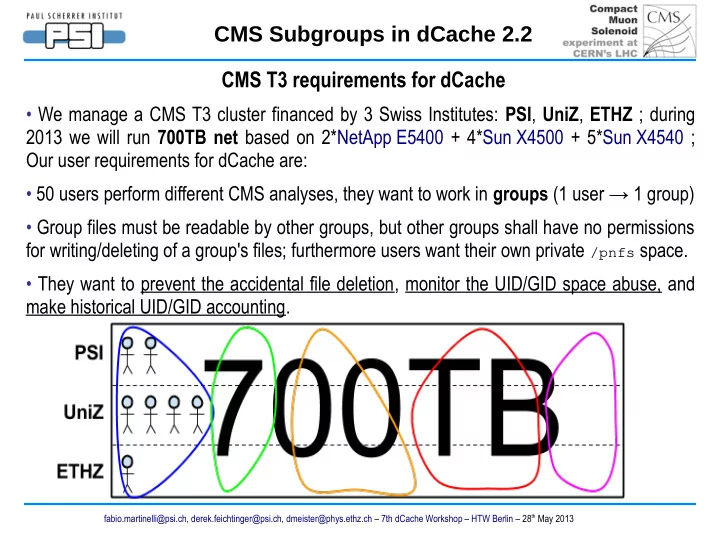
  • We manage a CMS T3 cluster financed by 3 Swiss Institutes: PSI, UniZ, ETHZ ; during

2013 we will run 700TB net based on 2*NetApp E5400 + 4*Sun X4500 + 5*Sun X4540 ; Our user requirements for dCache are:

  • 50 users perform different CMS analyses, they want to work in groups (1 user → 1 group)
  • Group files must be readable by other groups, but other groups shall have no permissions

for writing/deleting of a group's files; furthermore users want their own private /pnfs space.

  • They want to prevent the accidental file deletion, monitor the UID/GID space abuse, and

make historical UID/GID accounting.

slide-2
SLIDE 2

fabio.martinelli@psi.ch, derek.feichtinger@psi.ch, dmeister@phys.ethz.ch – 7th dCache Workshop – HTW Berlin – 28th May 2013

CMS Subgroups in dCache 2.2 How to prevent the accidental deletion?

  • Is the write protection on /pnfs so important ? Yes!
  • Real case, in 2012 a CMS user accidentally deleted 1PB of data from EOSCMS because
  • f a wrong run of a recursive tool + wrong permissions on the dirs.
  • Nowadays uberftp offers the -rm -r option and srmrmdir offers the -recursive option.
  • :-|

From the WLCG Service Report: Accidental deletion on EOSCMS of 1.6M files (1PB) by an (unprivileged) CMS user; Several group-writeable areas deleted, only a minor fraction could be recovered; Permissions tightened, other preventive measures being reviewed. Our sites are not safe just because we use X509s, VOMS proxies or Space Tokens; luckily we can easily profit from a less naive /pnfs permissions assignment.

slide-3
SLIDE 3

fabio.martinelli@psi.ch, derek.feichtinger@psi.ch, dmeister@phys.ethz.ch – 7th dCache Workshop – HTW Berlin – 28th May 2013

CMS Subgroups in dCache 2.2 How to prevent the accidental deletion?

  • Like many WLCG sites we were mapping in gPlazma all the internal and external grid

users as the user cmsuser:cms + phedex:cms; in that way it was impossible to fullfill our requirements.

  • We use LDAP to manage users and groups ( standard /etc/openldap/schema/nis.schema ), with SL5 UIs

and WNs configured to use nss_ldap and SL6 servers to use the new nss-pam-ldapd.

  • We decided to create 10 LDAP secondary groups e.g. psi-bphys, psi-pixel, uniz-

bphys, ethz-higgs, etc. to partition the 50 users + 5 primary groups for the analyses + 1 secondary group cms to aggregate all the users; we also stored all the users' X509 DNs ( by a custom /etc/openldap/schema/local.schema ); so we can now automatically generate by Python both the files grid-vorolemap and storage-authzdb ; storage-authzdb can manage a user that belongs to more than one group:

  • authorize cmsuser read-write UID GID1,GID2,GID3 / / /
  • According to this new LDAP schema a user has a primary group + 2 secondary groups:
  • $ uid=528(martinelli) gid=533(higgs) groups=533(higgs),520(ethz-higgs),500(cms)
slide-4
SLIDE 4

fabio.martinelli@psi.ch, derek.feichtinger@psi.ch, dmeister@phys.ethz.ch – 7th dCache Workshop – HTW Berlin – 28th May 2013

CMS Subgroups in dCache 2.2 How to prevent the accidental deletion?

  • storage-authzdb generated by Python from our LDAP + storage-authzdb_template :
  • authorize cmsuserA read-write 4170 533,520,500 / / /
  • authorize cmsuserB read-write 1663 530,510,500 / / /
  • authorize cmsuserC read-write 2282 532,515,500 / / /
  • authorize cmsuser read-write 501 500 / / /
  • To allow to the internal grid users to work in groups we created 10 group dirs mode 775
  • wned by root; srmcp will write there new files with mode 664; srmmkdir will create new

dirs with mode 775; only the group members can alter their group dir content, but not the dir itself; both external ( user cmsuser ) and internal grid users can read all the /pnfs space.

  • # ls -l /pnfs/psi.ch/cms/trivcat/store/t3groups
  • drwxrwxr-x 2 root bphys 512 May 13 15:08 bphys
  • drwxrwxr-x 2 root pixel 512 May 13 15:08 pixel
  • drwxrwxr-x 2 root higgs 512 May 13 15:08 higgs
slide-5
SLIDE 5

fabio.martinelli@psi.ch, derek.feichtinger@psi.ch, dmeister@phys.ethz.ch – 7th dCache Workshop – HTW Berlin – 28th May 2013

CMS Subgroups in dCache 2.2 How to prevent the accidental deletion?

  • The users can get protected their private CMS /pnfs home, both ownership and modes:
  • # ls -l /pnfs/psi.ch/cms/trivcat/store/user
  • drwxr-xr-x 2 cmsuserA bphys 512 Feb 21 11:04 cmsuserA
  • drwxr-xr-x 2 cmsuserB ewk 512 Jan 24 15:53 cmsuserB
  • drwxr-xr-x 18 cmsuserC bphys 512 Jan 5 2010 cmsuserC
  • Before all the CMS /pnfs homes were assigned to the user cmsuser, while now a user

different from cmsuserA will get this error:

  • $ srmrm srm://SE/pnfs/psi.ch/cms/trivcat/store/user/cmsuserA/dir/file
  • Return code: SRM_FAILURE
  • Explanation: problem with one or more files:
  • Permission denied
  • file#0 : srm://SE/pnfs/psi.ch/cms/trivcat/store/user/cmsuserA/dir/file,

SRM_AUTHORIZATION_FAILURE, "Permission denied"

slide-6
SLIDE 6

fabio.martinelli@psi.ch, derek.feichtinger@psi.ch, dmeister@phys.ethz.ch – 7th dCache Workshop – HTW Berlin – 28th May 2013

CMS Subgroups in dCache 2.2 How to monitor the UID/GID space abuse?

  • For us it's important to monitor the group space usage to avoid GIDs that consume too

much, so we check the files that belong to a specific GID, wherever they are in /pnfs

  • Can we use the Explicit, or Implicit, Space Tokens provided by dCache to check the space

abuse? We did not manage to do that for several reasons:

  • Our quota concept is more a soft quota than an hard quota, we don't want to stop the

writes but be aware that a GID is using too much and take actions.

  • How to consolidate previously stored /pnfs user files into a new group Space Token ?
  • We can't have the users' x509 DNs listed in LinkGroupAuthorization.conf, only VOs

like /cms and its related VO roles.

  • Generally speaking Space Tokens are intended to manage VOs, not local VO subgroups.
slide-7
SLIDE 7

fabio.martinelli@psi.ch, derek.feichtinger@psi.ch, dmeister@phys.ethz.ch – 7th dCache Workshop – HTW Berlin – 28th May 2013

CMS Subgroups in dCache 2.2 How to monitor the UID/GID space abuse?

  • So we introduced our group quota model + a related Nagios check:
  • quota(group)=[TOTAL*(1-PHEDEX-GROUP-SYSTEM)*ACTIVE_USERS(group) / ACTIVE_USERS_TOT] + GROUP_SPECIAL(group)
  • TOTAL = 700TB net for us.
  • PHEDEX = fraction of dCache reserved for CMS PhEDEx datasets e.g. 0.5.
  • GROUP = the fraction of space reserved for special allocations to groups, e.g. 0.1
  • SYSTEM = the fraction of free space the system needs to function properly, e.g. 0.01.
  • ACTIVE_USERS(group) = the number of active users ( ! /sbin/nologin ) in that group.
  • ACTIVE_USERS_TOT = the total number of active users ( ! /sbin/nologin ).
  • GROUP_SPECIAL(group) = a special additional quota assigned to a given group.
  • For example: quota(533) = 45TB, quota(530) = 32TB, quota(532) = 18TB, …
  • Nagios will run a check that consult both LDAP and Chimera to verify:
  • usage( /pnfs, group ) > quota( group ) ? YES → e-mail to the group leader
slide-8
SLIDE 8

fabio.martinelli@psi.ch, derek.feichtinger@psi.ch, dmeister@phys.ethz.ch – 7th dCache Workshop – HTW Berlin – 28th May 2013

CMS Subgroups in dCache 2.2 How to monitor the UID/GID space abuse?

  • To identify the group big dirs the group leader could use the /pnfs views, functions and

CLI that we created inside Postgresql:

  • Please consult the following link for the details:
  • http://trac.dcache.org/wiki/contributed/NagiosCheckBigDirs
  • An example of SQL run:
  • # time psql -U nagios -d chimera --command="select * from v_pnfs_du_cmsusers;"
  • pnfs_dir_du
  • 274 <-- = du -s /pnfs/psi.ch/cms/trivcat/store/user = 274 TB
  • real

2m19.576s

slide-9
SLIDE 9

fabio.martinelli@psi.ch, derek.feichtinger@psi.ch, dmeister@phys.ethz.ch – 7th dCache Workshop – HTW Berlin – 28th May 2013

CMS Subgroups in dCache 2.2 How to create an historical UID/GID /pnfs accounting?

  • For us the /pnfs files with group cms are PhEDEx files or general interest files.
  • Because in Chimera the files are now assigned to the 5 primary groups or to the

secondary group cms it's enough to run a SELECT(group) vs Chimera to get the actual

/pnfs space usage by that group.

  • To store and plot an historical evolution of the /pnfs group usage our Nagios quota check

returns the /pnfs group usage also as performances data:

  • # /opt/nagios/check_quota_pnfs_gid.py -H t3ldap -g 532

Group 532 /pnfs usage = 29.0TB < 44.7TB = quota(532)|pnfs_usage_gid_532=29.0TB;44.7;;;;

  • The PNP4Nagios plugin will store the performances data as .rrd files and plot them.
  • Or we could create a table inside the dCache DBs to store these values.
slide-10
SLIDE 10

fabio.martinelli@psi.ch, derek.feichtinger@psi.ch, dmeister@phys.ethz.ch – 7th dCache Workshop – HTW Berlin – 28th May 2013

CMS Subgroups in dCache 2.2 Conclusions

  • For our CMS T3 having few cmsuserX + one primary group cms doesn't model our

complex community so we mapped local grid users as LDAP users and introduced 5 primary groups + 10 secondary groups + one secondary group cms ; this setup avoids the accidental deletion, allows us to create a group quota system based on active users that we check by Nagios and plot by PNP4Nagios.

  • dCache could add a similar /pnfs UID/GID accounting table ( Billing DB ? ).
  • If you're interested to replicate the setup just contact us, basically you can recycle all the

Python logics and the Nagios check once you have a similar LDAP system at your site.