Chapter 7, Object design is the process of adding details to the - - PDF document

chapter 7
SMART_READER_LITE
LIVE PREVIEW

Chapter 7, Object design is the process of adding details to the - - PDF document

Object Design Chapter 7, Object design is the process of adding details to the


slide-1
SLIDE 1

1

15-ObjectDesign 1

Chapter 7,

Object Design

2 15-ObjectDesign

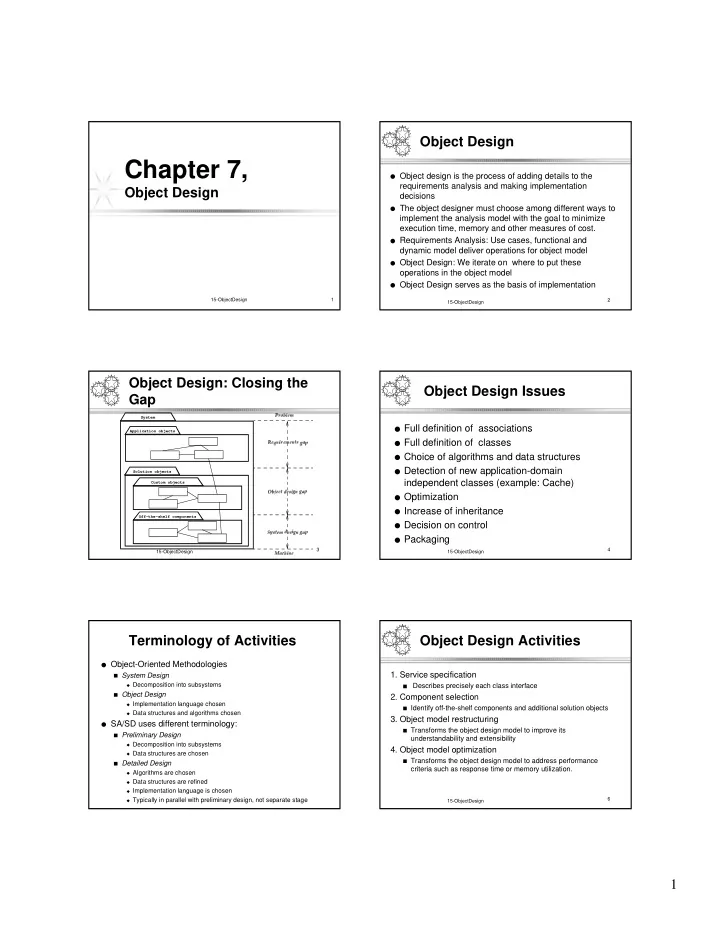
Object Design

  • Object design is the process of adding details to the

requirements analysis and making implementation decisions

  • The object designer must choose among different ways to

implement the analysis model with the goal to minimize execution time, memory and other measures of cost.

  • Requirements Analysis: Use cases, functional and

dynamic model deliver operations for object model

  • Object Design: We iterate on where to put these
  • perations in the object model
  • Object Design serves as the basis of implementation

3 15-ObjectDesign

Object Design: Closing the Gap

Custom objects Application objects Off-the-shelf components Solution objects System

✂✁ ✄ ☎✝✆ ✞ ✟ ✠☛✡ ☞ ✌ ✍ ✎✝✞ ✏ ✑✓✒ ✔ ✞ ✟✖✕✝✞ ✒ ✍ ✗✝✎✘✗✙✡ ✚ ✛ ☎ ✜ ✞ ☞ ✔ ✕ ✞ ✒ ✍ ✗✝✎✘✗✙✡ ✚ ✢✘✞ ✣ ✤ ✍ ✁ ✞ ✟✥✞ ✎ ✔ ✒ ✗✓✡ ✚

4 15-ObjectDesign

Object Design Issues

  • Full definition of associations
  • Full definition of classes
  • Choice of algorithms and data structures
  • Detection of new application-domain

independent classes (example: Cache)

  • Optimization
  • Increase of inheritance
  • Decision on control
  • Packaging

Terminology of Activities

  • Object-Oriented Methodologies

■ System Design

◆ Decomposition into subsystems

■ Object Design

◆ Implementation language chosen ◆ Data structures and algorithms chosen

  • SA/SD uses different terminology:

■ Preliminary Design

◆ Decomposition into subsystems ◆ Data structures are chosen

■ Detailed Design

◆ Algorithms are chosen ◆ Data structures are refined ◆ Implementation language is chosen ◆ Typically in parallel with preliminary design, not separate stage

6 15-ObjectDesign

Object Design Activities

  • 1. Service specification

■ Describes precisely each class interface

  • 2. Component selection

■ Identify off-the-shelf components and additional solution objects

  • 3. Object model restructuring

■ Transforms the object design model to improve its

understandability and extensibility

  • 4. Object model optimization

■ Transforms the object design model to address performance

criteria such as response time or memory utilization.

slide-2
SLIDE 2

2

7 15-ObjectDesign

Service Specification

  • Requirements analysis

■ Identifies attributes and operations without specifying

their types or their parameters.

  • Object design

■ Add visibility information ■ Add type signature information ■ Add contracts

8 15-ObjectDesign

Add Visibility

UML defines three levels of visibility:

  • Private:

■ A private attribute can be accessed only by the class in which it is

defined.

■ A private operation can be invoked only by the class in which it is

defined.

■ Private attributes and operations cannot be accessed by

subclasses or other classes.

  • Protected:

■ A protected attribute or operation can be accessed by the class in

which it is defined and on any descendent of the class.

  • Public:

■ A public attribute or operation can be accessed by any class. 9 15-ObjectDesign

Information Hiding Heuristics

  • Build firewalls around classes

■ Carefully define public interfaces for classes as well as

subsystems

  • Apply “Need to know” principle. The fewer an
  • peration knows

■ the less likely it will be affected by any changes ■ the easier the class can be changed

  • Trade-off

■ Information hiding vs efficiency

10 15-ObjectDesign

Information Hiding Design Principles

  • Only the operations of a class are allowed to manipulate

its attributes

■ Access attributes only via operations.

  • Hide external objects at subsystem boundary

■ Define abstract class interfaces which mediate between system

and external world as well as between subsystems

  • Do not apply an operation to the result of another
  • peration.

■ Write a new operation that combines the two operations. 11 15-ObjectDesign

Add Type Signature Information

Hashtable +put(key:Object,entry:Object) +get(key:Object):Object +remove(key:Object) +containsKey(key:Object):boolean +size():int

  • numElements:int

Hashtable +put() +get() +remove() +containsKey() +size()

  • numElements:int

12 15-ObjectDesign

Contracts

  • Contracts on a class enable caller and callee to share the

same assumptions about the class.

  • Contracts include three types of constraints:

■ Invariant: A predicate that is always true for all instances of a

  • class. Invariants are constraints associated with classes or
  • interfaces. Invariants are used to specify consistency constraints

among class attributes.

■ Precondition: A predicate that must be true before an operation is

  • invoked. Preconditions are associated with a specific operation.

Preconditions are used to specify constraints that a caller must meet before calling an operation.

■ Postcondition: A predicate that must be true after an operation is

  • invoked. Postconditions are associated with a specific operation.

Postconditions are used to specify constraints that the object must ensure after the invocation of the operation.

slide-3
SLIDE 3

3

13 15-ObjectDesign

Expressing constraints in UML

  • OCL (Object Constraint Language)

■ OCL allows constraints to be formally specified on single model

elements or groups of model elements

■ A constraint is expressed as an OCL expression returning the value true

  • r false. OCL is not a procedural language (cannot constrain control

flow).

  • OCL expressions for Hashtable operation put():

■ Invariant:

◆ context Hashtable inv: numElements >= 0

■ Precondition:

◆ context Hashtable::put(key, entry) pre:!containsKey(key)

■ Post-condition:

◆ context Hashtable::put(key, entry) post: containsKey(key) and get(key) =

entry OCL expression

Context is a class

  • peration

14 15-ObjectDesign

Expressing Constraints in UML

  • A constraint can also be depicted as a note

attached to the constrained UML element by a dependency relationship.

HashTable put(key,entry:Object) get(key):Object remove(key:Object) containsKey(key:Object):boolean <<invariant>> numElements >= 0 <<precondition>> !containsKey(key) <<precondition>> containsKey(key) <<precondition>> containsKey(key) <<postcondition>> get(key) == entry <<postcondition>> !containsKey(key) size():int numElements:int 15 15-ObjectDesign

Object Design Areas

  • 1. Service specification

■ Describes precisely each class interface

  • 2. Component selection

■ Identify off-the-shelf components and additional solution objects

  • 3. Object model restructuring

■ Transforms the object design model to improve its

understandability and extensibility

  • 4. Object model optimization

■ Transforms the object design model to address performance

criteria such as response time or memory utilization.

16 15-ObjectDesign

Component Selection

  • Select existing off-the-shelf class libraries,

frameworks or components

  • Adjust the class libraries, framework or

components

■ Change the API if you have the source code. ■ Use the adapter or bridge pattern if you don’t have

access

17 15-ObjectDesign

Reuse...

  • Look for existing classes in class libraries

■ JSAPI, JTAPI, ....

  • Select data structures appropriate to the

algorithms

■ Container classes ■ Arrays, lists, queues, stacks, sets, trees, ...

  • Define new internal classes and operations only if

necessary

■ Complex operations defined in terms of lower-level

  • perations might need new classes and operations

18 15-ObjectDesign

Object Design Areas

  • 1. Service specification

■ Describes precisely each class interface

  • 2. Component selection

■ Identify off-the-shelf components and additional solution objects

  • 3. Object model restructuring

■ Transforms the object design model to improve its

understandability and extensibility

  • 4. Object model optimization

■ Transforms the object design model to address performance

criteria such as response time or memory utilization.

slide-4
SLIDE 4

4

19 15-ObjectDesign

Restructuring Activities

  • Realizing associations
  • Revisiting inheritance to increase reuse
  • Revising inheritance to remove implementation

dependencies

20 15-ObjectDesign

Increase Inheritance

  • Rearrange and adjust classes and operations to

prepare for inheritance

  • Abstract common behavior out of groups of

classes

■ If a set of operations or attributes are repeated in 2

classes the classes might be special instances of a more general class.

  • Be prepared to change a subsystem (collection of

classes) into a superclass in an inheritance hierarchy.

21 15-ObjectDesign

Building a super class from several classes

  • Prepare for inheritance. All operations must have the same signature

but often the signatures do not match:

■ Some operations have fewer arguments than others: Use

  • verloading (Possible in Java)

■ Similar attributes in the classes have different names: Rename

attribute and change all the operations.

■ Operations defined in one class but no in the other: Use virtual

functions and class function overriding.

  • Abstract out the common behavior (set of operations with same

signature) and create a superclass out of it.

  • Superclasses are desirable. They

■ increase modularity, extensibility and reusability ■ improve configuration management 22 15-ObjectDesign

Implement Associations

  • Strategy for implementing associations:

■ Be as uniform as possible ■ Individual decision for each association

  • Example of uniform implementation

■ 1-to-1 association:

◆ Role names are treated like attributes in the classes and

translate to references

■ 1-to-many association:

◆ Translate to Vector

■ Qualified association:

◆ Translate to Hash table 23 15-ObjectDesign

Unidirectional 1-to-1 Association

MapArea ZoomInAction 1 1 MapArea ZoomInAction targetMap:MapArea

✛ ☎ ✜ ✞ ☞ ✔ ✕✝✞ ✒ ✍ ✗✝✎✦✟✧✄ ✕ ✞ ✆✝☎ ✞ ★ ✄ ✁ ✞ ✔ ✁ ✡ ✎ ✒ ★ ✄ ✁ ✟✧✡ ✔ ✍ ✄ ✎ ✛ ☎ ✜ ✞ ☞ ✔ ✕ ✞ ✒ ✍ ✗✝✎✦✟✧✄ ✕ ✞ ✆✝✡ ★ ✔ ✞ ✁ ✔ ✁ ✡ ✎ ✒ ★ ✄ ✁ ✟✧✡ ✔ ✍ ✄ ✎

24 15-ObjectDesign

Bidirectional 1-to-1 Association

MapArea ZoomInAction 1 1 MapArea ZoomInAction

  • targetMap:MapArea
  • zoomIn:ZoomInAction

+getZoomInAction() +setZoomInAction(action) +getTargetMap() +setTargetMap(map)

✩✖✪ ✫✙✬✝✭✝✮✦✯✰✬✝✱✝✲ ✳✥✴☛✵✖✶✰✯✰✬✝✷✸✪✂✬ ✹✙✶✰✺ ✬✻✮ ✺ ✼✰✴✰✱ ✹✙✶✰✺ ✵✖✼✘✮ ✲ ✶✰✴ ✩✖✪ ✫✙✬✝✭✝✮✥✯✰✬✝✱✝✲ ✳✥✴☛✵✖✶✰✯✰✬✝✷✸✼ ✹✙✮ ✬✝✺✥✮ ✺ ✼✰✴✰✱ ✹✙✶✰✺ ✵✖✼✰✮ ✲ ✶✰✴
slide-5
SLIDE 5

5

25 15-ObjectDesign

1-to-Many Association

Layer LayerElement 1 * Layer LayerElement

  • containedIn:Layer
  • layerElements:Set

+elements() +addElement(le) +getLayer() +setLayer(l) +removeElement(le)

Object design model before transformation Object design model after transformation

26 15-ObjectDesign

Qualification

Scenario

  • runs:Hashtable

+elements() +addRun(simname,sr:SimulationRun) +removeRun(simname,sr:SimulationRun) SimulationRun

  • scenarios:Vector

+elements() +addScenario(s:Scenario) +removeScenario(s:Scenario) simname 0..1 * Object design model before transformation Object design model after transformation Scenario SimulationRun 27 15-ObjectDesign

Object Design Areas

  • 1. Service specification

■ Describes precisely each class interface

  • 2. Component selection

■ Identify off-the-shelf components and additional solution objects

  • 3. Object model restructuring

■ Transforms the object design model to improve its

understandability and extensibility

  • 4. Object model optimization

■ Transforms the object design model to address performance

criteria such as response time or memory utilization.

28 15-ObjectDesign

Design Optimizations

  • Design optimizations are an important part of the object

design phase:

■ The requirements analysis model is semantically correct but often

too inefficient if directly implemented.

  • Optimization activities during object design:
  • 1. Add redundant associations to minimize access cost
  • 2. Rearrange computations for greater efficiency
  • 3. Store derived attributes to save computation time
  • As an object designer you must strike a balance between

efficiency and clarity.

■ Optimizations will make your models more obscure 29 15-ObjectDesign

Design Optimization Activities

  • 1. Add redundant associations:

■ What are the most frequent operations? ( Sensor data

lookup?)

■ How often is the operation called? (30 times a month,

every 50 milliseconds)

  • 2. Rearrange execution order

■ Eliminate dead paths as early as possible (Use

knowledge of distributions, frequency of path traversals)

■ Narrow search as soon as possible ■ Check if execution order of loop should be reversed

  • 3. Turn classes into attributes

30 15-ObjectDesign

Implement Application domain classes

  • To collapse or not collapse: Attribute or association?
  • Object design choices:

■ Implement entity as embedded attribute ■ Implement entity as separate class with associations to other

classes

  • Associations are more flexible than attributes but often

introduce unnecessary indirection.

slide-6
SLIDE 6

6

31 15-ObjectDesign

Optimization Activities: Collapsing Objects

Person SocialSecurity ID:String Person SSN:String

32 15-ObjectDesign

To Collapse or not to Collapse?

  • Collapse a class into an attribute if the only
  • perations defined on the attributes are Set() and

Get().

33 15-ObjectDesign

Design Optimizations (continued)

Store derived attributes

■ Example: Define new classes to store information locally (database

cache)

  • Problem with derived attributes:

■ Derived attributes must be updated when base values change. ■ There are 3 ways to deal with the update problem:

◆ Explicit code: Implementor determines affected derived attributes

(push)

◆ Periodic computation: Recompute derived attribute occasionally (pull) ◆ Active value: An attribute can designate set of dependent values

which are automatically updated when active value is changed (notification, data trigger)

34 15-ObjectDesign

Optimization Activities: Delaying Complex Computations

Image filename:String width() height() paint() Image filename:String width() height() paint() RealImage width() height() paint() data:byte[] data:byte[] ImageProxy filename:String width() height() paint() image 1 0..1 35 15-ObjectDesign

Documenting the Object Design: The Object Design Document (ODD)

  • Object design document

■ Same as RAD +... ■ … + additions to object, functional and dynamic models (from solution

domain)

■ … + Navigational map for object model ■ … + Javadoc documentation for all classes

  • ODD Management issues

■ Update the RAD models in the RAD? ■ Should the ODD be a separate document? ■ Who is the target audience for these documents (Customer,

developer?)

■ If time is short: Focus on the Navigational Map and Javadoc

documentation?

  • Example of acceptable ODD:

■ http://macbruegge1.informatik.tu-muenchen.de/james97/index.html 36 15-ObjectDesign

Documenting Object Design: ODD Conventions

  • Each subsystem in a system provides a service (see

Chapter on System Design)

■ Describes the set of operations provided by the subsystem

  • Specifying a service operation as

■ Signature: Name of operation, fully typed parameter list and return

type

■ Abstract: Describes the operation ■ Pre: Precondition for calling the operation ■ Post: Postcondition describing important state after the execution of

the operation

Use JavaDoc for the specification of service operations.

slide-7
SLIDE 7

7

37 15-ObjectDesign

JavaDoc

  • Add documentation comments to the source code.
  • A doc comment consists of characters between /** and */
  • When JavaDoc parses a doc comment, leading *

characters on each line are discarded. First, blanks and tabs preceding the initial * characters are also discarded.

  • Doc comments may include HTML tags
  • Example of a doc comment:

/** * This is a <b> doc </b> comment */

38 15-ObjectDesign

More on Java Doc

  • Doc comments are only recognized when placed

immediately before class, interface, constructor, method or field declarations.

  • When you embed HTML tags within a doc comment, you

should not use heading tags such as <h1> and <h2>, because JavaDoc creates an entire structured document and these structural tags interfere with the formatting of the generated document.

  • Class and Interface Doc Tags
  • Constructor and Method Doc Tags

39 15-ObjectDesign

Class and Interface Doc Tags

@author name-text

■ Creates an “Author” entry.

@version version-text

■ Creates a “Version” entry.

@see classname

■ Creates a hyperlink “See Also classname”

@since since-text

■ Adds a “Since” entry. Usually used to specify that a feature or change

exists since the release number of the software specified in the “since-text”

@deprecated deprecated-text

■ Adds a comment that this method can no longer be used. Convention is to

describe method that serves as replacement

■ Example: @deprecated Replaced by setBounds(int, int, int, int). 40 15-ObjectDesign

Constructor and Method Doc Tags

  • Can contain @see tag, @since tag, @deprecated as

well as: @param parameter-name description

Adds a parameter to the "Parameters" section. The description may be continued on the next line.

@return description

Adds a "Returns" section, which contains the description of the return value.

@exception fully-qualified-class-name description

Adds a "Throws" section, which contains the name of the exception that may be thrown by the method. The exception is linked to its class documentation.

@see classname

Adds a hyperlink "See Also" entry to the method.

41 15-ObjectDesign

Example of a Class Doc Comment

/** * A class representing a window on the screen. * For example: * <pre> * Window win = new Window(parent); * win.show(); * </pre> * * @author Sami Shaio * @version %I%, %G% * @see java.awt.BaseWindow * @see java.awt.Button */ class Window extends BaseWindow { ... }

42 15-ObjectDesign

Example of a Method Doc Comment

/** * Returns the character at the specified index. An index * ranges from <code>0</code> to <code>length() - 1</code>. * * @param index the index of the desired character. * @return the desired character. * @exception StringIndexOutOfRangeException * if the index is not in the range <code>0</code> * to <code>length()-1</code>. * @see java.lang.Character#charValue() */ public char charAt(int index) { ... }

slide-8
SLIDE 8

8

43 15-ObjectDesign

Example of a Field Doc Comment

  • A field comment can contain only the @see,

@since and @deprecated tags

/** * The X-coordinate of the window. * * @see window#1 */ int x = 1263732;

44 15-ObjectDesign

Example: Specifying a Service in Java

/** Office is a physical structure in a building. It is possible to create an instance of a office; add an occupant; get the name and the number of occupants */

public class Office {

/** Adds an occupant to the office */ * @param NAME name is a nonempty string */ public void AddOccupant(string name); /** @Return Returns the name of the office. Requires, that Office has been initialized with a name */ public string GetName();

....

}

45 15-ObjectDesign

Implementation of Application Domain Classes

  • New objects are often needed during object design:

■ Use of Design patterns lead to new classes ■ The implementation of algorithms may necessitate objects to hold

values

■ New low-level operations may be needed during the

decomposition of high-level operations

  • Example: The EraseArea() operation offered by a drawing

program.

■ Conceptually very simple ■ Implementation

◆ Area represented by pixels ◆ Repair () cleans up objects partially covered by the erased area ◆ Redraw() draws objects uncovered by the erasure ◆ Draw() erases pixels in background color not covered by other objects

46 15-ObjectDesign

Application Domain vs Solution Domain Objects

Incident Report Requirements Analysis (Language of Application Domain) Incident Report Object Design (Language of Solution Domain) Text box Menu Scrollbar

47 15-ObjectDesign

Package it all up

  • Pack up design into discrete physical units that can be

edited, compiled, linked, reused

  • Construct physical modules

■ Ideally use one package for each subsystem ■ System decomposition might not be good for implementation.

  • Two design principles for packaging

■ Minimize coupling:

◆ Classes in client-supplier relationships are usually loosely coupled ◆ Large number of parameters in some methods mean strong

coupling (> 4-5)

◆ Avoid global data

■ Maximize cohesiveness:

◆ Classes closely connected by associations => same package

48 15-ObjectDesign

Packaging Heuristics

  • Each subsystem service is made available by one or

more interface objects within the package

  • Start with one interface object for each subsystem service

■ Try to limit the number of interface operations (7+-2)

  • If the subsystem service has too many operations,

reconsider the number of interface objects

  • If you have too many interface objects, reconsider the

number of subsystems

  • Difference between interface objects and Java interfaces

■ Interface object : Used during requirements analysis, system

design and object design. Denotes a service or API

■ Java interface: Used during implementation in Java (A Java

interface may or may not implement an interface object)

slide-9
SLIDE 9

9

49 15-ObjectDesign

Summary

  • Object design closes the gap between the requirements

and the machine.

  • Object design is the process of adding details to the

requirements analysis and making implementation decisions

  • Object design includes:
  • 1. Service specification
  • 2. Component selection
  • 3. Object model restructuring
  • 4. Object model optimization
  • Object design is documented in the Object Design

Document, which can be generated using tools such as JavaDoc.