B-trees anhtt-fit@mail.hut.edu.vn B tree A B-Tree of order m (the - - PDF document

b trees
SMART_READER_LITE
LIVE PREVIEW

B-trees anhtt-fit@mail.hut.edu.vn B tree A B-Tree of order m (the - - PDF document

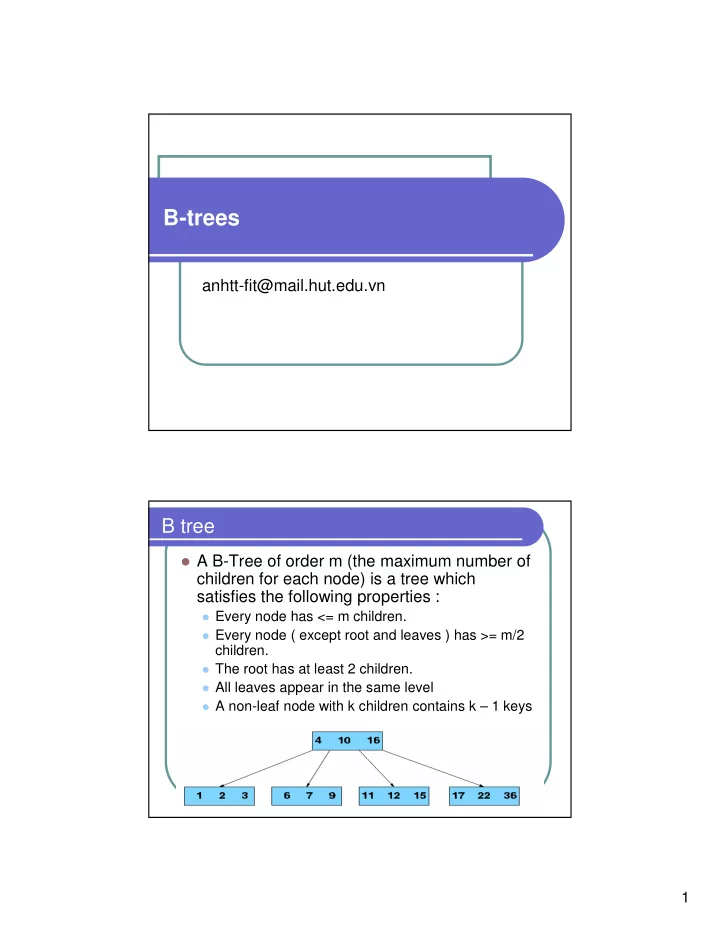
B-trees anhtt-fit@mail.hut.edu.vn B tree A B-Tree of order m (the maximum number of children for each node) is a tree which satisfies the following properties : Every node has <= m children. Every node ( except root and leaves )


slide-1
SLIDE 1

1

B-trees

anhtt-fit@mail.hut.edu.vn

B tree

A B-Tree of order m (the maximum number of

children for each node) is a tree which satisfies the following properties :

Every node has <= m children. Every node ( except root and leaves ) has >= m/2

children.

The root has at least 2 children. All leaves appear in the same level A non-leaf node with k children contains k – 1 keys

slide-2
SLIDE 2

2

B-Tree

Generalizes 2-3-4 trees by allowing up to M links per

node.

Main application: file systems.

Reading a page into memory from disk is expensive. Accessing info on a page in memory is free. Goal: minimize # page accesses. Node size M = page size.

Space-time tradeoff.

M large ! only a few levels in tree. M small ! less wasted space. Number of page accesses is logMN per op. Typical M = 1000, N < 1 trillion.

Example

TELSTRA: customer billing database with 51

billion rows, 4.2 terabytes of data.

Databases cannot be maintained entirely in

memory, b-trees are often used to index the data and to provide fast access.

slide-3
SLIDE 3

3

Search B-Tree in the wild

Red-black trees: widely used as system symbol tables

Java: java.util.TreeMap, java.util.TreeSet. C++ STL: map, multimap, multiset. Linux kernel: linux/rbtree.h.

B-Trees: widely used for file systems and databases

Windows: HPFS. Mac: HFS, HFS+. Linux: ReiserFS, XFS, Ext3FS, JFS. Databases: ORACLE, DB2, INGRES, SQL, PostgreSQL

All nodes in B-Tree are assumed to be stored in

secondary storage (disk) rather than primary storage (memory),

There basic operations for accessing a page: Disk-

Read(), Disk-Write(), Allocate-Node()

slide-4
SLIDE 4

4

B-Tree Library

Software and documentation is accessed at

http://www.hydrus.org.uk/doc/bt/html/index.ht ml

Notes

Initiate the library

#include "btree.h“ int btinit(void);

The B Tree is stored in a UNIX disk file. The

file can contain many B Trees, each of which is referred to by a name assigned by the user (or application).

slide-5
SLIDE 5

5

API

Creating a B Tree File

BTA* btcrt(char* fid, int nkeys, int shared);

Opening a B Tree File

BTA* btopn(char* fid, int mode, int shared);

Closing a B Tree File

int btcls(BTA* btact);

BTA : BT activation context

API (cont.)

Inserting a key and data

int btins(BTA* btact, char* key, char* data, int dsize);

Updating data for an existing key

int btupd(BTA* btact, char* key, char* data, int dsize);

Locating data for an existing key

int btsel(BTA* btact, char* key, char* data, int dsize, int* rsize);

Deleting a key and associated data

int btdel(BTA* btact, char* key);

Locating data for the next key in sequence

int btseln(BTA* btact, char* key, char* data, int dsize, int* rsize);

slide-6
SLIDE 6

6

Building and installing the BT Library

Unpack the tar file into a convenient directory.

$cd <bt library> $make clean $make

Make built an UNIX static library libbt.a, a BT

test harness bt, and a utility, kcp, which performs intelligent copies of BT index files.

Quiz 1

Install and compile BT Library in your machine Run BT test harness to verify if successful

installed

See documentation at

http://www.hydrus.org.uk/doc/bt/html/ch05.htm

slide-7
SLIDE 7

7

Quiz 2

Use the BT library to write a phone book

program that manipulates data on the secondary disk.

Another library for B-Tree

Download at

http://www.mycplus.com/utilitiesdetail.asp?iPro= 10

This library allow specifying different

comparison functions for keys.

slide-8
SLIDE 8

8

Mini project 1

Make a program to manage a computer dictionary

Add/Search/Delete a word (using B-Tree) Auto complete search. Ex. When we enter “comput” and

<tab>, the word “computer” should be auto completed (like Shell)

Suggestion search => Use soundex library

Build two programs using the two BT library

respectively.

Test the performance of the two programs with a dictionary of

millions words (the words can be randomly created)

Test for the two basic operations: search and insert

Project in group of 3-4 persons