3D Modeling Art/Science Collaboration Example title Artists - - PowerPoint PPT Presentation

3d modeling art science collaboration example title
SMART_READER_LITE
LIVE PREVIEW

3D Modeling Art/Science Collaboration Example title Artists - - PowerPoint PPT Presentation

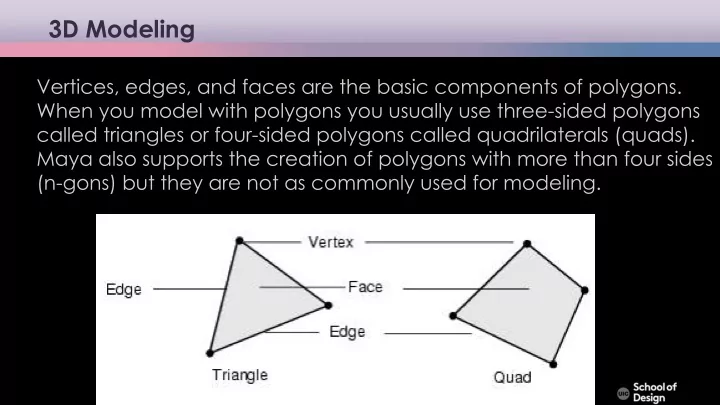
3D Modeling Art/Science Collaboration Example title Artists recommend the following: Vertices, edges, and faces are the basic components of polygons. When you model with polygons you usually use three-sided polygons basic understanding of art


slide-1
SLIDE 1

Artists recommend the following: basic understanding of art history critical theory elements and conventions of media arts programming

  • pen mind

conceptual art design creative processes not everything is quantifiable

Art/Science Collaboration Example title

Computer ¡Science

Vertices, edges, and faces are the basic components of polygons. When you model with polygons you usually use three-sided polygons called triangles or four-sided polygons called quadrilaterals (quads). Maya also supports the creation of polygons with more than four sides (n-gons) but they are not as commonly used for modeling.

3D Modeling

slide-2
SLIDE 2

Artists recommend the following: basic understanding of art history critical theory elements and conventions of media arts programming

  • pen mind

conceptual art design creative processes not everything is quantifiable

Art/Science Collaboration Example title

Computer ¡Science

edges

3D Modeling

slide-3
SLIDE 3

Artists recommend the following: basic understanding of art history critical theory elements and conventions of media arts programming

  • pen mind

conceptual art design creative processes not everything is quantifiable

Art/Science Collaboration Example title

Computer ¡Science

Normals are imaginary lines perpendicular to each point on a curve

  • r surface (NURBs), or to the surface of a polygon (Polygon)

In Maya, normals are used to determine the orientation of a polygon face (face normals), or how the edges of faces will visually appear in relation to each other when shaded (vertex normals). Face normal

Normals

slide-4
SLIDE 4

Artists recommend the following: basic understanding of art history critical theory elements and conventions of media arts programming

  • pen mind

conceptual art design creative processes not everything is quantifiable

Art/Science Collaboration Example title

Computer ¡Science

Vertex normals You can modify the shading of individual polygons by manually editing the vertex normals associated with the polygon mesh. Since they are always perpendicular to the curve or surface, the way normal lines point toward or away from each other can reveal subtle curvature.

Normals

slide-5
SLIDE 5

Artists recommend the following: basic understanding of art history critical theory elements and conventions of media arts programming

  • pen mind

conceptual art design creative processes not everything is quantifiable

Art/Science Collaboration Example title

Computer ¡Science

Creating polygons

  • Using primitives (Create / Polygon Primitives)
  • Creating Polygon from scratch (Mesh Tools / Create Polygon Tool)
slide-6
SLIDE 6

Artists recommend the following: basic understanding of art history critical theory elements and conventions of media arts programming

  • pen mind

conceptual art design creative processes not everything is quantifiable

Art/Science Collaboration Example title

Computer ¡Science

Primitives

slide-7
SLIDE 7

Artists recommend the following: basic understanding of art history critical theory elements and conventions of media arts programming

  • pen mind

conceptual art design creative processes not everything is quantifiable

Art/Science Collaboration Example title

Computer ¡Science

Creating polygons

Smoothing polygons

smoothing ¡polygons

slide-8
SLIDE 8

Artists recommend the following: basic understanding of art history critical theory elements and conventions of media arts programming

  • pen mind

conceptual art design creative processes not everything is quantifiable

Art/Science Collaboration Example title

Computer ¡Science

Creating polygons

Editing in component mode

  • Transform vertices, edges, and faces
  • Extrude faces or edges (Edit Mesh / Extrude)
  • Split faces using snap (Mesh Tools / Multi-Cut)
  • Combine or separate meshes
  • Merge vertices, edges, and faces
  • Delete vertices, edges, and faces
  • Append the deleted faces (Mesh Tools / Append to Polygon)
slide-9
SLIDE 9

Artists recommend the following: basic understanding of art history critical theory elements and conventions of media arts programming

  • pen mind

conceptual art design creative processes not everything is quantifiable

Art/Science Collaboration Example title

Computer ¡Science

3D modeling

Real-time vs recorded Real-time: rendering for interactive media, such as games and simulations, is calculated and displayed immediately. It uses the viewer's PC processor and graphics card to produce individual frames of animation as they are displayed. Non real-time (offline rendering): animations for non-interactive media, such as feature films and video, are rendered much more slowly and presented as video files. Non-real time rendering enables the leveraging of limited processing power in order to obtain higher image quality.

slide-10
SLIDE 10

Artists recommend the following: basic understanding of art history critical theory elements and conventions of media arts programming

  • pen mind

conceptual art design creative processes not everything is quantifiable

Art/Science Collaboration Example title

Computer ¡Science

3D modeling

A screenshot image of Minecraft scene: Stonehenge in Wiltshire, recreated in Minecraft blocks by Ordnance Survey Innovation Lab.

slide-11
SLIDE 11

Artists recommend the following: basic understanding of art history critical theory elements and conventions of media arts programming

  • pen mind

conceptual art design creative processes not everything is quantifiable

Art/Science Collaboration Example title

Computer ¡Science

3D modeling

3D coordinate system The 3D world in computer graphics applications is visualized using a Cartesian coordinate system.

slide-12
SLIDE 12

Artists recommend the following: basic understanding of art history critical theory elements and conventions of media arts programming

  • pen mind

conceptual art design creative processes not everything is quantifiable

Art/Science Collaboration Example title

Computer ¡Science

3D modeling

Navigating display windows View panel change (Space Bar or check the left area layout) : Single View vs. Four View Perspective View + Orthographic View Tumble, Track, Dolly Tool (Alt (option) + Mouse Button (left, middle, right button))

slide-13
SLIDE 13

Artists recommend the following: basic understanding of art history critical theory elements and conventions of media arts programming

  • pen mind

conceptual art design creative processes not everything is quantifiable

Art/Science Collaboration Example title

Computer ¡Science

Hierarchy

View panel Check out objects in the scene. Each modeling object is consisted with transform and shape nodes. You can control their hierarchical relations in these windows: Outliner window Hypergraph window

slide-14
SLIDE 14

Artists recommend the following: basic understanding of art history critical theory elements and conventions of media arts programming

  • pen mind

conceptual art design creative processes not everything is quantifiable

Art/Science Collaboration Example title

Computer ¡Science

Hierarchy

Group vs. parent Toggle on [Outliner/Display/Shapes] to show shape node along with transform node. It is important to understand the relations between a transform node and its manipulator's position as a pivot point, when you move, rotate, and scale an object.

slide-15
SLIDE 15

Artists recommend the following: basic understanding of art history critical theory elements and conventions of media arts programming

  • pen mind

conceptual art design creative processes not everything is quantifiable

Art/Science Collaboration Example title

Computer ¡Science

Hierarchy

Move the pivot point Changing the pivot, which is a center of manipulator insert key, or fn + left arrow key, or d key

slide-16
SLIDE 16

Artists recommend the following: basic understanding of art history critical theory elements and conventions of media arts programming

  • pen mind

conceptual art design creative processes not everything is quantifiable

Art/Science Collaboration Example title

Computer ¡Science

Hierarchy

Move the pivot point Changing the pivot, which is a center of manipulator insert key, or fn + left arrow key, or d key

slide-17
SLIDE 17

Artists recommend the following: basic understanding of art history critical theory elements and conventions of media arts programming

  • pen mind

conceptual art design creative processes not everything is quantifiable

Art/Science Collaboration Example title

Computer ¡Science

3D modeling examples

3D printing of a generative design lamp Image courtesy of Nervous System.

slide-18
SLIDE 18

Artists recommend the following: basic understanding of art history critical theory elements and conventions of media arts programming

  • pen mind

conceptual art design creative processes not everything is quantifiable

Art/Science Collaboration Example title

Computer ¡Science

3D modeling examples

3D printing of a generative design lamp Image courtesy of Nervous System.

slide-19
SLIDE 19

Artists recommend the following: basic understanding of art history critical theory elements and conventions of media arts programming

  • pen mind

conceptual art design creative processes not everything is quantifiable

Art/Science Collaboration Example title

Computer ¡Science

3D modeling examples

Timothy J. Reynolds, Low poly art, AWWWARDS Paper City Vimeo Kenneth A. Huff Meats Meier Game of Thrones intro Official Show Open Art of VFX What software was used to create the intro for Game of Thrones (TV series)? Pixar Animation- Luxo Jr. Timothy j. Reynolds

slide-20
SLIDE 20

Artists recommend the following: basic understanding of art history critical theory elements and conventions of media arts programming

  • pen mind

conceptual art design creative processes not everything is quantifiable

Art/Science Collaboration Example title

Computer ¡Science

cultural heritage art project World Heritage List of UNESCO real-time interactive high-resolution 3D art visualization historical reconstruction of Kizhi advanced concepts in real-time graphics

  • complex illumination with dynamic-irradiance environment mapping
  • shadow mapping
  • complex materials with normal and gloss mapping

Virtual Kizhi

slide-21
SLIDE 21

Artists recommend the following: basic understanding of art history critical theory elements and conventions of media arts programming

  • pen mind

conceptual art design creative processes not everything is quantifiable

Art/Science Collaboration Example title

Computer ¡Science

Virtual Kizhi

slide-22
SLIDE 22

Artists recommend the following: basic understanding of art history critical theory elements and conventions of media arts programming

  • pen mind

conceptual art design creative processes not everything is quantifiable

Art/Science Collaboration Example title

Computer ¡Science

Virtual Kizhi

slide-23
SLIDE 23

Artists recommend the following: basic understanding of art history critical theory elements and conventions of media arts programming

  • pen mind

conceptual art design creative processes not everything is quantifiable

Art/Science Collaboration Example title

Computer ¡Science

Virtual Kizhi

slide-24
SLIDE 24

Artists recommend the following: basic understanding of art history critical theory elements and conventions of media arts programming

  • pen mind

conceptual art design creative processes not everything is quantifiable

Art/Science Collaboration Example title

Computer ¡Science

Virtual Kizhi

slide-25
SLIDE 25

Artists recommend the following: basic understanding of art history critical theory elements and conventions of media arts programming

  • pen mind

conceptual art design creative processes not everything is quantifiable

Art/Science Collaboration Example title

Computer ¡Science

DataVis Workshop EVL

Daria Tsoupikova Associate Professor School of Design Electronic Visualization Lab (EVL)

slide-26
SLIDE 26

Artists recommend the following: basic understanding of art history critical theory elements and conventions of media arts programming

  • pen mind

conceptual art design creative processes not everything is quantifiable

Art/Science Collaboration Example title

Computer ¡Science

DataVis Workshop EVL

Daria Tsoupikova Associate Professor School of Design Electronic Visualization Lab (EVL)

slide-27
SLIDE 27

Artists recommend the following: basic understanding of art history critical theory elements and conventions of media arts programming

  • pen mind

conceptual art design creative processes not everything is quantifiable

Art/Science Collaboration Example title

Computer ¡Science

DataVis Workshop EVL

Daria Tsoupikova Associate Professor School of Design Electronic Visualization Lab (EVL)

slide-28
SLIDE 28

Artists recommend the following: basic understanding of art history critical theory elements and conventions of media arts programming

  • pen mind

conceptual art design creative processes not everything is quantifiable

Art/Science Collaboration Example title

Computer ¡Science

DataVis Workshop EVL

Daria Tsoupikova Associate Professor School of Design Electronic Visualization Lab (EVL)

slide-29
SLIDE 29

Artists recommend the following: basic understanding of art history critical theory elements and conventions of media arts programming

  • pen mind

conceptual art design creative processes not everything is quantifiable

Art/Science Collaboration Example title

Computer ¡Science

DataVis Workshop EVL

Daria Tsoupikova Associate Professor School of Design Electronic Visualization Lab (EVL)

slide-30
SLIDE 30

Artists recommend the following: basic understanding of art history critical theory elements and conventions of media arts programming

  • pen mind

conceptual art design creative processes not everything is quantifiable

Art/Science Collaboration Example title

Computer ¡Science

DataVis Workshop EVL

Daria Tsoupikova Associate Professor School of Design Electronic Visualization Lab (EVL)

A high-resolution interactive 3D visualization developed in 3D modeling software displayed in real-time global-scale data visualization renderer