3/13/2012 Shapes, Inc. Modeling the Shapes, Inc. Business We have - - PDF document

3 13 2012
SMART_READER_LITE
LIVE PREVIEW

3/13/2012 Shapes, Inc. Modeling the Shapes, Inc. Business We have - - PDF document

3/13/2012 Shapes, Inc. Modeling the Shapes, Inc. Business We have been hired to model the business objects of Shapes, Inc. Following are their requirements. Shape 1. All Shapes have an (x, y) position marking the Shape center 2. All Shapes


slide-1
SLIDE 1

3/13/2012 1

Shapes, Inc.

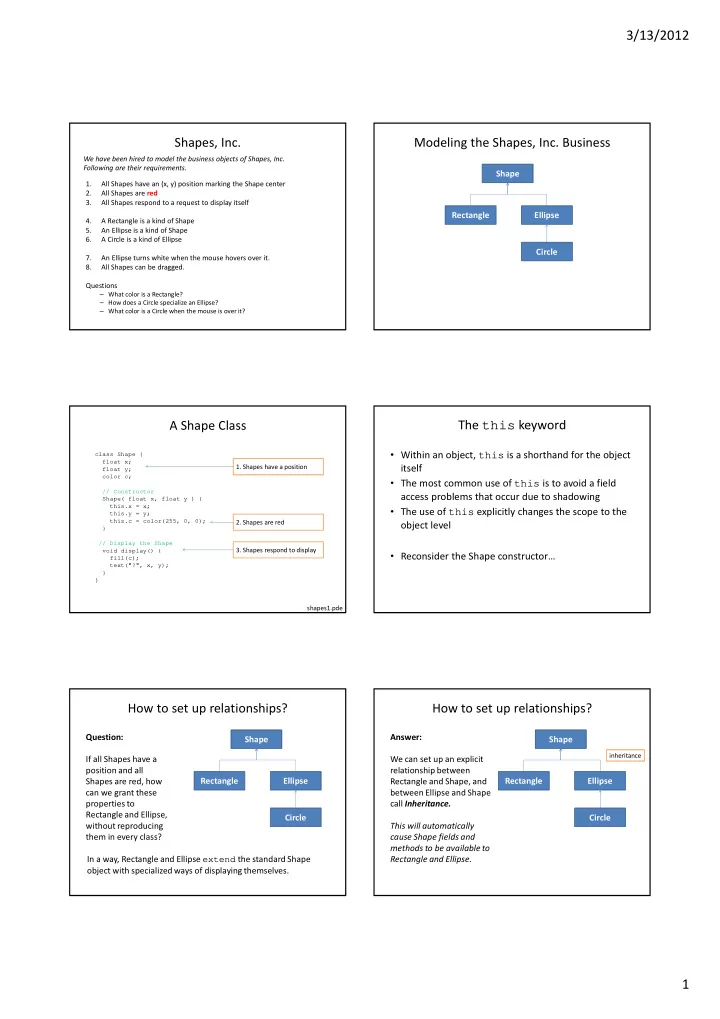
1. All Shapes have an (x, y) position marking the Shape center 2. All Shapes are red 3. All Shapes respond to a request to display itself 4. A Rectangle is a kind of Shape 5. An Ellipse is a kind of Shape 6. A Circle is a kind of Ellipse 7. An Ellipse turns white when the mouse hovers over it. 8. All Shapes can be dragged. Questions

– What color is a Rectangle? – How does a Circle specialize an Ellipse? – What color is a Circle when the mouse is over it?

We have been hired to model the business objects of Shapes, Inc. Following are their requirements.

Modeling the Shapes, Inc. Business

Shape Rectangle Ellipse Circle

A Shape Class

class Shape { float x; float y; color c; // Constructor Shape( float x, float y ) { this.x = x; this.y = y; this.c = color(255, 0, 0); } // Display the Shape void display() { fill(c); text("?", x, y); } }

  • 1. Shapes have a position
  • 2. Shapes are red
  • 3. Shapes respond to display

shapes1.pde

The this keyword

  • Within an object, this is a shorthand for the object

itself

  • The most common use of this is to avoid a field

access problems that occur due to shadowing

  • The use of this explicitly changes the scope to the
  • bject level
  • Reconsider the Shape constructor…

How to set up relationships?

Shape Rectangle Ellipse Circle Question: If all Shapes have a position and all Shapes are red, how can we grant these properties to Rectangle and Ellipse, without reproducing them in every class? In a way, Rectangle and Ellipse extend the standard Shape

  • bject with specialized ways of displaying themselves.

How to set up relationships?

Shape Rectangle Ellipse Circle Answer: We can set up an explicit relationship between Rectangle and Shape, and between Ellipse and Shape call Inheritance. This will automatically cause Shape fields and methods to be available to Rectangle and Ellipse.

inheritance

slide-2
SLIDE 2

3/13/2012 2

Inheritance – Some Terminology

  • A new class (subclass) can be declared to extend the

behavior of an existing class (superclass)

– A subclass is aka: derived class, child class, … – A superclass is aka: base class, parent class,

  • A subclass automatically gets access to (i.e. inherits)

all members of the superclass

– Members include both fields and methods

  • A subclass can override the members of its

superclass by re-declaring them

– Think of variable shadowing, but now for methods too

shapes2.pde

class Rectangle extends Shape { float w; float h; Rectangle( float x, float y, float w, float h) { super(x, y); this.w = w; this.h = h; } // Display the Ellipse void display() { fill(c); rect(x, y, w, h); } }

sets up the inheritance relationship adds two new fields, width and height invokes the superclass constructor

  • verrides the Shape display() method

Where does a Rectangle find x and y?

The super keyword

  • Within an object, super is a shorthand for the

superclass of the current object

  • The most common use of super is to invoke a

superclass constructor

  • The use of super explicitly changes the scope to the

superclass level

void setup() { size(500, 500); Shape s = new Shape(100, 100); Rectangle r = new Rectangle (100, 200, 60, 50); s.display(); r.display(); }

Test it

shapes2.pde Note: The Rectangle knows where to draw itself, even though it does not have an x or y field. It inherits x and y from Shape.

The Ellipse Class

class Ellipse extends Shape { float w; float h; Ellipse( float x, float y, float w, float h) { super(x, y); this.w = w; this.h = h; } // Display the Ellipse void display() { fill(c); ellipse(x, y, w, h); } }

shapes3.pde

void setup() { size(500, 500); smooth(); ellipseMode(CENTER); rectMode(CENTER); Shape s = new Shape(100, 100); Rectangle r = new Rectangle (100, 200, 60, 50); Ellipse e = new Ellipse(200, 100, 70, 30); s.display(); r.display(); e.display(); }

Test it

shapes3.pde

slide-3
SLIDE 3

3/13/2012 3

Inheritance, Cont’d

  • Inheritance

hierarchies can be used to establish multiple layers of

  • bjects

Shape Rectangle Ellipse Circle

inheritance

The Circle Class

class Circle extends Ellipse { float r; Circle( float x, float y, float r ) { super(x, y, 2*r, 2*r); this.r = r; } }

adds only a radius field translates radius to Ellipse constructor width and height arguments shapes4.pde

void setup() { size(500, 500); smooth(); ellipseMode(CENTER); rectMode(CENTER); Shape s = new Shape(100, 100); Rectangle r = new Rectangle(100, 200, 60, 50); Ellipse e = new Ellipse(200, 100, 70, 30); Circle c = new Circle(200, 200, 25); s.display(); r.display(); e.display(); c.display(); }

Test it

shapes4.pde

Polymorphism

poly = many, morph = form

http://en.wikipedia.org/wiki/Polymorphism_%28biology%29

In Biology, when there is more than one form in a single population In Computing, we have two common types of Polymorphism

  • 1. Signature Polymorphism
  • 2. Subtype Polymorphism

Signature Polymorphism

  • It is possible to define multiple functions with

the same name, but different signatures.

– A function signature is defined as

  • The function name, and
  • The order and type of its parameters
  • Consider the built-in color() function …

color(gray) color(gray, alpha) color(value1, value2, value3) color(value1, value2, value3, alpha) …

Signature Polymorphism

void draw() { } void mousePressed() { int i; i = 10; i = increment(i, 2); //i = increment(i); println(i); } // increment a variable int increment(int j, int delta) { j = j + delta; return j; } int increment(int k) { k = increment(k, 1); return k; }

In this case it is said that the increment function is

  • verloaded
slide-4
SLIDE 4

3/13/2012 4

Subtype Polymorphism

  • Inheritance implements Subtype Polymorphism

– A Rectangle is a type of Shape – An Ellipse is a type of Shape – A Circle is a type of Ellipse

  • Implication:

– A Rectangle can be stored in a variable of type Shape – What about Ellipses, Circles?

Using Subtype Polymorphism

Shape[] shapes = new Shape[3]; void setup() { size(500, 500); smooth(); ellipseMode(CENTER); rectMode(CENTER); shapes[0] = new Rectangle(100, 200, 60, 50); shapes[1] = new Ellipse(200, 100, 70, 30); shapes[2] = new Circle(200, 200, 25); for (int i=0; i<shapes.length; i++) { shapes[i].display(); } }

Store everything that is a type of Shape in an array

  • f Shapes.

shapes5.pde an array of Shapes all objects that are Shape subclasses can be stored in the array, even Circle now we can use a loop

containsPoint()

  • Let’s give each shape a containsPoint()

method that returns a boolean

– Returns true if the shape contains a given point – Returns false otherwise

  • Each subclass must implement a different

version of containsPoint() because each uses a different calculation.

containsPoint() for Shape

– By default, the abstract Shape object cannot determine if it contains a point – Always return false

class Shape { … // Test if a point is within a Shape boolean containsPoint( float x, float y ) { return false; } } shapes6.pde

containsPoint() for Rectangle

– Test the location of the point wrt the locations of Rectangle sides

class Rectangle extends Shape { … // containsPoint() for Rectangle boolean containsPoint( float x, float y ) { float w2 = 0.5*w; float h2 = 0.5*h; if (x < this.x-w2) { return false; } if (x > this.x+w2) { return false; } if (y < this.y-h2) { return false; } if (y > this.y+h2) { return false; } return true; } } shapes6.pde

containsPoint() for Ellipse

– Use a special formula to determine if a point is in an Ellipse

class Ellipse extends Shape { … // containsPoint() for an Ellipse boolean containsPoint( float x, float y ) { float dx = x - this.x; float dy = y - this.y; float hw = 0.5*w; float hh = 0.5*h; if ( (dx*dx)/(hw*hw) + (dy*dy)/(hh*hh) < 1.0 ) { return true; } else { return false; } } } shapes6.pde

slide-5
SLIDE 5

3/13/2012 5

containsPoint() for Circle

– Test the distance between the point and the Circle center to see if it is less than the radius

class Circle extends Ellipse { … // containsPoint() for a Circle boolean containsPoint( float x, float y ) { if ( dist(this.x, this.y, x, y) < r ) { return true; } else { return false; } } } shapes6.pde

All Subclasses Get New Superclass Methods

  • Add a method to Shape that changes the fill color

to white when the mouse is over the Shape

  • Use containsPoint() to test this condition
  • Plan
  • 1. Move the display() loop from setup() to draw()
  • 2. Add a mouseMoved() method to Shape that changes

fill color based on containsPoint()

  • 3. Call all Shape class mouseMoved() methods from

top-level mouseMoved().

New Top-level Program

Shape[] shapes = new Shape[3]; void setup() { size(500, 500); smooth(); ellipseMode(CENTER); rectMode(CENTER); shapes[0] = new Rectangle (100, 200, 60, 50); shapes[1] = new Ellipse(200, 100, 70, 30); shapes[2] = new Circle(200, 200, 25); } void draw() { background(200); for (int i=0; i<shapes.length; i++) { shapes[i].display(); } } void mouseMoved() { for (int i=0; i<shapes.length; i++) { shapes[i].mouseMoved(); } }

display loop moved to draw() mouseMoved() called for all Shapes shapes6.pde

mouseMoved() method for Shape

class Shape { … void mouseMoved() { if ( containsPoint( mouseX, mouseY ) == true ) { this.c = color(255); } else { this.c = color(255, 0, 0); } } }

  • Uses containsPoint() to decide how to change fill color
  • Note: The appropriate subclass implementation of

containsPoint() will be invoked, depending upon the type

  • f Shape subclass on which the method is invoke upon

This is declared in the Shape class, but … … this is invoked on the subclass that overrides it. shapes6.pde

Test it

shapes6.pde

  • But wait, only Ellipse objects are supposed to

turn white on mouse over, not Rectangles

  • Overriding a method can also be used to cancel

default behavior.

  • Add the following method to Rectangle to
  • verride the Shape class mouseMoved() to

replace behavior

void mouseMoved() { // Do nothing } shapes6.pde

slide-6
SLIDE 6

3/13/2012 6

Dragging Shapes

Shape dragged = null; // The Shape being dragged float offsetX = 0.0; // The offset between the Shape float offsetY = 0.0; // center and mouse position. void mousePressed() { // If pressed on Shape, save Shape and offset for (int i=0; i<shapes.length; i++) { if (shapes[i].containsPoint( mouseX, mouseY )) { dragged = shapes[i];

  • ffsetX = shapes[i].x - mouseX;
  • ffsetY = shapes[i].y - mouseY;

return; } } } void mouseReleased() { // Cancel all dragging on release dragged = null; } void mouseDragged() { // If dragging, move Shape on drag if (dragged == null) return; dragged.x = mouseX + offsetX; dragged.y = mouseY + offsetY; }

With only the following additions to the program, it is possible to implement interactive Shape dragging, for ALL Shape subclasses. The power of inheritance…

Summary

– Inheritance

  • A relationship established between two classes
  • Fields and methods of the superclass become available

to all subclass by default

  • Subclasses can replace (override) superclass members

(fields and methods) by declaring new versions

  • Inheritance implements the concept of subtype

polymorphism

– Objects of a subclass type can be assigned to variables declared as one of its superclass types

– Keywords

  • extends, this, super