1 Waterfall Model Waterfall Model Description of complete system. - - PowerPoint PPT Presentation

1
SMART_READER_LITE
LIVE PREVIEW

1 Waterfall Model Waterfall Model Description of complete system. - - PowerPoint PPT Presentation

Next Topic: Software Process Examples of Software Processes To manage complexity of software, we require a Waterfall process process that codifies the activities of software Incremental process design, development and validation


slide-1
SLIDE 1

1

CISC 323, winter 2003, software process 1

Next Topic: Software Process

To manage complexity of software, we require a process that codifies the activities of software design, development and validation There are many processes. Which one is correct depends on the desired quality attributes of the system under construction. Process model: describes process Reading:

  • Bahrami Chapter 3
  • Custom Courseware: Microsoft paper

(Cusumano & Selby)

CISC 323, winter 2003, software process 2

Examples of Software Processes

Waterfall process Incremental process

  • Microsoft

…There are many more!

CISC 323, winter 2003, software process 3

Ad Hoc Process

analysis ---> code --> test --> code --> test … may work for small program, one programmer for larger systems, doomed to failure

CISC 323, winter 2003, software process 4

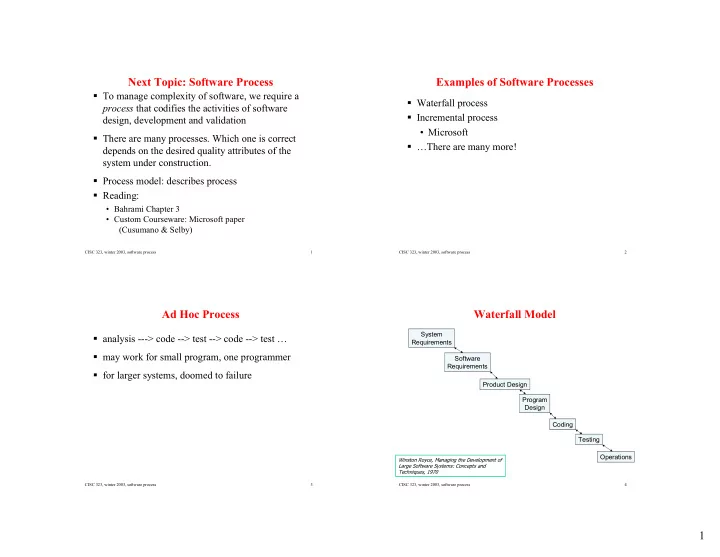
Waterfall Model

System Requirements Software Requirements Product Design Program Design Coding Testing Operations

Winston Royce, Managing the Development of Large Software Systems: Concepts and Techniques, 1970

slide-2
SLIDE 2

2

CISC 323, winter 2003, software process 5

Waterfall Model

System Requirements Software Requirements Product Design Program Design Coding Testing Operations

  • Description of complete system.
  • Boundaries between hardware

and software components.

  • Example: brakes in a car
  • braking system includes
  • foot pedal
  • brake pads
  • software to control brakes.

CISC 323, winter 2003, software process 6

Waterfall Model

System Requirements Software Requirements Product Design Program Design Coding Testing Operations

Includes: functional requirements E.g., depressing the brake slows the car down

CISC 323, winter 2003, software process 7

Waterfall Model

System Requirements Software Requirements Product Design Program Design Coding Testing Operations Includes: non-functional requirements

  • E.g. performance: brakes must

respond within 100 ms of being activated

  • E.g., availability: if software

fails, brakes must still function manually.

CISC 323, winter 2003, software process 8

Waterfall Model

System Requirements Software Requirements Product Design Program Design Coding Testing Operations

  • Description of functions the

software must fulfill and associated quality attributes.

  • Expressed from point of view of a

user of the system.

  • Does not include implementation

decisions such as algorithms, data structures used to address these requirements.

slide-3
SLIDE 3

3

CISC 323, winter 2003, software process 9

Waterfall Model

System Requirements Software Requirements Product Design Program Design Coding Testing Operations Example: for course marks program, functions are:

  • Student can access system

from any CASLab machine

  • Student can specify course in

which he/she is enrolled and request grades for that course

  • Grades recorded for that

course will be presented to user in a readable format

  • …etc.

CISC 323, winter 2003, software process 10

Waterfall Model

System Requirements Software Requirements External Design Internal Design Coding Testing Operations

  • Describes software design meeting the

requirements specified above.

  • Design is external, from point of view of a

user of the software.

  • Shows how requirements are mapped to

system features.

CISC 323, winter 2003, software process 11

Waterfall Model

System Requirements Software Requirements External Design Internal Design Coding Testing Operations

  • May include:
  • detailed functional design
  • screen mockups
  • interaction design.
  • Does not describe system implementation,

e.g., algorithms, data structures, etc.

CISC 323, winter 2003, software process 12

Waterfall Model

System Requirements Software Requirements External Design Internal Design Coding Testing Operations Describes implementation of software. Includes, e.g.,

  • Deployment architecture
  • Component architecture
  • Component interfaces
  • Data model
  • Protocols (how components

communicate with each other.)

slide-4
SLIDE 4

4

CISC 323, winter 2003, software process 13

Waterfall Model

System Requirements Software Requirements External Design Internal Design Coding Testing Operations Actual programming

  • f software.

CISC 323, winter 2003, software process 14

Waterfall Model

System Requirements Software Requirements External Design Internal Design Coding Testing Operations Ensuring software performs to specification. Addresses both function and quality attributes.

CISC 323, winter 2003, software process 15

Waterfall Model

System Requirements Software Requirements External Design Internal Design Coding Testing Operations Once software has been delivered, revisions will be required to address

  • errors
  • new requirements

This is called software maintenance

CISC 323, winter 2003, software process 16

Bahrami's Simplification

What How Do It Test Use

slide-5
SLIDE 5

5

CISC 323, winter 2003, software process 17

Premise of Waterfall Model

Each step completed successfully provides strong foundation for next step Forces developers to cope with data and control flows, errors, problems earlier in development Each step should be performed by those skilled in those steps Document everything: software requirements, preliminary design, interface design, final design, test plan/test results,

  • perating instructions
  • “To procure 5 million dollars of software, I would

estimate a 1500 page specification is about right.” (Royce)

CISC 323, winter 2003, software process 18

Relative Cost to Fix or Change Software Throughout Lifecycle

20 40 60 80 100 120 140 160 Req Code Accept Test Large Project Small Project

CISC 323, winter 2003, software process 19

Waterfall Model

Emphasis on catching problems early through requirements, design stages

  • Opportunities for validation at every stage
  • Testing, inspection

Clear documentation created in each phase

  • Helpful for coordinating team-work
  • But may create bottlenecks

Works best for well-understood styles of software

  • In poorly understood domains, requirements and design

are heavily influenced by technical feasibility

CISC 323, winter 2003, software process 20

Strengths and Weaknesses of Waterfall Model (1)

Primary function

  • determine order of stages in software development
  • set transition requirements from one stage to another

Waterfall Model

  • document (or task) driven
  • better than ad-hoc process
  • most widely used process model in standards and industry
slide-6
SLIDE 6

6

CISC 323, winter 2003, software process 21

Strengths and Weaknesses of Waterfall Model (2)

weaknesses

  • emphasis on fully elaborated documents before going onto

next stage

  • only works for well defined, mature, predictable types of

software

  • doesn’t work for highly interactive software, new

technology, research

  • real projects rarely follow sequential flow of model

CISC 323, winter 2003, software process 22

Strengths and Weaknesses of Waterfall Model (3)

weaknesses

  • difficult for customer to state all requirements explicitly at

start of project

  • working version of program not available until very late in

project life-span

  • major blunder may not be discovered until very late
  • sequential style leads to bottlenecks and doesn’t lend itself

to parallel activities

CISC 323, winter 2003, software process 23

Software Prototyping

traditional understanding of “prototype”: mock-up of a newly engineered product example: prototype aircraft

  • checking systems, test flights
  • make refinements before going into production
  • have to build nearly whole thing (airframe,

engines, cockpit controls, hydraulics, landing gear, electronics, etc.) before test

CISC 323, winter 2003, software process 24

Software Prototyping

for software, prototype used to

  • try out on customers
  • firm up requirements (picture worth 1000

words)

  • no functions, just skeleton, no special cases
  • at extreme, may appear to work
  • try out possible trouble areas
  • performance; time and resources
  • achievable; new technology
  • investigating different options
slide-7
SLIDE 7

7

CISC 323, winter 2003, software process 25

Key considerations for using Prototypes

  • bjectives for each prototype activity should be clearly

established define the prototype process ahead (prototyping does NOT mean hacking) results from prototyping effort must be documented and analyzed before decision on how to proceed complete one prototype and analyze results before starting next iteration prototype results can be

  • throw-away
  • foundation for enhancement
  • repackaged as product

CISC 323, winter 2003, software process 26

Competing Philosophies on Prototyping (1)

  • throw away prototype
  • help customer identify requirements
  • tools used for prototype not suitable for production
  • quick & dirty prototype
  • used to quickly bring up system, modify until customer

grants approval

  • resulting software difficult to maintain
  • heavily patched and no documentation
  • working version available quickly
  • misused by some software contractors?

CISC 323, winter 2003, software process 27

Competing Philosophies on Prototyping (2)

  • detailed design-driven prototype
  • from engineering: pre-production model
  • model complete and as perfect as possible
  • test-driven by user; could uncover major changes
  • non-functioning mock-ups of proposed user interface
  • can be “wizard-of-oz” set up
  • usually provides visual examples of inputs and outputs

from system processes

  • used to follow flow of tasks
  • sometimes on paper only or on computer screens only
  • examples may be manually prepared by developers
  • no data actually input to computer
  • not results oriented

CISC 323, winter 2003, software process 28

Weaknesses of Prototyping

what do we do with prototype when it has served its purpose? customers see what appears to be a working system

  • usually held together with “chewing gum and baling

wire”

  • customers expects prototype to be delivered system
  • management may collapse to customers demands

developer has made implementation compromises

  • inappropriate O/S or programming language
  • may become an integral part of the system
slide-8
SLIDE 8

8

CISC 323, winter 2003, software process 29

The Incremental Model

combination of waterfall model and prototyping each sequence of the process

  • produces a deliverable “increment” of the software
  • can incorporate the prototyping paradigm

first increment is often the core product

  • basic requirements met
  • supplementary features undelivered

evaluate with user plan for next increment repeat until full product delivered focus on delivery of operational product with each increment

CISC 323, winter 2003, software process 30

Evolutionary Rapid Prototyping

  • “an easily built, readily modifiable, ultimately extensible,

partially specified, working model of primary aspects of a proposed system”

  • primary objective: “provide a cost-effective means of

discovering the true and complete set of system functional requirements that will optimally satisfy the legitimate business needs of the user” not throw-away: evolves into final system not quick-and-dirty: detailed analysis and design take place not mock-up: uses real user data

CISC 323, winter 2003, software process 31

Steps in Evolutionary Rapid Prototyping (1)

  • ***Prototype most important aspects of the system first***
  • ***Have a prototyping process/procedure defined ahead***
  • divide application into well defined pieces
  • pieces that can be developed independently
  • decide order of prototyping different pieces
  • ordering may change as development proceeds
  • plan prototyping activities
  • decide objectives
  • don’t get into endless loop of prototyping

CISC 323, winter 2003, software process 32

Steps in Evolutionary Rapid Prototyping (2)

  • get prototype working
  • evaluate your results
  • show it to someone!
  • keep objectives in mind the whole time
  • make refinements
  • update requirements documentation
  • freeze portion of prototype that’s done
  • move on to next piece to prototype
  • build final product from prototype pieces
  • final product may need some fine tuning to satisfy

product requirements

  • final product must be validated against project

requirements before turning over to user

slide-9
SLIDE 9

9

CISC 323, winter 2003, software process 33

Evolutionary Rapid Prototyping

CISC 323, winter 2003, software process 34

Weakness of Evolutionary Rapid Prototyping

can easily turn into “quick and dirty” non-functional issues such as performance left until last

  • no overall design done to address these

some applications do not lend themselves to rapid prototyping

  • operating systems, telecomm software, real time

systems, dbm systems, scientific research software

  • rapid prototyping focus is on user satisfaction

CISC 323, winter 2003, software process 35

Object-Oriented Systems Development (1)

incremental approach with an emphasis on object-oriented programming driven by use cases all design decisions should stem from user requirements test cases based on user requirements not a complete plan, but a model of the different steps and how they relate to each other

CISC 323, winter 2003, software process 36

Object-Oriented Systems Development (2)

Build a Use-Cases Model Object Analysis Validate/test Analysis Write OO code User satisfaction, usability & QA tests Design classes, define attributes and methods Build object and dynamic model Design and prototype user interface testing: user satisfaction, usability, quality Implementation Design

slide-10
SLIDE 10

10

CISC 323, winter 2003, software process 37

Object-Oriented Analysis

determining system requirements identify users/actors identify use cases: scenarios for actor's use of system identify objects and their interactions

CISC 323, winter 2003, software process 38

Object-Oriented Design

design class structure of code start with classes identified in analysis stage

  • may need more for implementation

determine attributes & methods determine relationships between classes

CISC 323, winter 2003, software process 39

Goal: Reusability

first, look for existing classes that you could use

  • don't waste time re-inventing the wheel

when you build classes, try to design them to be more generally useful, so others can re-use

  • requires much more careful design
  • thinking about how others will use

trade-offs: reusability vs. design & implementation time, sometimes versus efficiency of the code

CISC 323, winter 2003, software process 40

In-Depth Study: The Microsoft Process

First paper in custom courseware (required reading):

  • How Microsoft Builds Software; Cusumano and

Selby, Communications of the ACM, June 1997 condensed from full-length book: MicroSoft Secrets; Cusumano, Selby, Simon & Schuster Inc., 1995

slide-11
SLIDE 11

11

CISC 323, winter 2003, software process 41

Interesting Numbers

Windows 95

  • contains > 11 million lines of code
  • more than 200 programmers & testers
  • management of a project of this size is a major

challenge – in addition to the technical challenges Windows XP

  • contains > 45 million lines of code

CISC 323, winter 2003, software process 42

The Microsoft Triangle

Decision making focuses on following three dimensions of quality in the end product:

  • 1. Functions supported

=> allow for evolving requirements, work from vision statement

  • 2. Time to Market

=> rapid development, daily builds, testing buddies => well established plans and schedules

  • 3. Implementation defects remaining

=> small number of bugs acceptable => heavy reliance on testing, multiple testing strategies, “testing buddies”

CISC 323, winter 2003, software process 43

Background

Microsoft started as small group of "hackers" Old meaning of "hacker": "long-haired, unkempt technical wizards" hacking away at coding. Creative, very good at getting code up and running quickly. As Microsoft grew, needed more structure without stifling creativity and talent Two problems with waterfall model:

  • too rigid when user requirements constantly evolving
  • not enough freedom for creative, talented employees

Dilemma: how to provide maximum freedom for employees without chaos resulting

CISC 323, winter 2003, software process 44

Microsoft's Solution: "Synch-and-Save"

large project groups divided into many small groups each group responsible for subset of features of project groups work fairly independently in parallel, subject to some basic ground rules

Central master copy of project code

private copy

  • f part of

code in use by one team private copy

  • f part of

code in use by another team

check out check in check out check in

slide-12
SLIDE 12

12

CISC 323, winter 2003, software process 45

Daily Build Process (1)

Check Out

  • private copies of source code
  • from centralized master version
  • multiple developers can check out same code at same

time Implement Feature

  • developer implements his/her own changes
  • could take a few hours to several days

Build Private Release

  • developer builds own private copy of the product with

newly implemented features Test Private Release

  • developer tests own copy of product

CISC 323, winter 2003, software process 46

Daily Build Process (2)

Synch Code Changes

  • compare private copies of source files back to master

version

  • other developers may have made changes in the mean

time Merge Code Changes

  • update private copies of source files to include any

changes from other developers Build Private Release

  • developer builds own copy of product with both own

changes and changes of other developers Test Private Release

  • test to make sure newly implemented code still works

with others’ changes

CISC 323, winter 2003, software process 47

Daily Build Process (3)

Execute Quick Test

  • done on private release
  • highly automated
  • makes sure new

changes do not interfere with basic functionality

  • f product
  • does not test new

feature directly

  • e.g., quick test on

EXCEL takes 30 minutes

  • also called smoke test
  • r regression test

Check in

  • developer officially

checks his private copies into the master version

  • has to synch and merge

again in case of further changes

  • if conflicts, may have to

withdraw changes

  • deadline for check in
  • for EXCEL, 2PM

CISC 323, winter 2003, software process 48

Daily Build Process (4)

every day after check-in deadline project's build master generates complete build of product from master version

  • compiles all code in master version to create program
  • called “daily build”
  • after successful build
  • executes series of automated tests
  • assures basic functionality works correctly
  • makes daily build available to all project staff
  • if build is unsuccessful or tests fail:
  • developer who "broke" the build must fix

immediately!

slide-13
SLIDE 13

13

CISC 323, winter 2003, software process 49

Microsoft Process

planning phase: "vision statement", divide project into 3-4 sub-projects

  • first sub-project contains most critical features

development phase: for each sub-project

  • each sub-project fairly stable before moving on

to next stabilization phase: additional testing without adding new features

CISC 323, winter 2003, software process 50

Microsoft Process

Planning (3-12 months) Stabilization (3-8 months) Development (6-12 months) Stabilization (3-8 months) Milestone 0 Subproject 1 Subproject 2 Subproject 3 Feature Complete: All features implemented, some bugs & performance issues may remain Release Code Complete Visual Freeze: no more changes to user interface

CISC 323, winter 2003, software process 51

Microsoft Process

Release Planning (3-12 months) Stabilization (3-8 months) Development (6-12 months) Stabilization (3-8 months) Milestone 0 Subproject 1 Subproject 2 Subproject 3 Code, test,

  • ptimize, stabilize

(6-10 weeks) Integration test, debug (2-5 weeks) Buffer time (2-5 weeks)

CISC 323, winter 2003, software process 52

Planning Phase (3-12 months)

Marketing, "vision statement", design goals Initial specification

  • only preliminary outline
  • 20 to 30% changes from start to end of project
  • project managers keep it up-to-date
  • answers questions such as
  • What is the point of this feature?
  • What does the user want to use this feature for?

Project managers do extensive prototyping

  • with Visual Basic
  • from users viewpoint
slide-14
SLIDE 14

14

CISC 323, winter 2003, software process 53

Development Phase (6-12 months)

3 or 4 major milestone releases

  • pretend these will be shipped

Developers write code Testers write test suites User education staff write draft documentation Developers fix errors continuously as testers find them 1/3 of total development phase is “buffer” time

CISC 323, winter 2003, software process 54

Stabilization Phase (3-8 months)

1/3 of total time in project Extensive testing & debugging No new features “Zero bug release”

  • no more high-severity bugs have been found
  • decision to postpone fixing all remaining bugs until next

release

CISC 323, winter 2003, software process 55

Principles (1)

Manage by milestones

  • Start with most difficult things first

Assume change will happen

  • Don’t write complete specification up front
  • "Vision Statement", not rigid specification
  • Build in buffer time for unforeseen delays

Hire the smartest people

  • Best software programmers may write ten to twenty

times more code in same time as the least productive member of team Establish functional specialties Work in small teams

CISC 323, winter 2003, software process 56

Principles (2)

Focus on customer problems

  • not on technologies or processes

Ownership of schedules

  • “Fix” project resources
  • Number of people
  • Amount of time
  • Set intended ship date
  • Define milestones backwards from target ship date
  • No separate maintenance group
  • Fixes included in next product release
slide-15
SLIDE 15

15

CISC 323, winter 2003, software process 57

Role of Program Managers

Typical companies:

  • managers make all design decisions: structure of code and

how to divide tasks

  • developers follow instructions & turn design into code

Microsoft:

  • developers involved in design
  • manager organizes, keeps records, makes sure decisions

get made

  • success depends on personalities

CISC 323, winter 2003, software process 58

Testing (1)

Microsoft hires almost equal number of testers & developers quick tests on daily build developers create debug versions

  • usually to view internal data structures
  • improve memory usage and execution speed

use assertions “if then” tests

  • when making assumptions about data stored elsewhere in

program instrumentation for user testing

  • captures commands users select
  • captures corresponding source code statements that get

executed

CISC 323, winter 2003, software process 59

Testing (2)

usability testing

  • lab with users "off the street”
  • user interfaces tested

weekly test releases

  • to testing group for thorough testing
  • use highly structured scripts
  • “guerrilla” testing
  • try to break the product

CISC 323, winter 2003, software process 60

Testing (3)

testing buddies

  • work side by side with developers
  • developer shares private release with his testing buddy
  • do private release testing before code goes to daily build
  • ther kinds
  • performance testing
  • internal usage
  • beta testing
slide-16
SLIDE 16

16

CISC 323, winter 2003, software process 61

Observations From Book (1)

little architectural documentation

  • source code is one main document
  • try to keep code as simple as possible
  • compartmentalize code

very few code comments

  • half life of source code is as little as 18 months

CISC 323, winter 2003, software process 62

Observations From Book (2)

authors recommend:

  • more use of metrics (do use bug counts)
  • design and code reviews
  • intensive code inspections
  • detect and fix problems before incorporated into product
  • refine product architecture
  • more education for junior developers

CISC 323, winter 2003, software process 63

Observations From Book (3)

"Synch and save" makes it simpler to react to customer feedback through development Works well for some kinds of applications (Word, Excel) Operating systems (Windows) & applications such as interactive video are more "tightly coupled"

  • harder to break into independent chunks

These programs would benefit from more up-front planning

CISC 323, winter 2003, software process 64

Netscape vs. Internet Explorer

  • ptional readings in custom courseware from Competing on

Internet Time: Lessons From Netscape and its Battle With Microsoft, by Cusumano & Yoffie Netscape's Goals:

  • design for multiple platforms
  • modular code design
  • common components to share between products and

platforms

  • allow more parallel development
  • parallel development means smaller teams, everyone

works faster

slide-17
SLIDE 17

17

CISC 323, winter 2003, software process 65

The Reality

Netscape Communicator is a very large product started with small program written by a few people Each version developed quickly forced to add features and rush to compete with IE too rushed to do careful design, ensure modularity goal for new version: redesign

  • restructure system, rewrite "dead code"
  • lacked resources to do a good redesign and still push

ahead with new features

CISC 323, winter 2003, software process 66

Microsoft's Advantages

bigger company, more money/people for project

  • were able to re-write and re-design while still adding

features made decision to improve design earlier than Netscape

  • while program was smaller, job was easier

CISC 323, winter 2003, software process 67

Browser War: Netscape versus Microsoft

Optional reading in custom courseware: Excerpts from: Cusumano & Yoffie. Competing on Internet Time: Lessons From Netscape and its Battle With Microsoft. Entertaining account from the trenches of Netscape and Microsoft

CISC 323, winter 2003, software process 68

Netscape’s Goals

Design for multiple platforms (Microsoft’s weakness) Modular code design:

  • common components to share between products and

platforms

  • allow more parallel development
  • parallel development means smaller teams, everyone

works faster

  • “To succeed in Internet time, […] it is of paramount

importance to have small teams […]. When our teams grew beyond a certain point, they began to resemble a 200-person three-legged race where […] you were guaranteed to have stumbles and slow down through no fault of any particular person or group.”

  • - B. Lisbonne (Netscape)
slide-18
SLIDE 18

18

CISC 323, winter 2003, software process 69

The Reality

Netscape Communicator is a very large product Started with small program written by a few people Each version developed quickly Forced to add features and rush to compete with IE Too rushed to do careful design, ensure modularity Goal for new version: redesign

  • restructure system, rewrite "dead code"
  • lacked resources to do a good redesign and still push

ahead with new features

CISC 323, winter 2003, software process 70

Microsoft's Advantages

Bigger company, more money/people for project

  • were able to re-write and re-design while still adding

features Made decision to improve design earlier than Netscape Since program was smaller, job was easier “So we componentized the browser the last few weeks of ’95 and the first month or so of ’96. […] And so there were some white-knuckle weeks there where Humpty Dumpty was all on the floor and we’re putting him back together and the performance was really bad. It was an exciting time. But that investment was incredible for us.”

  • - B. Slivka (Microsoft)

CISC 323, winter 2003, software process 71

Moral

Both Netscape Communicator & Microsoft IE supply lots of features users want IE gained business advantage in part because code was better structured, more modular

  • easier & faster to make changes and add features

Principles of thoughtful, clean design and implementation made a difference!