1 Common Response Code Triton Cluster at San Diego Supercomputer - - PDF document

1
SMART_READER_LITE
LIVE PREVIEW

1 Common Response Code Triton Cluster at San Diego Supercomputer - - PDF document

Example line of the log file Optional HW2: Data Mining from Web Server Logs 66.249.64.13 - - [18/Sep/2004:11:07:48 +1000] "GET / HTTP/1.0" 200 6433 "-" "Googlebot/2.1" 10.32.1.43 - - [06/Feb/2013:00:07:00]


slide-1
SLIDE 1

1

1

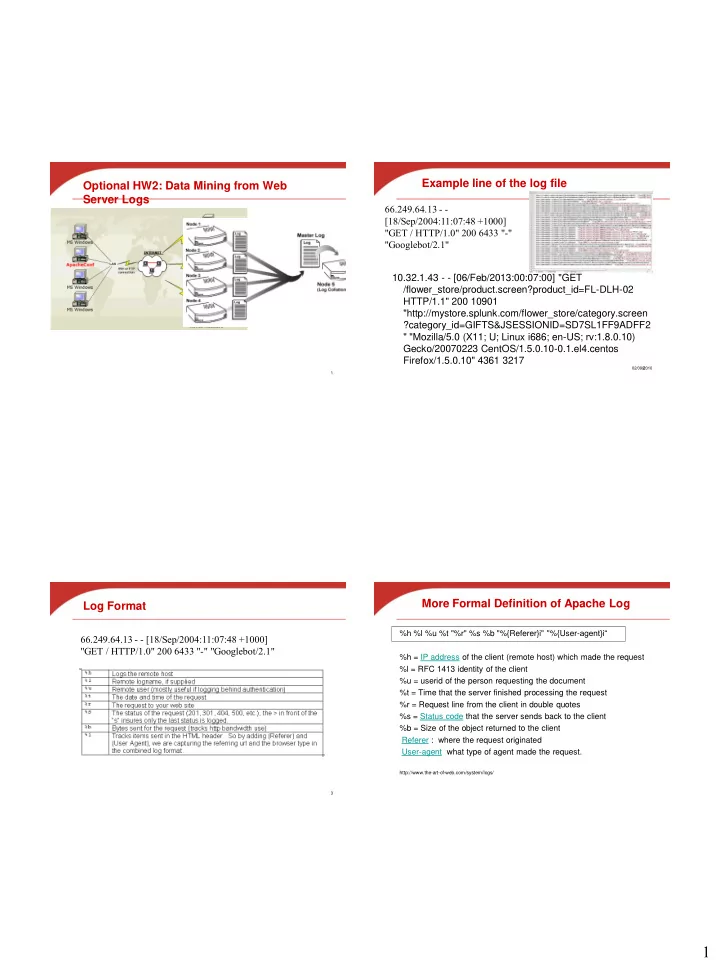
Optional HW2: Data Mining from Web Server Logs

02/09/2010 2

Example line of the log file

10.32.1.43 - - [06/Feb/2013:00:07:00] "GET /flower_store/product.screen?product_id=FL-DLH-02 HTTP/1.1" 200 10901 "http://mystore.splunk.com/flower_store/category.screen ?category_id=GIFTS&JSESSIONID=SD7SL1FF9ADFF2 " "Mozilla/5.0 (X11; U; Linux i686; en-US; rv:1.8.0.10) Gecko/20070223 CentOS/1.5.0.10-0.1.el4.centos Firefox/1.5.0.10" 4361 3217 66.249.64.13 - - [18/Sep/2004:11:07:48 +1000] "GET / HTTP/1.0" 200 6433 "-" "Googlebot/2.1"

3

Log Format

66.249.64.13 - - [18/Sep/2004:11:07:48 +1000] "GET / HTTP/1.0" 200 6433 "-" "Googlebot/2.1"

More Formal Definition of Apache Log

%h %l %u %t "%r" %s %b "%{Referer}i" "%{User-agent}i“ %h = IP address of the client (remote host) which made the request %l = RFC 1413 identity of the client %u = userid of the person requesting the document %t = Time that the server finished processing the request %r = Request line from the client in double quotes %s = Status code that the server sends back to the client %b = Size of the object returned to the client Referer : where the request originated User-agent what type of agent made the request.

http://www.the-art-of-web.com/system/logs/
slide-2
SLIDE 2

2

5

Common Response Code

  • 200 - OK
  • 206 - Partial Content
  • 301 - Moved Permanently
  • 302 - Found
  • 304 - Not Modified
  • 401 - Unauthorised (password required)
  • 403 - Forbidden
  • 404 - Not Found.
6

Triton Cluster at San Diego Supercomputer Center

  • 256 nodes. Each node is 2 quad-core Intel Nehalem 2.4 GHz
  • processors. 24 GB memory. 20 TeraFlops peak
  • Each node has local storage.
  • The cluster has an attached storage called Data Oasis

Storage for Triton Cluster

(http://tritonresource.sdsc.edu/storage.php)

  • Home Area Storage (Dual Copy Storage)
  • on Solaris-based NFS servers using ZFS as the

underlying file system.

  • 300MB/second single node. >500MB/second

aggregate

  • 50GB+ per user. E.g. /home/tyang-ucsb
  • Lustre Storage PFS (Single Copy Storage)
  • a parallel file system. Known as Data Oasis. 800TB

terabytes

  • 500MB/sec to single node; > 2.5GB/sec aggregate
  • /oasis/triton/scratch/<username>
  • No backup

How to Use

  • ssh triton-login.sdsc.edu -l tyang-ucsb
  • There are 4 job queues available and we use

“small” and “batch”.

  • Execute a job in one of two modes

– Interactive

  • qsub -I -l nodes=2:ppn=1 -l walltime=00:15:00

– qsub job-script-file

  • qsub job-script-file

Parallel file system (Oasis)

Home Triton cluster Login node

slide-3
SLIDE 3

3

How to Execute Log Processing Sample

  • ssh triton-login.sdsc.edu -l tyang-ucsb
  • cd log
  • Allocate 2 nodes from “small” queue using
  • qsub -I -l nodes=2:ppn=1 -l walltime=00:15:00
  • Execute a script to create Hadoop file systme, and

run the log processing job.

  • sh log.sh
  • Type: exit

Home Linux Triton cluster Login node Hadoop

Compile the sample log code at Triton

  • Copy code/data from /home/tyang-ucsb/log to your own

directory.

  • Allocate a machine
  • qsub -I -l nodes=1:ppn=1 -l walltime=00:15:00
  • Change directory to log and type make
  • Java code is compiled to produce loganalyzer.jar

Home Triton cluster Login node

Hadoop installation at Trition

  • Installed in /opt/hadoop/hadoop0.20.2/
  • Only accessible from the computing nodes.
  • Can compile from a computing node
  • Configure Hadoop on-demand with myHadoop:
  • Request nodes using PBS

– For example, #PBS –l nodes=2:ppn=1

  • Configure (transient mode)
  • $MY_HADOOP_HOME/bin/configure.sh -n 2 –c

$HADOOP_CONF_DIR

Home Linux Triton cluster Login node Hadoop

The head of sample script (log.sh)

  • #!/bin/bash
  • #PBS -q small
  • #PBS -N LogSample
  • #PBS -l nodes=2:ppn=1
  • #PBS -o tyang.out
  • #PBS -e tyang.err
  • #PBS -l walltime=00:10:00
  • #PBS -A tyang-ucsb
  • #PBS -V
  • #PBS -M tyang@cs.ucsb.edu
  • #PBS -m abe
slide-4
SLIDE 4

4

Sample script log.sh (Continue)

  • export HADOOP_CONF_DIR="/home/tyang-ucsb/log/ConfDir“
  • Set up the configurations for myHadoop
  • $MY_HADOOP_HOME/bin/configure.sh -n 2 -c

$HADOOP_CONF_DIR

  • Format HDFS
  • $HADOOP_HOME/bin/hadoop --config

$HADOOP_CONF_DIR namenode –format

  • More hadoop shell command:

http://hadoop.apache.org/docs/stable/file_system_shell.html http://hadoop.apache.org/docs/stable/commands_manual.html

  • Start daemons in all nodes for Hadoop
  • $HADOOP_HOME/bin/start-all.sh
  • $HADOOP_HOME/bin/hadoop dfsadmin -safemode leave

Script log.sh (Continue)

  • Copy data to HDFS
  • $HADOOP_HOME/bin/hadoop --config

$HADOOP_CONF_DIR dfs -copyFromLocal ~/log/templog1 input/a

  • Run log analysis job
  • time $HADOOP_HOME/bin/hadoop --config

$HADOOP_CONF_DIR jar loganalyzer.jar LogAnalyzer input

  • utput
  • Copy out the output results
  • $HADOOP_HOME/bin/hadoop --config

$HADOOP_CONF_DIR dfs -copyToLocal output ~/log/output

  • Stop all Hadoop daemons and cleanup
  • $HADOOP_HOME/bin/stop-all.sh
  • $MY_HADOOP_HOME/bin/cleanup.sh -n 2
02/09/2010

Node allocation and storage access

  • Node allocation through PBS
  • The processors per node (ppn) are set to 1.
  • For example, qsub -I -l nodes=2:ppn=1 -l

walltime=00:10:00

  • Consistency in configuration:
  • "-n" option is set consistently in commands

– $MY_HADOOP_HOME/bin/configure.sh – $MY_HADOOP_HOME/bin/cleanup.sh

Parallel file system (Oasis)

Home Triton cluster Login node