Virtual Meetings Reminders! Controls are at the bottom of the - - PowerPoint PPT Presentation

virtual meetings
SMART_READER_LITE
LIVE PREVIEW

Virtual Meetings Reminders! Controls are at the bottom of the - - PowerPoint PPT Presentation

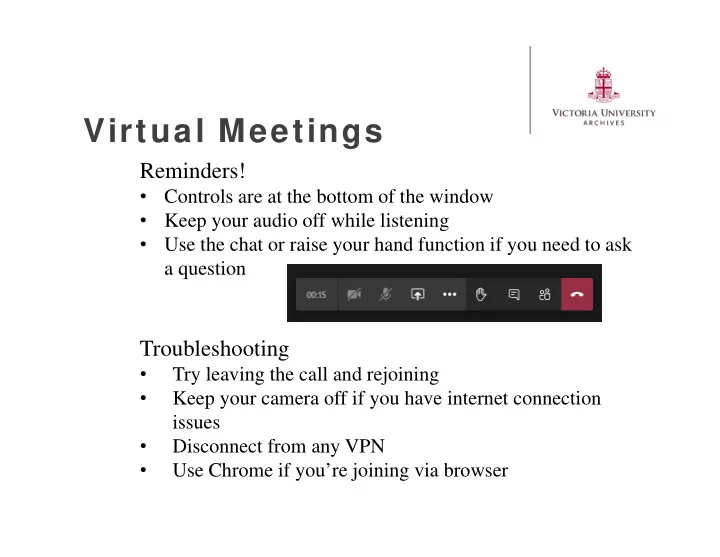
Virtual Meetings Reminders! Controls are at the bottom of the window Keep your audio off while listening Use the chat or raise your hand function if you need to ask a question Troubleshooting Try leaving the call and rejoining


slide-1
SLIDE 1

Reminders!

  • Controls are at the bottom of the window
  • Keep your audio off while listening
  • Use the chat or raise your hand function if you need to ask

a question

Troubleshooting

  • Try leaving the call and rejoining
  • Keep your camera off if you have internet connection

issues

  • Disconnect from any VPN
  • Use Chrome if you’re joining via browser

Virtual Meetings

slide-2
SLIDE 2

Records Managem ent Support Group

Jess Todd 416-585-4562 jess.todd@vicu.utoronto.ca

V:\archives\Records Management\Training\SupportGroup\20200825 Meeting Three

slide-3
SLIDE 3

What’s New Working from Home Transferring to the Archives [Electronic Records] Resources Discussion

Agenda

slide-4
SLIDE 4

W hat’s New

Working from Home

Tip sheet

Transferring Electronic Records

Tip sheet and Form

Virtual Office Hours

  • Coming soon!

Photographer: Unknown Construction of Emmanuel College, 1930 1991.161/547 Victoria University Archives

slide-5
SLIDE 5

W orking From Hom e

Good News

  • Nothing has changed!
  • Continue with following all the usual best practices and

policies for creating, receiving, maintaining, and destroying all university records

Bad News

  • Everything has changed!
  • Email and digital records are being created, used, and

relied on far more.

  • Work processes may change in order to work from home.

Photographer: A. W. Banfield

  • Rev. Banfield Translating Gospel, 1902

1989.130/12 Victoria University Archives

slide-6
SLIDE 6

W orking From Hom e

  • Ensure there are no digital records stored on your home

computer or other devices.

  • Need to transfer digital records back to your office?
  • Small amounts/file sizes? You can probably email them to yourself.
  • Large amounts/files sizes? Set up a OneDrive folder to upload the

materials for you to retrieve in the office.

  • Remote access to your work computer? This will give you access to

any shared drives where you can work as normal or download from OneDrive/email.

  • If your office is using SharePoint or OneDrive as their repository for

records, make certain you are adding your records.

Photographer: A. W. Banfield

  • Rev. Banfield Translating Gospel, 1902

1989.130/12 Victoria University Archives

slide-7
SLIDE 7

Transferring to the Archives [ Electronic]

Basics

  • You need to tell us what you have to transfer using the

Transfer Form

  • Roughly equivalent to a box content list for transferring paper records
  • Allows us to prepare and may prompt follow-up questions.
  • Folders/files will need to be zipped prior to transfer
  • This helps prevent any accidental changes to the records.
  • We can accept transfers in a variety of ways!
  • OneDrive is likely the easiest.
  • Can also accept large transfers or very large files on hard drives or
  • ther portable media.
slide-8
SLIDE 8

Resources

Records Management at Victoria

http://library.vicu.utoronto.ca/archives/records_management

ITS Work from home checklist

https://its.utoronto.ca/wp-content/uploads/2020/03/working-remotely- checklist.pdf

UofT Telecommuting Guidelines

https://www.hrandequity.utoronto.ca/wp- content/uploads/sites/15/2020/03/COVID19-Temporary-Special- Telecommuting-Guideline.pdf

UTARMS

https://utarms.library.utoronto.ca/sites/default/public/forms-pdfs/utarms_wfh- guidelines.pdf

slide-9
SLIDE 9

Discussion:

W hat’s Next?

Jess Todd Records Manager/Archivist 416-585-4562 | jess.todd@vicu.utoronto.ca

Other topics for discussion?

  • Legal
  • Privacy
  • Archives
  • Digitization
  • Disposition
  • Succession planning

How is managing records from home working out for you?

Follow -Up: Tell one person about this support group!