Secure hashing, authen/ca/on root@topi:/etc# more shadow - - PowerPoint PPT Presentation

secure hashing authen ca on
SMART_READER_LITE
LIVE PREVIEW

Secure hashing, authen/ca/on root@topi:/etc# more shadow - - PowerPoint PPT Presentation

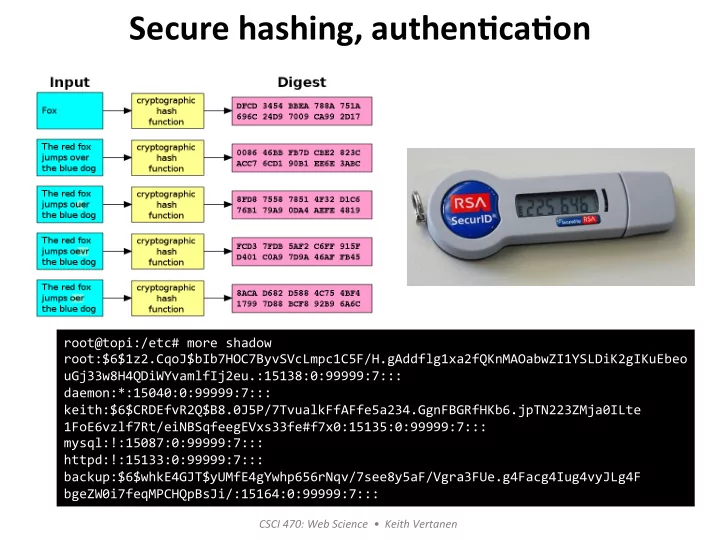
Secure hashing, authen/ca/on root@topi:/etc# more shadow root:$6$1z2.CqoJ$bIb7HOC7ByvSVcLmpc1C5F/H.gAddflg1xa2fQKnMAOabwZI1YSLDiK2gIKuEbeo uGj33w8H4QDiWYvamlfIj2eu.:15138:0:99999:7:::


slide-1
SLIDE 1

CSCI ¡470: ¡Web ¡Science ¡ ¡• ¡ ¡Keith ¡Vertanen ¡

Secure ¡hashing, ¡authen/ca/on ¡

root@topi:/etc# ¡more ¡shadow ¡ root:$6$1z2.CqoJ$bIb7HOC7ByvSVcLmpc1C5F/H.gAddflg1xa2fQKnMAOabwZI1YSLDiK2gIKuEbeo ¡ uGj33w8H4QDiWYvamlfIj2eu.:15138:0:99999:7::: ¡ daemon:*:15040:0:99999:7::: ¡ keith:$6$CRDEfvR2Q$B8.0J5P/7TvualkFfAFfe5a234.GgnFBGRfHKb6.jpTN223ZMja0ILte ¡ 1FoE6vzlf7Rt/eiNBSqfeegEVxs33fe#f7x0:15135:0:99999:7::: ¡ mysql:!:15087:0:99999:7::: ¡ httpd:!:15133:0:99999:7::: ¡ backup:$6$whkE4GJT$yUMfE4gYwhp656rNqv/7see8y5aF/Vgra3FUe.g4Facg4Iug4vyJLg4F ¡ bgeZW0i7feqMPCHQpBsJi/:15164:0:99999:7::: ¡

slide-2
SLIDE 2

Overview ¡

  • Hash ¡func0ons ¡

– Normal ¡vs. ¡cryptographic ¡hash ¡ – Uses ¡ – Important ¡proper0es ¡ – How ¡they ¡work, ¡current ¡choices ¡

  • Authen0ca0on ¡

– Passwords ¡

  • Store ¡as ¡a ¡hash ¡
  • Sal0ng ¡

– Tokens ¡ – Biometrics ¡

2 ¡

slide-3
SLIDE 3

Hash ¡func0ons ¡

  • Normal ¡hash ¡func0ons: ¡

– Key: ¡large ¡data ¡set ¡of ¡variable ¡length ¡ – Value: ¡small ¡data ¡set ¡of ¡fixed ¡length ¡ – Examples: ¡

  • Error ¡checking: ¡checksum, ¡CRC ¡
  • Constant ¡0me ¡data ¡structures: ¡Java ¡HashMap ¡

¡ ¡

3 ¡

slide-4
SLIDE 4

Cryptographic ¡hash ¡func0ons ¡

  • Secure ¡hash ¡func0ons: ¡

– Hash ¡H(x) ¡easy ¡to ¡compute ¡for ¡x ¡ – Arbitrary ¡length ¡input ¡→ ¡fixed ¡length ¡output ¡ – Output: ¡message ¡digest, ¡fingerprint ¡ – One-­‑way: ¡given ¡h=H(x) ¡intractable ¡to ¡find ¡x ¡

  • MD5 ¡(128 ¡bits) ¡
  • SHA-­‑1 ¡(160 ¡bits) ¡
  • SHA-­‑256 ¡(256 ¡bits) ¡
  • SHA-­‑512 ¡(512 ¡bits) ¡

¡ ¡

4 ¡

slide-5
SLIDE 5

Secure ¡hash ¡uses ¡

  • User ¡authen0ca0on ¡

– e.g. ¡Store ¡hash ¡instead ¡of ¡actual ¡password ¡

  • Message ¡authen0city ¡

– e.g. ¡Digital ¡signing ¡of ¡email ¡messages ¡

  • Intrusion ¡detec0on ¡

– e.g. ¡Detect ¡if ¡important ¡files ¡changed ¡

  • Compact ¡file ¡iden0fiers ¡

– e.g. ¡Git ¡ ¡

¡ ¡

5 ¡

slide-6
SLIDE 6

Secure ¡hashes, ¡important ¡proper0es ¡

  • First ¡pre-­‑image ¡resistant ¡

– For ¡a ¡hash ¡h, ¡intractable ¡to ¡find ¡x ¡s.t. ¡H(x) ¡= ¡h ¡ – Hard ¡to ¡invert ¡ – Why ¡do ¡we ¡need ¡this? ¡ ¡ ¡

  • If ¡easy ¡to ¡invert, ¡not ¡useful ¡for ¡secure ¡applica0ons ¡
  • Hacker ¡could ¡recover ¡your ¡actual ¡password ¡from ¡

database ¡on ¡a ¡compromised ¡server ¡

6 ¡

slide-7
SLIDE 7

Secure ¡hashes, ¡important ¡proper0es ¡

  • Second ¡pre-­‑image ¡resistant ¡

– Weak ¡collision ¡resistant ¡ – For ¡input ¡x, ¡intractable ¡to ¡find ¡y ¡≠ ¡x ¡s.t. ¡H(y) ¡= ¡H(x) ¡ – Difficult ¡to ¡find ¡a ¡second ¡input ¡that ¡hashes ¡to ¡the ¡ same ¡thing ¡as ¡a ¡given ¡first ¡input ¡

7 ¡

slide-8
SLIDE 8

Secure ¡hashes, ¡important ¡proper0es ¡

  • Strong ¡collision ¡resistant ¡

– Intractable ¡to ¡find ¡any ¡pair ¡(x, ¡y) ¡s.t. ¡H(x) ¡= ¡H(y) ¡ – Difficult ¡to ¡find ¡any ¡two ¡inputs ¡with ¡same ¡hash ¡ – Why ¡do ¡we ¡need ¡this? ¡

  • Adacker ¡computes ¡2 ¡messages: ¡x, ¡y ¡s.t. ¡H(x) ¡= ¡H(y) ¡
  • Gives ¡message ¡x ¡to ¡Alice ¡to ¡hash ¡and ¡sign ¡

– e.g. ¡Invoice ¡with ¡a ¡total ¡of ¡$50 ¡

  • Adacker ¡replaces ¡x ¡with ¡y ¡

– e.g. ¡Invoice ¡with ¡a ¡total ¡of ¡$5000 ¡

  • Adack ¡can ¡claim ¡Alice ¡signed ¡the ¡larger ¡one ¡

8 ¡

slide-9
SLIDE 9

History ¡of ¡secure ¡hashes ¡

  • 1991: ¡MD5 ¡by ¡Ron ¡Rivest, ¡128-­‑bit ¡
  • 1993: ¡SHA-­‑0 ¡by ¡NSA ¡
  • 1995: ¡SHA-­‑1, ¡revised ¡to ¡fix ¡weakness, ¡160-­‑bit ¡
  • 1996: ¡Adack ¡found ¡on ¡MD5 ¡ ¡
  • 2001: ¡SHA-­‑2 ¡family, ¡224/256/384/512 ¡bits ¡
  • 2005: ¡Adack ¡found ¡on ¡SHA-­‑1 ¡
  • 2010: ¡NIST, ¡federal ¡agencies ¡must ¡use ¡SHA-­‑2 ¡
  • 2012: ¡SHA-­‑3, ¡NIST ¡selects ¡Keccak ¡"ket-­‑chak" ¡

9 ¡

hdp://blogs.technet.com/b/srd/archive/2012/06/06/more-­‑informa0on-­‑ about-­‑the-­‑digital-­‑cer0ficates-­‑used-­‑to-­‑sign-­‑the-­‑flame-­‑malware.aspx ¡ hdp://www.win.tue.nl/hashclash/rogue-­‑ca/ ¡

slide-10
SLIDE 10

One ¡round ¡within ¡SHA-­‑1 ¡: ¡

  • A, ¡B, ¡C, ¡D ¡and ¡E ¡are ¡32-­‑bit ¡words ¡of ¡state ¡
  • F ¡is ¡a ¡nonlinear ¡func0on ¡that ¡varies ¡
  • <<<n ¡a ¡lek ¡bit ¡rota0on ¡by ¡n ¡places ¡
  • n ¡varies ¡for ¡each ¡opera0on ¡
  • Wt ¡expanded ¡message ¡word ¡of ¡round ¡t ¡
  • Kt ¡round ¡constant ¡of ¡round ¡t ¡
  • Box ¡with ¡plus: ¡addi0on ¡modulo ¡232 ¡

10 ¡ ¡ ¡

slide-11
SLIDE 11

Authen0ca0on ¡

  • Proving ¡your ¡iden0fy ¡

– Something ¡you ¡know: ¡password, ¡PIN, ¡pet's ¡name ¡ – Something ¡you ¡possess: ¡a ¡key, ¡smart ¡card ¡ – Something ¡you ¡are: ¡fingerprints, ¡re0na, ¡face ¡ – Something ¡you ¡do: ¡voice ¡print, ¡handwri0ng, ¡ typing ¡rhythm ¡

  • Means ¡of ¡authen0ca0on ¡

– Password ¡ – Token-­‑based ¡ – Biometric ¡

11 ¡

slide-12
SLIDE 12

Password ¡authen0ca0on ¡

  • Users ¡choose ¡some ¡secret ¡password ¡

– Differing ¡levels ¡of ¡required ¡complexity/annoyance ¡

12 ¡ hdps://xkcd.com/936/ ¡

slide-13
SLIDE 13

Password ¡storage ¡

  • User ¡ID ¡and ¡password ¡ ¡

– Must ¡be ¡stored ¡somewhere, ¡e.g. ¡/etc/passwd ¡

  • Normally ¡hash ¡of ¡password, ¡not ¡plaintext ¡or ¡encrypted ¡

– Shadow ¡password ¡file, ¡e.g. ¡/etc/shadow ¡

  • Reachable ¡only ¡by ¡privileged ¡users ¡

13 ¡ % ¡more ¡passwd ¡ root:x:0:0:root:/root:/bin/bash ¡ daemon:x:1:1:daemon:/usr/sbin:/bin/sh ¡ work:x:1000:1000::/home/work:/bin/sh ¡ mysql:x:104:110:MySQL ¡Server,,,:/nonexistent:/bin/false ¡ httpd:x:1001:1001::/home/httpd:/bin/sh ¡ backup:x:1005:1005::/home/backup:/bin/sh ¡ % ¡more ¡shadow ¡ root:$6$1z2.CqoJ$bIb7HOC7ByvSVcLmpc1C5F/H.gAddflg1xa2fQKnMAOabwZI1YSLDiK2gIKuEbeo ¡ uGj33w8H4QDiWYvamlfIj2eu.:15138:0:99999:7::: ¡ daemon:*:15040:0:99999:7::: ¡ work:$6$CRDEfvR2Q$B8.0J5P/7TvualkFfAFfe5a234.GgnFBGRfHKb6.jpTN223ZMja0ILte ¡ 1FoE6vzlf7Rt/eiNBSqfeegEVxs33fe#f7x0:15135:0:99999:7::: ¡ mysql:!:15087:0:99999:7::: ¡ httpd:!:15133:0:99999:7::: ¡ backup:$6$whkE4GJT$yUMfE4gYwhp656rNqv/7see8y5aF/Vgra3FUe.g4Facg4Iug4vyJLg4F ¡ bgeZW0i7feqMPCHQpBsJi/:15164:0:99999:7::: ¡

slide-14
SLIDE 14

Adacking ¡passwords ¡

  • If ¡password ¡hashes ¡compromised, ¡adacker: ¡

– Knows ¡any ¡users ¡with ¡same ¡password ¡ – Can ¡tell ¡if ¡user ¡has ¡same ¡password ¡on ¡mul0ple ¡ systems ¡(if ¡systems ¡use ¡same ¡hash ¡func0on) ¡ – Can ¡use ¡an ¡offline ¡dic0onary ¡adack ¡

  • Dic0onary ¡adack: ¡

– Precompute ¡hash ¡value ¡for: ¡ ¡

  • All ¡sequences ¡of ¡a ¡given ¡(short) ¡length ¡
  • Common ¡words ¡

– Check ¡for ¡match ¡against ¡hash ¡in ¡password ¡file ¡

14 ¡

slide-15
SLIDE 15

Salt ¡

  • Sal0ng ¡passwords ¡

– On ¡account ¡crea0on, ¡assign ¡salt ¡value ¡

  • Timestamp, ¡random ¡value, ¡... ¡

– Salt ¡stored ¡unencrypted, ¡associated ¡with ¡user ¡ID ¡ – Hash ¡computed ¡from ¡salt ¡plus ¡user's ¡password ¡ – Makes ¡dic0onary ¡adack ¡much ¡more ¡expensive ¡

15 ¡

% ¡more ¡shadow ¡ root:$6$1z2.CqoJ$bIb7HOC7ByvSVcLmpc1C5F/ H.gAddflg1xa2fQKnMAOabwZI1YSLDiK2gIKuEbeouGj33w8H4QDiWYvamlfIj2eu.: 15138:0:99999:7::: ¡ daemon:*:15040:0:99999:7::: ¡ work:$6$CRDEfvR2Q$B8.0J5P/ 7TvualkFfAFfe5a234.GgnFBGRfHKb6.jpTN223ZMja0ILte1FoE6vzlf7Rt/ eiNBSqfeegEVxs33fe#f7x0:15135:0:99999:7::: ¡ mysql:!:15087:0:99999:7::: ¡ httpd:!:15133:0:99999:7::: ¡ backup:$6$whkE4GJT$yUMfE4gYwhp656rNqv/7see8y5aF/ Vgra3FUe.g4Facg4Iug4vyJLg4FbgeZW0i7feqMPCHQpBsJi/:15164:0:99999:7::: ¡

$6 ¡= ¡SHA-­‑512, ¡random ¡salt ¡value, ¡SHA-­‑512 ¡of ¡salt ¡+ ¡password ¡

slide-16
SLIDE 16

Key ¡stretching ¡(strengthing) ¡

  • Slow ¡down ¡the ¡hashing ¡

– Users ¡can ¡wait ¡a ¡bit, ¡slows ¡brute-­‑force ¡adacks ¡

  • e.g. ¡UNIX ¡CRYPT, ¡iterated ¡DES ¡25 ¡0mes ¡

– hash(intermediate ¡hashes, ¡password, ¡salt) ¡

  • x0 ¡= ¡0 ¡
  • xi ¡= ¡h(xi-­‑1 ¡+ ¡password ¡+ ¡salt) ¡for ¡i ¡= ¡1, ¡…, ¡r ¡

16 ¡ hdp://www.tarsnap.com/scrypt/scrypt.pdf ¡

slide-17
SLIDE 17

17 ¡

hdp://php.net/manual/en/func0on.crypt.php ¡ ¡ hdp://php.net/manual/en/func0on.password-­‑hash.php ¡ ¡

slide-18
SLIDE 18

Improving ¡password ¡security ¡

  • Reac0ve ¡password ¡checker: ¡

– System ¡adacks ¡itself, ¡revokes ¡guessed ¡passwords ¡

  • But ¡system ¡has ¡to ¡do ¡an ¡expensive ¡amount ¡of ¡work ¡
  • Proac0ve ¡password ¡checker: ¡

– Users ¡selects ¡a ¡candidate ¡password ¡ – System ¡checks ¡if ¡allowable ¡ – Hopefully ¡guide ¡users ¡to ¡secure ¡choice ¡ ¡

  • Without ¡too ¡much ¡annoyance ¡

– But ¡different ¡systems ¡have: ¡

  • Different ¡min/max ¡lengths, ¡allowed ¡symbols, ¡case ¡rules,

¡ number ¡rules, ¡... ¡

18 ¡

slide-19
SLIDE 19

Improving ¡password ¡security ¡

  • User ¡educa0on ¡

– Encourage/force ¡longer ¡more ¡complex ¡passwords ¡

  • e.g. ¡Users ¡oken ¡mistakenly ¡believe ¡reversing ¡word ¡

makes ¡password ¡unguessable ¡

– Use ¡first ¡leder ¡of ¡personal ¡phrase ¡ ¡

  • "My ¡dog's ¡first ¡name ¡is ¡Rex" ¡-­‑> ¡"MdfniR" ¡

– Use ¡random ¡collec0on ¡of ¡words ¡

  • "correcthorsebaderystaple" ¡
  • Computer-­‑generated ¡passwords ¡

– Normally ¡low ¡acceptance, ¡users ¡write ¡them ¡down ¡ – Generate ¡pronounceable ¡syllables, ¡FIPS ¡PUB ¡181 ¡

19 ¡

slide-20
SLIDE 20

Token-­‑based ¡/ ¡two-­‑factor ¡

  • Require ¡possession ¡of ¡an ¡object ¡

– Unique ¡ID ¡based ¡

  • Magne0c ¡strip ¡
  • Embedded ¡microprocessor ¡
  • e.g. ¡ATM ¡card, ¡mobile ¡phone ¡
  • Oken ¡in ¡combina0on ¡with ¡user ¡knowledge ¡

– e.g. ¡ATM ¡PIN, ¡password ¡

20 ¡

slide-21
SLIDE 21

Biometric ¡authen0ca0on ¡

  • Padern ¡recogni0on ¡based ¡

– Facial ¡recogni0on: ¡loca0on ¡of ¡facial ¡features ¡ – Fingerprints: ¡ridges ¡and ¡furrows ¡on ¡finger0p ¡ – Hand ¡geometry: ¡shape, ¡length, ¡width ¡of ¡fingers ¡ – Re0nal: ¡veins ¡beneath ¡re0nal ¡surface ¡ – Iris: ¡structure ¡of ¡the ¡iris ¡ – Signature: ¡style ¡of ¡handwri0ng ¡ – Voice: ¡paderns ¡in ¡speech ¡signal ¡

  • Verifica0on: ¡proving ¡you ¡are ¡who ¡you ¡say ¡
  • Iden0fica0on: ¡find ¡out ¡who ¡you ¡are ¡

– e.g. ¡Avoid ¡entering ¡username ¡

21 ¡

slide-22
SLIDE 22

Biometric ¡characteris0cs ¡

22 ¡

Accuracy ¡ Cost ¡ Hand ¡ ¡ Signature ¡ ¡ Face ¡ ¡ Voice ¡ Re/na ¡ ¡ Finger ¡ Iris ¡

slide-23
SLIDE 23

23 ¡

hdp://www.cl.cam.ac.uk/~jgd1000/UK_IRIS.png ¡ ¡ hdp://i.dailymail.co.uk/i/pix/2012/02/17/ ar0cle-­‑0-­‑11C5E3C4000005DC-­‑346_468x286.jpg ¡ ¡ hdp:// www.tomsguide.com/us/ iphone-­‑touchid-­‑ hack,news-­‑17586.html ¡ ¡

slide-24
SLIDE 24

24 ¡

hdp://www.nuance.com/for-­‑business/by-­‑solu0on/customer-­‑service-­‑solu0ons/solu0ons-­‑services/inbound-­‑solu0ons/voice-­‑authen0ca0on-­‑biometrics/vocal-­‑password/index.htm ¡ ¡

hdp://www.cs.cmu.edu/afs/cs/Web/People/jeongue/jeon/Speaker%20Verifica0on.htm ¡ ¡

False ¡ accept ¡ False ¡ reject ¡

slide-25
SLIDE 25

Summary ¡

  • Cryptographic ¡hash ¡func0ons ¡

– Digital ¡signing ¡messages, ¡password ¡ authen0ca0on, ¡detec0ng ¡changes ¡in ¡files ¡

  • Proving ¡who ¡you ¡are ¡

– Passwords ¡

  • Store ¡only ¡secure ¡hash ¡
  • Sal0ng ¡
  • Key ¡stretching ¡

– Tokens, ¡two-­‑factor ¡ – Biometrics ¡

25 ¡