Review addressing modes Op Src Dst Comments movl $0, %rax - - PowerPoint PPT Presentation

review addressing modes
SMART_READER_LITE
LIVE PREVIEW

Review addressing modes Op Src Dst Comments movl $0, %rax - - PowerPoint PPT Presentation

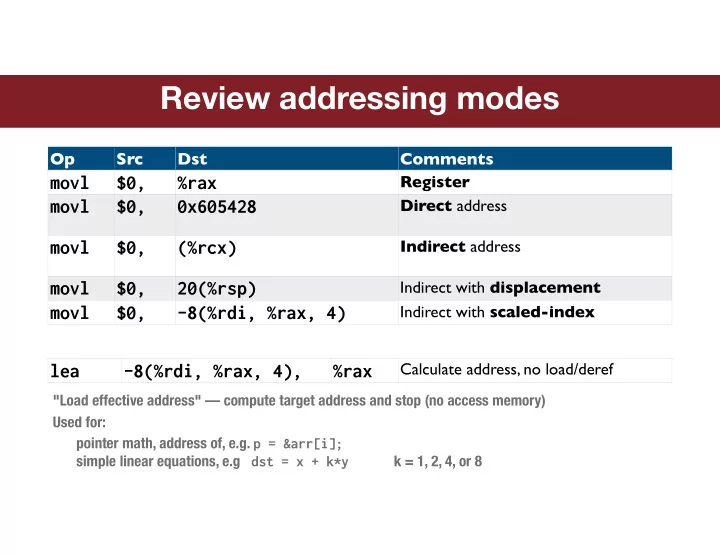
Review addressing modes Op Src Dst Comments movl $0, %rax Register movl $0, 0x605428 Direct address movl $0, (%rcx) Indirect address movl $0, 20(%rsp) Indirect with displacement movl $0, -8(%rdi, %rax, 4) Indirect with


slide-1
SLIDE 1

Review addressing modes

Op Src Dst Comments

movl $0, %rax

Register

movl $0, 0x605428

Direct address

movl $0, (%rcx)

Indirect address

movl $0, 20(%rsp)

Indirect with displacement

movl $0,

  • 8(%rdi, %rax, 4)

Indirect with scaled-index

lea

  • 8(%rdi, %rax, 4),

%rax

Calculate address, no load/deref

"Load effective address" — compute target address and stop (no access memory) Used for: pointer math, address of, e.g. p = &arr[i];
 simple linear equations, e.g dst = x + k*y k = 1, 2, 4, or 8

slide-2
SLIDE 2

CPU registers

What are registers?

Small set of named "data cubbies" on CPU itself

CPU can directly manipulate values in register (reaching out to memory is much slower) 16 general-purpose integer registers

Each register stores a 64-bit data value

Anything in integer family long, int, char, address, signed/unsigned (floating point registers are separate) Virtual sub-registers %rax -> %eax -> %ax -> %al

Some registers have special role

Dictated by ISA/convention If/when not in use for special role, register may be used for other purposes

Register Special role

%rax

Return value from function

%rdi

1st argument to function

%rsi

2nd argument to function

%rdx

3rd argument to function

%rsp

Stack pointer

%rip

Instruction pointer

%eflags

Processor status/condition cod

...

see full list in x86 guide on web site

int binky(int arg) Function binky is going to read arg from %edi and write return value to %eax

slide-3
SLIDE 3

Sample ALU instructions

add src, dst

dst = dst + src

sub src, dst

dst = dst - src

imul src, dst

dst = dst * src

and src, dst

dst = dst & src

xor src, dst

dst = dst ^ src

sal count, dst

dst = dst << count

sar count, dst

dst = dst >> count

neg dst

dst = -dst

not dst

dst = ~dst

Two operand instructions One operand instructions

No distinction between signed/unsigned operands — why?

slide-4
SLIDE 4

Compiler explorer

Fun tool to interactively examine C->asm translation!

https://godbolt.org

slide-5
SLIDE 5

Program execution

f7 eb 07 89

00000000004004d6 <loop>: 4004d6: 8b 07 mov (%rdi),%eax 4004d8: 83 c0 01 add $0x1,%eax 4004db: 89 07 mov %eax,(%rdi) 4004dd: eb f7 jmp 4004d6 <loop>

01 c0 83 07 8b

4004d6: 4004d7: 4004d8: 4004d9: 4004da: 4004db: 4004dc: 4004dd: 4004de:

%rip

What does it mean for a program to execute?

Instructions loaded into memory Stack configured (more on that later…) %rip stores address of current instruction, proceeds sequentially program code entered at main function

jmp is akin to mov <target>, %rip (not valid to directly access %rip in this way though…)

jmp mov add mov

slide-6
SLIDE 6

Processor state

Information about 
 currently executing program

Temporary data

%rax, %rdi, … current parameters, local variables

Location of runtime stack

%rsp

Location of current instruction

%rip

Status of recent operation

CF ZF SF OF

%rax %rdi %r14 %r15 ... %rsp %rip CF ZF SF OF

General purpose registers Stack pointer Instruction pointer Condition codes %eflags

slide-7
SLIDE 7

Control flow

Controlling flow

Instructions proceed sequentially by default Jmp instruction changes %rip (unconditionally) if/loops/switch need a conditional jmp — "branch"

Branch is 2-step process

  • 1. Previous instruction writes condition codes

Codes report whether operation resulted in zero, overflow, etc

  • 2. Branch instruction reads condition codes

Whether takes branch or falls through depends on state of condition codes

Test result is "passed" through %eflags register

cmp $0x9, %eax je target

CF ZF SF OF

%eflags

slide-8
SLIDE 8

Condition codes

Op Comments

cmp

  • p1,
  • p2

Computes op2-op1, discard result, set condition codes

test

  • p1,
  • p2

Computes op2&op1, discard result, set condition codes

sub

  • p1,
  • p2
  • p 2 = op2-op1, set condition codes

add

  • p1,
  • p2
  • p2 = op2+op1, set condition codes

%eflags register used as set of boolean values

ZF = zero flag SF = sign flag CF = carry flag, unsigned overflow (out of MSB) OF = overflow flag, signed overflow (into MSB)

Codes explicitly set by cmp/test, implicitly set by many instructions Codes read by jx instructions

slide-9
SLIDE 9

Example branch instructions

Op Description Condition

jmp

unconditional

je

equal/zero

ZF=1 jne

not equal/not zero

ZF=0 js

negative

SF=1 jl

less (signed)

SF!=OF jle

less or equal (signed)

SF!=OF or ZF=1 jb

below (unsigned)

CF=1

Examples:

Assume previous instruction was cmp op1, op2. Computed "result" op2-op1 je: Jump if ZF is 1

result op2-op1 is zero means op1 is equal to op2

jl: Jump if SF != 0F

result op2-op1 is negative means op2 is less than op1

  • ther case: if result ended up positive due to overflow, op2 is also less than op1
slide-10
SLIDE 10

If/then

4004d6: cmp $0x6,%edi 4004d9: jne 4004de <if_then+0x8> 4004db: add $0x1,%edi 4004de: imul $0x23,%edi,%edi 4004e1: lea 0x7(%rdi),%eax 4004e4: retq

int if_then(int arg) { if (arg == 6) arg++; arg *= 35; return arg + 7; }

Consider:

How does assembly change if test on line 1 is: arg == 9? arg <= 6? What if put line 3 inside else clause?

(test ? expr : expr)

Can be implemented by similar if/else assembly sequence

slide-11
SLIDE 11

Loops

400504: mov $0x0,%edx 400509: mov $0x0,%eax 40050e: jmp 400515 <for_loop+0x11> 400510: add %edx,%eax 400512: add $0x1,%edx 400515: cmp %edi,%edx 400517: jl 400510 <for_loop+0xc> 400519: repz retq

int for_loop(int n) { int sum = 0; for (int i = 0; i < n; i++) sum += i; return sum; }

Translation re-arranged from what you might expect

First iteration jumps over body to get to test/branch — why?

slide-12
SLIDE 12

Assembly tools

Objdump

Extracts code from compiled executable, displays instructions in assembly myth51> objdump –d myprogram

Gdb

Can debug at source or assembly level! Single step by instruction, read/write register values (gdb) disassemble main (gdb) info reg (gdb) layout split

Compiler explorer

https://godbolt.org/g/NYuQKY

References on web site

http://cs107.stanford.edu/guide/x86-64.html http://cs107.stanford.edu/resources/onepage_x86-64.pdf