R Basics for Math 283 Vectors can be defined in R using the function - - PowerPoint PPT Presentation

r basics for math 283
SMART_READER_LITE
LIVE PREVIEW

R Basics for Math 283 Vectors can be defined in R using the function - - PowerPoint PPT Presentation

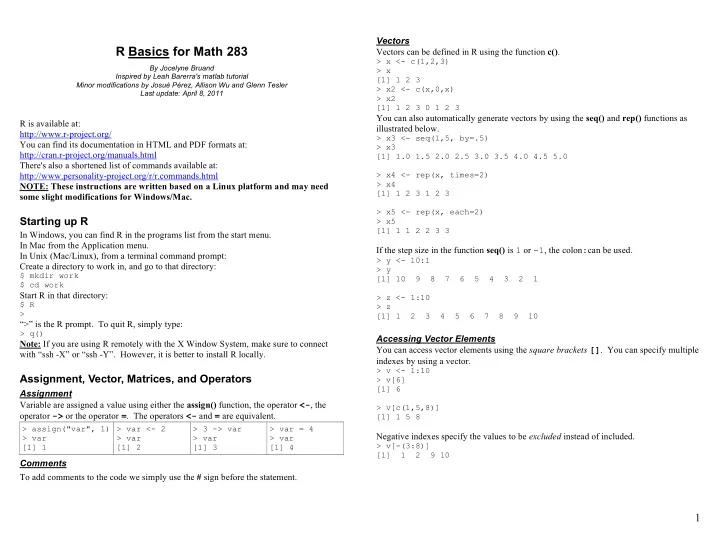
Vectors R Basics for Math 283 Vectors can be defined in R using the function c() . > x <- c(1,2,3) By Jocelyne Bruand > x Inspired by Leah Barerra's matlab tutorial [1] 1 2 3 Minor modifications by Josu Prez, Allison Wu and Glenn


slide-1
SLIDE 1

1

R Basics for Math 283

By Jocelyne Bruand Inspired by Leah Barerra's matlab tutorial Minor modifications by Josué Pérez, Allison Wu and Glenn Tesler Last update: April 8, 2011

R is available at: http://www.r-project.org/ You can find its documentation in HTML and PDF formats at: http://cran.r-project.org/manuals.html There's also a shortened list of commands available at: http://www.personality-project.org/r/r.commands.html NOTE: These instructions are written based on a Linux platform and may need some slight modifications for Windows/Mac.

Starting up R

In Windows, you can find R in the programs list from the start menu. In Mac from the Application menu. In Unix (Mac/Linux), from a terminal command prompt: Create a directory to work in, and go to that directory:

$ mkdir work $ cd work

Start R in that directory:

$ R >

“>” is the R prompt. To quit R, simply type:

> q()

Note: If you are using R remotely with the X Window System, make sure to connect with “ssh -X” or “ssh -Y”. However, it is better to install R locally.

Assignment, Vector, Matrices, and Operators

Assignment Variable are assigned a value using either the assign() function, the operator <-, the

  • perator -> or the operator =. The operators <- and = are equivalent.

> assign("var", 1) > var [1] 1 > var <- 2 > var [1] 2 > 3 -> var > var [1] 3 > var = 4 > var [1] 4

Comments To add comments to the code we simply use the # sign before the statement. Vectors Vectors can be defined in R using the function c().

> x <- c(1,2,3) > x [1] 1 2 3 > x2 <- c(x,0,x) > x2 [1] 1 2 3 0 1 2 3

You can also automatically generate vectors by using the seq() and rep() functions as illustrated below.

> x3 <- seq(1,5, by=.5) > x3 [1] 1.0 1.5 2.0 2.5 3.0 3.5 4.0 4.5 5.0 > x4 <- rep(x, times=2) > x4 [1] 1 2 3 1 2 3 > x5 <- rep(x, each=2) > x5 [1] 1 1 2 2 3 3

If the step size in the function seq() is 1 or -1, the colon:can be used.

> y <- 10:1 > y [1] 10 9 8 7 6 5 4 3 2 1 > z <- 1:10 > z [1] 1 2 3 4 5 6 7 8 9 10

Accessing Vector Elements You can access vector elements using the square brackets []. You can specify multiple indexes by using a vector.

> v <- 1:10 > v[6] [1] 6 > v[c(1,5,8)] [1] 1 5 8

Negative indexes specify the values to be excluded instead of included.

> v[-(3:8)] [1] 1 2 9 10

slide-2
SLIDE 2

2

Arrays and Matrices You can create matrices by using the array() function, which takes the form array(data_vector, dim_vector). If there are less values in the data vector than the dimension of the array calls for, then the values are recycled.

> array(1:4, c(2,2)) [,1] [,2] [1,] 1 3 [2,] 2 4 > array(1:4, c(2,3)) [,1] [,2] [,3] [1,] 1 3 1 [2,] 2 4 2 > array(0, c(2,2)) [,1] [,2] [1,] 0 0 [2,] 0 0

Accessing Array Elements Array elements can be accessed in the same way as vectors.

> A <- array(1:4, c(2,2)) [,1] [,2] [1,] 1 3 [2,] 2 4

A[i] accesses the i-th element in matrix A (going by columns).

> A[3] [1] 3

A[i,] accesses the i-th row in matrix A.

> A[1,] [1] 1 3

A[,j] accesses the j-th column in matrix A.

> A[,1] [1] 1 2

A[i,j] accesses the element in the i-th row, j-th column in A.

> A[1,2] [1] 3

Also, you can create matrices by using matrix(data_vector, number_rows, number of cols). For example:

> j <- matrix(1:4, 2, 2) > j [,1] [,2] [1,] 1 3 [2,] 2 4

Accessing the elements remains the same no matter the function used to create the matrix. Some Basic Functions on Vectors and Arrays

Type ‘help(function_name)’ for details on usage. dim t max min mean var sd sort sum prod diff

Operators Arithmetic operators in R

* / +

  • ^

are element-by-element operators, and follow the expected order of operations.

> 12/3+4^5-4^5 [1] 4

In order to do matrix operations which follow the rules of linear algebra, you must use the following operators (%*%is the dot product (inner product) and %o% is the outer matrix multiplication):

%*% %o%

Here's what a few operators would return:

> x <- c(1,2,3) > y <- c(4,5,6) > x+y [1] 5 7 9 > x-y [1] -3 -3 -3 > x*y [1] 4 10 18 > x/y [1] 0.25 0.40 0.50 > x^y [1] 1 32 729 > x%*%y [,1] [1,] 32 > x%o%y [,1] [,2] [,3] [1,] 4 5 6 [2,] 8 10 12 [3,] 12 15 18

Note that a vector does not have a “direction”, i.e. the function c() does not create row vectors or column vectors, just vectors. More Basic Operators/Functions

exp log log10 log2 sqrt

Workspace and File Management

The following functions manage your file system and the variables in your R workspace.

browse.workspace() creates a window with information about all variables in the

workspace

ls()

list the variables in the workspace

rm(x)

remove x from the workspace

rm(list=ls())

remove all the variables from the workspace

dir()

list the directory/files of the current directory.

setwd(my_dir)

change current working directory to my_dir

unlink(filename)

deletes the file filename.

slide-3
SLIDE 3

3 Reading/Writing Data from/to a File

Data frames R encourages the use of data frames which are matrices in which each column has a title and can be of a different type.

> df <- data.frame(name=c("Joe", "Tom"), age=c(21,22)) > df name age 1 Joe 21 2 Tom 22

Writing data to file The function write.table() allows to write data to a file. However, all will be converted to a data frame first.

> write.table(df, file="example.txt")

example.txt:

"name" "age" "1" "Joe" 21 "2" "Tom" 22

Notice how R added row labels for you. This can be a problem when trying to write a matrix to a file:

> write.table(array(1:4, c(2,2)), file="example.txt")

example.txt:

"V1" "V2" "1" 1 3 "2" 2 4

Luckily, if you do not want to deal with data frames, there is a way around it: write.table(array(1:4, c(2,2)), file="example.txt", row.names=FALSE, col.names=FALSE) example.txt:

1 3 2 4

Reading data from file Data files can be read using the table.read() function. Let us take the last file we wrote. example.txt:

1 3 2 4

Then, we can read its content in the following manner.

> A <- read.table("example.txt") > A V1 V2 1 1 3 2 2 4

You can use the data frame like a matrix, but if you want to convert it back to a matrix, you can do that in the following way: > array(unlist(A, use.names=FALSE), dim(A)) Or the command: > matrix(unlist(A, use.names=FALSE), dim(A)) With either command the output would be:

[,1] [,2] [1,] 1 3 [2,] 2 4

Control Flow

Conditional Control – if, else, ifelse Conditional control is achieved using the if/else statements.

> if (expr_1) expr_2 else expr_3

This first evaluates expr_1. If it is true, then expr_2 is executed, otherwise, expr_3 is executed. There is a vectorized version of the if/else construct, the ifelse() function. This has the form ifelse(condition, a, b) and returns a vector of the length of its longest argument, with elements a[i] if condition[i] is true, otherwise b[i].

> x <- 0 > if (x == 0) x = 1 else x = 2 > x [1] 1 > if (x == 0) x = 1 else x = 2 > x [1] 2 > ifelse(c(TRUE, FALSE), c(1,1), c(2,2)) [1] 1 2

Repetitive Execution – for, while, break Statements can be repeated a specific number of times using for loops.

> for (name in expr_1) expr_2

This causes name to iterate through a vector expr_1 and execute expr_2 for each value

  • f name.

For example, we could add the numbers from 1 to 10:

> x <- 0 > for(i in 1:10) x = x+i > x [1] 55

slide-4
SLIDE 4

4

We can also repeat a statement (or set of statement) until we fulfill a condition by using while loops.

> while (expr_1) expr_2

In this case, expr_2 is executed until expr_1 becomes false. We can do the same thing as in the previous example using a while loop. For the use of curly braces, see the section compound statements.

> i <- 1 > x <- 0 > while (i <= 10) { + x = x+i; + i = i+1; + } > x [1] 55

The break statement allows for an unexpected stop in the loop. Whenever the program reaches a break statement, it immediately exits the loop it is in.

> x <- 0 > for(i in 1:10) { + x = x + i; + if (i == 8) + break; + } > x [1] 36

Compound Statements Let's consider the previous example:

> while (i <= 10) { + x = x+i; + i = i+1; + }

We can see that the executed expression is actually a series of two statements (x = x+i and i = i + 1) encapsulated by curly brackets { }. This is a compound statement. When a list of statements is surrounded by curly brackets, it is considered to be one

  • expression. In this case, both statements will be executed at each iteration of the while

loop.

Simple Plots

Basic Commands plot(x, y) If x and y are vectors, plot(x, y) produces a scatterplot of y against x. The same eff ect can be produced by supplying one argument (second form) as either a list containing two elements x and y or a two-column matrix. See next section. plot(x) If x is a time series, this produces a time-series plot. If x is a numeric vector, it produces a plot of the values in the vector against their index in the vector. hist(x) Produces a histogram of the numeric vector x. A sensible number of classes is usually chosen, but a recommendation can be given with the nclass= argument. Alternatively, the breakpoints can be specified exactly with the breaks= argument. axis Set specified x- and y-axis limits. Usage: axis([xmin xmax ymin ymax]) title(main, sub) Adds a title main to the top of the current plot in a large font and (optionally) a sub-title sub at the bottom in a smaller font. Arguments to High-Level Plotting Commands (plot, hist, ...) add=TRUE Forces the function to act as a low-level graphics function, superimposing the plot on the current plot (some functions only). axes=FALSE Suppresses generation of axes|useful for adding your own custom axes with the axis() function. The default, axes=TRUE, means include axes. log="x" log="y" log="xy" Causes the x, y or both axes to be logarithmic. This will work for many, but not all, types of plot. type="p" type="l" type="b" type="o" type="h" type="s" type="S" type="n" Plot individual points (the default) Plot lines Plot points connected by lines (both) Plot points overlaid by lines Plot vertical lines from points to the zero axis (high-density) Step-function plot. The top of the vertical defines the point. Step-function plot. The bottom of the vertical defines the point. No plotting at all. However axes are still drawn (by default) and the coordinate system is set up according to the data. Ideal for creating plots with subsequent low-level graphics functions. xlab=string ylab=string Axis labels for the x and y axes. Use these arguments to change the default labels. main=string Figure title, placed at the top of the plot in a large font. sub=string Sub-title, placed just below the x-axis in a smaller font.

slide-5
SLIDE 5

5

Superimposition You can superimpose one plot into another with the command par(new=TRUE) but it is necessary to modify other settings to obtain the desired axes and labels. An example would be:

> plot(x, y) > par(new=TRUE) > plot(z, t)

You can also add a parameter add=TRUE to many plot commands. For scatter plots, you can use plot() for the first one and points() to superimpose additional plots. Multiple plots To have multiple plots or graphs in the same output window, you can use the commands split.screen(), screen(), close.screen(). An example would be:

> split.screen(c(1,2)) > screen(1) > plot(x, y) > screen(2) > plot(z, t) > close.screen()

There exist other ways to do this with the functions par() (see parameters mfrow, mfcol, and mfg) and layout(). An example showing how to control the margins around and between multiple plots in one figure is at http://research.stowers-institute.org/efg/R/Graphics/Basics/mar-oma/index.htm There are also device-dependent ways to put up multiple plot windows (as opposed to multiple plots in one window). On Mac OS X, use quartz(). Saving plots You can save your plot using the functions postcript(), pdf(), png() and jpeg(). You must first start to record your plot, then write your plot, then you can turn off your “recording” driver by using the dev.off() function.

> png(file="test.png") > plot(x, y) > dev.off() #turns off write-to-file device

A second method is to draw the plot in the GUI and output it to a file::

> dev.print(postscript, 'file.eps', horizontal=FALSE,

  • nefile=FALSE, paper='special');

> dev.print(pdf,'file.pdf');

Scripts and Functions

An R-file is a text file that contains R commands and has a .R filename extention. You can edit files from the R prompt using the vi editor (it may need to be installed).

> vi (file = “myfilename.R”)

However, if you are not familiar with vi, I would strongly suggest you use another text

  • editor. The Windows version of R comes with an editor.

The name of the file does not have to match the name of the function. You have to source the file in order to have the functions available in your workspace. Sourcing a file is the equivalent to copying all its content and pasting it into your R command

  • prompt. In the Windows version of R, you can use the source item from the menu.

Script R-file. No input or output arguments. Just a series of commands. Example: script.R.

x <- seq(-3,3,by=.1) y <- x^2 png(file="parabola.png") plot(x, y, xlab="x", ylab="y", main="parabola y = x^2", type="l", col="blue") dev.off() #turns off write-to-file device

The file can then be ran in the R prompt using the source() function.

> source(“script.R”)

Function R-files. Contain a function definition line and can accept input arguments and return output argument. Example: stats_wrapper.R

stats_wrapper <- function(x) { # stats_wrapper.R # computes the mean and variance of vector x mean_x = mean(x) var_x = var(x) c(mean_x, var_x) }

Example usage:

> source("stats_wrapper.R") > stats_wrapper(c(1,2,3)) [1] 2 1

slide-6
SLIDE 6

6 Statistics in R

Some Distributions Functions are provided to evaluate the cumulative distribution function P(X <= x), the probability density function and the quantile function (given q, the smallest x such that P(X <= x) > q), and to simulate from the distribution. Distribution R name Additional arguments binomial

binom size, prob

chi-squared

chisq df, ncp

exponential

exp rate

F

f df1, df2, ncp

geometric

geom prob

hypergeometric

hyper m, n, k

negative binomial

nbinom size, prob

normal

norm mean, sd

Poisson

pois lambda

student's t

t df, ncp

uniform

unif min, max

Wilcoxon

wilcox m, n

Prefix the name given here by `d' for the density, `p' for the CDF, `q' for the quantile function (inverse) and `r' for simulation (random deviates). The first argument is x for dxxx, q for pxxx, p for qxxx and n for rxxx (except for rhyper and rwilcox, for which it is nn). For example, let's say we flip a fair coin 3 times and let X be the number of heads. Recall from lecture that the random variable X would follow a binomial distribution with parameters n = 3 and p = ½. As a quick reminder, here's how the pdf and the cdf of X look like: pdf: P(X = x) cdf: P(X ≤ x) x = 0 1/8 x < 0 x = 1 3/8 0 ≤ x < 1 1/8 x = 2 3/8 1 ≤ x < 2 1/2 x = 3 1/8 2 ≤ x < 3 7/8 all other x x ≥ 3 1 Let's find the probability that we get exactly 2 heads. We use the pdf of X at x = 2.

> dbinom(2, 3, 1/2) [1] 0.375

Now, let's find the probability that we get 2 heads or less. That's the cdf of X at x = 2.

> pbinom(2, 3, 1/2) [1] 0.875

Now, let's what the smallest value of x such that P(X ≤ x) ≥ 3/4. If we look at the cdf table, we can see that we achieve this at x = 2 where P(X ≤ x) = 7/8.

> qbinom(3/4, 3, 1/2) [1] 2

Finally, let's generate 10 random values of X according to its distribution.

> rbinom(10, 3, 1/2) [1] 2 2 2 1 0 2 3 2 1 1

(you will get different values since it is random) Notice how the values 1 and 2 appear more often. That's consistent with the pdf of X. Some Hypothesis Tests

t.test(x, mu=my_mu)

One sample t-test for mean my_mu.

t.test(x, y)

Welch's two-sample t-test

t.test(x, y, var.equal=TRUE)

Student two-sample t-test (classic)

t.test(x, y, paired=TRUE)

Paired two-sample t-test.

wilcox.test(x, y)

Wilcoxon rank sum test (Mann-Whitney U)

wilcox.test(x, y, paired=TRUE) Wilcoxon signed rank test.

help (function_name)

Best way to know how to correctly use built-in function and understand what it is doing.

Sources:

  • An Introduction to R. http://cran.r-project.org/doc/manuals/R-intro.html
  • http://www.personality-project.org/r/r.commands.html
slide-7
SLIDE 7

7

Exercises

Generate values from a binomial distribution

Generate 10,000 random values from a binomial distribution and store in row vector empirical_bino. Use help to figure out input values for rbinom.

> empirical_bino <- rbinom(10000, 100, 1/2)

Check that the mean and variance are close to that of the distribution from which it was generated.

> mean(empirical_bino) > var(empirical_bino)

Since binomial with p=1/2 is symmetric, check that median is also near true mean.

> median(empirical_bino)

Check out the distribution of the values in empirical_bino by plotting the histogram.

> hist(empirical_bino)

Draw/trace plot of the distribution over the histogram.

> prop <- hist(empirical_bino, xlab = 'bins', ylab='counts') > lines(prop$mids, prop$counts, col=”blue”) > b = prop$breaks > binsize = b[2] - b[1] > lines(0:100, 10000*binsize*dbinom(0:100, 100, 1/2), col="red")

Working with the cdf Get the probability that values from B(100,1/2) are less than or equal to the mean of the values in empirical_bino. Do the same for the median.

> pmean = pbinom(mean(empirical_bino), 100, 1/2) > pmedian = pbinom(median(empirical_bino), 100, 1/2)

Use the cdf to get back the critical values corresponding to those probability cutoffs.

> qbinom(pmean, 100, 1/2) > qbinom(pmedian, 100, 1/2)

Plot the cdf of empirical_bino We need to sort the values in empirical_bino from low to high and get the corresponding probability Px = P(X<=x) for each value in the array according to the theoretical distribution.

> Px = pbinom(sort(empirical_bino), 100, 1/2)

Plot the sorted values of empirical_bino on x-axis and corresponding theoretical probabilities on y-axis.

> plot(sort(empirical_bino), Px, xlab="x", ylab="P_x", main="cdf

  • f empirical bino", type="l", col="blue")

Odds and Ends Let us practice file i/o with the first 10 numbers of our empirical distribution

> write.table(empirical_bino[1:10], "empirical_bino.txt") > read.table("empirical_bino.txt") > unlink(“empirical_bino.txt”) # deletes file

Function example Create simple function called sim_bino that plots the distribution of m values generated from a binomial distribution with parameters n and p, saves the plot to a file and returns the mean and variance of the observed distribution. The function call should look like the following (n=100, p=1, m=100000, filename=test.png):

>>[obs_mean, obs_var] = sim_bino(100,1/2,10000, ’test.png’) File: sim_bino.R function(n,p,m,plotname) { # Simple function that plots distribution of m values from a # binomial distribution with parameters n and p and saves the # plot to file plotname empirical_bino <- rbinom(m, n, p) png(plotname) prop <- hist(empirical_bino, xlab = "bins", ylab="counts") lines(prop$mids, prop$counts, col="blue") binsize = prop$breaks[2] - prop$breaks[1] lines(0:100, 10000*binsize*dbinom(0:100, 100, 1/2), col="red") dev.off() c(mean(empirical_bino), var(empirical_bino)) }