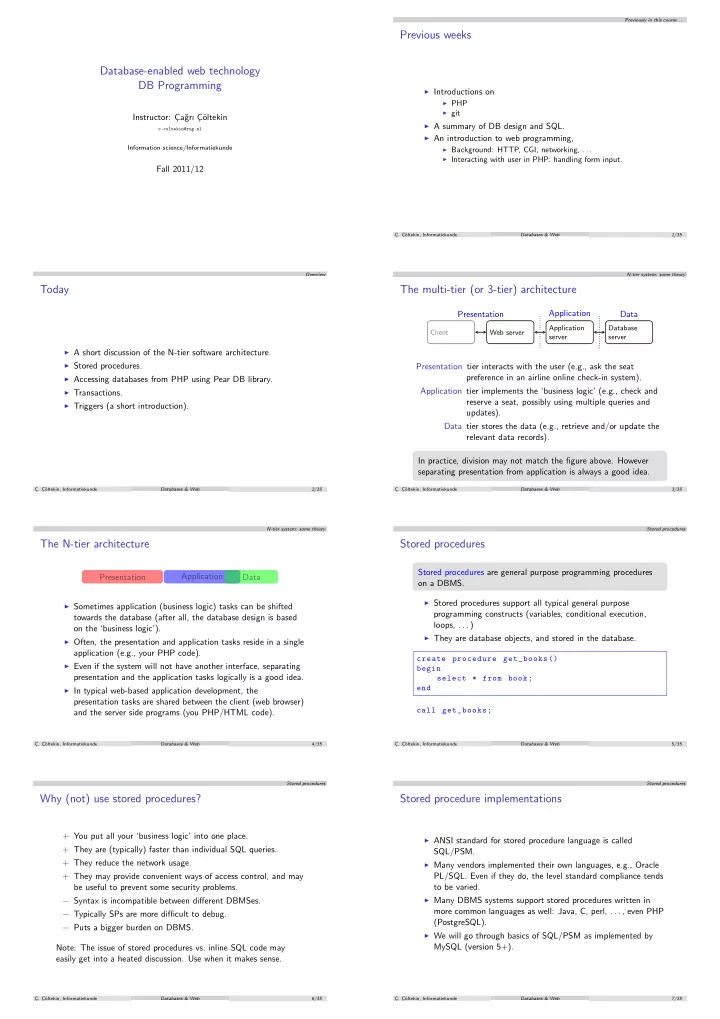
Previous weeks Database-enabled web technology DB Programming - - PDF document

previous weeks database enabled web technology db
SMART_READER_LITE
LIVE PREVIEW

Previous weeks Database-enabled web technology DB Programming - - PDF document

Previously in this course . . . Previous weeks Database-enabled web technology DB Programming Introductions on PHP git Instructor: C a gr C oltekin A summary of DB design and SQL. c.coltekin@rug.nl An


slide-1
SLIDE 1

Database-enabled web technology DB Programming

Instructor: C ¸a˘ grı C ¸¨

  • ltekin

c.coltekin@rug.nl

Information science/Informatiekunde

Fall 2011/12

Previously in this course . . .

Previous weeks

◮ Introductions on

◮ PHP ◮ git

◮ A summary of DB design and SQL. ◮ An introduction to web programming,

◮ Background: HTTP, CGI, networking, . . . ◮ Interacting with user in PHP: handling form input. C ¸. C ¸¨

  • ltekin, Informatiekunde

Databases & Web 1/35 Overview

Today

◮ A short discussion of the N-tier software architecture. ◮ Stored procedures. ◮ Accessing databases from PHP using Pear DB library. ◮ Transactions. ◮ Triggers (a short introduction).

C ¸. C ¸¨

  • ltekin, Informatiekunde

Databases & Web 2/35 N-tier system: some theory

The multi-tier (or 3-tier) architecture

Client Web server Application server Database server

Presentation Application Data Presentation tier interacts with the user (e.g., ask the seat preference in an airline online check-in system). Application tier implements the ‘business logic’ (e.g., check and reserve a seat, possibly using multiple queries and updates). Data tier stores the data (e.g., retrieve and/or update the relevant data records). In practice, division may not match the figure above. However separating presentation from application is always a good idea.

C ¸. C ¸¨

  • ltekin, Informatiekunde

Databases & Web 3/35 N-tier system: some theory

The N-tier architecture

Presentation Application Data

◮ Sometimes application (business logic) tasks can be shifted

towards the database (after all, the database design is based

  • n the ‘business logic’).

◮ Often, the presentation and application tasks reside in a single

application (e.g., your PHP code).

◮ Even if the system will not have another interface, separating

presentation and the application tasks logically is a good idea.

◮ In typical web-based application development, the

presentation tasks are shared between the client (web browser) and the server side programs (you PHP/HTML code).

C ¸. C ¸¨

  • ltekin, Informatiekunde

Databases & Web 4/35 Stored procedures

Stored procedures

Stored procedures are general purpose programming procedures

  • n a DBMS.

◮ Stored procedures support all typical general purpose

programming constructs (variables, conditional execution, loops, . . . )

◮ They are database objects, and stored in the database.

create procedure get_books () begin select * from book; end call get_books;

C ¸. C ¸¨

  • ltekin, Informatiekunde

Databases & Web 5/35 Stored procedures

Why (not) use stored procedures?

+ You put all your ‘business logic’ into one place. + They are (typically) faster than individual SQL queries. + They reduce the network usage. + They may provide convenient ways of access control, and may be useful to prevent some security problems. − Syntax is incompatible between different DBMSes. − Typically SPs are more difficult to debug. − Puts a bigger burden on DBMS. Note: The issue of stored procedures vs. inline SQL code may easily get into a heated discussion. Use when it makes sense.

C ¸. C ¸¨

  • ltekin, Informatiekunde

Databases & Web 6/35 Stored procedures

Stored procedure implementations

◮ ANSI standard for stored procedure language is called

SQL/PSM.

◮ Many vendors implemented their own languages, e.g., Oracle

PL/SQL. Even if they do, the level standard compliance tends to be varied.

◮ Many DBMS systems support stored procedures written in

more common languages as well: Java, C, perl, . . . , even PHP (PostgreSQL).

◮ We will go through basics of SQL/PSM as implemented by

MySQL (version 5+).

C ¸. C ¸¨

  • ltekin, Informatiekunde

Databases & Web 7/35

slide-2
SLIDE 2

Stored procedures

Stored procedures in MySQL

delimiter $$ create procedure get_books () begin select * from book; end $$ delimiter ;

◮ call get_books(); calls the procedure. ◮ show procedure status; lists the stored procedures in the

database.

◮ show create procedure get_books(); lists the procedure

code.

◮ drop procedure get_books; drops it. ◮ Change of delimiter is a trick to be able to use multiple

statements with the default statement delimiter ‘;’.

C ¸. C ¸¨

  • ltekin, Informatiekunde

Databases & Web 8/35 Stored procedures

SP variables

◮ You can use local variables in an stored procedure. ◮ You have to declare all local variables before the actual code

  • starts. For examaple:

declare customer_id int;

◮ The keyword set is used for variable assignments.

set customer_id = 10;

◮ You can define or use so-called session variables which are

accessible throughout the same database connection. Session variables start with a ‘@’.

set @update_status = ’success; ... select @update_status ;

C ¸. C ¸¨

  • ltekin, Informatiekunde

Databases & Web 9/35 Stored procedures

SP arguments

◮ As expected, stored procedures can take arguments,

create procedure confirm_order (in cid int , out status varchar (10))

◮ The arguments are defined to be one of

in arguments are read-only.

  • ut arguments are set inside the procedure, they do

not have to be defined before. inout arguments are read, and modified by the stored procedure.

call confirm_order (10, @status ); select @status;

C ¸. C ¸¨

  • ltekin, Informatiekunde

Databases & Web 10/35 Stored procedures

SP control structures

Stored procedures support basic control structures.

◮ if-then-else:

if x = 0 then set @status = ’x = 0’; elsif x < 10 then set @status = ’0 < x < 10’; else set @status = ’x > 10’; end if;

◮ case

case x when 0 then set @status = ’x = 0’; when 1 then set @status = ’x = 1’; else set @status = ’not 0 or 1’; end case;

C ¸. C ¸¨

  • ltekin, Informatiekunde

Databases & Web 11/35 Stored procedures

SP loops

◮ while

while <condition > do ... end while;

◮ repeat

repeat ... until <condition > end repeat;

◮ loop

<loop_label >: loop ... if <condition > then leave <loop_label >: end if; end loop <loop_label >;

C ¸. C ¸¨

  • ltekin, Informatiekunde

Databases & Web 12/35 Stored procedures

SP: cursors

◮ A cursor is a pointer to a row of a table, or a query result. ◮ Like local variables, you need to declare the cursor before

using it:

declare cur cursor for select * from book;

◮ To start using it, you need to use the statement open. ◮ fetch reads the row, and moves the cursor to the next row,

fetch cur into isbn , author , title;

(assuming isbn, author and title are previously defined variables)

C ¸. C ¸¨

  • ltekin, Informatiekunde

Databases & Web 13/35 Stored procedures

SP in MySQL an example

1 drop procedure if exists confirm_order; 2 delimiter $$ 3 create procedure confirm_order(in cust_id int , out nitems int) 4 begin 5 declare isbn_tmp varchar (13) default null; 6 declare customer , quantity int; 7 declare more_rows bool default true; 8 declare cur cursor for 9 select cID , ISBN , qty from basket where cID = cust_id; 10 declare continue handler for not found set more_rows = false; 11 set nitems = 0; 12

  • pen cur;

13 fetch cur into customer , isbn_tmp , quantity; 14 while more_rows do 15 set nitems = nitems + quantity; 16 insert into

  • rders (cID , ISBN , qty , order_date , status)

17 values (customer , isbn_tmp , quantity , now(), ’N’); 18 fetch cur into customer , isbn_tmp , quantity; 19 end while; 20 end $$ 21 delimiter ;

call confirm_order(10, @nbooks); select @nbooks;

C ¸. C ¸¨

  • ltekin, Informatiekunde

Databases & Web 14/35 Stored procedures

Stored procedures: access control

◮ Stored procedures can be used to restrict direct access to

database tables.

◮ The stored procedures are run with the database user who

created them.

◮ The other users can execute a stored procedure even if they

have no rights to access the tables used by the stored procedures.

◮ The rights are granted (and taken away) as in any other

database object, using grant and revoke SQL statements.

C ¸. C ¸¨

  • ltekin, Informatiekunde

Databases & Web 15/35

slide-3
SLIDE 3

Stored procedures

Stored procedures: closing notes

◮ Similar to stored procedures, users can also define stored

functions which act like standard SQL functions, such as

upper() or year().

◮ Stored procedures created, removed just like other database

  • bjects.

◮ SPs allow full procedural language constructs to be used with

databases.

◮ SPs are just another tool available to software developer. Use

them when it makes sense.

C ¸. C ¸¨

  • ltekin, Informatiekunde

Databases & Web 16/35 DB access from PHP

DB access from PHP using Pear DB

◮ There are multiple ways of connecting to databases, even

multiple methods to connect to the same DBMS (For example, MySQL mysql_ and mysqli_ interfaces).

◮ We will follow a unified approach through Pear DB library. ◮ DB library allows a unified way to access different database

management systems.

◮ A newer version, MDB2, with some improvements exists. We

will stick to better-known and wide-spread DB library. You should consider MDB2 if it is available.

C ¸. C ¸¨

  • ltekin, Informatiekunde

Databases & Web 17/35 DB access from PHP

Pear DB: a first example

1 <?php 2 require_once (’DB.php’); 3 require_once (’db -config.php’); 4 $conn = DB:: connect("mysql :// $user:$pass@$host/$db"); 5 6 $res = $conn ->query(’select * from book ’); 7 8 echo "<table border =\"1\">"; 9 echo "<tr ><th >ISBN </th ><th >title </th ></tr >"; 10 while ($row = $res ->fetchRow( DB_FETCHMODE_ASSOC )) { 11 echo "<tr ><td >${row[’ISBN ’]} </td >"; 12 echo "<td >${row[’title ’]} </td ></tr >"; 13 } 14 echo " </table >"; 15 $conn ->disconnect (); 16 ?>

C ¸. C ¸¨

  • ltekin, Informatiekunde

Databases & Web 18/35 DB access from PHP

Pear DB: the DSN

phptype://user:pass@proto+host:port/db?opt=val&opt=val. . . phptype DB connection type (e.g., mysql, mysqli, odbc, sqlite, . . . ) username DB user name. password Password to connect to the DB protocol Connection protocol (e.g., tcp, unix, . . . ) hostspec Host name (or IP address) port Port number of the DB server database Name of the database

  • ption=value additional options for the DB connection

C ¸. C ¸¨

  • ltekin, Informatiekunde

Databases & Web 19/35 DB access from PHP

Pear DB: connecting to a database

◮ DB:connect() takes a DSN argument and an optional set of

  • ptions, and returns a connection handler if successful.

◮ DSN can be specified either as a string, or an array of the form

$dsn = array(’phptype ’ => ’mysql ’, ’hostspec ’ => ’localhost ’, ... )

◮ A second optional argument can be used to specify options

like debug level, various portability options etc.

$options = array( ’debug ’ => 0, ’portability ’ => DB_PORTABILITY_LOWERCASE , ... )

◮ You can also set the options later using setOption().

C ¸. C ¸¨

  • ltekin, Informatiekunde

Databases & Web 20/35 DB access from PHP

Error Handling

◮ The database operations do not always get executed

  • successfully. You should check for errors.

◮ PEAR::isError() returns true if given DB object is an error. ◮ getMessage() can be used to get the error message. ◮ The same functions are usable on other DB objects, for

example query result.

$db = DB:: connect($dsn , $options ); if (PEAR :: isError($db)) { die($db ->getMessage ()); }

C ¸. C ¸¨

  • ltekin, Informatiekunde

Databases & Web 21/35 DB access from PHP

Pear DB: query

◮ Pear DB supports a number of query functions. query() is

the simplest form.

◮ query() returns a ‘result handler’. ◮ fetchRow() can be used to process each row in a result. ◮ numCols(), and numRows() give the number of columns and

rows returned for a query. affectedRows() gives the number

  • f rows affected by an insert or update.

$q = "insert into book (ISBN , title) values ($isbn , $title)"; $res = $db ->query($q); if (PEAR :: isError($res )) { echo "insert failed: $res ->getMessage ()"; } else { echo "$res ->affectedRows () lines changed"; }

C ¸. C ¸¨

  • ltekin, Informatiekunde

Databases & Web 22/35 DB access from PHP

Input validation

◮ Not validating user input introduces bugs, and possible

security problems!

◮ Consider the statement:

insert into book values (’$isbn’, ’$title’).

where we take user input ‘The Hitchhiker’s Guide to the Galaxy’.

◮ The SQL statement, after PHP replaces the values will be:

insert into book values ( ’0330258648 ’ , ’The Hitchhiker ’s Guide to the Galaxy ’)

◮ This is an invalid statement. We want

’The Hitchhiker\’s Guide to the Galaxy’

This is also a security risk (to which we will return next week).

C ¸. C ¸¨

  • ltekin, Informatiekunde

Databases & Web 23/35

slide-4
SLIDE 4

DB access from PHP

Input validation in Pear DB

◮ Pear DB provides functions for escaping strings depending on

DBMS in use.

◮ escapeSimple() escapes the string values. ◮ escapeSmart() also converts numeric/boolean values if

necessary (e.g., convert true to 1 if required by the DBMS).

◮ quoteIdentifier() quotes identifiers, for example table or

column names. For example, if you are using a reserved word,

  • r space in a column name.

◮ You should always escape user input in your SQL statements.

$q = "insert into book values (’" . $db ->escapeSimple($isbn) . "’, ’", . $db ->escapeSimple($title) . "’");

C ¸. C ¸¨

  • ltekin, Informatiekunde

Databases & Web 24/35 DB access from PHP

Pear DB prepare/execute

◮ For SQL statements that are used multiple times with

different values, an alternative to query() is using prepare() and execute() functions.

◮ prepare() takes a query string with missing values:

$qh = $db->prepare(’insert into book values(?,?)’);

◮ execute() takes the handle returned by prepare() and an

array of values, and replaces the ? with the values in the array:

$db->execute($qh, array($isbn, $title));

◮ prepare()/execute() automatically escapes the input. ◮ If you do not want that for some reason, you can use ‘!’

instead of ‘?’.

◮ If you want to pass contents of a file as is (e.g., image data),

use ‘&’ in prepare() and give the filename in execute().

C ¸. C ¸¨

  • ltekin, Informatiekunde

Databases & Web 25/35 Transaction processing

Consider a customer ordering a book in our bookshop example.

  • 1. Customer finds the book s/he is interested in stock.
  • 2. Customer orders the book: we add it to orders and discount it

from the stock. How about: Customer 1 Customer 2 Finds the book in stock Finds the book in stock Orders the book Orders the book We want the operations ‘check availability’ and ‘update stock/order’ to be atomic.

C ¸. C ¸¨

  • ltekin, Informatiekunde

Databases & Web 26/35 Transaction processing

Database transactoins

The solution to these problem by the databases are transactions.

  • A. Transactions are atomic: either all parts are executed or none.
  • C. Transactions are required to preserve consistency when run

alone.

  • I. The DBMS executes transactions such that they appear to

run in isolation.

  • D. The effects of the transactions are required to be durable:

after transaction is finished, the effect persists even in case of system failures. These properties are often called the ACID properties.

C ¸. C ¸¨

  • ltekin, Informatiekunde

Databases & Web 27/35 Transaction processing

Transactions in SQL

◮ The statement start transaction starts a transaction. ◮ The transaction ends with either commit or rollback. ◮ If some hardware/network failure caused transaction to be

interrupted, the system rolls back by default.

◮ Normally every SQL DDL or DML statements is committed

automatically.

set autocommit = 0; start transaction; select isbn into @isbn from book where title=’The Left Hand of Darkness ’; select qty from stock where isbn = @isbn;

  • - rollback

here if qty < 1; update stock set qty= qty - 1 where isbn = @isbn; commit;

MySQL Note: transactions are available in some storage engines.

C ¸. C ¸¨

  • ltekin, Informatiekunde

Databases & Web 28/35 Transaction processing

Transaction isolation levels

Transaction isolation levels can be set using

set transaction isolation level <level> command.

Where <level> is one of: SERIALIZABLE transactions execute in complete isolation. DBMS may run multiple transactions concurrently only if they do not interfere with the others. REPEATABLE READ is similar to serializable, but inserts are allowed in the range the transaction may be reading. The same query should return the same values during the transaction (except so-called ‘phantom reads’). READ COMMITTED The transaction does not read the uncommitted data, but two queries may return different results during the transaction. READ UNCOMMITTED ‘Dirty reads’ are allowed. The data transaction reads may be rolled back.

C ¸. C ¸¨

  • ltekin, Informatiekunde

Databases & Web 29/35 Transaction processing

Transactions in PHP / Pear DB

$db ->autoCommit(false ); $db ->query (...); ... if (some condition) { $db ->rollback () } else { $db ->commit (); }

Notes:

◮ The above sets isolation level to DBMS default. ◮ Other interfaces provide similar functions for using

transactions.

◮ You cannot maintain transactions over different connections.

C ¸. C ¸¨

  • ltekin, Informatiekunde

Databases & Web 30/35 Triggers

Triggers

◮ Triggers are a piece of conditional code that is run on DBMS

when a certain event happens on a certain table.

◮ Triggers are similar to stored procedures, except they are not

called by user code, but executed automatically.

◮ Triggers can be used for doing arbitrary check in case a

certain event occurs.

◮ Triggers can be used to duplicate data. ◮ Triggers can be used simulate check constraints. ◮ Trigger syntax and support varies among different DBMSes.

C ¸. C ¸¨

  • ltekin, Informatiekunde

Databases & Web 31/35

slide-5
SLIDE 5

Triggers

Triggers in SQL

create trigger <trigger_name > <when > <action >

  • n <table >

for each row begin /* trigger body */ end

◮ <action> is either insert, update or delete. ◮ <when> is either before or after ◮ If for each line is specified, the trigger is run for each line.

Otherwise, it is run once.

◮ Trigger body is similar to stored procedures. Within the

trigger body the new values is accessible through the variable

new and previous value is accessible through the variable old.

◮ The trigger can be removed using

drop trigger <trigger_name>.

C ¸. C ¸¨

  • ltekin, Informatiekunde

Databases & Web 32/35 Triggers

Trigger example (MySQL)

1 drop trigger if exists test; 2 delimiter $$ 3 create trigger test before insert on book 4 for each row 5 begin 6 declare msg varchar (255); 7 if new.year > year(now ()) then 8 set msg = concat(’Invalid year in book table: ’, 9 cast(new.year as char )); 10 signal sqlstate ’45000 ’ set message_text = msg; 11 end if; 12 end $$ 13 delimiter ;

Note: this works only in MySQL 5.5+

C ¸. C ¸¨

  • ltekin, Informatiekunde

Databases & Web 33/35 Wrapping up

Summary

Stored Procedures or stored functions allow general-purpose procedural programming on the DBMS side. PHP DB access There are many ways to access databases from PHP, but Pear DB (or it’s successor MDB2) provide a uniform way to access multiple databases. DB transactions ensure that a set of successive SQL statements are executed in an atomic manner without external influences. Triggers are like stored procedures. However, they are executed when a specified event happens.

C ¸. C ¸¨

  • ltekin, Informatiekunde

Databases & Web 34/35 Wrapping up

Further reading and next week

Further reading

◮ On stored procedures, transactions and triggers:

◮ Any good DB book will have further info ◮ MySQL manual for MySQL specifics. ◮ Other online sources

◮ On PHP Pear DB:

◮ Pear DB manual at

http://pear.php.net/manual/en/package.database.db.php

◮ Many other online sources and tutorials are available.

Next week: back to web server programming . . .

◮ Session management. ◮ Security (some).

C ¸. C ¸¨

  • ltekin, Informatiekunde

Databases & Web 35/35