
SLIDE 1
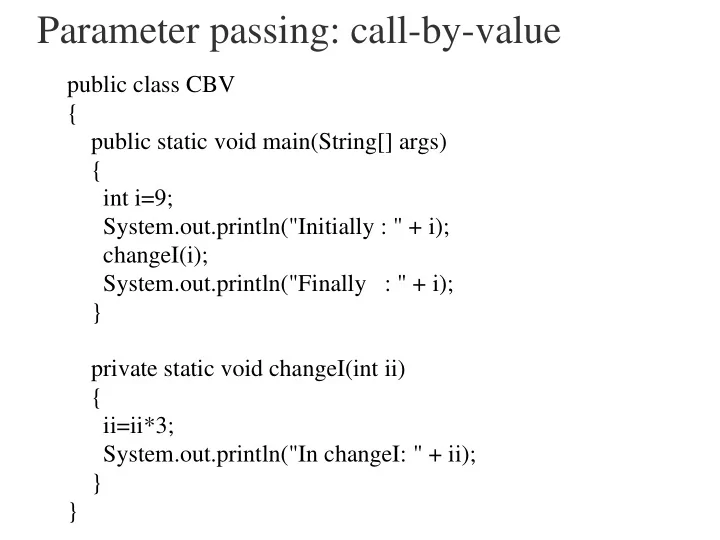
Parameter passing: call-by-value public class CBV { public static - - PowerPoint PPT Presentation
Parameter passing: call-by-value public class CBV { public static void main(String[] args) { int i=9; System.out.println("Initially : " + i); changeI(i); System.out.println("Finally : " + i); } private static void
methods and fields are “inherited” and need not be
method overriding
public class A extends B ...
public class Person { private String name=""; private int age=0; public void setName(String s) { name=s; } public void setAge(int a) { age=a; } public String getName() { return name; } public int getAge() { return age; } public String toString() { return "name="+name+ "age="+age; } } public class Adult extends Person { private Person spouse=null; public void marry(Person p) { if (spouse != null) { spouse=p; p.marry(this); } } public void divorce() { if (spouse!=null) { spouse.divorce(); spouse=null; } } }
except static that never change
access only within the class in which it is declared Use DANGER!!! -- use this rarely variables and methods for internal consumption
access inside the class in which it is declared all extensions of that class Use frequent – perhaps the most common access level variables and methods for the class and all subclasses
access inside the class in which it is declared all extensions of that class all classes in the same package Use never!! “public” access to everyone use accessor methods other methods unchanging static variables
public class Person1 { protected String name=""; protected int age=0; public Person1(String s) { name=s; } public void setAge(int a) { age=a; } public String getName() { return name; } public int getAge() { return age; } public String toString() { return "name="+name+ "age="+age; } }
public class Adult1 extends Person1 { protected Adult1 spouse=null; public Adult1(String n) { super(n); } public String toString() { if (spouse==null) return "name="+name+ "--single"; else return "name="+name + " married to " + spouse.getName(); } public void marry(Adult1 p) { if (spouse == null) { spouse=p; p.marry(this); }} private boolean divorcing=false; public void divorce() { divorcing=true; if (spouse!=null && !divorcing) { spouse.divorce(); spouse=null; } divorcing=false; }}
e.g., toString method of Person1 is overridden
public class Bigamist1 extends Adult1 { protected Adult1 spouse2=null; public Bigamist1(String n) { super(n); } public void marry(Adult1 p1, Adult1 p2) { marry(p1); if (spouse2 == null) { spouse2=p2; p2.marry(this); } } public void divorce(Adult1 p) { if (spouse==p) { spouse.divorce(); spouse=null; if (spouse2!=null) { spouse=spouse2; spouse2=null; }} if (spouse2==p) { spouse2.divorce(); spouse2=null; }} public String toString() { String rtn="name="+getName(); if (spouse==null) return rtn + " Single"; rtn = rtn + " married to " + spouse.getName(); if (spouse2==null) return rtn; return rtn + " and " +spouse2.getName(); } public static void main(String[] args) { Bigamist1 m = new Bigamist1("Dick"); Adult1 w = new Adult1("Jane"); Adult1 w2 = new Adult1("Mary"); System.out.println(m); m.marry(w); System.out.println(m); System.out.println(w); m.divorce(); System.out.println(m); m.marry(w, w2); System.out.println(m); }}
doing so turns off the default constructor --
A constructor of the superclass is called Then statements in the subclass’ constructor are
public class A { String s="???"; public String toString() { return s; } public static void main(String[] args) { A a = new A(); System.out.println(a); }} public class B { String s="???"; public B(String ss) { s=ss; } public String toString() { return s; } public static void main(String[] args) { B b = new B(); System.out.println(b); } }
public class B { String s="???"; public B(String ss) { s=ss; } public String toString() { return s; } public static void main(String[] args) { B b = new B(“q”); System.out.println(b); } } public class C extends B { public static void main(String[] args) { C c = new C(); } }
class A extends Object
toString()
getClass()
equals()
clone()
wait()
notify()
Person p = new Person(); Person p = new Person(); Attorney a = new Attorney(); Attorney a = new Attorney(); Knight k = new Knight(); Knight k = new Knight(); a = p; a = p; // not ok // not ok p = a; p = a; //ok //ok a = k; a = k; //ok //ok a = (Attorney) p; a = (Attorney) p; //dangerous //dangerous