How to create spare part manuals from Autodesk inventor design - - PowerPoint PPT Presentation

how to create spare part manuals from autodesk inventor
SMART_READER_LITE
LIVE PREVIEW

How to create spare part manuals from Autodesk inventor design - - PowerPoint PPT Presentation

How to create spare part manuals from Autodesk inventor design with ToDoT www.SIngeCa.it Machinery manufactures need to produce spare parts manuals; Manufactures of Engineering to order special machinery need to produce a different spare


slide-1
SLIDE 1

www.SIngeCa.it
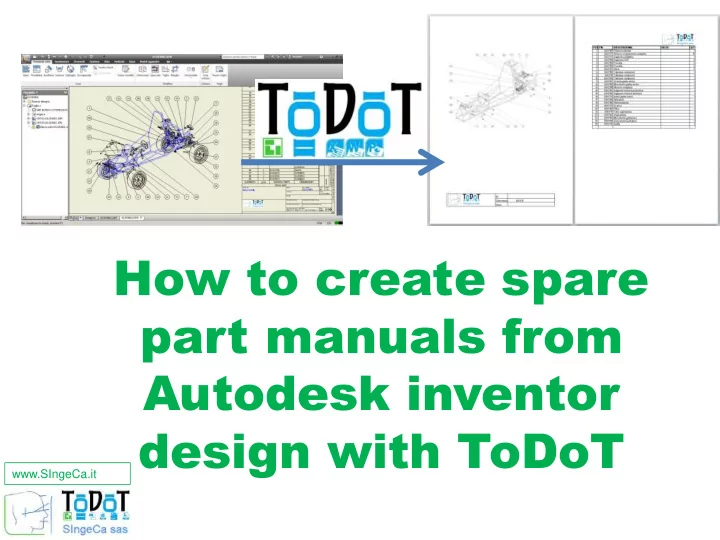
How to create spare part manuals from Autodesk inventor design with ToDoT

slide-2
SLIDE 2

www.SIngeCa.it

Scenario Scenario

Machinery manufactures need to produce spare parts manuals; Manufactures of Engineering to

  • rder special machinery need

to produce a different spare parts manual in each project;

slide-3
SLIDE 3

www.SIngeCa.it

Scenario Scenario

Machinery manufactures need to produce spare parts manuals; Manufactures of Engineering to

  • rder special machinery need

to produce a different spare parts manual in each project; …Quickly

slide-4
SLIDE 4

www.SIngeCa.it

The he typical typical spar spare e par parts ts manual: manual:

Project related information (customer, product number, etc.);

slide-5
SLIDE 5

www.SIngeCa.it

The he typical typical spar spare e par parts ts manual: manual:

Images; Project related information (customer, product number, etc.);

slide-6
SLIDE 6

www.SIngeCa.it

The he typical typical spar spare e par parts ts manual: manual:

Images; Part lists, etc. Project related information (customer, product number, etc.);

slide-7
SLIDE 7

www.SIngeCa.it

Images; Part lists, etc. Project related information (customer, product number, etc.);

From

  • m CA

CAD da D data ta The he typical typical spar spare e par parts ts manual: manual:

slide-8
SLIDE 8

www.SIngeCa.it

Images; Part lists, etc. Project related information (customer, product number, etc.);

From

  • m CA

CAD da D data ta

…find …open …export

…save as …copy, paste The he typical typical spar spare e par parts ts manual: manual:

slide-9
SLIDE 9

www.SIngeCa.it

Images; Part lists, etc. Project related information (customer, product number, etc.);

Page lay ge layouts

  • uts

made made with with usual tools: usual tools: The he typical typical spar spare e par parts ts manual: manual:

slide-10
SLIDE 10

www.SIngeCa.it

Images; Part lists, etc. Project related information (customer, product number, etc.);

Page lay ge layouts

  • uts

made made with with usual tools: usual tools: Ex Excel cel Wor

  • rd

…copy, paste …page layout …print preview The he typical typical spar spare e par parts ts manual: manual:

slide-11
SLIDE 11

www.SIngeCa.it

The spar he spare par e parts ts manual with manual with ToDoT

  • DoT
slide-12
SLIDE 12

www.SIngeCa.it

The spar he spare par e parts ts manual with manual with ToDoT

  • DoT

Inventor assembly is processed; Drawings retrieved;

slide-13
SLIDE 13

www.SIngeCa.it

The spar he spare par e parts ts manual with manual with ToDoT

  • DoT

Inventor assembly is processed; Drawings retrieved; Images and part lists extrated and saved in Excel format; Result is translated in pdf

slide-14
SLIDE 14

www.SIngeCa.it

The spar he spare par e parts ts manual with manual with ToDoT

  • DoT

1 1 – define e define excel templa cel template te

Co Cover er, , def default ault sections, sections, etc. etc.

(Custo (Customiza mizable) ble)

slide-15
SLIDE 15

www.SIngeCa.it

De Defau ault lt se sect ction ions s fr from te

  • m templa

mplate te sh showed ed in right in right grid rid

The spar he spare par e parts ts manual with manual with ToDoT

  • DoT

2 2 - Open templa Open template te in T in ToDoT

  • DoT
slide-16
SLIDE 16

www.SIngeCa.it

The spar he spare par e parts ts manual with manual with ToDoT

  • DoT

Pr Preview view

Assembl Assembly y tr tree in ee in the the left left grid rid

3 3 – Open I Open Invento entor r asse assembl mbly y in in ToDoT

  • DoT
slide-17
SLIDE 17

www.SIngeCa.it

The spar he spare par e parts ts manual with manual with ToDoT

  • DoT

Dr Drag g sections sections

Dr Drag sub g sub-asse assemblies mblies und under pr er prope

  • per section

r section

4 4 – Edit manual Edit manual content content

slide-18
SLIDE 18

www.SIngeCa.it

The spar he spare par e parts ts manual with manual with ToDoT

  • DoT

User User can sa can save e and and reuse euse la later the lay ter the layout

  • ut
slide-19
SLIDE 19

www.SIngeCa.it

The spar he spare par e parts ts manual with manual with ToDoT

  • DoT

(ie

  • ie. B

. Based ased on par

  • n part

t number str number structur ucture or e or ipr iproper

  • perties

ties values) values)

Ca Capa pabil bilit ity y to pr to pre-assign assign subassemb subassembli lies es to secti to section

  • n

wit with r h rule ule-ba based sed sele selection ction

slide-20
SLIDE 20

www.SIngeCa.it

5 5 – Run.

  • un. ToDot
  • Dot:

The spar he spare par e parts ts manual with manual with ToDoT

  • DoT
slide-21
SLIDE 21

www.SIngeCa.it

Opens Opens dr drawi awings ngs in in In Invento entor

5 5 – Run.

  • un. ToDot
  • Dot:

The spar he spare par e parts ts manual with manual with ToDoT

  • DoT
slide-22
SLIDE 22

www.SIngeCa.it

Opens Opens dr drawi awings ngs in in In Invento entor

5 5 – Run.

  • un. ToDot
  • Dot:

Extr Extracts acts ima images and ges and par part t lis lists ts and po and popula pulates tes E Excel cel Templa emplate te

The spar he spare par e parts ts manual with manual with ToDoT

  • DoT
slide-23
SLIDE 23

www.SIngeCa.it

Opens Opens dr drawi awings ngs in in In Invento entor

5 5 – Run.

  • un. ToDot
  • Dot:

Extr Extracts acts ima images and ges and par part t lis lists ts and po and popula pulates tes E Excel cel Templa emplate te

The spar he spare par e parts ts manual with manual with ToDoT

  • DoT

When done hen done manual manual is is sa saved ed as .pdf as .pdf, , or

  • r
  • pened
  • pened in

in Ex Excel to cel to allo allow w fur further ther edits edits by by the user the user

slide-24
SLIDE 24

www.SIngeCa.it

Contact Contact us us

To request more information –

  • r to book a live demo ask your

reseller Or contact us: info@singeca.it www.singeca.it