Guidance for Macros in PowerPoints We use macros within PowerPoints - - PowerPoint PPT Presentation

guidance for macros in powerpoints
SMART_READER_LITE
LIVE PREVIEW

Guidance for Macros in PowerPoints We use macros within PowerPoints - - PowerPoint PPT Presentation

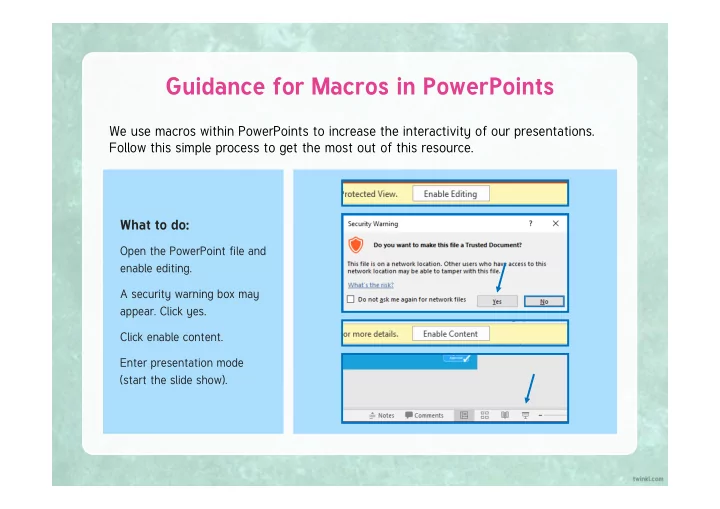
Guidance for Macros in PowerPoints We use macros within PowerPoints to increase the interactivity of our presentations. Follow this simple process to get the most out of this resource. What to do: Open the PowerPoint file and enable editing. A


slide-1
SLIDE 1

We use macros within PowerPoints to increase the interactivity of our presentations. Follow this simple process to get the most out of this resource.

Guidance for Macros in PowerPoints

What to do:

Open the PowerPoint file and enable editing. A security warning box may

  • appear. Click yes.

Click enable content. Enter presentation mode (start the slide show).

slide-2
SLIDE 2

Year One

Computing | Year 5 | Online Safety | Spam! | Lesson 1

Online Safety

Computing

slide-3
SLIDE 3
slide-4
SLIDE 4

Success Criteria Aim

  • To identify spam emails and what to do with them.
  • I can look at the sender and subject to spot a spam email.
  • I can identify the potential dangers of spam email.
  • I know what to do with spam email.
  • I can take steps to avoid receiving spam.
slide-5
SLIDE 5

Junk Mail

Do you sometimes get letters or leaflets through your letter box that aren’t really for anyone in your home? Do you think they are sent especially to your home? What do the people in your home do with them? Why are they sent and who by?

slide-6
SLIDE 6

What Is Spam?

We call the unwanted letters and leaflets posted to homes ‘junk mail’. Spam is the name we give to the email version of junk mail. They are emails someone receives without asking for them. They are sent to any email address that the sender has, and are never just for the person that receives it. ^ Inbox bill776556@interspam.ds 1-4 of 4 Sender Subject Date FREE Money!!! £££ 03/01/2019 The Free Stuff Co! Reply now for FREE Stuff :D 04/02/2019 Lottery Legends You have won £5 million! 05/02/2019 bananas2345666@spamnet.botOpen now to read a secret! 06/02/2019

slide-7
SLIDE 7

What Is Spam?

On a sticky note, write how having your email inbox filled with this type of message would make you feel. ^ Inbox bill776556@interspam.ds 1-4 of 4 Sender Subject Date FREE Money!!! £££ 03/01/2019 The Free Stuff Co! Reply now for FREE Stuff :D 04/02/2019 Lottery Legends You have won £5 million! 05/02/2019 bananas2345666@spamnet.botOpen now to read a secret! 06/02/2019

slide-8
SLIDE 8

Annoying but Harmless?

We can agree that spam is very annoying, but is it dangerous? Look at this email. Could it be unsafe?

Save and Win!!

Dear customer Save 50% on tinned ham and you could win £100 in our prize draw! Click here to enter or click here to download our entry form.

Inbox X

The Ham Kings Date: 03/01/2019

Reply Reply to all Forward

slide-9
SLIDE 9

Annoying but Harmless?

The links you can click could take you to a dangerous website. The links and download could contain a virus.

Save and Win!!

Dear customer Save 50% on tinned ham and you could win £100 in our prize draw! Click here to enter or click here to download our entry form.

Inbox X

The Ham Kings Date: 03/01/2019

Reply Reply to all Forward

If you click the links or download the file, it could let the sender know that your email address belongs to

  • someone. They could then send you lots more spam.

Filling in details on an online form like this gives your personal information to a stranger. This is called phishing (pretending to be a real company to get your details).

slide-10
SLIDE 10

Protect Your Inbox

When using email, it is important to try to protect yourself from spam. It can be quite easy to spot spam… ^ Index SNAZZY SHOES CO.

fakerboy1331234@spamtown300.pe.it

1-1 of 1 Sender Subject Date You’ve WON some FREE shoes! 03/01/2018

  • A spam email will often look like it is from a
  • company. Sometimes, it will look like it is from a

company you trust.

  • The emails often come from a strange-looking or

unknown email address.

  • The subject might say that you have won something
  • r that there is an amazing deal for you.
slide-11
SLIDE 11

Protect Your Inbox

If you spot spam…

  • Do not open the email.
  • Find out how to ‘mark as junk’ so that your

email provider knows the email is junk mail. This will move it out of your inbox.

  • If you think the email might be dangerous, ask a

trusted adult to help you report it. ^ Index SNAZZY SHOES CO.

fakerboy1331234@spamtown300.pe.it

1-1 of 1 Sender Subject Date You’ve WON some FREE shoes! 03/01/2018 Mark as Junk

slide-12
SLIDE 12

Protect Your Inbox

If you open an email and then realise it’s spam… Make sure you do not reply to it or forward it. Don’t click any links or attachments in it - these could be really harmful! You can still move the email to your junk folder or report it after you’ve opened it. Tell a trusted adult that you opened it by accident, just so they can check that nothing harmful has happened.

slide-13
SLIDE 13

Protect Your Inbox

There are things you can do to prevent more spam emails in the future… Avoid putting your email address into websites or online forms unless you have to. Try not to sign up to mailing lists. Send any unwanted spam emails straight to your junk folder.

slide-14
SLIDE 14

Stay Safe from Spam!

Complete the Stay Safe from Spam! Activity Sheet to show how much you know about avoiding the dangers of spam.

slide-15
SLIDE 15

Quick Quiz

^ Inbox Steakhouse 1-5 of 5 Sender Subject Date Free Tinned Beef and Shopping Vouchers!! 27/12/2018 Lauren F The photos you wanted  1/1/2019 Ham.house.uk.pu ###sale### 2/1/2019 Mum Re: thanks! 3/1/2019 Canned shopping Register to get super deals 4/1/2019 Kyron has received these emails. Which emails should Kyron choose to open? Discuss the emails with your partner and vote yes or no for each one.

slide-16
SLIDE 16

Success Criteria Aim

  • To identify spam emails and what to do with them.
  • I can look at the sender and subject to spot a spam email.
  • I can identify the potential dangers of spam email.
  • I know what to do with spam email.
  • I can take steps to avoid receiving spam.
slide-17
SLIDE 17