Database Systems II Secondary Storage CMPT 454, Simon Fraser - - PDF document

database systems ii
SMART_READER_LITE
LIVE PREVIEW

Database Systems II Secondary Storage CMPT 454, Simon Fraser - - PDF document

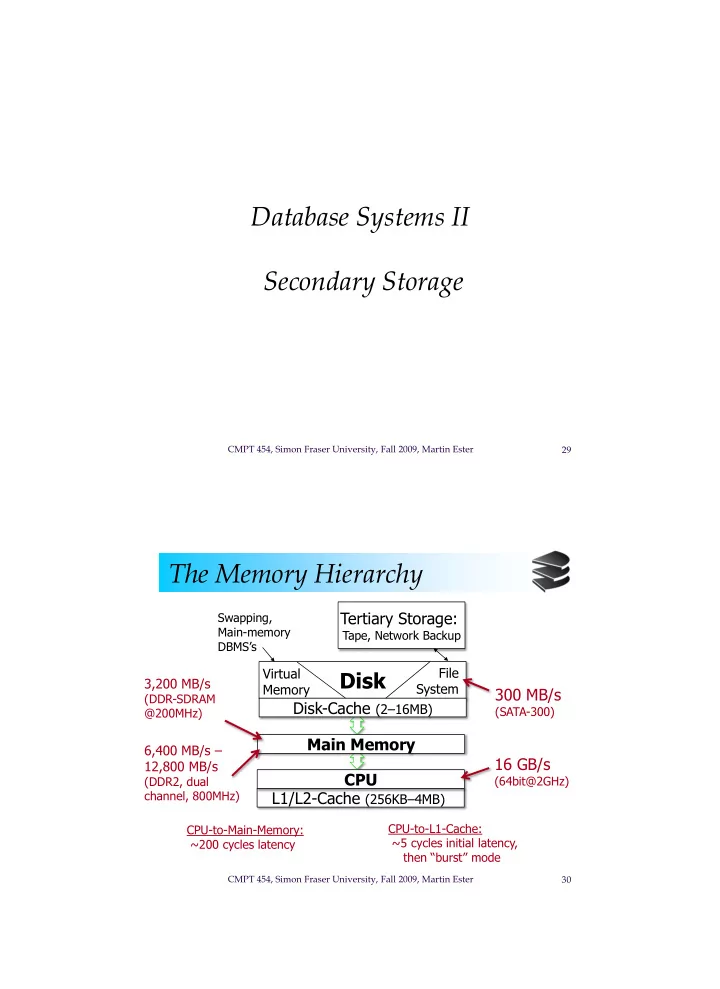
Database Systems II Secondary Storage CMPT 454, Simon Fraser University, Fall 2009, Martin Ester 29 The Memory Hierarchy Tertiary Storage: Swapping, Main-memory Tape, Network Backup DBMSs Virtual File Disk 3,200 MB/s Memory System


slide-1
SLIDE 1

CMPT 454, Simon Fraser University, Fall 2009, Martin Ester 29

Database Systems II Secondary Storage

CMPT 454, Simon Fraser University, Fall 2009, Martin Ester 30

The Memory Hierarchy

Disk

Tertiary Storage:

Tape, Network Backup

Main Memory L1/L2-Cache (256KB–4MB) Disk-Cache (2–16MB) 300 MB/s

(SATA-300)

16 GB/s

(64bit@2GHz)

6,400 MB/s – 12,800 MB/s

(DDR2, dual channel, 800MHz) CPU-to-L1-Cache: ~5 cycles initial latency, then “burst” mode

CPU

Virtual Memory File System

CPU-to-Main-Memory: ~200 cycles latency

3,200 MB/s

(DDR-SDRAM @200MHz) Swapping, Main-memory DBMS’s

slide-2
SLIDE 2

CMPT 454, Simon Fraser University, Fall 2009, Martin Ester 31

The Memory Hierarchy

Cache Data and instructions in cache when needed by CPU. On-board (L1) cache on same chip as CPU, L2 cache on separate chip. Capacity ~ 1MB, access time a few nanoseconds. Main memory All active programs and data need to be in main memory. Capacity ~ 1 GB, access time 10-100 nanoseconds.

CMPT 454, Simon Fraser University, Fall 2009, Martin Ester 32

The Memory Hierarchy

Secondary storage Secondary storage is used for permanent storage

  • f large amounts of data, typically a magnetic

disk. Capacity up to 1 TB, access time ~ 10 milliseconds. Tertiary storage To store data collections that do not fit onto secondary storage, e.g. magnetic tapes or optical disks. Capacity ~ 1 PB, access time seconds / minutes.

slide-3
SLIDE 3

CMPT 454, Simon Fraser University, Fall 2009, Martin Ester 33

The Memory Hierarchy

Trade-off The larger the capacity of a storage device, the slower the access (and vice versa). A volatile storage device forgets its contents when power is switched off, a non-volatile device remembers its content. Secondary storage and tertiary storage is non- volatile, all others are volatile. DBS needs non-volatile (secondary) storage devices to store data permanently.

CMPT 454, Simon Fraser University, Fall 2009, Martin Ester 34

The Memory Hierarchy

RAM (main memory) for subset of database used by current transactions. Disk to store current version of entire database (secondary storage). Tapes for archiving older versions of the database (tertiary storage).

slide-4
SLIDE 4

CMPT 454, Simon Fraser University, Fall 2009, Martin Ester 35

The Memory Hierarchy

Typically programs are executed in virtual memory of size equal to the address space of the processor. Virtual memory is managed by the operating system, which keeps the most relevant part in the main memory and the rest on disk. A DBS manages the data itself and does not rely

  • n the virtual memory.

However, main memory DBS do manage their data through virtual memory.

CMPT 454, Simon Fraser University, Fall 2009, Martin Ester 36

Moore’s Law

Gordon Moore in 1965 observed that the density

  • f integrated circuits (i.e., number of transistors

per unit) increased at an exponential rate, thus roughly doubles every 18 months. Parameters that follow Moore‘s law:

  • number of instructions per second that can be exceuted

for unit cost,

  • number of main memory bits that can be bought for

unit cost,

  • number of bytes on a disk that can be bought for unit

cost.

slide-5
SLIDE 5

CMPT 454, Simon Fraser University, Fall 2009, Martin Ester 37

Moore’s Law

Number of transistors on an integrated circuit

CMPT 454, Simon Fraser University, Fall 2009, Martin Ester 38

Moore’s Law

Disk capacity

slide-6
SLIDE 6

CMPT 454, Simon Fraser University, Fall 2009, Martin Ester 39

Moore’s Law

But some other important hardware parameters do not follow Moore’s law and grow much slower. Theses are, in particular,

  • speed of main memory access, and
  • speed of disk access.

For example, disk latencies (seek times) have almost stagnated for past 5 years. Thus, moving data from one level of the memory hierarchy to the next becomes progressively larger.

CMPT 454, Simon Fraser University, Fall 2009, Martin Ester 40

Disks

Secondary storage device of choice. Data is stored and retrieved in units called disk blocks or pages. Main advantage over tapes: random access vs. sequential access. Unlike RAM, time to retrieve a disk page varies depending upon location on disk. Therefore, relative placement of pages on disk has major impact on DBMS performance!

slide-7
SLIDE 7

CMPT 454, Simon Fraser University, Fall 2009, Martin Ester 41

Disks

Disk consists of two main, moving parts: disk assembly and head assembly. Disk assembly stores information, head assembly reads and writes information.

Platters Spindle Disk head Arm movement Arm assembly Tracks

CMPT 454, Simon Fraser University, Fall 2009, Martin Ester 42

Disks

The platters rotate around central spindle. Upper and lower platter surfaces are covered with magnetic material, which is used to store bits. The arm assembly is moved in or out to position a head on a desired track. All tracks under heads at the same time make a cylinder (imaginary!). Only one head reads/writes at any one time.

slide-8
SLIDE 8

CMPT 454, Simon Fraser University, Fall 2009, Martin Ester 43

Disks

Track Sector Gap

Top view

  • f a platter

surface

CMPT 454, Simon Fraser University, Fall 2009, Martin Ester 44

Disks

Block size is a multiple of sector size (which is fixed). Time to access (read/write) a disk block (disk latency) consists of three components:

  • seek time: moving arms to position disk head
  • n track,
  • rotational delay (waiting for block to rotate

under head), and

  • transfer time (actually moving data to/from

disk surface). Seek time and rotational delay dominate.

slide-9
SLIDE 9

CMPT 454, Simon Fraser University, Fall 2009, Martin Ester 45

Disks

3 or 5x x 1 N

Cylinders Traveled Time

Seek time

CMPT 454, Simon Fraser University, Fall 2009, Martin Ester 46

Disks

Average seek time

SEEKTIME (i j)

S = N(N-1)

N N

i=1 j=1 j i

Typical average seek time = 5 ms

slide-10
SLIDE 10

CMPT 454, Simon Fraser University, Fall 2009, Martin Ester 47

Disks

Average rotational delay Average rotational delay R = 1/2 revolution Typical R = 5 ms

Head Here Block I Want

CMPT 454, Simon Fraser University, Fall 2009, Martin Ester 48

Disks

Transfer time Typical transfer rate: 100 MB/sec Typical block size: 16KB Transfer time: block size transfer rate Typical transfer time = 0.16 ms

slide-11
SLIDE 11

CMPT 454, Simon Fraser University, Fall 2009, Martin Ester 49

Disks

Typical average disk latency is 10 ms, maximum latency 20 ms. In 10 ms, a modern microprocessor can execute millions of instructions. Thus, the time for a block access by far dominates the time typically needed for processing the data in memory. The number of disk I/Os (block accesses) is a good approximation for the cost of a database

  • peration.

CMPT 454, Simon Fraser University, Fall 2009, Martin Ester 50

Accelerating Disk Access

Organize data by cylinders to minimize the seek time and rotational delay. ‘Next’ block concept:

  • blocks on same track, followed by
  • blocks on same cylinder, followed by
  • blocks on adjacent cylinder.

Blocks in a file are placed sequentially on disk (by ‘next’). Disk latency can approach the transfer rate.

slide-12
SLIDE 12

CMPT 454, Simon Fraser University, Fall 2009, Martin Ester 51

Accelerating Disk Access

Example

Assuming 10 ms average seek time, no rotational delay, 40 MB/s transfer rate. Read a single 4 KB Block

– Random I/O: 10 ms – Sequential I/O: 10 ms

Read 4 MB in 4 KB Blocks (amortized)

– Random I/O: 10 s – Sequential I/O: 0.1 s  Speedup factor of 100

CMPT 454, Simon Fraser University, Fall 2009, Martin Ester 52

Accelerating Disk Access

Block size selection

Bigger blocks  amortize I/O cost. Bigger blocks  read in more useless stuff and takes longer to read. Good trade-off block size from 4KB to 16 KB. With decreasing memory costs, blocks are becoming bigger!

slide-13
SLIDE 13

CMPT 454, Simon Fraser University, Fall 2009, Martin Ester 53

Accelerating Disk Access

Using multiple disks

Replace one disk (with one independent head) by many disks (with many independent heads). Striping a relation R: divide its blocks over n disks in a round robin fashion. Assuming that disk controller, bus and main memory can handle n times the transfer rate, striping a relation across n disks can lead to a speedup factor of up to n.

CMPT 454, Simon Fraser University, Fall 2009, Martin Ester 54

Accelerating Disk Access

Disk scheduling

For I/O requests from different processes, let the disk controller choose the processing order. According to the elevator algorithm, the disk controller keeps sweeping from the innermost to the outermost cylinder, stopping at a cylinder for which there is an I/O request. Can reverse sweep direction as soon as there is no I/O request ahead in the current direction. Optimizes the throughput and average response time.

slide-14
SLIDE 14

CMPT 454, Simon Fraser University, Fall 2009, Martin Ester 55

Accelerating Disk Access

Double buffering

In some scenarios, we can predict the order in which blocks will be requested from disk by some process. Prefetching (double buffering) is the method of fetching the necessary blocks into the buffer in advance. Requires enough buffer space. Speedup factor up to n, where n is the number

  • f blocks requested by a process.

CMPT 454, Simon Fraser University, Fall 2009, Martin Ester 56

Accelerating Disk Access

Single buffering

(1) Read B1 Buffer (2) Process Data in Buffer (3) Read B2 Buffer (4) Process Data in Buffer ... Execution time = n(P+R) where P = time to process one block R = time to read in one block n = # blocks read.

slide-15
SLIDE 15

CMPT 454, Simon Fraser University, Fall 2009, Martin Ester 57

Accelerating Disk Access

Double buffering

(1) Read B1, . . ., Bn Buffer (2) Process B1 in Buffer (3) Process B2 in Buffer ... Execution time = R + nP as opposed to n(P+R).  remember that R >> P

CMPT 454, Simon Fraser University, Fall 2009, Martin Ester 58

Disk Failures

In an intermittent failure, a read or write

  • peration is unsuccessful, but succeeds with

repeated tries.  parity checks to detect intermittent failures Media decay is a permanent corruption of one

  • r more bits which make the corresponding

sector impossible to read / write.  stable storage to recover from media decay A disk crash makes the entire disk permanently unreadable.  RAID to recover from disk crashes

slide-16
SLIDE 16

CMPT 454, Simon Fraser University, Fall 2009, Martin Ester 59

Disk Failures

Checksums

Add n parity bits every m data bits. The number of 1’s among a collection of bits and their parity bit is always even. The parity bit is the modulo-2 sum of its data bits.

m=8, n=1 Block A: 01101000:1 (odd # of 1’s) Block B: 11101110:0 (even # of 1’s)

If Block A instead contains

Block A’: 01100000:1 (has odd # of 1’s)

error detected

CMPT 454, Simon Fraser University, Fall 2009, Martin Ester 60

Disk Failures

Checksums

But what if multiple bits are corrupted? E.g., if Block A instead contains

Block A’’: 01000000:1 (has even # of 1’s)

 error cannot be detected

Probability that a single parity bit cannot detect a corrupt block is ½. This is assuming that the probability of disk failures involving an odd / even number of bits is identical.

slide-17
SLIDE 17

CMPT 454, Simon Fraser University, Fall 2009, Martin Ester 61

Disk Failures

Checksums

More parity bits decrease the probability of an undetected failure. With n ≤ m independent parity bits, this probability is only 1/2n . E.g., we can have eight parity bits, one for the first bit of every byte, the second one for the second bit of every byte . . . The chance for not detecting a disk failure is then only 1/256.

CMPT 454, Simon Fraser University, Fall 2009, Martin Ester 62

Disk Failures

Stable storage

Sectors are paired, and information X is written both on sectors Xl and Xr. Assume that both copies are written with a sufficient number of parity bits so that bad sectors can be detected. If sector is bad (according to checksum), write to alternative sector. Alternate reading Xl and Xr until a good value is returned. Probability of Xl and Xr both failing is very low.

slide-18
SLIDE 18

CMPT 454, Simon Fraser University, Fall 2009, Martin Ester 63

Disk Failures

Disk arrays

So far, we cannot recover from disk crashes. To address this problem, use Redundant Arrays

  • f Independent Disks (RAID), arrangements of

several disks that gives abstraction of a single, large disk. Goals: Increase reliability (and performance). Redundant information allows reconstruction

  • f data if a disk fails.

Data striping improves the disk performance.

CMPT 454, Simon Fraser University, Fall 2009, Martin Ester 64

Disk Failures

Failure Models for Disks

What is the expected time until disk crash? We assume uniform distribution of failures over time. Mean time to failure: time period by which 50% of a population of disks have failed (crashed). Typical mean time to failure is 10 years. In this case, 5% of disks crash in the first year, 5% crash in the second year, . . ., 5% crash in the tenth year, . . ., 5% crash in the twentieth year.

slide-19
SLIDE 19

CMPT 454, Simon Fraser University, Fall 2009, Martin Ester 65

Disk Failures

Failure Models for Disks

Given the mean time to failure (mtf) in years, we can derive the probability p of a particular disk failing in a given year. p = 1 / (2 * mtf) Ex.: mtf = 10, p = 1/20 = 5% Mean time to data loss: time period by which 50%

  • f a population of disks have had a crash that

resulted in data loss. The mean time to disk failure is not necessarily the same as the mean time to data loss.

CMPT 454, Simon Fraser University, Fall 2009, Martin Ester 66

Disk Failures

Failure Models for Disks

Failure rate: percentage of disks of a population that have failed until a certain point of time. Survival rate: percentage of disks of a population that have not failed until a certain point of time. While it simplifies the analysis, the assumption

  • f uniform distribution of failures is unrealistic.

Disks tend to fail early (manufacturing defects that have not been detected) or late (wear-and- tear).

slide-20
SLIDE 20

CMPT 454, Simon Fraser University, Fall 2009, Martin Ester 67

Disk Failures

Failure Models for Disks

Survival rate (realistic) time

CMPT 454, Simon Fraser University, Fall 2009, Martin Ester 68

Disk Failures

Mirroring

The data disk is copied unto a second disk, the mirror disk. When one of the disk crashes, we replace it by a new disk and copy the other disk to the new

  • ne.

Data loss can only occur if the second disk crashes while the first one is being replaced. This probability is negligible. Mirroring is referred to as RAID level 1.

slide-21
SLIDE 21

CMPT 454, Simon Fraser University, Fall 2009, Martin Ester 69

Disk Failures

Parity blocks

Mirroring doubles the number of disks needed. The parity block approach needs only one redundant disk for n (arbitray) data disks. In the redundant disk, the ith block stores parity checks for the ith blocks of all the n data disks. Parity block approach is called RAID level 4.

A B C P

CMPT 454, Simon Fraser University, Fall 2009, Martin Ester 70

Disk Failures

Parity blocks

Reading blocks is the same as without parity blocks. When writing a block on a data disk, we also need to update the corresponding block of the redundant disk. This can be done using four (three additional) disk I/O: read old value of data disk block, read corresponding block of redundant (parity) disk, write new data block, recompute and write new redundant block.

slide-22
SLIDE 22

CMPT 454, Simon Fraser University, Fall 2009, Martin Ester 71

Disk Failures

Parity blocks

If one of the disks crashes, we bring in a new disk. The content of this disk can be computed, bit by bit, using the remaining n disks. No difference between data disks and parity disk. Computation based on the definition of parity, i.e. total number of ones is even.

CMPT 454, Simon Fraser University, Fall 2009, Martin Ester 72

Disk Failures

Example

n = 3 data disks

Disk 1, block 1: 11110000 Disk 2, block 1: 10101010 Disk 3, block 1: 00111000

… and one parity disk

Disk 4, block 1: 01100010

 Sum over each column is always an even number of 1’s  Mod-2 sum can recover any missing single row

slide-23
SLIDE 23

CMPT 454, Simon Fraser University, Fall 2009, Martin Ester 73

Disk Failures

Example

Suppose we have:

Disk 1, block 1: 11110000 Disk 2, block 1: ???????? Disk 3, block 1: 00111000 Disk 4, block 1: 01100010 (parity)

Use mod-2 sums for block 1 over disks 1,3,4 to recover block 1 of failed disk 2:

 Disk 2, block 1: 10101010

CMPT 454, Simon Fraser University, Fall 2009, Martin Ester 74

Disk Failures

RAID level 5

In the RAID 4 scheme, the parity disk is the

  • bottleneck. On average, n-times as many writes
  • n the parity disk as on the data disks.

However, the failure recovery method does not distinguish the types of the n + 1 disks. RAID level 5 does not use a fixed parity disk, but use block i of disk j as redundant if i MOD n+1 = j.

D C B A