9/17/2010 Todays lecture Advanced databases and data models: - - PDF document

9 17 2010
SMART_READER_LITE
LIVE PREVIEW

9/17/2010 Todays lecture Advanced databases and data models: - - PDF document

9/17/2010 Todays lecture Advanced databases and data models: Native XML management Shredding Hybrid solutions Theme3: Efficient storage of XML SQL/XML HShreX HShreX Efficency Lena Strmbck June 17, 2009 1 XML as a data model


slide-1
SLIDE 1

9/17/2010 1

Advanced databases and data models: Theme3: Efficient storage of XML

June 17, 2009 1

Lena Strömbäck

Today´s lecture

Native XML management Shredding Hybrid solutions SQL/XML HShreX HShreX Efficency

XML as a data model

XML is richer than the relational model

Tree structure, Order …

Vary from highly structured to unstructured Vary from highly structured to unstructured

Database export … Annotated text documents

Can contain links to other type of entities What does this mean for efficient storage?

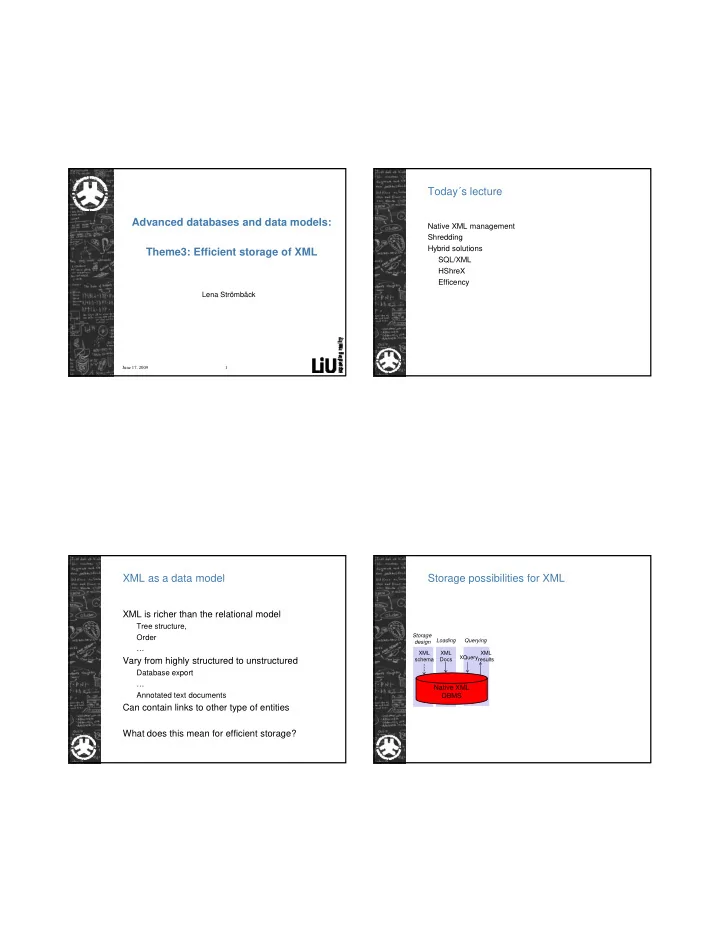
Storage possibilities for XML

Storage design Loading Querying XML results XQuery XML Docs XML schema

Native XML DBMS

results Que y Docs schema

slide-2
SLIDE 2

9/17/2010 2

Native XML databases

  • Defines a (logical) model for an XML document
  • Elements, attributes, PCDATA, document order.
  • The XML document is the logical unit of storage
  • Can have any physical underlying storage model
  • Often: grouping documents, collections

Often: grouping documents, collections

  • Query model: Xpath and in most cases Xquery
  • Examples:
  • eXist http://exist-db.org/
  • MarkLogic http://www.marklogic.com

Storage possibilities for XML

Mapping layer

Storage design Loading Querying XML results XQuery XML Docs XML schema Storage design Loading Querying XML results XQuery XML Docs XML schema

Relational DBMS

Relational results SQL Tuples Relational schema

Native XML DBMS

results XQuery Docs schema

Shredding How to shred XML?

<?xml version="1.0" encoding="UTF-8"?> <families xmlns:xsi=http://www.w3.org/2001/XMLSchem a-instance> <family> <parent> <name>Lena</name> <job>Lektor</job> </parent> <child> <name>Ludvig</name> <school>Skolan</school> Id Pid

  • Id

Pid 1

Families Family Parent

</child> </family> </families> Source Ordinal attrName isValue Value 1 Families False 1 1 1 Family False 2 2 1 Parent False 3 3 1 Name True Lena 3 2 Job True Docent .. Id Pid Name Job 2 1 Lena Lektor Id Pid Name School 3 1 Ludvig Skolan

Parent Child

Related work

Shredding of XML into relational storage Bohannon et al. 2002, (ICDE), Florescu and Cossman 1999 (IEEE Data Eng), Georgiadis and Vassalos 2007 (SIGMOD), g ( ), Grust et al. (2007) (SIMOD), Mlynkova 2009 (DEXA)

slide-3
SLIDE 3

9/17/2010 3

Hybrid XML Storage

XML data XQuery XML results

Mapping

XML data SQL/XQuery XML /R l ti l

Hybrid DBMS app g layer

XML /Relational results Native Hybrid

New possibilities…

<model id="Tyson1991CellModel_6" name="Tyson1991_CellCycle_6var"> <listOfSpecies> + <species id="C2" name="cdc2k" compartment="cell"> + <species id="M" name="p-cyclin_cdc2" compartment="cell"> + <species id="YP" name="p-cyclin" compartment="cell"> … </listOfSpecies> <listOfReactions> <reaction id="Reaction1" name="cyclin_cdc2k dissociation"> <annotation> <rdf:li rdf:resource="http://www.reactome.org/#REACT_6308"/> <rdf:li rdf:resource="http://www.geneontology.org/#GO:0000079"/> </annotation> <listOfReactants> f /

Id Name Annotation Formula Reaction1 cyclin_cdc2k dissociation <annotation …..> <kinetic_law …..> Id Name Compartment C2 cdc2k cell M p-cyclin_cdc2 cell YP p-cyclin cell …. …. ….

Species: Reaction:

<speciesReference species="M"/> </listOfReactants> <listOfProducts> <speciesReference species="C2"/> <speciesReference species="YP"/> </listOfProducts> <kineticLaw> <math xmlns="http://www.w3.org/1998/Math/MathML"> <apply> <times/> <ci> k6 </ci> <ci> M </ci> </apply></math> <listOfParameters> <parameter id="k6" value="1“> </listOfParameters> </kineticLaw> </reaction> + <reaction id="Reaction2" name="cdc2k phosphorylation"> ... more reactions </listOfReactions> </model> </sbml>

Reaction2 cdc2k phosphorylation <annotation ….> <kinetic_law ….> …. …. …. …. Id Species Reaction1 M Reaction2 …. …. …. Id Species Reaction1 C2 Reaction1 YP …. ….

Products: Reactants:

Hybrid storage and SQL/XML

Hybrid XML storage Beyer et al. Hua Liu et al. Rys et al. (2005) (SIGMOD) Proposed as SQL standard Available in: DB2, Microsoft SQL Server, Oracle More limited versions in other databases….

XML type

CREATE TABLE: create table sbml_data (sbml_doc XML); create table reaction ( id varchar(100) not null, name varchar(250), math XML, annotation XML, primary key(id) )

slide-4
SLIDE 4

9/17/2010 4

Querying

select sbml_doc.query('/sbml/model/listOfSpecies/species[@id = "C2"]') from sbml_data; <species id="C2" name="cdc2k" compartment="cell"> <annotation> …</annotation> </species>

Querying

select reactome_doc.query( 'for $react in /model/listOfReactions/reaction return <path> <from> {data($react/listOfReactants/speciesReference/@species)} </from> <via> {data($react/@id)} </via> { ($ @ )} <to> {data($react/listOfProducts/speciesReference/@species)} </to> </path>') from reactome_data; <path><from>M</from><via>Reaction1</via><to>C2</to></path> <path><from>M</from><via>Reaction1</via><to>YP</to></path>

Transforming data to relations

insert into reaction(id, name, annotation, formula) select r.value('@id','varchar(100)') as id, r.value('@name','varchar(250)') as name, r.value('annotation','xml') as annotation, r value('kinetic formula' 'xml') as formula r.value( kinetic formula , xml ) as formula, from (select sbml_doc .nodes(sbml/model/listOfReactions/reaction‘) from sbml_data) as d(r);

Transforming data to XML

select reaction.reaction as name, reaction.id, (select (select speciesReference.reactant as species from reactants speciesReference where reaction.id = speciesReference.id for XML auto, type) from emptyXML as listOfReactants for XML auto, type), (select (select speciesReference.product as species from products speciesReference where reaction.id = speciesReference.id for XML auto, type) from emptyXML as listOfProducts for XML auto, type) , from reaction for XML auto, type

slide-5
SLIDE 5

9/17/2010 5

Syntax differs between DBMS´s (DB2)

select sbml_doc.query( 'for $y in /model/listOfReactions/reaction/listOfModifiers/modifierSpeciesReference, $z in /model/listOfSpecies/species[@id = $y/@species] return <modifier> {$y/@species} {$y/../../@id} {$z/@compartment} </modifier>') from reactome_data; xquery for $y in db2-fn:xmlcolumn('REACTOME_DATA.REACTOME_DOC')/model/ listOfReactions/reaction /listOfModifiers/modifierSpeciesReference, $z in db2-fn:xmlcolumn('REACTOME_DATA.REACTOME_DOC')/model/ listOfSpecies/species[@id = $y/@species] return <modifier> {$y/@species} {$y/../../@id} {$z/@compartment} </modifier>

Efficiency: Increasing query complexity

4000 Native 2000 Species Path Path (2 step) Path (3 step) Path (4 step) Designed shredding Automatic shredding

Efficiency: Combining representations

4000 XQuery 2000 3.4 SQL (designed) SQL (automatic) Mixed

Efficiency: Return the result as XML

300 400 500 XQuery (rdbms 1) 100 200 Species (1) Species (100) Species (1000) Reaction (1) Reaction (500) Reaction (10000) Que y ( db s ) SQL (rdbms1)

slide-6
SLIDE 6

9/17/2010 6

Higher complexity

Numerous alternatives for XML storage How to achieve models that are efficient and easy to use Dependent on application, XML data and query load

What are we doing? Efficiency studies Guidelines Tool development Guidelines:

Keep together what naturally belong together Do not shred parts of the XML where the schema allows large variation Take variations of the actual data into account Shred elements that are critical for performance p Prefer the representation that is required for query results Avoid shredding where future versions of the schema is likely to change. Avoid shredding if parallel versions of data is to be kept

HShreX – a tool for evaluation

XML Schema XML data Relational schema Queries

Extension of an old tool Shrex to allow hybrid storage

+ Annotations + Shredding rules

DBMS

slide-7
SLIDE 7

9/17/2010 7

Working with HShreX:

<?xml version="1.0" encoding="UTF-8"?> <xs:schema xmlns:xs="http://www.w3.org/2001/XMLSchema" xmlns:shrex="http://www.cse.ogi.edu/shrex"> <xs:element name="families"> <xs:complexType> <xs:sequence maxOccurs="unbounded"> <xs:element name="family" type="familyType"/> </xs:sequence> </xs:complexType> </xs:element> <xs:complexType name="familyType"> <xs:sequence> <xs:element name="parent" type="parentType" > Id Pid

  • Id

Pid 1

Families Families_family Families family parent

<xs:element name= parent type= parentType > <xs:element name="child" type="childType" > </xs:sequence> </xs:complexType> <xs:complexType name="parentType"> <xs:sequence> <xs:element name="name" type="xs:string"/> <xs:element name="job" type="xs:string"/> </xs:sequence> </xs:complexType> <xs:complexType name="childType"> <xs:sequence> <xs:element name="name" type="xs:string"/> <xs:element name="school" type="xs:string"/> </xs:sequence> </xs:complexType> </xs:schema> Id Pid Name Job 2 1 Lena Lektor Id Pid Name School 3 1 Ludvig Skolan

Families_family_parent Families_family_child

Working with HShreX:

<?xml version="1.0" encoding="UTF-8"?> <xs:schema xmlns:xs="http://www.w3.org/2001/XMLSchema" xmlns:shrex="http://www.cse.ogi.edu/shrex"> <xs:element name="families"> <xs:complexType> <xs:sequence maxOccurs="unbounded"> <xs:element name="family" type="familyType"/> </xs:sequence> </xs:complexType> </xs:element> <xs:complexType name="familyType"> <xs:sequence> Id Pid

  • Id

Pid Child 1 <child> <name>Ludvig</name> <school>Skolan/school>

Families Families_family

<xs:sequence> <xs:element name="parent" type="parentType" > <xs:element name="child" type="childType" shrex:maptoxml=“true”> </xs:sequence> </xs:complexType> <xs:complexType name="parentType"> <xs:sequence> <xs:element name="name" type="xs:string"/> <xs:element name="job" type="xs:string"/> </xs:sequence> </xs:complexType> <xs:complexType name="childType"> <xs:sequence> <xs:element name="name" type="xs:string"/> <xs:element name="school" type="xs:string"/> </xs:sequence> Id Pid Name Job 2 1 Lena Lektor </child>

Families_family_parent

Working with HShreX:

<?xml version="1.0" encoding="UTF-8"?> <xs:schema xmlns:xs="http://www.w3.org/2001/XMLSchema" xmlns:shrex="http://www.cse.ogi.edu/shrex"> <xs:element name="families"> <xs:complexType> <xs:sequence maxOccurs="unbounded"> <xs:element name="family" type="familyType"/> </xs:sequence> </xs:complexType> </xs:element> <xs:complexType name="familyType"> <xs:sequence> Id Pid

  • Id

Pid 1

Families Families_family Person

<xs:sequence> <xs:element name="parent" type="parentType" shrex:tablename=“person”> <xs:element name="child" type="childType" shrex:tablename=“person” > </xs:sequence> </xs:complexType> <xs:complexType name="parentType"> <xs:sequence> <xs:element name="name" type="xs:string"/> <xs:element name="job" type="xs:string"/> </xs:sequence> </xs:complexType> <xs:complexType name="childType"> <xs:sequence> <xs:element name="name" type="xs:string"/> <xs:element name="school" type="xs:string"/> Id Pid Name Job School 2 1 Lena Lektor 3 1 Ludvig Skolan

Person

Working with HShreX:

<?xml version="1.0" encoding="UTF-8"?> <xs:schema xmlns:xs="http://www.w3.org/2001/XMLSchema" xmlns:shrex="http://www.cse.ogi.edu/shrex"> <xs:element name="families"> <xs:complexType> <xs:sequence maxOccurs="unbounded"> <xs:element name="family" type="familyType"/> </xs:sequence> </xs:complexType> </xs:element> <xs:complexType name="familyType"> <xs:sequence> Id Pid

  • Id

Pid Name Job 1 Lena Lektor

Families Families_family Families family child

<xs:sequence> <xs:element name="parent" type="parentType" shrex:withparenttable=“true”> <xs:element name="child" type="childType" > </xs:sequence> </xs:complexType> <xs:complexType name="parentType"> <xs:sequence> <xs:element name="name" type="xs:string"/> <xs:element name="job" type="xs:string"/> </xs:sequence> </xs:complexType> <xs:complexType name="childType"> <xs:sequence> <xs:element name="name" type="xs:string"/> <xs:element name="school" type="xs:string"/> </xs:sequence> Id Pid Name School 3 1 Ludvig Skolan

Families_family_child
slide-8
SLIDE 8

9/17/2010 8

HShrex Demo

Data model Native Mixed Shredded SBML Nr of annotations 1 21

Use case: Modelling

Nr of relations 3 8 121 UniProt Nr of annotations 1 24 Nr of relations 2 32 121

Annotations

maptoxml ignore withparenttable

  • utline

tablename tablename fieldname sqltype

Use case: Querying

Mixed select m.species from reaction r, modifier m where r.shrex_id = m.shrex_pid and r.name=react1; Shredded Native: select entry.query('data(//uniprot:accession)') from uniprot_entry where entry.exist(//uniprot:subcellularLocation [uniprot:location/text()="Cytoplasm"]')=1; Mixed: select accession select m.species from sbml_model_listOfReactions_reaction r, sbml_model_listOfReactions_reaction_l istOfModifiers_modifiersSpeciesReference p, sbml_model_listOfReactions_reaction_l istOfModifiers lm where m.shrex_pid = lm.shrex_id and lm.shrex_pid = r.shrex_id and r.name = React1'; from uniprot_entry_accession, entry, uniprot_entry_comment where comment.exist(//uniprot:subcellularLocation[uni prot:location/text()= "Cytoplasm"]')=1 and uniprot_entry_comment.shrex_pid = entry.shrex_id and uniprot_entry_accession.shrex_pid = entry.shrex_id

slide-9
SLIDE 9

9/17/2010 9

Use case: Efficiency

4000 6000 8000 Shredded Mixed 1000 1500 2000 Shredded Mixed 2000 4000 2750 25 MB 5500 50 MB 8250 75 MB 1100 100 M Mixed Native 500 1000 1 s t e p 2 s t e p s 3 s t e p s 4 s t e p s 5 s t e p s Native

Lab exercises

Use HShreX for performance studies. Three suggested datasets: SBML (Reactome) SBML (Biomodels) SBML (Biomodels) PSI MI Michigan Benchmark If own data – check with the lab assistant For + select own of several tasks

NoSQL – non relational databases

Examples: Document store: CouchDB, ApacheDB XML database: Marklogic Server, eXist Graph: AllegroGraph, Neo4j Object database: GemStone/S Object database: GemStone/S Key/value store on disk: BigTable Eventually consistent key-value store: Cassandra Ordered Key-value store: Berkeley DB Tabular: BigTable, HyperTable, Hbase Tuple store: Apache River

Neo

Neo4j is a graph database. It is an embedded, disk-based, fully transactional Java persistence engine that stores data structured in graphs rather than in tables. Linköping related company. Interesting for semi-structured data.

slide-10
SLIDE 10

9/17/2010 10

The Neo Persistence Engine

Primitives:

nodes, relationships properties

Features

ACID transaction Durable persistence Transaction recovery

Implementation

Java

Representing XML in Neo: Basic solution Representing XML in Neo: Customizations Yahoo!: A web of concepts

  • Concept: Things of interest to the users of the web.
  • Concept represented as:
  • Id
  • meta-data (attributes with values)

( )

  • Goals: Concept centric data organization
  • What to support:
  • Nested structure?
  • Provenance, versions uncertainty?
  • Relations between concepts?
slide-11
SLIDE 11

9/17/2010 11

What do we search for?

Individual concepts: 60-70% Sets of concepts 10-20% Attributes of a concept: Rather small correlation (restaurant menu 3%) Aggreation: 59% of users click on more than one URL. Concepts vs. Browsing: Follow paths of how user browsed. Easy to find patterns of what users commonly visit.